What Is Print Management
This document provides an overview of the Print Management Service in insureMO. It also introduces the basic information about associated services and how they interact with each other.
Print Management Service establishes a relationship between business fields and print fields. It manages print status, the number of prints, and historical data.
As a back-end service, GIMO has developed the front-end for Print Management Service. If other projects need to use this function, they can directly call the API of the Print Management Service or develop their own front-end page.
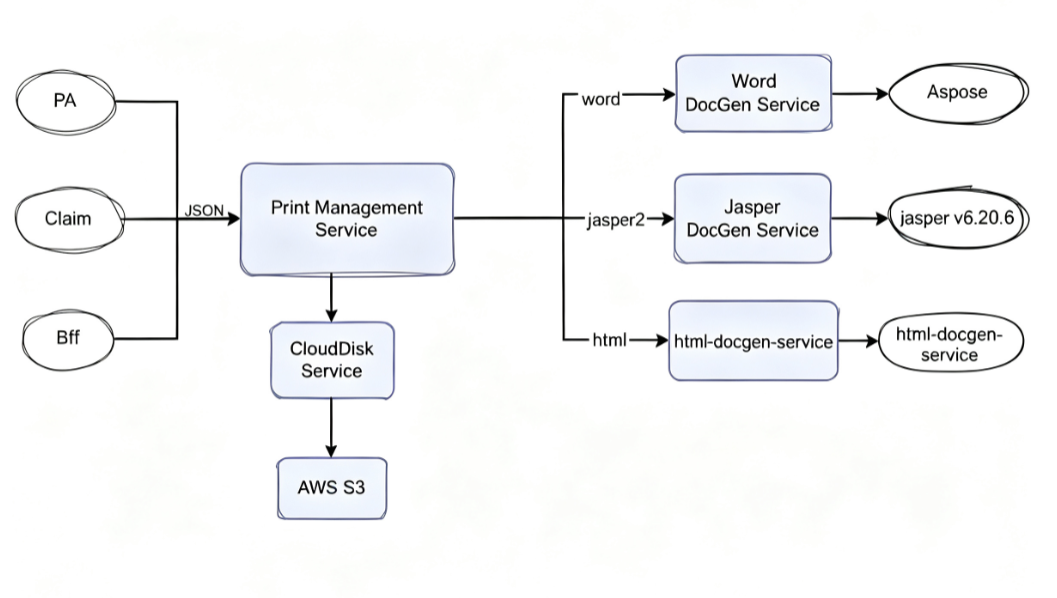
This Print Management Service consists of the following APIs:
- Generate print tasks
- Update print tasks
- Execute print tasks
- Obtain results
- Query print task information
- Query print task history
- Print multiple tasks
- Merge multiple task results
With these APIs, users can perform various operations related to print management in insureMO.
Where to Use Print Management
Scenario 1: If you have already utilized the document generation service to generate a document but require an application to manage business fields, such as policy numbers and claim numbers, as well as the interconnections between multiple document generation tasks, the Print Management Service can be employed.
Scenario 2: When you have already used the Word document generation service.
How to Use Print Management
Steps:

- Upload and manage template
-
Click Sign in to log in to insureMO Portal with your personal account.
infoIf you do not have a personal insureMO account, click Sign up to register one.
-
Click Catalog at the top of the home page.
-
In the left pane of Catalog page, navigate to Utility & AI > Outout & Document Management to find the Print Management Service service card.
-
Select Template Maintain in the navigation pane of the left side of the page.
-
Click Upload Template on the page.
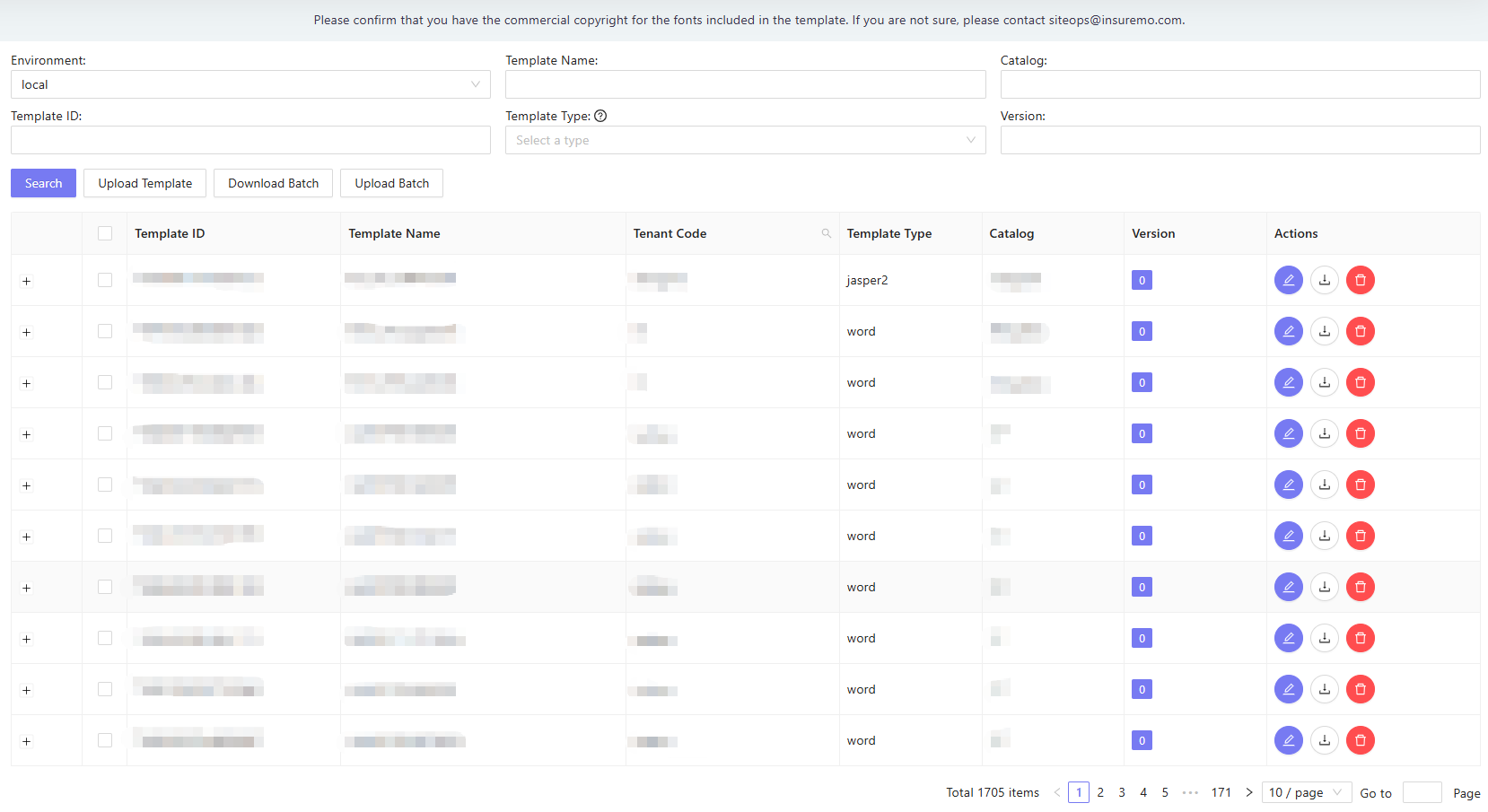
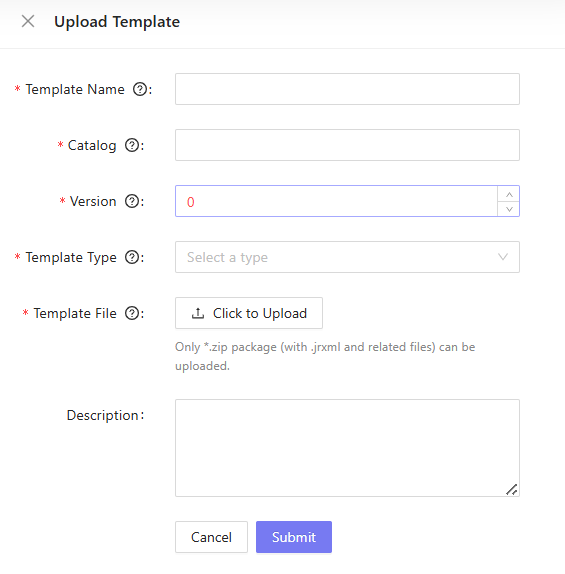
- Manage print task
-
Select Printing Generation Task in the navigation pane of the left side of the page.
-
Click create task to generate new print task
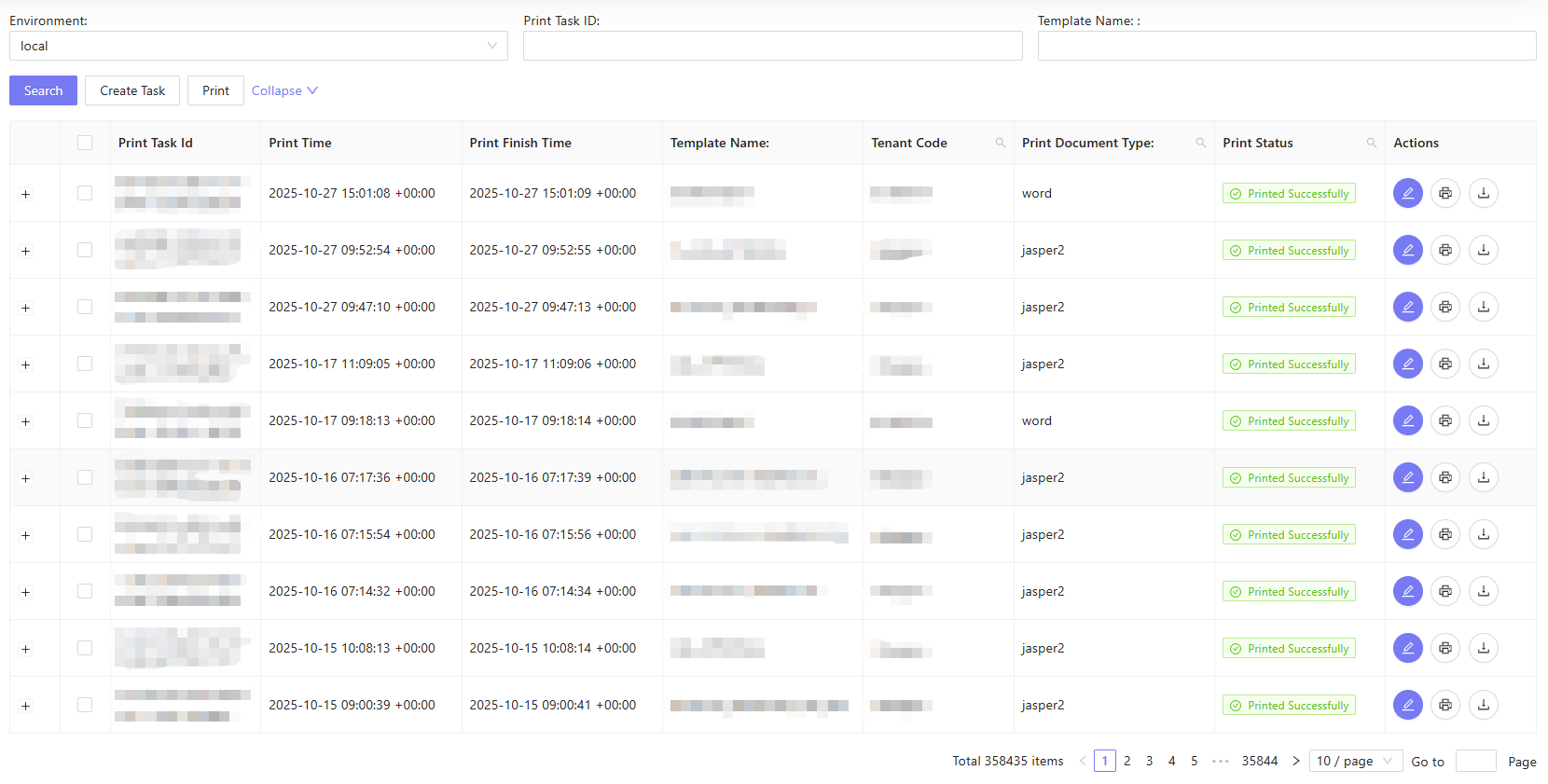
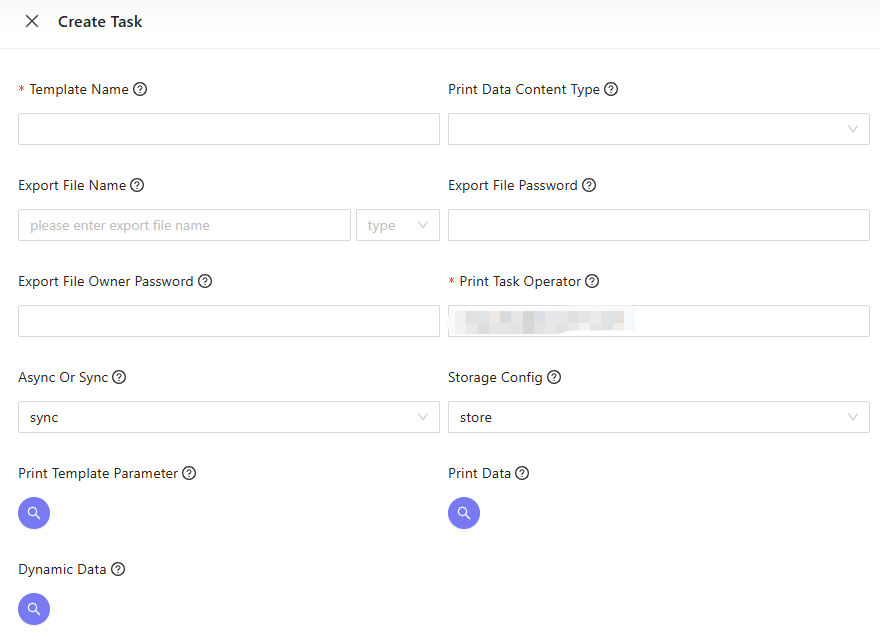
-
Edit print task
-
Execute print task
-
Download print task result
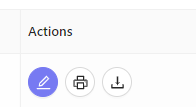
- Search print task history
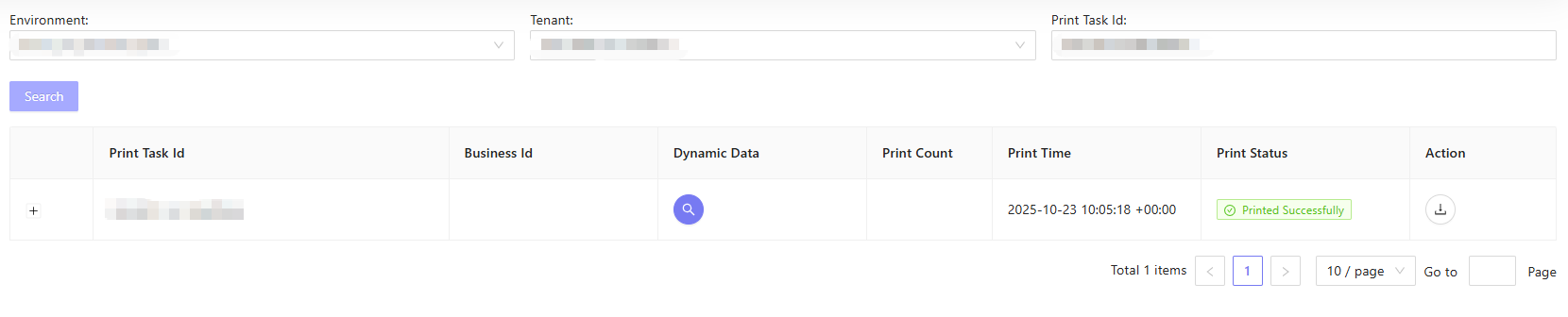
- Select Print Task History in the navigation pane of the left side of the page.
- Click the print task id and you will see the print task history.
PS: We support word-docgen-service, docgen-service, and jasper-docgen-service. Please make sure the template type is right. And don’t use the jasper as your new template, because we will not support this type as we already have jasper2 (jasper version 6.20.6+).
For default the template type is jasper.
- Word-docgen-service: the template type is
word. - Docgen-service: the template type is
jasper, the jasper version is 6.4.3. - Jasper-docgen-service, the template type is
jasper2, the jasper version is 6.20.6.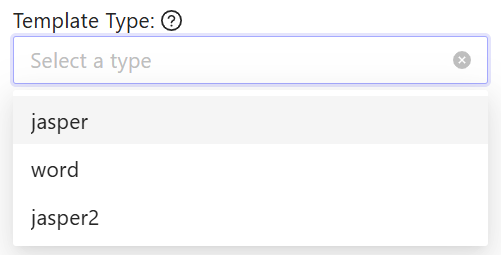
Security
- Some customers need the password for their
pdf, and print task supports the password setting in word-docgen-service and jasper-docgen-service.
For jasper-docgen-service
- We support two parameters:
export_file_passwordandexport_file_owner_password. The export_file_password is the pdf read password, and export_file_owner_password is the pdf edit password.
For word-docgen-service
- We support one parameter:
export_file_passwordand the export_file_password is the pdf read password.
Mappings of Print Management and Word Docgen Service:
- For word-docgen-service, we can call the service api directly or call it by the print management api.
- There is a parameter mapping between these two services.
- The
print_datain print management api ismappingin print/template api of the word-docgen-service. - The
print_template_parameterin print management api is theinstructionsin print/template api of the word-docgen-service. - The
export_file_typein print management api is theoutputFormatin print/template api of the word-docgen-service. Please note that the word docgen only supports word and pdf now.
Jasper-docgen-service supports pdf,docx,xlsx,csv and html.
Develop Steps:
- Upload the template in webpage or by API:
- {{insuremo_gw_url}}/mo-fo/1.0/print/v3/template/upload
- Call api to generate a pdf(or other format)
- {{insuremo_gw_url}}/mo-fo/1.0/print/v3/printtask/create
- {{insuremo_gw_url}}/mo-fo/1.0/print/v3/printtask/execute
- This api will return the pdf content as base64 format in targetfilecontent,you don’t need to call the next api to get the result
- {{insuremo_gw_url}}/mo-fo/1.0/print/v3/printtask/generate
- This api can create one print task and execute it,it is the merge of last two apis
- Get the result on webpage or by api

- {{insuremo_gw_url}}/mo-fo/1.0/print/v3/printtask/get-result-by-id
Deploy Templates:
We now support the packaging and publishing functions for templates.
- You need to manage your templates in the portal environment.
- Ask the siteops team to copy the
print-template-data-jobunder themo-templateworkspace to your DevOps CI/CD service. - After that, you can use this service to package all the templates of the current tenant.
- When you click Deploy, these templates will be published to the corresponding target environment under the current tenant.
Audit Template Upload Record
Input the \print-management-service and transaction_name: upload_template and you can check the template upload record. If the content is base64, you can use a tool transfer the base64 to zip file.
Migrate from jasper 6.4.3 to jasper 6.20.0
-
jasper 6.4.3 is not support by the insureMO now, and we plan to remove the docgen-service in the non-prod environment. So, for anyone whose template type is jasper, the printtask will be failed in ptdev since the service is offline now.
-
Please follow the guide to change the template from jasper 6.4.3 to jasper 6.20.0, and reimport to print management and test the whole feature.
-
The template type is jasper, which means the jasper version is 6.4.3. The jasper2 means the jasper version is 6.20.0 and up.
-
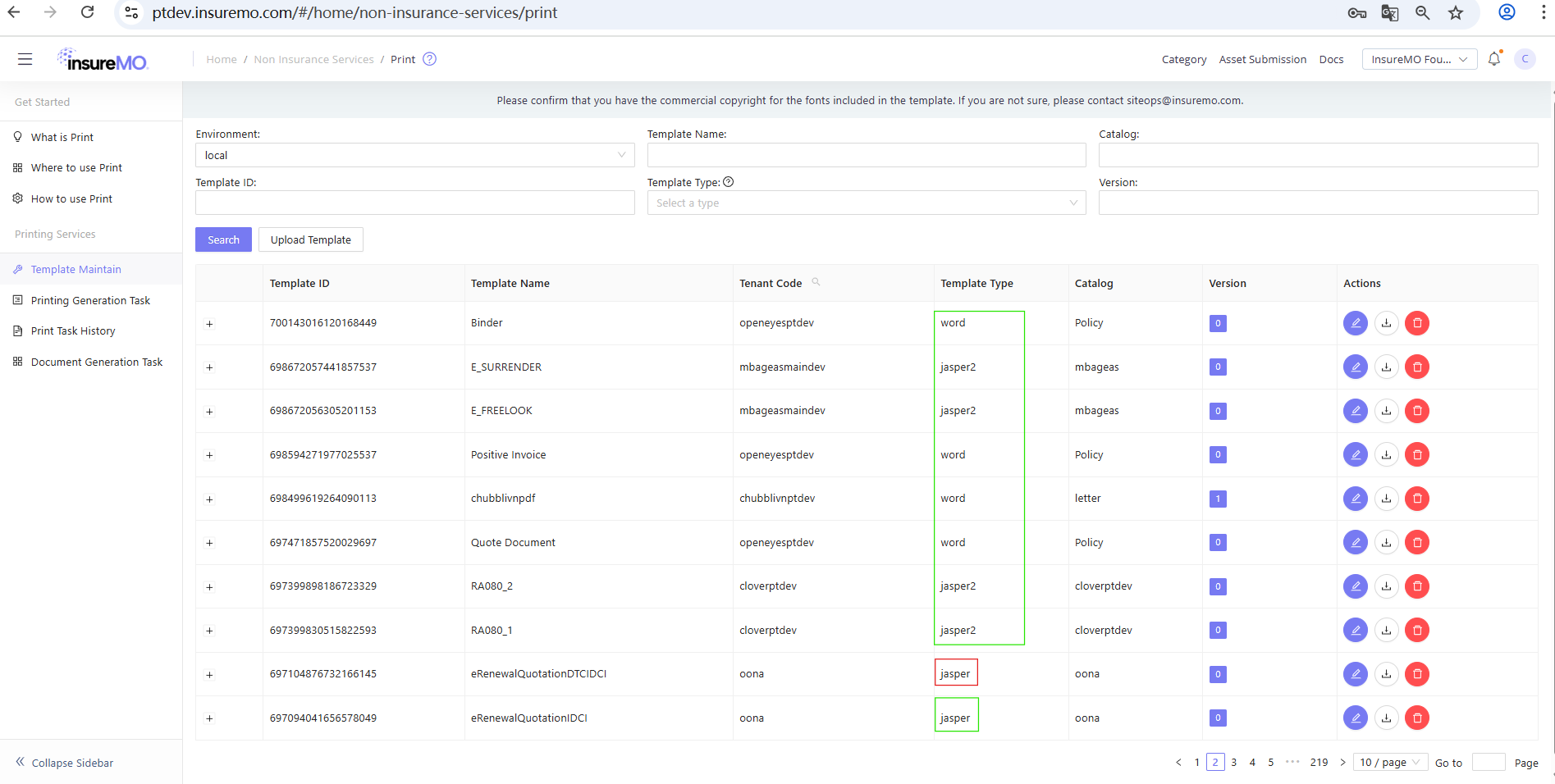
- Download the template in the print management and template maintain page.
- Open the template by jasper studio 6.20.0 and up: you can download it here: https://community.jaspersoft.com/download-jaspersoft/community-edition/
- Make sure the template pdf generation feature works well in local. Then, upload the template to print management again and make sure the template type is jasper2. Finally, test the whole feature in your environment and check the task status and pdf.
Base URLs: {{insuremo_gw_url}}/mo-fo/1.0/print/v3
Changes from V2 to V3
Template Engine
- V3 supports a configurable template engine routing via config center, in addition to the default
print_doc_typebased routing. - V3 adds
htmlas a new template type (Vender=3).
Response Format
- For
generateAPI, V3 clearsprint_datain the response to reduce payload size. - For
generateandexecuteAPIs, when the print task has an error, V3 returns a structured error code viaModelWithCodeinstead of a generic 599 error.
V2 → V3 API Mapping
| V2 API Path | V3 API Path |
|---|---|
| POST {{insuremo_gw_url}}/mo-fo/1.0/print/v2/template/upload | POST {{insuremo_gw_url}}/mo-fo/1.0/print/v3/template/upload |
| GET {{insuremo_gw_url}}/mo-fo/1.0/print/v2/template/download | GET {{insuremo_gw_url}}/mo-fo/1.0/print/v3/template/download |
| POST {{insuremo_gw_url}}/mo-fo/1.0/print/v2/printtask/query-many | POST {{insuremo_gw_url}}/mo-fo/1.0/print/v3/printtask/query-many |
| GET {{insuremo_gw_url}}/mo-fo/1.0/print/v2/printtask/query-one | GET {{insuremo_gw_url}}/mo-fo/1.0/print/v3/printtask/query-one |
| GET {{insuremo_gw_url}}/mo-fo/1.0/print/v2/printtask/get-result-by-id | GET {{insuremo_gw_url}}/mo-fo/1.0/print/v3/printtask/get-result-by-id |
| GET {{insuremo_gw_url}}/mo-fo/1.0/print/v2/printtask/get-his-by-taskid | GET {{insuremo_gw_url}}/mo-fo/1.0/print/v3/printtask/get-his-by-taskid |
| POST {{insuremo_gw_url}}/mo-fo/1.0/print/v2/printtask/execute | POST {{insuremo_gw_url}}/mo-fo/1.0/print/v3/printtask/execute |
| POST {{insuremo_gw_url}}/mo-fo/1.0/print/v2/printtask/execute-all | POST {{insuremo_gw_url}}/mo-fo/1.0/print/v3/printtask/execute-all |
| POST {{insuremo_gw_url}}/mo-fo/1.0/print/v2/printtask/create | POST {{insuremo_gw_url}}/mo-fo/1.0/print/v3/printtask/create |
| POST {{insuremo_gw_url}}/mo-fo/1.0/print/v2/printtask/update | POST {{insuremo_gw_url}}/mo-fo/1.0/print/v3/printtask/update |
| POST {{insuremo_gw_url}}/mo-fo/1.0/print/v2/printtask/generate | POST {{insuremo_gw_url}}/mo-fo/1.0/print/v3/printtask/generate |
How to get token
Please refer to this document: insureMO Identity Management - Get Token.
POST {{insuremo_gw_url}}/mo-fo/1.0/print/v3/template/upload
POST {{insuremo_gw_url}}/mo-fo/1.0/print/v3/template/upload
Body Parameters
name: "TestDemo"
version: "0"
catalog: "TestDemo"
description: ""
template: ""
template_type: "jasper"
Params
| Name | Location | Type | Required | Description |
|---|---|---|---|---|
| body | body | object | no | none |
| » name | body | string | yes | template_name |
| » version | body | string | no | version |
| » catalog | body | string | no | catalog |
| » description | body | string | no | description |
| » template | body | string(binary) | no | template |
| » template_type | body | string | no | template_type,jasper,jasper2,word,html |
Response Examples
200 Response
{
  "code": "string",
  "errors": [
    {
      "code": "string",
      "message": "string",
      "message_params": [
        "string"
      ]
    }
  ],
  "message": "string",
  "message_params": [
    "string"
  ],
  "trace_id": "string"
}
Responses
| HTTP Status Code | Meaning | Description | Data schema |
|---|---|---|---|
| 200 | OK | none | ErrorResponseModel |
| 499 | Unknown | none | ErrorResponseModel |
| 599 | Unknown | none | ErrorResponseModel |
GET {{insuremo_gw_url}}/mo-fo/1.0/print/v3/template/download
GET {{insuremo_gw_url}}/mo-fo/1.0/print/v3/template/download
Request Param
| Name | Position | Type | Required | Description |
|---|---|---|---|---|
| template_name | query | string | no | none |
| version | query | string | no | none |
| base64 | query | string | no | none |
| tenant_code | query | string | no | none |
| Authorization | header | string | no | none |
| x-mo-target-tenant | header | string | no | target tenant code |
Response
200 Response
{}Response
| Status Code | Status CodeMeaning | Description | Data Model |
|---|---|---|---|
| 200 | OK | Success | Inline |
POST {{insuremo_gw_url}}/mo-fo/1.0/print/v3/printtask/query-many
POST {{insuremo_gw_url}}/mo-fo/1.0/print/v3/printtask/query-many
V3 Change: Tenant filtering uses
x-mo-target-tenant(TargetTenantCode) directly. The super tenant bypass is removed.
Request Param
| Name | Position | Type | Required | Description |
|---|---|---|---|---|
| page_size | query | string | Yes | none |
| page_no | query | string | Yes | none |
| print_task_id | query | string | no | none |
| business_id | query | string | no | none |
| business_id2 | query | string | no | none |
| business_id3 | query | string | no | none |
| business_type | query | string | no | none |
| task_generate_time_start | query | string | no | none |
| task_generate_time_end | query | string | no | none |
| print_status | query | string | no | none |
| print_status_id | query | string | no | none |
| order | query | string | no | none |
| tenant_code | query | string | no | none |
| x-mo-target-tenant | header | string | yes | target tenant code |
| x-mo-user-identity | header | string | no | none |
Response
Success
{
  "code": "i_common_success",
  "message": "request success",
  "trace_id": "3238a6e096a10ecf6497d40e2df4758d",
  "total": 3302,
  "page_size": 10,
  "current_page": 1,
  "data": [
    {
      "print_task_id": "c0cd5b34-910c-4e76-a2c6-aac89cadb458",
      "print_status": "Printed Successfully",
      "print_status_id": 2,
      "print_time": "2024-03-27T00:01:05Z",
      "print_finish_time": "2024-03-27T00:01:06Z",
      "tenant_code_v2": "smktest",
      "business_type": "BusinessType2",
      "business_id": "businessID1",
      "business_id2": "",
      "business_id3": "",
      "business_id4": null,
      "org_code": "OrgCode2",
      "dynamic_data": "DynamicData,testonline",
      "print_operator": "printerchen1",
      "print_count": 1,
      "print_task_generate_date": "2024-03-27T00:01:05Z",
      "print_task_generate_operator": "chen"
    }
  ]
}
Fail Response
{
  "code": "e_print_input_parameter",
  "message": "page_size <= 0",
  "trace_id": ""
}
Response
| Status Code | Status CodeMeaning | Description | Data Model |
|---|---|---|---|
| 200 | OK | Success | Inline |
| 499 | Unknown | Fail Response | Inline |
GET {{insuremo_gw_url}}/mo-fo/1.0/print/v3/printtask/query-one
GET {{insuremo_gw_url}}/mo-fo/1.0/print/v3/printtask/query-one
V3 Change: Permission check uses
TargetTenantCodestrict match instead ofTenantCode+CanAccessAllTenant. Error response usesresp.ErrorWithCodeMsgfor more structured error format.
Request Param
| Name | Position | Type | Required | Description |
|---|---|---|---|---|
| print_task_id | query | string | yes | none |
| return_data_format | query | string | no | set to “status” to return only basic status fields |
| x-mo-target-tenant | header | string | yes | target tenant code |
Response
Success
{
  "code": "i_common_success",
  "message": "request success",
  "trace_id": "57594bbd262317162710865023ad0d32",
  "data": {
    "print_task_id": "bc2bd138-2196-4ec0-93b2-5d98384944e3",
    "print_status": "Printed Successfully",
    "print_status_id": 2,
    "print_time": "2024-03-22T03:31:59Z",
    "print_finish_time": "2024-03-22T03:32:00Z",
    "tenant_code_v2": "smktest",
    "print_doc_type": null,
    "template_name": "TestDemo",
    "template_version": null,
    "print_data_content_type": "json",
    "export_file_password": null,
    "export_file_owner_password": "",
    "export_file_type": "pdf",
    "export_file_name": "558560782793687040.pdf",
    "storage_config": "not_store",
    "async_or_sync": "sync",
    "print_data": "{\"docPrintModel\":{...}}",
    "print_template_parameter": null,
    "business_type": "BusinessType2",
    "business_id": "businessID1",
    "business_id2": "",
    "business_id3": "",
    "business_id4": null,
    "org_code": "OrgCode2",
    "dynamic_data": "DynamicData,testonline",
    "print_operator": "printerchen1",
    "print_count": 21,
    "print_task_generate_date": "2024-03-21T00:01:08Z",
    "print_task_generate_operator": "chen",
    "err_msg": "",
    "tenant_code": "smktest",
    "cloud_disk_config": ""
  }
}
Fail Response
{
  "code": "e_print_input_parameter",
  "message": "TenantCode not match with target tenant code,you don't have permission to update this printtask!",
  "trace_id": ""
}
Response
| Status Code | Status CodeMeaning | Description | Data Model |
|---|---|---|---|
| 200 | OK | Success | Inline |
| 499 | Unknown | Fail Response | Inline |
GET {{insuremo_gw_url}}/mo-fo/1.0/print/v3/printtask/get-result-by-id
GET {{insuremo_gw_url}}/mo-fo/1.0/print/v3/printtask/get-result-by-id
V3 Change: Permission check uses
TargetTenantCodestrict match.
Request Param
| Name | Position | Type | Required | Description |
|---|---|---|---|---|
| print_task_id | query | string | yes | none |
| base64 | query | string | no | base64, default is false, will download the file |
| x-mo-target-tenant | header | string | yes | target tenant code |
Response
Success (base64=true)
{
  "code": "i_common_success",
  "message": "request success",
  "trace_id": "...",
  "data": {
    "data": "JVBERi0xLjUK..."
  }
}
Success (base64=false or not set)
Returns binary file stream with headers:
Content-Type: application/octet-streamContent-Disposition: attachment; filename=<export_file_name>
Fail Response
{
  "code": "e_print_input_parameter",
  "message": "TenantCode not match with target tenant code!",
  "trace_id": ""
}
Response
| Status Code | Status CodeMeaning | Description | Data Model |
|---|---|---|---|
| 200 | OK | Success | Inline |
| 499 | Unknown | Fail Response | Inline |
Return Body
Status Code 499
| Name | Type | Required | Constraint | Description | |
|---|---|---|---|---|---|
| » code | string | true | none | none | |
| » message | string | true | none | none | |
| » trace_id | string | true | none | none |
GET {{insuremo_gw_url}}/mo-fo/1.0/print/v3/printtask/get-his-by-taskid
GET {{insuremo_gw_url}}/mo-fo/1.0/print/v3/printtask/get-his-by-taskid
V3 Change: V3 adds
TargetTenantCodepermission check on history query (V2 history controller had no tenant check).
Request Param
| Name | Position | Type | Required | Description |
|---|---|---|---|---|
| print_task_id | query | string | yes | none |
| x-mo-target-tenant | header | string | yes | target tenant code |
Response
Success
{
  "code": "i_common_success",
  "message": "request success",
  "trace_id": "7422cfd12159af807d71aaa35350ad85",
  "data": [
    {
      "print_task_id": "001ad9c5-8a5d-4ee8-8e02-9bb9b0d56eed",
      "print_status": "Printed Successfully",
      "print_status_id": 2,
      "print_time": "2024-01-14T01:01:47Z",
      "print_finish_time": "2024-01-14T01:01:47Z",
      "tenant_code_v2": "smktest",
      "business_type": "BusinessType2",
      "business_id": "businessID1",
      "business_id2": null,
      "business_id3": null,
      "business_id4": null,
      "org_code": "OrgCode2",
      "dynamic_data": "DynamicData,testonline",
      "print_operator": "chen",
      "print_count": 1,
      "print_task_generate_date": "2024-01-14T01:01:47Z",
      "print_task_generate_operator": "chen",
      "printTaskHisId": "f52cb869-7982-42f3-ad77-6a474c8bb3c9",
      "insert_by": "chen",
      "insert_time": "2024-01-14T01:01:47Z",
      "insert_reason": "execute"
    }
  ]
}
Fail Response
{
  "code": "e_print_input_parameter",
  "message": "TenantCode not match with target tenant code!",
  "trace_id": ""
}
Response
| Status Code | Status CodeMeaning | Description | Data Model |
|---|---|---|---|
| 200 | OK | Success | Inline |
| 499 | Unknown | Fail Response | Inline |
POST {{insuremo_gw_url}}/mo-fo/1.0/print/v3/printtask/execute
POST {{insuremo_gw_url}}/mo-fo/1.0/print/v3/printtask/execute
V3 Changes:
- Permission check uses
TargetTenantCodestrict match.- Supports
htmltemplate type (Vender=3) in addition to jasper/word/jasper2.- Uses configurable template engine routing via config center.
- When print task has error, returns structured error code via
ModelWithCodewithe_print_failedcode.- Async execution uses
copyBasicParamForAsyncto prevent gin.Context recycle panic.
Body Request Param
{
  "print_task_id": "001ad9c5-8a5d-4ee8-8e02-9bb9b0d56eed"
}
Request Param
| Name | Position | Type | Required | Description |
|---|---|---|---|---|
| x-mo-target-tenant | header | string | yes | target tenant code |
| body | body | object | no | none |
| » print_task_id | body | string | Yes | none |
Response
Success
{
  "code": "i_common_success",
  "message": "request success",
  "trace_id": "204d41519e8f20446459b176ea5c271b",
  "data": {
    "print_task_id": "001ad9c5-8a5d-4ee8-8e02-9bb9b0d56eed",
    "print_status": "Printed Successfully",
    "print_status_id": 2,
    "print_time": "2024-03-27T00:01:05Z",
    "print_finish_time": "2024-03-27T00:01:06Z",
    "tenant_code_v2": "smktest",
    "export_file_type": "pdf",
    "export_file_name": "558560782793687040.pdf",
    "storage_config": "store",
    "async_or_sync": "sync",
    "err_msg": "",
    "tenant_code": "smktest",
    "cloud_disk_config": "{...}"
  }
}
Error in Printing (V3 returns structured error code)
{
  "code": "e_print_failed",
  "message": "trace:xxx,error message from docgen service",
  "trace_id": "...",
  "data": {
    "print_task_id": "001ad9c5-8a5d-4ee8-8e02-9bb9b0d56eed",
    "print_status": "Error In Printing",
    "print_status_id": 3,
    "err_msg": "trace:xxx,error detail..."
  }
}
Fail Response
{
  "code": "e_print_input_parameter",
  "message": "TenantCode not match with target tenant code!",
  "trace_id": ""
}
Response
| Status Code | Status CodeMeaning | Description | Data Model |
|---|---|---|---|
| 200 | OK | Success | Inline |
| 499 | Unknown | Fail Response | Inline |
POST {{insuremo_gw_url}}/mo-fo/1.0/print/v3/printtask/execute-all
POST {{insuremo_gw_url}}/mo-fo/1.0/print/v3/printtask/execute-all
V3 Changes: Same as execute — uses
TargetTenantCode, supportshtmltype, configurable engine routing.
Body Request Param
[
  {"print_task_id": "001ad9c5-8a5d-4ee8-8e02-9bb9b0d56eed"},
  {"print_task_id": "c0cd5b34-910c-4e76-a2c6-aac89cadb458"}
]
Request Param
| Name | Position | Type | Required | Description |
|---|---|---|---|---|
| x-mo-target-tenant | header | string | yes | target tenant code |
| body | body | array | no | none |
| » print_task_id | body | string | Yes | none |
Response
Success
{
  "status": "ok"
}
Fail Response
{
  "code": "e_print_input_parameter",
  "message": "TenantCode not match with target tenant code!",
  "trace_id": ""
}
Response
| Status Code | Status CodeMeaning | Description | Data Model |
|---|---|---|---|
| 200 | OK | Success | Inline |
| 499 | Unknown | Fail Response | Inline |
POST {{insuremo_gw_url}}/mo-fo/1.0/print/v3/printtask/create
POST {{insuremo_gw_url}}/mo-fo/1.0/print/v3/printtask/create
V3 Changes:
TenantCodeandTenantCodeV2are set fromTargetTenantCodeinstead ofTenantCode.CheckInputParameterfor non-wordPrintTemplateParameteradds extra validation (checks for""andnullvalues and clears them).
if you are using the GIMO, please input the parameter like this:
business_id2: proposalNo
business_id3: policyNo
business_id4: endoNo
business_id5: idNo
Body Request Param
{
  "business_type": "BusinessType2",
  "business_id": "121212121",
  "business_id2": "business_id2",
  "business_id3": "business_id3",
  "business_id4": "business_id4",
  "org_code": "OrgCode2",
  "print_operator": "smktest",
  "template_name": "WordTemplate_delete1",
  "template_version": 0,
  "print_data": {"name":"chen"},
  "dynamic_data": "{\"name\":\"chen\"}",
  "export_file_name": "worddemopdf.pdf",
  "export_file_type": "pdf",
  "export_file_password": "123456!",
  "export_file_owner_password": "ownerPwd123!",
  "print_data_content_type": "json",
  "async_or_sync": "sync",
  "storage_config": "store",
  "print_doc_type": "word",
  "print_template_parameter": [
    {
      "instructionType": "Transform",
      "variableName": "Covers",
      "expression": "var Covers = [...]; ...",
      "expressionResultType": "list",
      "transformResultPath": "Covers"
    }
  ]
}
Request Param
| Name | Position | Type | Required | Description |
|---|---|---|---|---|
| x-mo-target-tenant | header | string | yes | target tenant code |
| body | body | object | no | none |
| » business_type | body | string | no | none |
| » business_id | body | string | no | none |
| » business_id2 | body | string | no | none |
| » business_id3 | body | string | no | none |
| » business_id4 | body | string | no | none |
| » org_code | body | string | no | none |
| » print_operator | body | string | Yes | none |
| » template_name | body | string | Yes | none |
| » template_version | body | integer | Yes | none |
| » print_data | body | object | Yes | JSON object |
| » dynamic_data | body | string | Yes | none |
| » export_file_name | body | string | Yes | none |
| » export_file_type | body | string | Yes | none |
| » export_file_password | body | string | no | none |
| » export_file_owner_password | body | string | no | none |
| » print_data_content_type | body | string | Yes | none |
| » async_or_sync | body | string | Yes | none |
| » storage_config | body | string | Yes | none |
| » print_doc_type | body | string | Yes | jasper, jasper2, word, or html |
| » print_template_parameter | body | [object] | no | none |
| »» instructionType | body | string | Yes | none |
| »» variableName | body | string | Yes | none |
| »» expression | body | string | Yes | none |
| »» expressionResultType | body | string | Yes | none |
| »» transformResultPath | body | string | Yes | none |
Response
Success
{
  "code": "i_common_success",
  "message": "request success",
  "trace_id": "705716c38bc6c19c6a86dc2f9a982024",
  "data": {
    "print_task_id": "084a958a-b6fc-4ad8-9761-5d2f4a4fa9ea",
    "print_status": "Not Printed",
    "print_status_id": 1,
    "print_time": null,
    "print_finish_time": null,
    "tenant_code_v2": "smktest",
    "print_doc_type": "word",
    "template_name": "WordTemplate_delete1",
    "template_version": 0,
    "print_data_content_type": "json",
    "export_file_password": "123456!",
    "export_file_owner_password": "ownerPwd123!",
    "export_file_type": "pdf",
    "export_file_name": "worddemopdf.pdf",
    "storage_config": "store",
    "async_or_sync": "sync",
    "print_data": "{...}",
    "print_template_parameter": "[...]",
    "business_type": "BusinessType2",
    "business_id": "121212121",
    "business_id2": "business_id2",
    "business_id3": "business_id3",
    "business_id4": "business_id4",
    "org_code": "OrgCode2",
    "dynamic_data": "{\"name\":\"chen\"}",
    "print_operator": "smktest",
    "print_count": null,
    "print_task_generate_date": "2024-03-27T03:38:54.429321841Z",
    "print_task_generate_operator": null,
    "err_msg": null,
    "tenant_code": "smktest",
    "cloud_disk_config": null
  }
}
Fail Response
{
  "code": "e_print_input_parameter",
  "message": "get parameter: templateName are empty !",
  "trace_id": ""
}
POST {{insuremo_gw_url}}/mo-fo/1.0/print/v3/printtask/update
POST {{insuremo_gw_url}}/mo-fo/1.0/print/v3/printtask/update
V3 Changes:
- Permission check uses
TargetTenantCodestrict match withresp.ErrorWithCodeMsg.DocgenSecurityis always overwritten (V2 only updates when password fields are non-empty).
Body Request Param
{
  "print_task_id": "f7a52c93-3ae6-4537-9ec2-cfab80ef1877",
  "business_type": "BusinessType2",
  "business_id": "121212121",
  "business_id2": "business_id2",
  "business_id3": "business_id3",
  "business_id4": "business_id4",
  "org_code": "OrgCode2",
  "print_operator": "smktest",
  "template_name": "WordTemplate_delete1",
  "template_version": 0,
  "print_data": {"name":"chen"},
  "dynamic_data": "{\"name\":\"chen\"}",
  "export_file_name": "worddemopdf.pdf",
  "export_file_type": "pdf",
  "export_file_password": "123456!",
  "export_file_owner_password": "ownerPwd123!",
  "print_data_content_type": "json",
  "async_or_sync": "sync",
  "storage_config": "store",
  "print_doc_type": "word",
  "print_template_parameter": [
    {
      "instructionType": "Transform",
      "variableName": "Covers",
      "expression": "var Covers = [...]; ...",
      "expressionResultType": "list",
      "transformResultPath": "Covers"
    }
  ]
}
Request Param
| Name | Position | Type | Required | Description |
|---|---|---|---|---|
| x-mo-target-tenant | header | string | yes | target tenant code |
| body | body | object | no | none |
| » print_task_id | body | string | Yes | none |
| » business_type | body | string | Yes | none |
| » business_id | body | string | Yes | none |
| » business_id2 | body | string | Yes | none |
| » business_id3 | body | string | Yes | none |
| » business_id4 | body | string | Yes | none |
| » org_code | body | string | Yes | none |
| » print_operator | body | string | Yes | none |
| » template_name | body | string | Yes | none |
| » template_version | body | integer | Yes | none |
| » print_data | body | object | Yes | JSON object |
| » dynamic_data | body | string | Yes | none |
| » export_file_name | body | string | Yes | none |
| » export_file_type | body | string | Yes | none |
| » export_file_password | body | string | Yes | none |
| » export_file_owner_password | body | string | Yes | none |
| » print_data_content_type | body | string | Yes | none |
| » async_or_sync | body | string | Yes | none |
| » storage_config | body | string | Yes | none |
| » print_doc_type | body | string | Yes | jasper, jasper2, word, or html |
| » print_template_parameter | body | [object] | Yes | none |
| »» instructionType | body | string | Yes | none |
| »» variableName | body | string | Yes | none |
| »» expression | body | string | Yes | none |
| »» expressionResultType | body | string | Yes | none |
| »» transformResultPath | body | string | Yes | none |
Response
Success
{
  "code": "i_common_success",
  "message": "request success",
  "trace_id": "0900d2773cdf0d3c54ad6b49269aff21",
  "data": {
    "print_task_id": "f7a52c93-3ae6-4537-9ec2-cfab80ef1877",
    "print_status": "Printed Successfully",
    "print_status_id": 2,
    "print_time": "2024-03-25T06:53:32Z",
    "print_finish_time": "2024-03-25T06:53:32Z",
    "tenant_code_v2": "smktest",
    "print_doc_type": "word",
    "template_name": "WordTemplate_delete1",
    "template_version": 0,
    "print_data_content_type": "json",
    "export_file_password": "123456!",
    "export_file_owner_password": "ownerPwd123!",
    "export_file_type": "pdf",
    "export_file_name": "worddemopdf.pdf",
    "storage_config": "store",
    "async_or_sync": "sync",
    "print_data": "{...}",
    "print_template_parameter": "[...]",
    "business_type": "BusinessType2",
    "business_id": "121212121",
    "business_id2": "business_id2",
    "business_id3": "business_id3",
    "business_id4": "business_id4",
    "org_code": "OrgCode2",
    "dynamic_data": "{\"name\":\"chen\"}",
    "print_operator": "smktest",
    "print_count": 1,
    "print_task_generate_date": "2024-03-25T06:53:24Z",
    "print_task_generate_operator": null,
    "err_msg": null,
    "tenant_code": "smktest",
    "cloud_disk_config": "{...}"
  }
}
Fail Response
{
  "code": "e_print_input_parameter",
  "message": "TenantCode not match with target tenant code,you don't have permission to update this printtask!",
  "trace_id": ""
}
Response
| Status Code | Status CodeMeaning | Description | Data Model |
|---|---|---|---|
| 200 | OK | Success | Inline |
| 499 | Unknown | Fail Response | Inline |
POST {{insuremo_gw_url}}/mo-fo/1.0/print/v3/printtask/generate
POST {{insuremo_gw_url}}/mo-fo/1.0/print/v3/printtask/generate
Create the printtask and execute directly to generate File.
V3 Changes:
- Supports
htmltemplate type (Vender=3).- Response clears
print_datafield (set to empty string) to reduce payload size. V2 returns the full decompressed print_data.- When print task has error, returns structured error code via
ModelWithCodewithe_print_failedcode andReturnBasedata, instead of a generic 599 error with full printTask.- Uses configurable template engine routing via config center.
if you are using the GIMO, please input the parameter like this:
business_id2: proposalNo
business_id3: policyNo
business_id4: endoNo
business_id5: idNo
Body request param
{
  "business_type": "BusinessType2",
  "business_id": "121212121",
  "business_id2": "business_id2",
  "business_id3": "business_id3",
  "business_id4": "business_id4",
  "org_code": "OrgCode2",
  "print_operator": "smktester",
  "template_name": "DataMODemo",
  "template_version": 0,
  "print_data": {
    "Policydetails": [
      {
        "DateofSigning": "44065",
        "NameofInsured": "TestInsured",
        "PolicyNumber": "FS912020",
        "PolicyType": "BuyerW&I"
      }
    ]
  },
  "dynamic_data": "{\"name\":\"12345678\"}",
  "export_file_name": "jasper2.pdf",
  "export_file_type": "pdf",
  "export_file_password": "123456!",
  "export_file_owner_password": "ownerPwd123!",
  "print_data_content_type": "json",
  "async_or_sync": "sync",
  "storage_config": "store",
  "print_doc_type": "jasper2"
}
Request Param
| Name | Position | Type | Required | Description |
|---|---|---|---|---|
| x-mo-target-tenant | header | string | yes | target tenant code |
| body | body | object | no | none |
| » business_type | body | string | no | none |
| » business_id | body | string | no | none |
| » business_id2 | body | string | no | none |
| » business_id3 | body | string | no | none |
| » business_id4 | body | string | no | none |
| » org_code | body | string | no | none |
| » print_operator | body | string | Yes | none |
| » template_name | body | string | Yes | none |
| » template_version | body | integer | Yes | none |
| » print_data | body | object | Yes | JSON object |
| » dynamic_data | body | string | no | none |
| » export_file_name | body | string | Yes | none |
| » export_file_type | body | string | Yes | pdf, docx, xlsx, csv, html |
| » export_file_password | body | string | no | none |
| » export_file_owner_password | body | string | no | none |
| » print_data_content_type | body | string | Yes | none |
| » async_or_sync | body | string | Yes | sync or async |
| » storage_config | body | string | Yes | store or not_store |
| » print_doc_type | body | string | Yes | jasper, jasper2, word, or html |
| » print_template_parameter | body | [object] | no | none |
Response example
200 Response (V3: print_data is cleared in response)
{
  "code": "i_common_success",
  "message": "request success",
  "trace_id": "...",
  "data": {
    "print_task_id": "084a958a-b6fc-4ad8-9761-5d2f4a4fa9ea",
    "print_status": "Printed Successfully",
    "print_status_id": 2,
    "print_time": "2024-03-27T03:38:55Z",
    "print_finish_time": "2024-03-27T03:38:56Z",
    "tenant_code_v2": "smktest",
    "print_doc_type": "jasper2",
    "template_name": "DataMODemo",
    "template_version": 0,
    "print_data_content_type": "json",
    "export_file_password": "123456!",
    "export_file_owner_password": "ownerPwd123!",
    "export_file_type": "pdf",
    "export_file_name": "jasper2.pdf",
    "storage_config": "store",
    "async_or_sync": "sync",
    "print_data": "",
    "print_template_parameter": null,
    "business_type": "BusinessType2",
    "business_id": "121212121",
    "business_id2": "business_id2",
    "business_id3": "business_id3",
    "business_id4": "business_id4",
    "org_code": "OrgCode2",
    "dynamic_data": "{\"name\":\"12345678\"}",
    "print_operator": "smktester",
    "print_count": 1,
    "print_task_generate_date": "2024-03-27T03:38:54Z",
    "print_task_generate_operator": null,
    "err_msg": "",
    "tenant_code": "smktest",
    "cloud_disk_config": "{...}"
  }
}
Error in Printing (V3 structured error response)
{
  "code": "e_print_failed",
  "message": "trace:xxx,error from docgen service",
  "trace_id": "...",
  "data": {
    "print_task_id": "...",
    "print_status": "Error In Printing",
    "print_status_id": 3,
    "err_msg": "trace:xxx,error detail...",
    "print_count": 1,
    "tenant_code": "smktest",
    "cloud_disk_config": ""
  }
}
Fail Response
{
  "code": "e_print_input_parameter",
  "message": "the template not exist,please check your template and version!",
  "trace_id": ""
}
Response Result
| Status Code | Status Code Meaning | Desc | DataModel |
|---|---|---|---|
| 200 | OK | OK | PrintTask (with print_data cleared) |
| 499 | Unknown | 499 | ErrorResponseModel |
| 599 | Unknown | 599 | ErrorResponseModel |