Introduction
Multi-factor Authentication (MFA) is a method to verify user identity, which is more secure than the classic username-password combination. MFA usually incorporates a password, and one or two additional authentication factors. Two-factor authentication (2FA) is a specific type of MFA.
MFA serves as an important part of Identity and Access Management (IAM). insureMO SNS Service offers the following MFA methods:
- Send an email with a random code.
- Send a message (SMS) with a random code.
- Time-based one time password (TOTP).
Usage Scenarios
Before granting a user access to a software application or network, identity verification systems confirm the user’s claimed identity by assessing characteristics that are specific to them. These characteristics are also known as “authentication factors”.
MFA is often used in the following scenarios:
- Ensure the availability of input parameters. When a user registers or fills in an email address or phone number, the system usually sends a random code to the corresponding recipient to ensure its authenticity.
- Ensure the authenticity of user actions. When a user logs in to the system or visits sensitive data, the system requires them to re-authenticate their identity.
- Prevent malicious attacks.
Email MFA
Setup
For creating an email account and your templates on Email web, see Email Service.
Developing with Email MFA API
Send An MFA Code via Email
Before the expiration time ends, there will be only one valid MFA code for the same business code and the same recipient. If you call the API multiple times in a short period to generate an MFA code for the same recipient, the new code will overwrite the previous one.
The MFA code will not appear in the response body.
Calling REST APIs
For all API lists, see insureMO API Reference - SNS.
Call Send MFA Email API to send a MFA code.
HTTP Method
POST
Request URL
{{insuremo_gw_url}}/mo-fo/1.0/sns/mfa/email/send
Header Parameters
Authorization: Bearer MOATYourAccessToken
Request Body:
{
    "to": "abc@test.com",         // Required, the recipient.
    "business_code": "string",    // Specify a business code.
    "block_resend_in_seconds": 0, // Prevent repeated sending in a short period of time.
    "code_length": 6,             // MFA code length. default 6.
    "code_strategy": 0,           // MFA code strategy. default 0. 0: only number, 1: number and uppercase ALPHA, 2: number and alpha.
    "expires_in_minutes": 15,     // Expiration time. default 15

    // Below parameters are the same as send email API
    "account_name": "string",
    "alias": "string",
    "attachments": [ ],
    "auto_format_html": true,
    "content": "string",
    "sender_params": { },
    "subject": "string",
    "template_code": "string",
    "template_params": { }
}To get the template_code, see Template Management
Using insureMO SNS SDK for JAVA
To setup SNS SDK Client, see Setup SNS client using insureMO SDK for JAVA.
Code example:
import com.insuremo.sdk.core.exception.ApiException;
import com.insuremo.sdk.services.sns.api.MfaEmailApi;
import com.insuremo.sdk.services.sns.bundle.SendMFAEmailResponseBundle;
import com.insuremo.sdk.services.sns.model.SendMFAEmailRequest;

import java.util.Map;

public class MfaEmailApi_sendMFAEmail {

    public static void main(SnsSdkClient snsSdkClient) {
        System.out.println("----- Example for MfaEmailApi.sendMFAEmail -----");
        MfaEmailApi mfaEmailApi = snsSdkClient.mfaEmailApi();

        System.out.println("----- sendMFAEmail -----");

        try {
            SendMFAEmailResponseBundle responseBundle = mfaEmailApi.newSendMFAEmailRequestBuilder()
                    .body(
                            new SendMFAEmailRequest()
//                                    .codeLength(6)
//                                    .blockResendInSeconds(30)
//                                    .expiresInMinutes(15)
                                    .accountName("sender-account-name")
                                    .templateCode("template-code")
                                    .templateParams(Map.of("template_var", "123"))
                                    .to("insuremo@insuremo.com")
                    )
                    .doRequest();
            System.out.println(responseBundle.getBody().getData());
        } catch (ApiException e) {
            System.out.println(e.getResponseBody());
            System.out.println(e.getCode());
        }

        System.out.println("----- Done. -----");
    }
}
Verify MFA Code for Email
Verify the code for a recipient. The recipient and business code must be the same as those in sending the MFA code email.
Calling REST APIs
For all API lists, see insureMO API Reference - SNS.
Call Verify MFA Email API to verify MFA code.
HTTP Method
POST
Request URL
{{insuremo_gw_url}}/mo-fo/1.0/sns/mfa/email/verify
Header Parameters
Authorization: Bearer MOATYourAccessToken
Request Body:
{
    "to": "+186xxxxx111",    // Required, the recipient.
    "business_code": "string", // Specify a business code.
    "code": "123456",          // Required, The code to be verified.
    "case_sensitive": false,   // Verify code case sensitive. Default false.
    "keep": false,             // Keep the code for multi-verificatoin. Default false.
    "output_result": false     // Output failure result instead of return error http status. Default false.
}
Using insureMO SNS SDK for JAVA
To setup SNS SDK Client, see Setup SNS client using insureMO SDK for JAVA.
Code example:
import com.insuremo.sdk.core.exception.ApiException;
import com.insuremo.sdk.services.sns.api.MfaEmailApi;
import com.insuremo.sdk.services.sns.bundle.VerifyMFAEmailResponseBundle;
import com.insuremo.sdk.services.sns.model.VerifyMFAEmailRequest;

public class MfaEmailApi_verifyMFAEmail {

    public static void main(SnsSdkClient snsSdkClient) {
        System.out.println("----- Example for MfaEmailApi.verifyMFAEmail -----");
        MfaEmailApi mfaEmailApi = snsSdkClient.mfaEmailApi();

        System.out.println("----- verifyMFAEmail -----");

        try {
            VerifyMFAEmailResponseBundle responseBundle = mfaEmailApi.newVerifyMFAEmailRequestBuilder()
                    .requestBody(new VerifyMFAEmailRequest()
                            .businessCode("example-business-code")
                            .to("+189xxxxx000")
                            .code("123456")
                    )
                    .doRequest();
            System.out.println(responseBundle.getBody().getData());
        } catch (ApiException e) {
            System.out.println(e.getResponseBody());
            System.out.println(e.getCode());
        }

        System.out.println("----- Done. -----");
    }
}
SMS MFA
Setup
For creating an SMS account and your templates on the SMS web, see SMS Service.
Developing with SMS MFA API
Send An MFA Code via SMS
Before the expiration time ends, there will only be one valid MFA code for the same business code and the same recipient. If you call the API multiple times in a short period to generate an MFA code for the same recipient, the new code will overwrite the previous one.
The MFA code will not appear in the response body.
Calling REST APIs
For all API lists, see insureMO API Reference - SNS.
Call Send MFA SMS API to send a MFA code.
HTTP Method
POST
Request URL
{{insuremo_gw_url}}/mo-fo/1.0/sns/mfa/sms/send
Header Parameters
Authorization: Bearer MOATYourAccessToken
Request Body:
{
    "to": "abc@test.com",         // Required, the recipient.
    "business_code": "string",    // Specify a business code.
    "block_resend_in_seconds": 0, // Prevent repeated sending in a short period of time.
    "code_length": 6,             // MFA code length. default 6.
    "code_strategy": 0,           // MFA code strategy. default 0. 0: only number, 1: number and uppercase ALPHA, 2: number and alpha.
    "expires_in_minutes": 15,     // Expiration time. default 15

    // Below parameters are the same as send SMS API
    "account_name": "string",
    "sign_name": "string",
    "auto_add_sign": true,
    "template_code": "string",
    "template_params": { },
    "sender_params": { },
    "use_zh_bracket": false
}
Using insureMO SNS SDK for JAVA
To setup SNS SDK Client, see Setup SNS client using insureMO SDK for JAVA.
Code example:
import com.insuremo.sdk.core.exception.ApiException;
import com.insuremo.sdk.services.sns.api.MfaEmailApi;
import com.insuremo.sdk.services.sns.bundle.SendMFASMSResponseBundle;
import com.insuremo.sdk.services.sns.model.SendMFASMSRequest;

import java.util.Map;

public class MfaSmsApi_sendMFASMS {

    public static void main(SnsSdkClient snsSdkClient) {
        System.out.println("----- Example for MfaSmsApi.sendMFASMS -----");
        MfaSmsApi mfaSmsApi = snsSdkClient.mfaSmsApi();

        System.out.println("----- sendMFASMS -----");

        try {
            SendMFASMSResponseBundle responseBundle = mfaSmsApi.newSendMFASMSRequestBuilder()
                    .body(
                            new SendMFASMSRequest()
//                                    .codeLength(6)
//                                    .blockResendInSeconds(30)
//                                    .expiresInMinutes(15)
                                    .accountName("sender-account-name")
                                    .signName("sender-sign-name")
                                    .templateCode("template-code")
                                    .templateParams(Map.of("template_var", "123"))
                                    .to("+18xxxxx000")
                                    .useZhBracket(true)
                    )
                    .doRequest();
            System.out.println(responseBundle.getBody().getData());
        } catch (ApiException e) {
            System.out.println(e.getResponseBody());
            System.out.println(e.getCode());
        }

        System.out.println("----- Done. -----");
    }
}
Verify MFA Code for SMS
Verify the code for a recipient. The recipient and business code must be the same as those in sending MFA code SMS.
Calling REST APIs
For all API lists, see insureMO API Reference - SNS.
Call Verify MFA SMS API to verify MFA code.
HTTP Method
POST
Request URL
{{insuremo_gw_url}}/mo-fo/1.0/sns/mfa/sms/verify
Header Parameters
Authorization: Bearer MOATYourAccessToken
Request Body:
{
    "to": "+186xxxxx111",    // Required, the recipient.
    "business_code": "string", // Specify a business code.
    "code": "123456",          // Required, The code to be verified.
    "case_sensitive": false,   // Verify code case sensitive. Default false.
    "keep": false,             // Keep the code for multi-verificatoin. Default false.
    "output_result": false     // Output failure result instead of return error http status. Default false.
}
Using insureMO SNS SDK for JAVA
To setup SNS SDK Client, see Setup SNS client using insureMO SDK for JAVA.
Code example:
import com.insuremo.sdk.core.exception.ApiException;
import com.insuremo.sdk.services.sns.api.MfaSmsApi;
import com.insuremo.sdk.services.sns.bundle.VerifyMFASMSResponseBundle;
import com.insuremo.sdk.services.sns.model.VerifyMFASMSRequest;

public class MfaEmailApi_verifyMFAEmail {

    public static void main(SnsSdkClient snsSdkClient) {
        System.out.println("----- Example for MfaSmsApi.verifyMFASMS -----");
        MfaSmsApi mfaSmsApi = snsSdkClient.mfaSmsApi();

        System.out.println("----- verifyMFASMS -----");

        try {
            VerifyMFASMSResponseBundle responseBundle = mfaSmsApi.newVerifyMFASMSRequestBuilder()
                    .requestBody(new VerifyMFASMSRequest()
                            .businessCode("example-business-code")
                            .to("+18xxxxx000")
                            .code("123456")
                    )
                    .doRequest();
            System.out.println(responseBundle.getBody().getData());
        } catch (ApiException e) {
            System.out.println(e.getResponseBody());
            System.out.println(e.getCode());
        }

        System.out.println("----- Done. -----");
    }
}
TOTP
Time-based One-Time Passwords (TOTP) is a common MFA form. Unique numeric passwords are generated with a standardized algorithm that uses the current time as an input. The time-based passwords are available offline and provide user-friendly and increased account security when used as a second factor.
Basic UI Operations
Entrance
-
Click Sign in to log in to insureMO portal.
infoIf you do not have a personal insureMO account, click Sign up to register one.
-
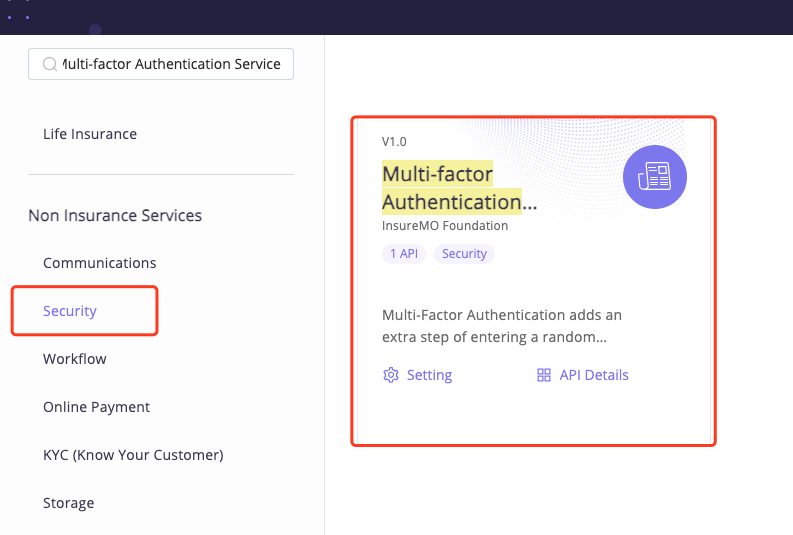
Select Catalog at the top of the home page.
-
Search for the Multi-factor Authentication Service card on the portal.
-
Or it can be found in Non Insurance Services > Security in the left side navigation pane.
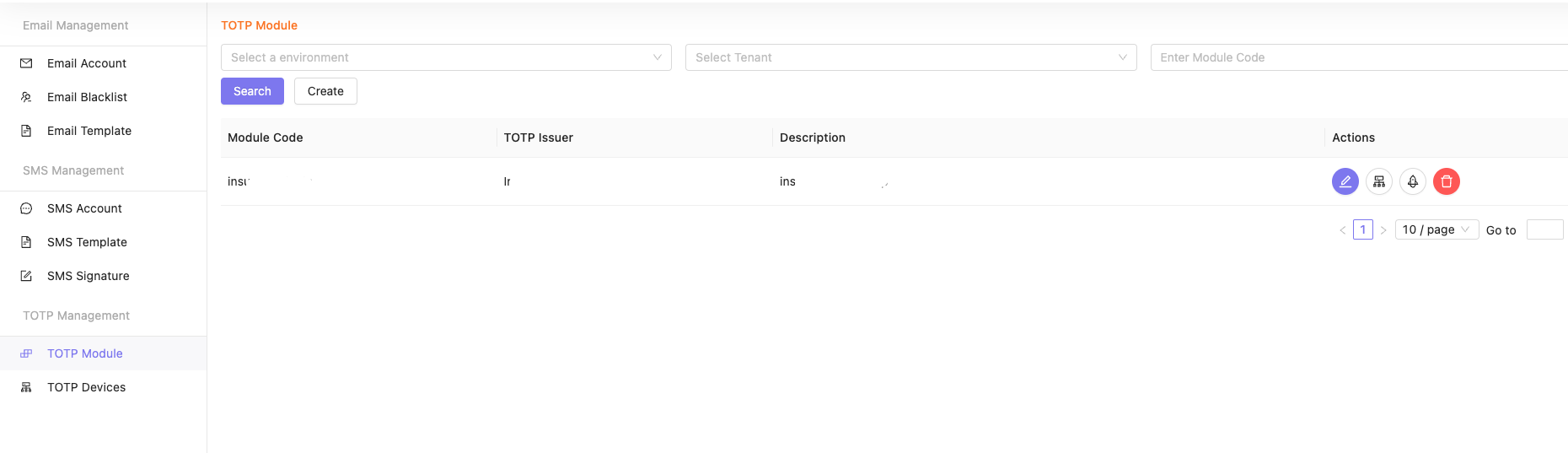
TOTP Module Management
Before creating your TOTP accounts and devices, you should create a module first.
On the Module Management page, you can search, create, update and delete your module.
Create
Click Submit to create a TOTP module.
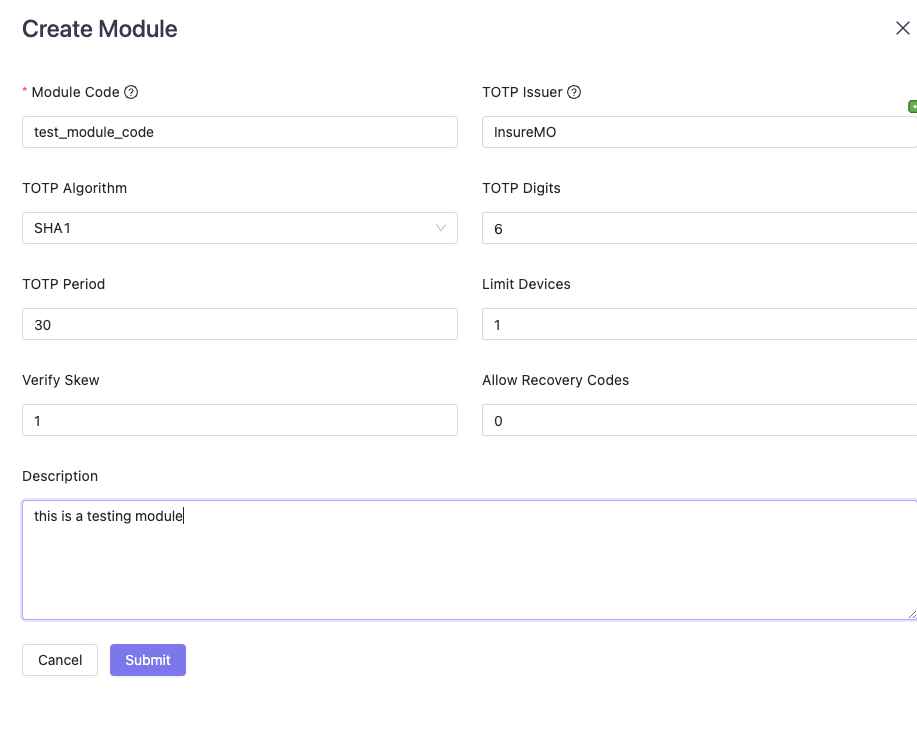
Fill the form and submit.
Module Code: An unique code for your module.TOTP Issuer: The name of your website or company, which will be displayed in the user’s app. It is defaulted to be the same asModule Codeif it is empty.TOTP Algorithm: The Algorithm of TOTP. It is defaulted to SHA1, which is the most popular option.TOTP Digits: The digits of the TOTP code. It is defaulted to 6, which is the most popular option.TOTP Period: The time period of a TOTP code. It is defaulted to 30, which is the most popular option.Limit Devices: The number of devices that can be added.Verify Skew: The codes from both the preceding and following periods will also be verified successfully. 1 is recommended.
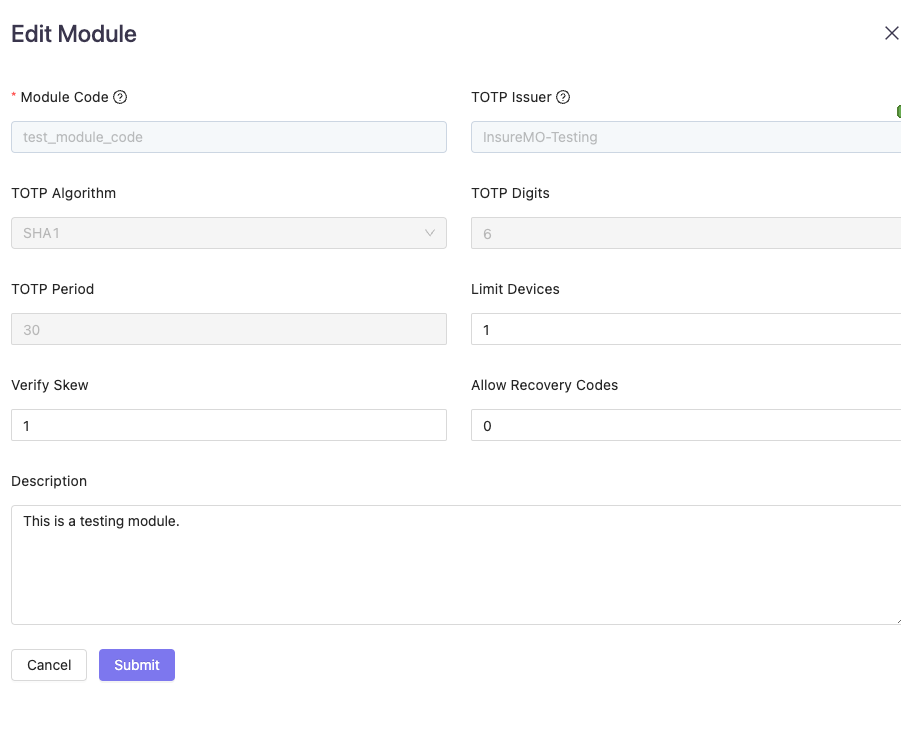
Edit
Find the module you will edit, and click Edit on the right side.
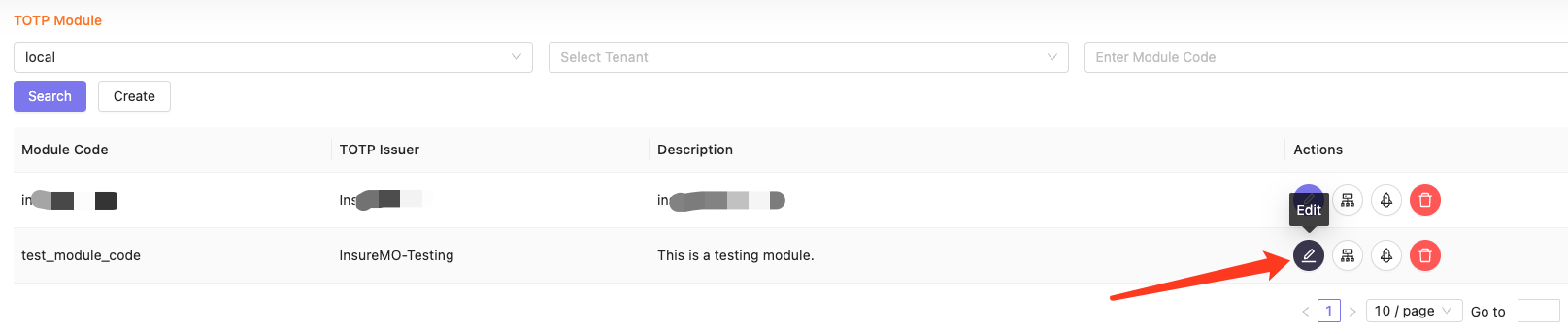
Edit the module and click Submit to update the module.
Only Limit Devices, Verify Skew, Allow Recovery Codes and Description can be edited.
Try
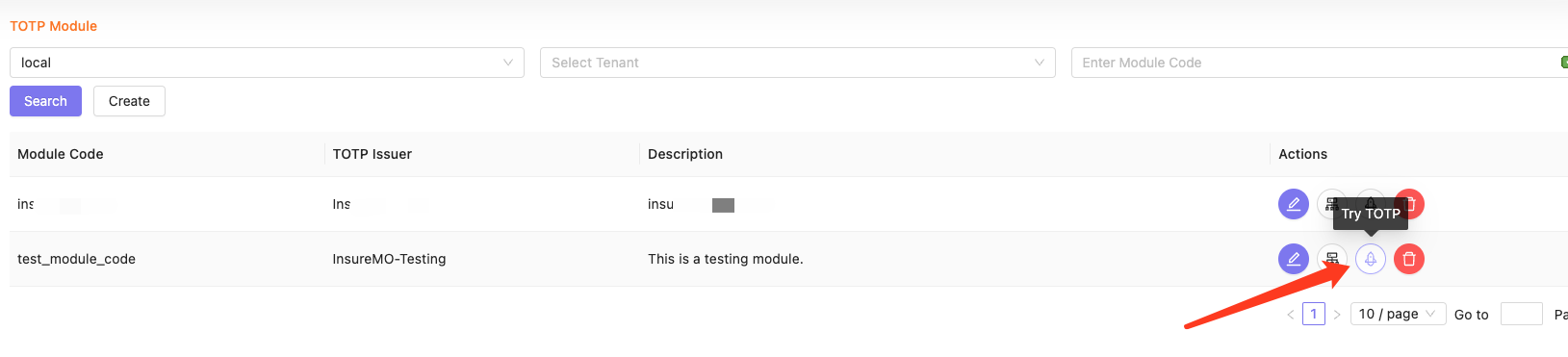
You can try to add a TOTP device.
Find the module you will try, and click Try on the right side.
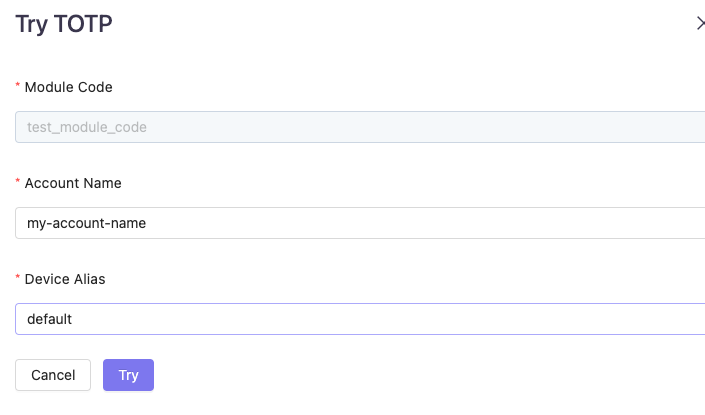
Fill in the Account Name and Device Alias, which should be unique in a module. Click Try.
Scan the QR code with your device, fill in the TOTP Code with six digits generated from the app and click Verify.
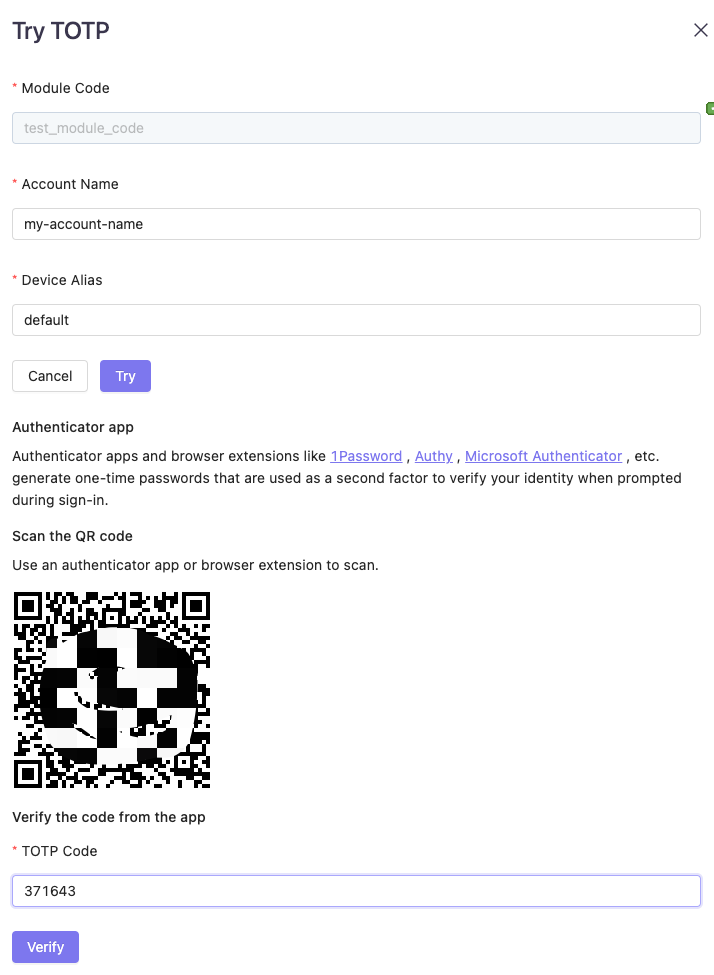
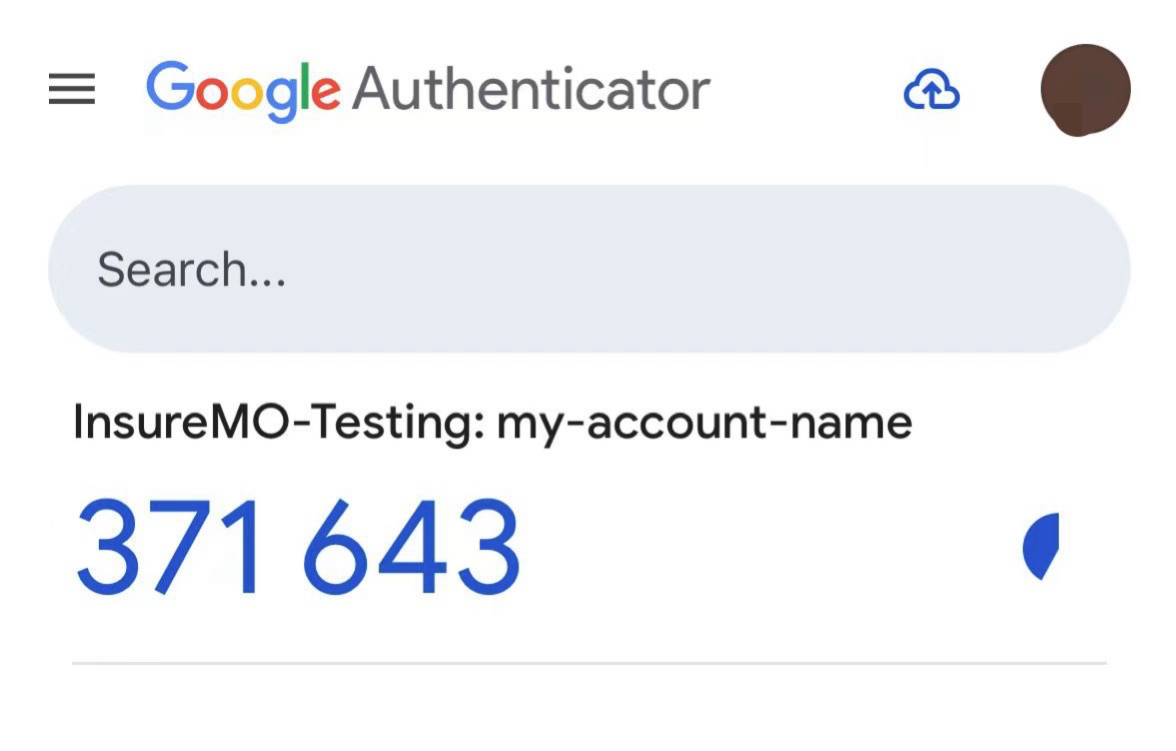
It will show Verify Successfully if the code is correct.
Devices that are added during the trying will not be added. If you need to add a real device, please call the API
Add TOTP DeviceandVerify TOTP Device First Time.
TOTP Device Management
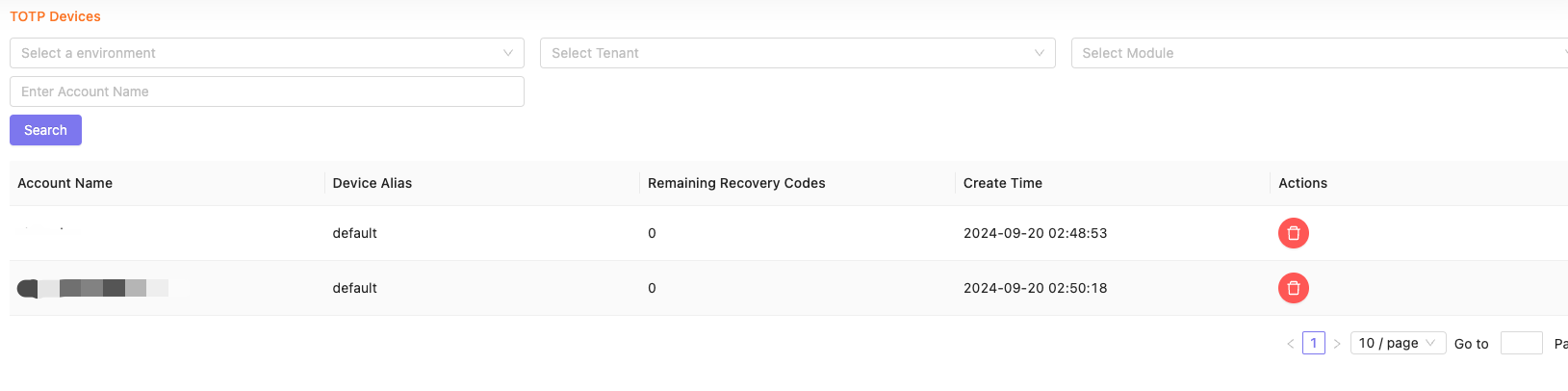
Click Show Devices on the right side of the module or click Device Management on the left side of the web to open the device management page.
You can search and delete devices on this page.
Developing with TOTP API
Add TOTP Device
New devices will only be staged temporarily and will only be added after the first-time verification.
The plaintext of totp_secret and totp_url only returns in this response and cannot be retrieved from other APIs.
Calling REST APIs
For more TOTP API lists, see TOTP API list.
Call Add TOTP Device API to add a TOTP device.
HTTP Method
POST
Request URL
{{insuremo_gw_url}}/mo-fo/1.0/sns/totp/device/add-one
Header Parameters
Authorization: Bearer MOATYourAccessToken
Request Body:
{
    "account_name": "example-account",         // Required, the account name
    "device_alias": "default",                 // Required, the device alias
    "module_code": "insuremo-test",            // Required, the module code
    "description": "this is a testing device",
    "dry_run": false,                          // Device will not be added after first-time verification if dry_run is true. Default false.
    "expires_in_minutes": 15,                  // First-time verification must be completed within this period. Default 15.
    "qr_code_height": 100,                     // QR code will be generated at the same time, if qr_code_height is greater than 0.
    "skip_first_verify": false                 // Skip first-time verification if skip_first_verify is true, and the device will be added directly.
}
Example Response Body
{
    "code": "i_common_created",
    "message": "created",
    "trace_id": "traceid0000000000000000000000000",
    "data": {
        "tenant": "tenant",
        "module_code": "test_module_code",
        "account_name": "example-account",
        "device_alias": "default",
        "description": "this is a testing device",
        "totp_url": "otpauth://totp/insureMO-Testing:example-account?algorithm=SHA1&digits=6&issuer=insureMO-Testing&period=30&secret=CT4WYX2QL2YGSF7PAAAAAAAAAAAAAAAA",
        "totp_secret": "CT4WYX2QL2YGSF7PAAAAAAAAAAAAAAAA",
        "image_base64": "iVBORw0KGgoAAAANSUhEUgAAAGQAAABkEAAAAAAFGRbLAAAEEUlEQVR4nORc7a7bOgxTh77/K3c46LIqDEkp2IBhPPpz4vojrmiJonvvnq9XRdiz6vHQ3V9f8+jvz67veO4ucmugsbk477rPH/57/j/2fP9RninjReap3kbPMkMvf43v66PpfaYhUjWfXRyHsdDbDI0+rgii+Kzigu8zERFlLAams8+829frHkeE8HlHEN8JEWfo+RI80MeXyIh9zj00KhQR9+3RW4pljz7m5ePzjgq2yyDr95mGiKtjDkOOUH/LMLzjHtbG+XqfSYhsMoNialVv4TjWVuvh+3YZLAmRTf3PMpXXXXXXXXXXXXXXXX=="
    }
}
Using insureMO SNS SDK For JAVA
To setup SNS SDK Client, see Setup SNS client using insureMO SDK for JAVA.
Code example:
import com.insuremo.sdk.core.exception.ApiException;
import com.insuremo.sdk.services.sns.api.TotpApi;
import com.insuremo.sdk.services.sns.bundle.AddTOTPDeviceResponseBundle;
import com.insuremo.sdk.services.sns.model.AddTOTPDeviceRequest;

public class TotpApi_addTOTPDevice {

    public static void main(SnsSdkClient snsSdkClient) {
        System.out.println("----- Example for TotpApi.addTOTPDevice -----");
        TotpApi totpApi = snsSdkClient.totpApi();
        System.out.println("----- addTOTPDevice -----");

        try {
            AddTOTPDeviceResponseBundle responseBundle = totpApi.newAddTOTPDeviceRequestBuilder()
                    .requestBody(new AddTOTPDeviceRequest()
                            .accountName("example-account")
                            .deviceAlias("default")
                            .moduleCode("insuremo-test")
                            .description("this is a testing device")
                    )
                    .doRequest();
            System.out.println(responseBundle.getBody().getData());
        } catch (ApiException e) {
            System.out.println(e.getResponseBody());
            System.out.println(e.getCode());
        }

        System.out.println("----- Done. -----");
    }
}
Verify TOTP Device First Time
Verification must be completed within 15 minutes.
otp_recovery_codes only return in this response and cannot be retrieved from other APIs.
Calling REST APIs
For more TOTP API lists, see TOTP API list.
Call Verify TOTP Device First Time API to verify the device for the first time.
HTTP Method
POST
Request URL
{{insuremo_gw_url}}/mo-fo/1.0/sns/totp/device/first-time-verify
Header Parameters
Authorization: Bearer MOATYourAccessToken
Request Body:
{
    "account_name": "example-account",
    "device_alias": "default",
    "module_code": "insuremo-test",
    "code": "123456"
}
Example Response Body
{
    "code": "i_common_created",
    "message": "created",
    "trace_id": "traceid0000000000000000000000000",
    "data": {
        "device_id": "00000000-0000-0000-0000-0000000000000000",
        "tenant": "tenant",
        "module_code": "insuremo-test",
        "account_name": "example-account",
        "device_alias": "default",
        "description": "this is a testing device",
        "creator": "tenant/my-user-name",
        "create_time": "2024-01-01T00:00:00Z",
        "modifier": "tenant/my-user-name",
        "modify_time": "2024-01-01T00:00:00Z",
        "recovery_code_count": 2,
        "otp_recovery_codes": [
            "ABCD-1234",
            "C3D4-E5F6"
        ]
    }
}
Using insureMO SNS SDK For JAVA
To setup SNS SDK Client, see Setup SNS client using insureMO SDK for JAVA.
Code example:
import com.insuremo.sdk.core.exception.ApiException;
import com.insuremo.sdk.services.sns.api.TotpApi;
import com.insuremo.sdk.services.sns.bundle.VerifyTOTPDeviceFirstTimeResponseBundle;
import com.insuremo.sdk.services.sns.model.VerifyTOTPDeviceRequest;

public class TotpApi_verifyTOTPDeviceFirstTime {

    public static void main(SnsSdkClient snsSdkClient) {
        System.out.println("----- Example for TotpApi.verifyTOTPDeviceFirstTime -----");
        TotpApi totpApi = snsSdkClient.totpApi();
        System.out.println("----- verifyTOTPDeviceFirstTime -----");

        try {
            VerifyTOTPDeviceFirstTimeResponseBundle responseBundle = totpApi.newVerifyTOTPDeviceFirstTimeRequestBuilder()
                    .requestBody(new VerifyTOTPDeviceRequest()
                            .accountName("example-account")
                            .deviceAlias("default")
                            .moduleCode("insuremo-test")
                            .code("123456")
                    )
                    .doRequest();
            System.out.println(responseBundle.getBody().getData());
        } catch (ApiException e) {
            System.out.println(e.getResponseBody());
            System.out.println(e.getCode());
        }

        System.out.println("----- Done. -----");
    }
}
Verify TOTP
The Verify TOTP API will return a failed result if the device has not been verified.
Calling REST APIs
For more TOTP API lists, see TOTP API list.
Call Verify TOTP API to add verify the device.
HTTP Method
POST
Request URL
{{insuremo_gw_url}}/mo-fo/1.0/sns/mfa/totp/verify
Header Parameters
Authorization: Bearer MOATYourAccessToken
Request Body:
{
    "account_name": "example-account",
    "module_code": "insuremo-test",
    "code": "123456"   // If a recovery code is used in verification, it will be invalid after success.
}
Using insureMO SNS SDK For JAVA
To setup SNS SDK Client, see Setup SNS client using insureMO SDK for JAVA.
Code example:
import com.insuremo.sdk.core.exception.ApiException;
import com.insuremo.sdk.services.sns.api.MfaTotpApi;
import com.insuremo.sdk.services.sns.bundle.VerifyMFATOTPResponseBundle;
import com.insuremo.sdk.services.sns.model.VerifyMFATOTPRequest;

public class MfaTotpApi_verifyMFATOTP {

    public static void main(SnsSdkClient snsSdkClient) {

        System.out.println("----- Example for MfaTotpApi.verifyMFATOTP -----");
        TotpApi totpApi = snsSdkClient.totpApi();
        System.out.println("----- verifyMFATOTP -----");

        try {
            VerifyMFATOTPResponseBundle responseBundle = mfaTotpApi.newVerifyMFATOTPRequestBuilder()
                    .requestBody(new VerifyMFATOTPRequest()
                            .accountName("example-account")
                            .moduleCode("insuremo-test")
                            .code("123456")
                    )
                    .doRequest();
            System.out.println(responseBundle.getBody().getData());
        } catch (ApiException e) {
            System.out.println(e.getResponseBody());
            System.out.println(e.getCode());
        }

        System.out.println("----- Done. -----");
    }
}
References
Setup The SNS Client Using The insureMO SDK for JAVA
See Welcome to insureMO SDK for Java for details.
maven dependency:
<properties>
    <insuremo.sdk.version>1.1.XXX</insuremo.sdk.version>
</properties>
<dependencies>
    <dependency>
        <groupId>com.insuremo.sdk</groupId>
        <artifactId>sns</artifactId>
        <version>${insuremo.sdk.version}</version>
    </dependency>
</dependencies>
Build SNS SDK Client
import com.insuremo.sdk.core.client.SDKClient;
import com.insuremo.sdk.services.sns.SnsSdkClient;

public class Main {

    public static SnsSdkClient buildClient() {
        SDKClient sdkClient = SDKClient.builder().
                defaultConfigs().
                // configure INSUREMO_GW_URL as your env property
                gateway(System.getenv("INSUREMO_GW_URL")).
                // configure INSUREMO_ACCESS_TOKEN as your env property
                accessToken(System.getenv("INSUREMO_ACCESS_TOKEN")).
                build();
        return new SnsSdkClient(sdkClient);
    }
}
TOTP API List
For all API lists, see insureMO API Reference - SNS.
| Summary | API |
|---|---|
| Add TOTP Module | POST {{insuremo_gw_url}}/mo-fo/1.0/sns/totp/module/add-one |
| Delete TOTP Module | POST {{insuremo_gw_url}}/mo-fo/1.0/sns/totp/module/delete-one |
| Paged List TOTP Modules | GET {{insuremo_gw_url}}/mo-fo/1.0/sns/totp/module/query-many |
| Update TOTP Module | POST {{insuremo_gw_url}}/mo-fo/1.0/sns/totp/module/update-one |
| Add TOTP Device | POST {{insuremo_gw_url}}/mo-fo/1.0/sns/totp/device/add-one |
| Delete TOTP devices by account name | POST {{insuremo_gw_url}}/mo-fo/1.0/sns/totp/device/delete-many |
| Delete TOTP device | POST {{insuremo_gw_url}}/mo-fo/1.0/sns/totp/device/delete-one |
| Verify TOTP Device First Time | POST {{insuremo_gw_url}}/mo-fo/1.0/sns/totp/device/first-time-verify |
| Paged List TOTP devices | GET {{insuremo_gw_url}}/mo-fo/1.0/sns/totp/device/query-many |
| Verify MFA TOTP | POST {{insuremo_gw_url}}/mo-fo/1.0/sns/mfa/totp/verify |
This document may include links to external websites and third-party features for demonstration purposes only. These links and features do not constitute an endorsement or recommendation by us. We do not control and are not responsible for the content, services, or privacy practices of these third parties. Users are advised to review the respective terms and privacy policies independently.