Basic Concept
There can be a lot of printing templates for insurance usage, such as policy documents, claim acknowledgment letters, and invoices.
Print management is a space where end users can search out pending print tasks to perform initial printing or previous print tasks to perform reprint.
Users can also select multiple files for batch printing at a later time.
User Scenario
For anybody who wants to use our platform to print or reprint a document.
Concept of Print Management
From the InsureMO perspective, it supports two service concepts: Document Generation and Print Task Management.
- Document Generation works mostly as a print server, which helps to generate PDF files and store them in a designated folder.
- Print Task Management works like a search index that links to the physical documents and helps users search out target documents for support and reprinting purposes.
In summary, Print Task Management is more of a management service while Document Generation is more of a physical generation.
The Current set of Print Task UI is powered by Print Task API which helps users search out documentation tasks.
Once printing is triggered, the system will interact with the Document Generation service to print end documents in the backend.
Basically, there are two types of printing that the system supports:
- Single Printing or Online Printing is to print documents one by one in real-time.
- Batch Printing is to select or send multiple print tasks together to the batch server to be bulk printed at a later time.
From the operation level, there are four operational scenarios for using print UI:
- “Initial Print”: Trigger a straight-through online printing with a print task created, and PDF generated and saved.
- “Download”: Download an existing PDF from an existing print task.
- “Reprint”: Re-trigger printing to generate a new PDF and save it.
- “Batch Print”: Schedule a print task without actual printing and then print a bunch of tasks together at a later time.
To use this module, it is essential to embed a print task generation trigger point API during business processes, such as policy issuance and accident reporting via development.
Relationship With Container Print Management Service
Technically speaking, developers can use both platform Print Task and Document Generation API for generation and management. Of course, if users have their own document generation tools, they can also only adopt Print Task Management or integrate it with their own document generation APIs.
From an app framework perspective, we provide an out-of-the-box UI and some search APIs to facilitate users to manage print tasks. At the backend, it still calls InsureMO print task API for processing. For detailed specifications and to stay informed about updates, both the Print Task and Document Generation API documentation are available on the InsureMO portal for reference.
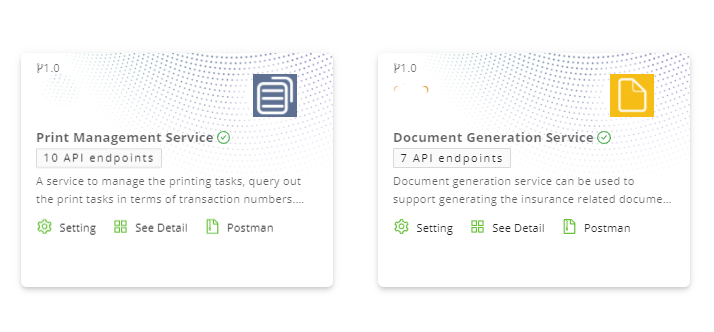
For applications that intend to incorporate the print task management feature, our suggested calling method is:
- To generate print tasks
The BFF can directly call InsureMO print task management API to generate tasks.
- To search print tasks
There are two options:
- Users can encapsulate a BFF around all InsureMO print task management APIs to search.
- Users can call the app framework print task management APIs to search. This process will call InsureMO print task management APIs at the backend.
Print Maintenance UI Operation Guide
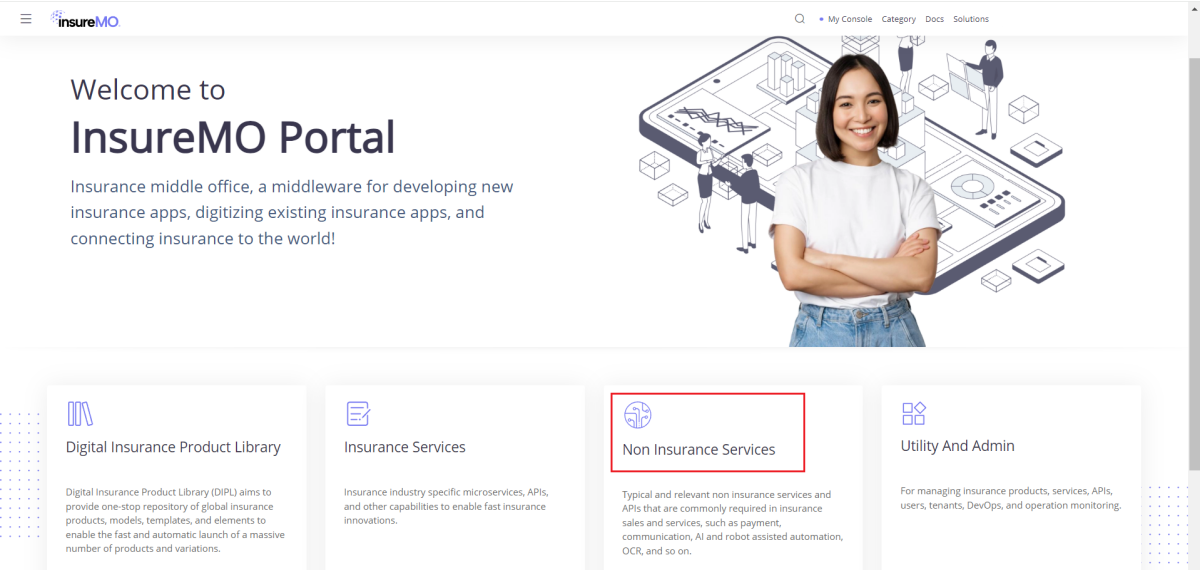
Enter Print;
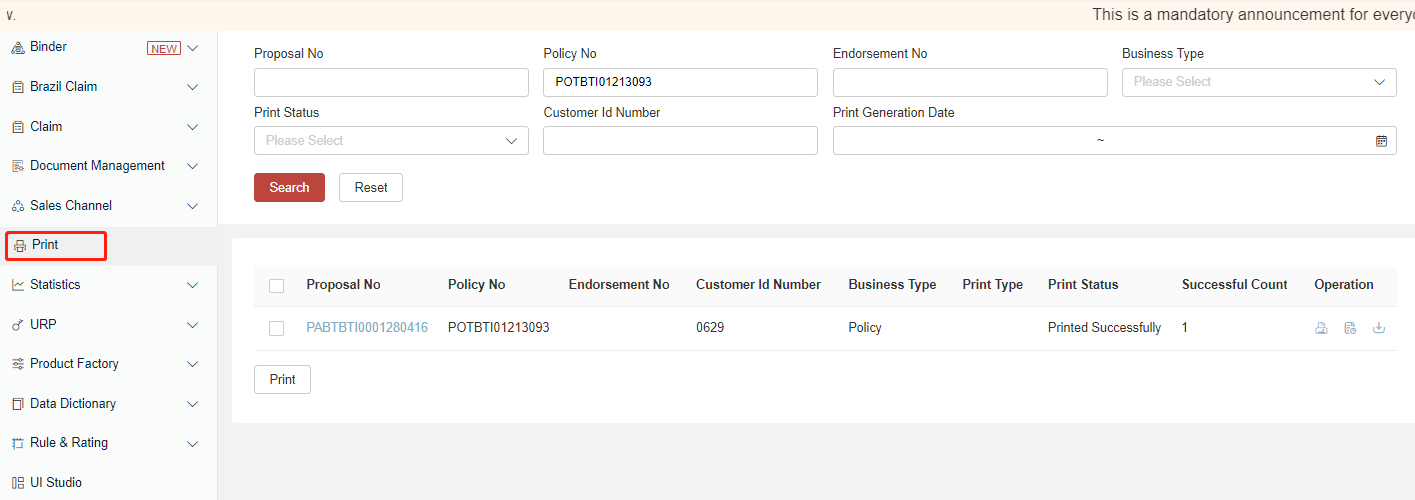
Log in to the home page of InsureMO and click Print on the left menu bar.
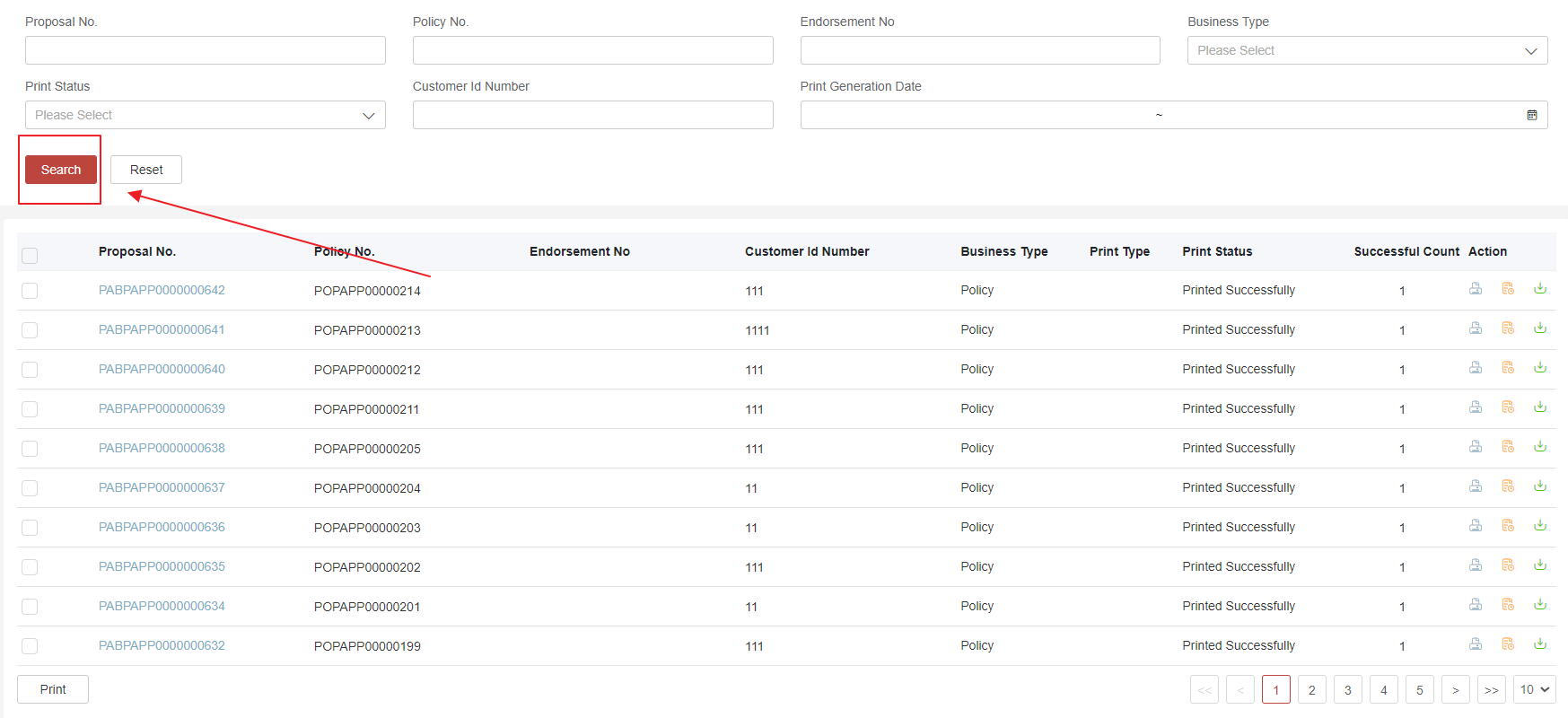
Search Print Task
You can search quickly or choose advanced search through specified fields.
Print or Reprint
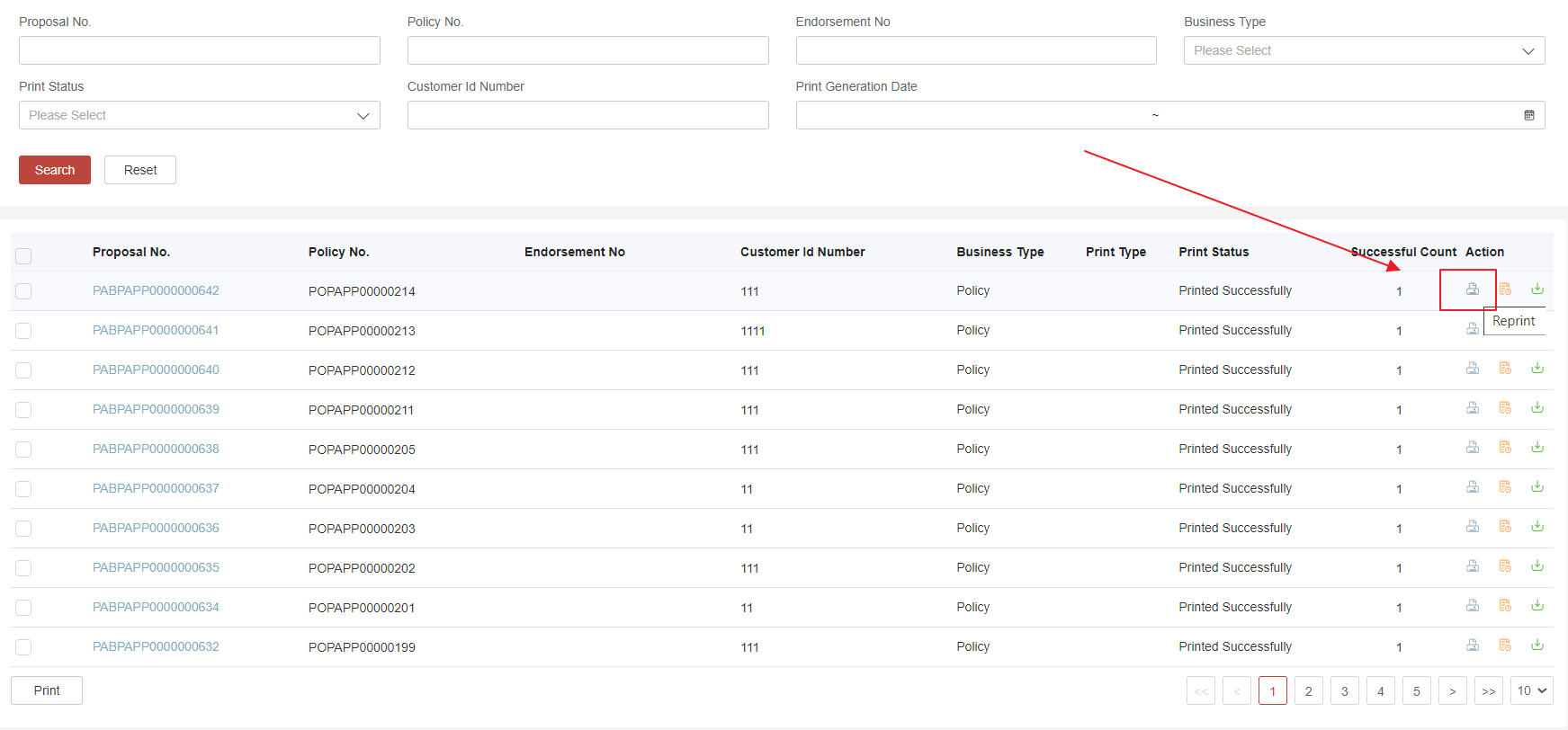
Select a print query result record to generate print again.
Batch Print
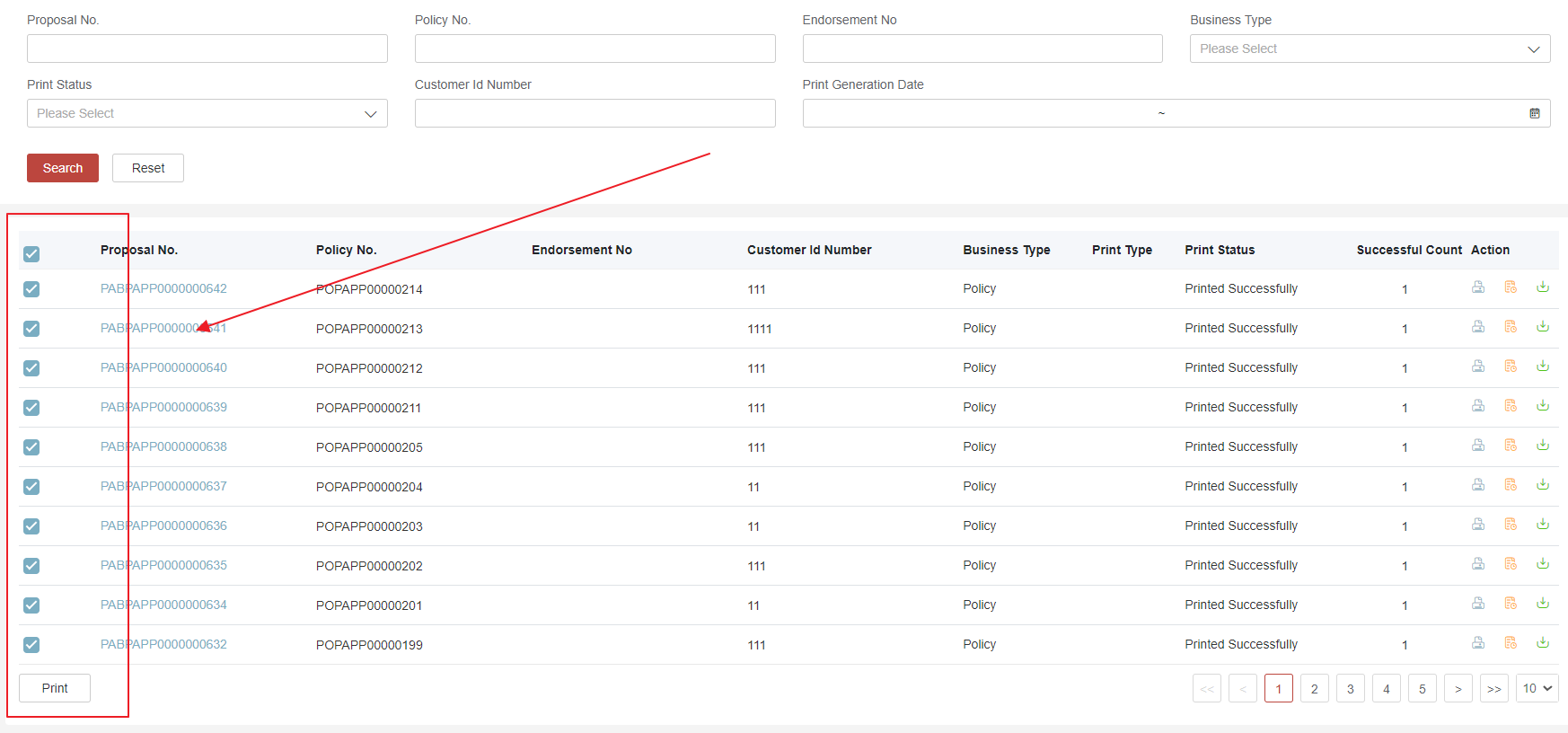
Select multiple print query results and send them to the batch server.
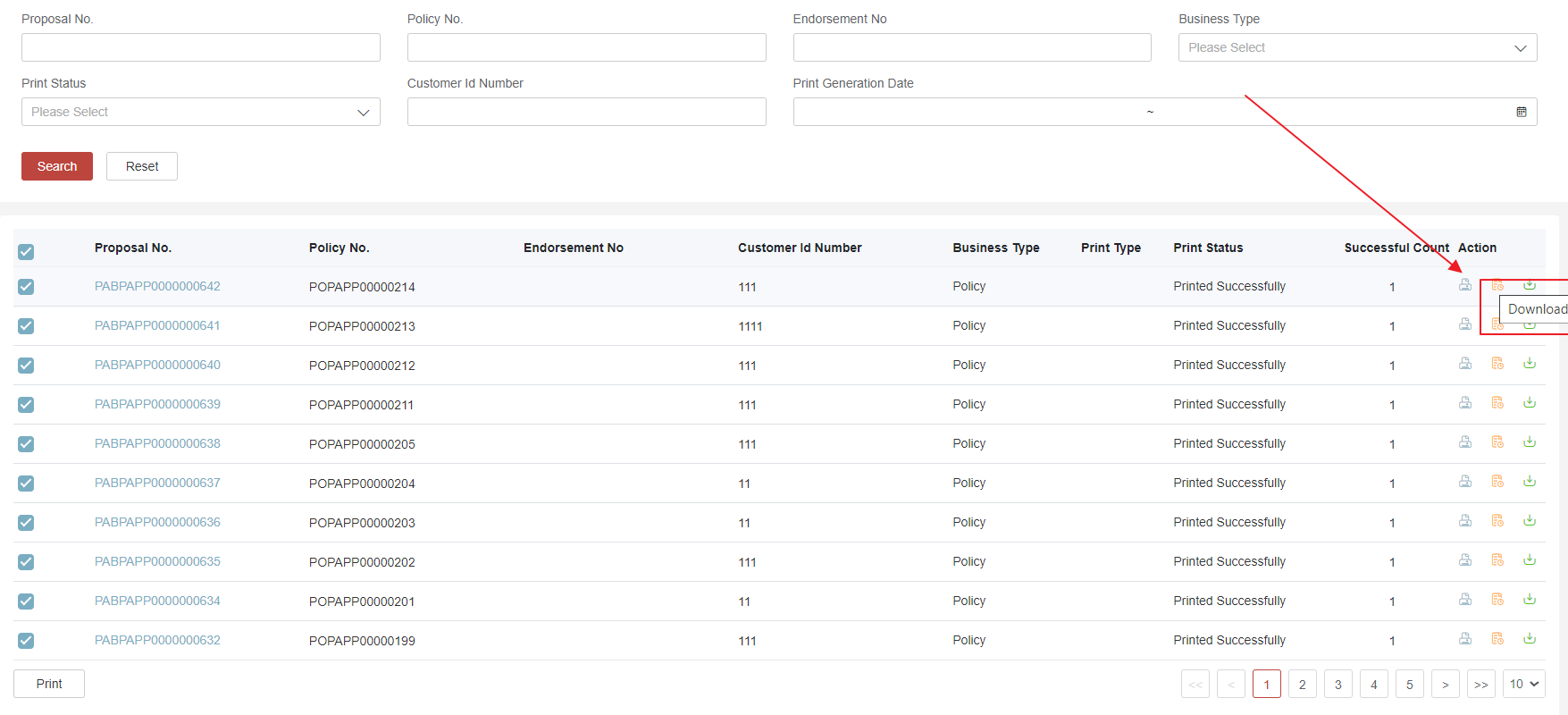
Download
Select a print query result record to download again the PDF printed before.
The file name can be passed as a parameter before print task generation. If the downloaded file name is not passed, the system will provide a default file name.
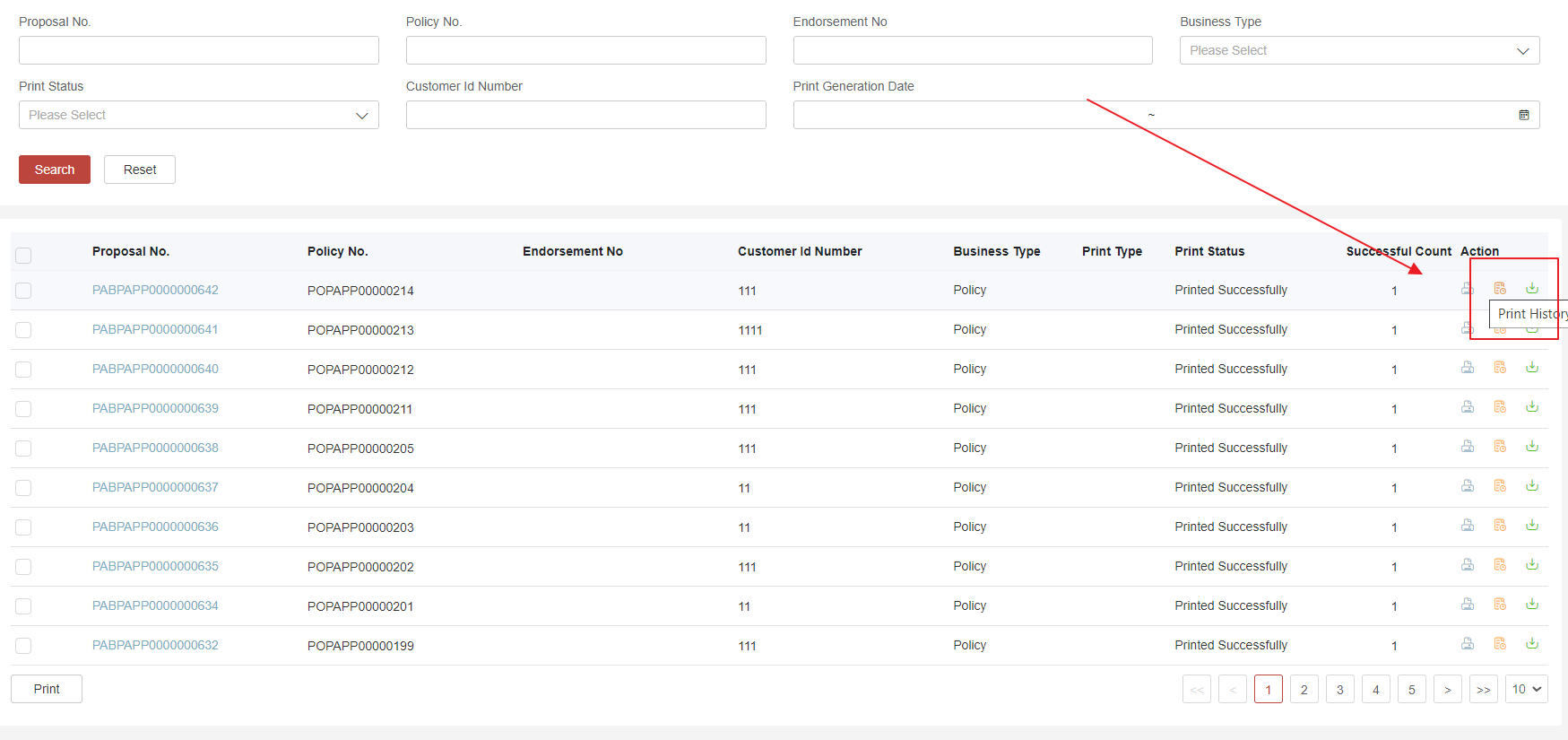
View Print History
Click the print query result record to view print history.
Print Task Code Table
There have been several code and data tables defined at the platform level. Users can go to the data table section to see code values.
- PrintStatus - Please follow the existing setting and do not change it.
- PrintModuleType - You can override current values and define yours.
- PrintDocType - You can override current values and define yours.
You can also go to InsureMO doc site to see Print Management Guide.
Print Task V1 & V2
There are two versions of API published for Print Task Management. Compared to V1, V2 of the Print task management has added more fixed fields for search to have a better system performance.
The choice between V1 and V2 is determined by the application’s decision on which API to use for generating print tasks. We would strongly suggest that all users adopt V2 API to create from the beginning, in preference to V1.
Of course, in order to allow users to search print tasks generated with the V2 version while compatible with V1, we have added a tab to allow clients to switch the display. An example is provided below. For new tenants, the system defaults to display V2 only. However, if users want to use V1 to generate, the display can be overridden by adjusting the platform global parameter -> UIConfig -> printUIVersionShow to input “V1” or “v1,v2”.
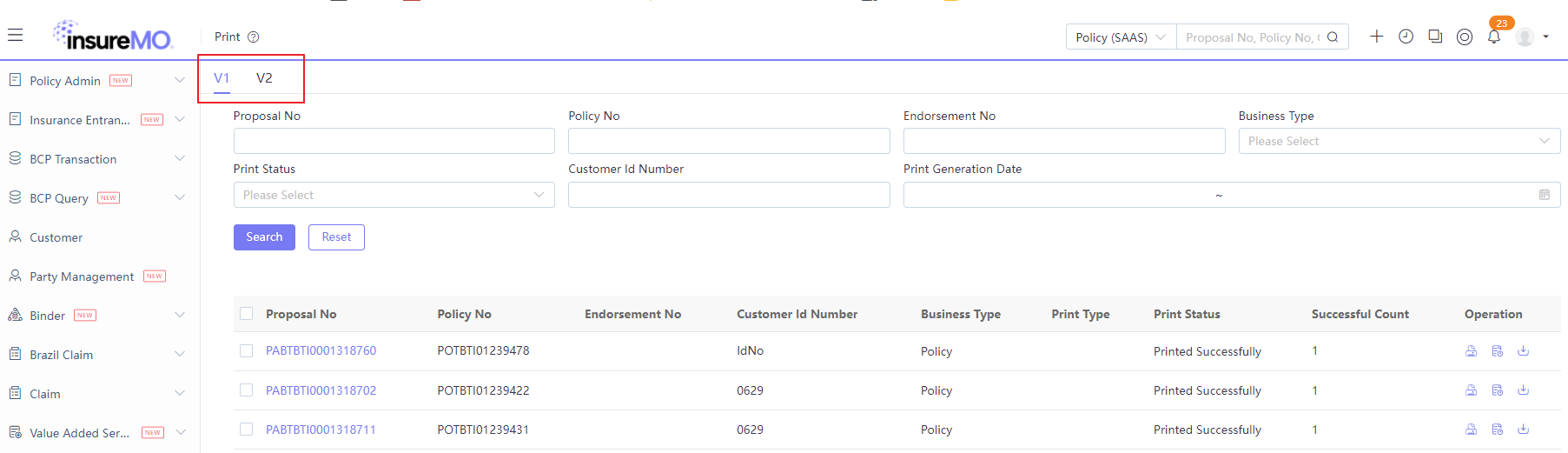
If you are currently using V1 and want to migrate to V2, you can follow the following steps:
- Switch your creation method in BFF to adopt the V2 API. For details, please see the print management guide in non-insurance service.
- Contact the InsureMO support team to perform legacy data migration for all existing cases in V1 to V2 upon the time you deploy your BFF to UAT/production.
- Change the global parameter mentioned above to display the V2 print tab only for users.
Please ensure that the version you created and queried is same. Recommend to use V2.
- Create Print Task
- Query Print Task
If you use the platform ui Print, please use the below mapping.
{
  ...
  "business_id": ${policyId},
  "business_id2": ${proposalNo},
  "business_id3": ${policyNo},
  "business_id4": ${endoNo},
  "business_id5": ${CustomerIdNumber},
  ...
}
Sample Word DocGen Configuration Process
In the latest release, InsureMO not only supports JasperReport-based document generation but also supports Word-based document generation service. For details, see Word Document Generation Guide.
With the introduction of WordDocGen, system analysts are now enabled to incorporate document templates into the product configuration process. To facilitate users to quickly go through the process, the following guide is provided.
A travel product in the User Operation Manual is taken as an example:
Design Aspose Template
The following takes a template for example.
Design Aspose Print Instruction
 [
  {
    "instructionType": "Transform",
    "variableName": "Covers",
    "expression": "var Covers = [...]; for(risk : data.PolicyObject.PolicyLobList[0].PolicyRiskList){if(not empty(risk['PolicyCoverageList']) and risk['PolicyCoverageList'].size() > =1){for(cover : risk['PolicyCoverageList']) {Covers.add(cover)} return Covers} }",
    "expressionResultType": "list",
    "transformResultPath": "Covers"
  },
    {
    "instructionType": "Transform",
    "variableName": "Insureds",
    "expression": "var Insureds = [...]; Insureds = data.PolicyObject.PolicyLobList[0].PolicyRiskList; return Insureds",
    "expressionResultType": "list",
    "transformResultPath": "Insureds"
  }
       ]
Upload Aspose Template to Print Server
It is used for runtime operations in the DEV environment for quick troubleshooting.
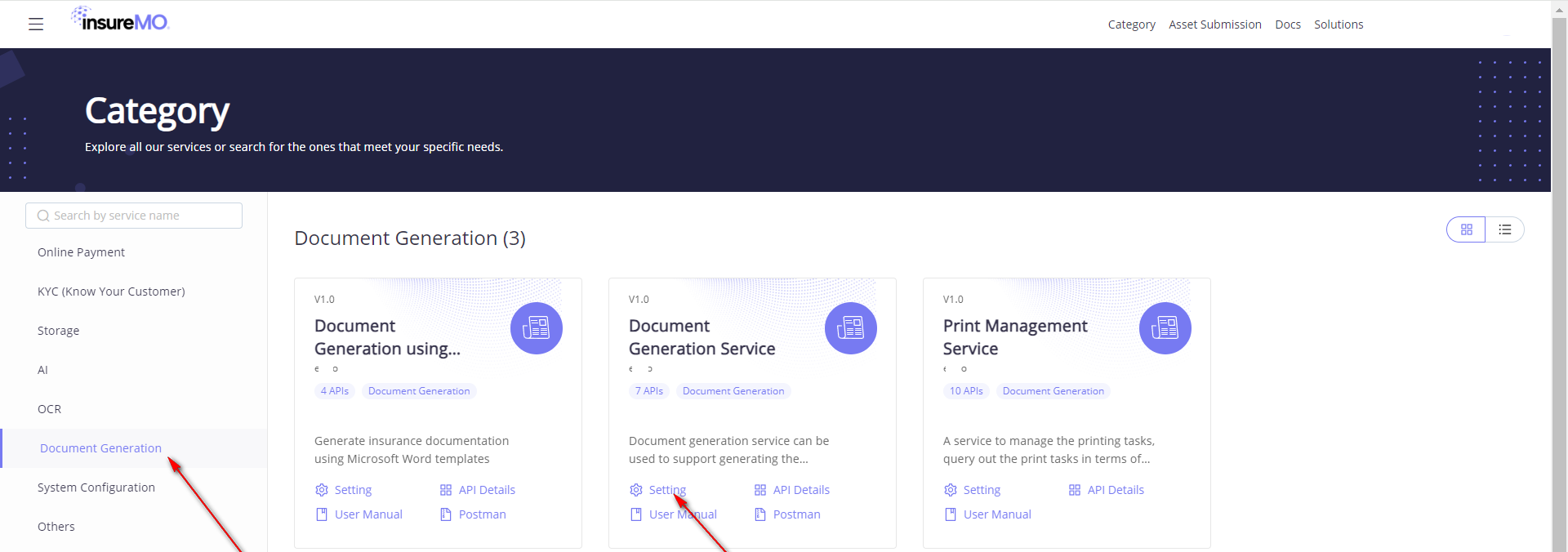
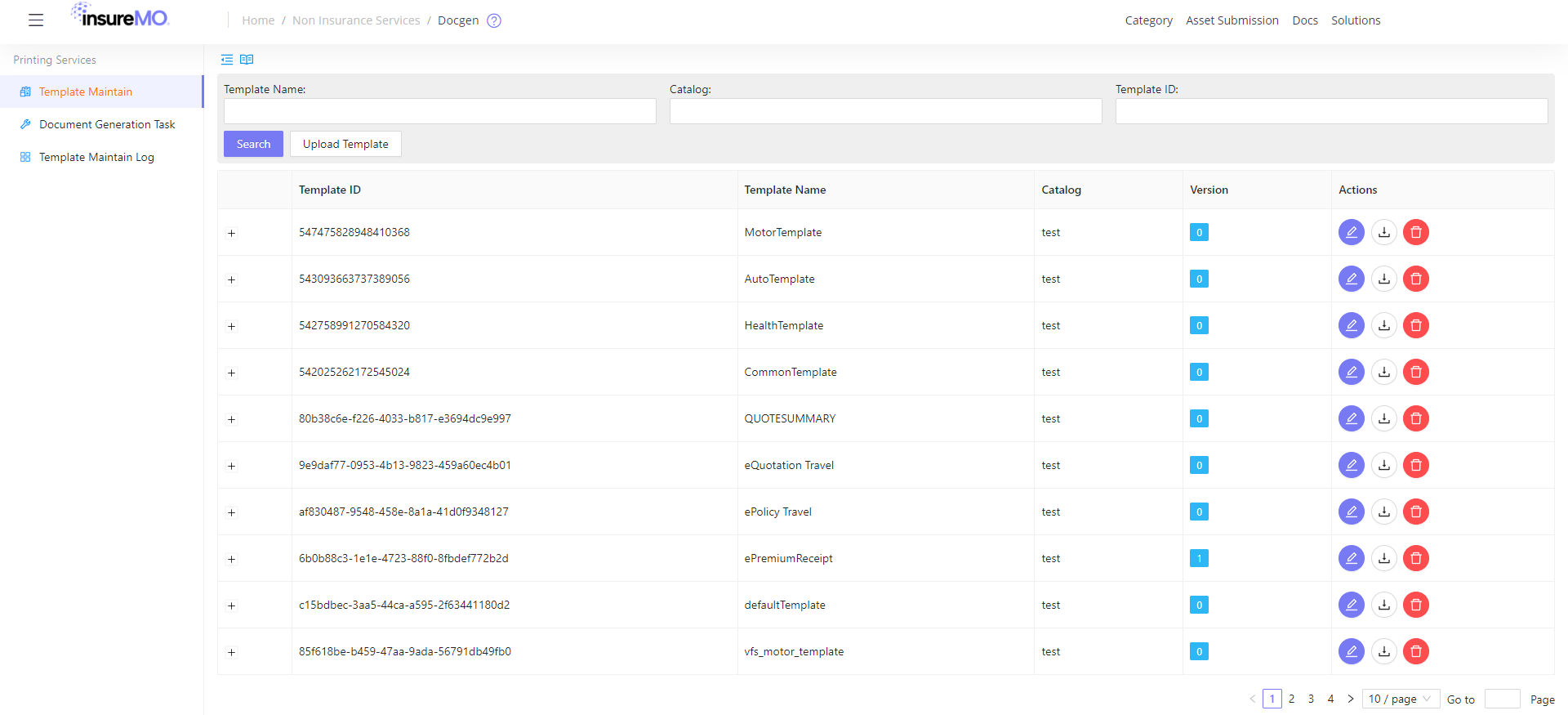
The uploaded files must be in ZIP format, and the following is an uploaded sample file.
Test Aspose Printout by Aspose Atomic API
URL: {Container Runtime GW Address}/eBao/1.0/print/template
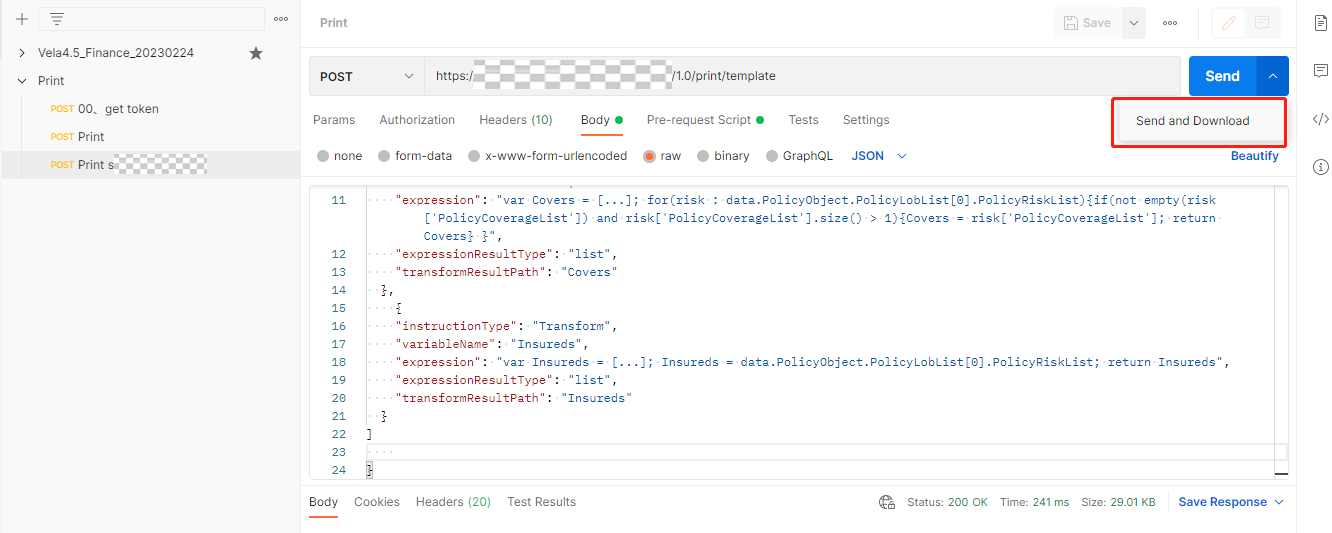
Request JSON Format:
{
    "mapping": {"PolicyObject}},
    "outputFormat": "pdf",
    "templateName": "",
    "version": "0",
    "instructions":
[{}]
}
Request JSON Sample:
{
"mapping": {
"PolicyObject": {
"AdjustedPremium": 680.4,
"AgentCode": "PTY10000104732814",
"AnnualPremium": 630,
"AutoUwResultCode": "1",
"BeforeVatPremium": 630,
"BookCurrencyCode": "USD",
"BusinessCateCode": "1",
"BusinessObjectId": 3517051304219,
"Commission": 63,
"CommissionRate": 0.1,
"DuePremium": 680.4,
"EffectiveDate": "2023-06-22",
"ExpiryDate": "2024-06-21",
"FirstDataEntryDate": "2023-06-21T10:45:49",
"GrossPremium": 680.4,
"IsIssueAfterPay": "Y",
"IsPremiumCalcSuccess": "Y",
"IsRenewable": "Y",
"IsTakeUpPolicy": "N",
"IssueDate": "2023-06-21T10:47:00",
"IssueUserId": -1,
"LocalCurrencyCode": "USD",
"OrgCode": "10002",
"PolicyAgentList": [
{
"AgentCode": "PTY10000104732814",
"BusinessObjectId": 370854223,
"ParentElementType": "POLICY",
"ParentPolicyElementId": 8581520129,
"PolicyElementId": 8581520131,
"PolicyId": 8581520129,
"PolicyStatus": 2,
"SequenceNumber": 1,
"ShareRate": 1
}
],
"PolicyCustomerList": [
{
"BusinessObjectId": 1000000290,
"CustomerName": "0629",
"CustomerNo": "CI00001023",
"DateOfBirth": "1988-06-08",
"Gender": "1",
"IdNo": "0629",
"IdType": "1",
"IsInsured": "N",
"IsOrgParty": "N",
"IsPolicyHolder": "Y",
"ParentElementType": "POLICY",
"ParentPolicyElementId": 8581520129,
"PolicyElementId": 8581520133,
"PolicyId": 8581520129,
"PolicyStatus": 2,
"SequenceNumber": 1
}
],
"PolicyElementId": 8581520129,
"PolicyId": 8581520129,
"PolicyLobList": [
{
"AdjustedPremium": 680.4,
"BeforeVatPremium": 630,
"BusinessObjectId": 351861068,
"DuePremium": 680.4,
"GrossPremium": 680.4,
"ParentElementType": "POLICY",
"ParentPolicyElementId": 8581520129,
"PolicyElementId": 8581520135,
"PolicyId": 8581520129,
"PolicyRiskList": [
{
"AdjustedPremium": 680.4,
"Age": 34,
"BeforeVatPremium": 630,
"BusinessObjectId": 351861075,
"CustomerName": "Customer",
"DateOfBirth": "1988-10-01",
"DuePremium": 680.4,
"GrossPremium": 680.4,
"IdNo": "IdNo",
"IdType": "1",
"ParentElementType": "POLICY_LOB",
"ParentPolicyElementId": 8581520135,
"PolicyCoverageList": [
{
"AdjustedPremium": 648,
"AnnualPremium": 600,
"BeforeVatPremium": 600,
"BusinessObjectId": 351861078,
"CoverageName": "Accident Death & Dismemberment",
"DuePremium": 648,
"GrossPremium": 648,
"IsFinalLevelCt": "Y",
"ParentElementType": "INSURED",
"ParentPolicyElementId": 8581520137,
"PolicyElementId": 8581520139,
"PolicyId": 8581520129,
"PolicyStatus": 2,
"ProductElementCode": "C100416",
"ProductElementId": 351926024,
"SequenceNumber": 1,
"SumInsured": 300000,
"Vat": 48
},
{
"AdjustedPremium": 10.8,
"AnnualPremium": 10,
"BeforeVatPremium": 10,
"BusinessObjectId": 351861078,
"CoverageName": "Baggage Delay",
"DuePremium": 10.8,
"GrossPremium": 10.8,
"IsFinalLevelCt": "Y",
"ParentElementType": "INSURED",
"ParentPolicyElementId": 8581520137,
"PolicyElementId": 8581520140,
"PolicyId": 8581520129,
"PolicyStatus": 2,
"ProductElementCode": "C100692",
"ProductElementId": 351926030,
"SequenceNumber": 2,
"SumInsured": 300000,
"Vat": 0.8
},
{
"AdjustedPremium": 21.6,
"AnnualPremium": 20,
"BeforeVatPremium": 20,
"BusinessObjectId": 351861078,
"CoverageName": "Travel Delay",
"DuePremium": 21.6,
"GrossPremium": 21.6,
"IsFinalLevelCt": "Y",
"ParentElementType": "INSURED",
"ParentPolicyElementId": 8581520137,
"PolicyElementId": 8581520141,
"PolicyId": 8581520129,
"PolicyStatus": 2,
"ProductElementCode": "C100715",
"ProductElementId": 351926027,
"SequenceNumber": 3,
"SumInsured": 300000,
"Vat": 1.6
}
],
"PolicyElementId": 8581520137,
"PolicyId": 8581520129,
"PolicyStatus": 2,
"ProductElementCode": "R10007",
"ProductElementId": 351926021,
"RiskName": "InsuredName",
"SequenceNumber": 1,
"SumInsured": 900000,
"TempData": {},
"Vat": 50.4
}
],
"PolicyStatus": 2,
"ProductCode": "TBTI",
"ProductElementCode": "TBTI",
"ProductElementId": 351925023,
"ProductId": 351925022,
"ProductLobId": 351925023,
"SequenceNumber": 1,
"SumInsured": 900000,
"TechProductCode": "TR_POC",
"TechProductId": 3516410623456,
"TotalInsuredCount": 1,
"Vat": 50.4
}
],
"PolicyNo": "POTBTI01213093",
"PolicyPaymentInfoList": [
{
"BusinessObjectId": 520259,
"ExpiryDate": "2024-06-21",
"InstallmentList": [
{
"BeforeVatPremium": 52.5,
"BeforeVatPremiumLocal": 52.5,
"BusinessObjectId": 200001394,
"Commission": 5.25,
"CommissionLocal": 5.25,
"DuePremium": 56.7,
"DuePremiumLocal": 56.7,
"FeeSeq": 1,
"InstallmentAmount": 56.7,
"InstallmentAmountLocal": 56.7,
"InstallmentDate": "2023-06-22",
"InstallmentPeriodSeq": 1,
"ParentElementType": "POLICY_PAYMENT",
"ParentPolicyElementId": 8581520143,
"PolicyElementId": 8581520147,
"PolicyId": 8581520129,
"PolicyStatus": 2,
"SequenceNumber": 1,
"Vat": 4.2,
"VatLocal": 4.2
},
{
"BeforeVatPremium": 52.5,
"BeforeVatPremiumLocal": 52.5,
"BusinessObjectId": 200001394,
"Commission": 5.25,
"CommissionLocal": 5.25,
"DuePremium": 56.7,
"DuePremiumLocal": 56.7,
"FeeSeq": 1,
"InstallmentAmount": 56.7,
"InstallmentAmountLocal": 56.7,
"InstallmentDate": "2023-07-22",
"InstallmentPeriodSeq": 2,
"ParentElementType": "POLICY_PAYMENT",
"ParentPolicyElementId": 8581520143,
"PolicyElementId": 8581520148,
"PolicyId": 8581520129,
"PolicyStatus": 2,
"SequenceNumber": 2,
"Vat": 4.2,
"VatLocal": 4.2
},
{
"BeforeVatPremium": 52.5,
"BeforeVatPremiumLocal": 52.5,
"BusinessObjectId": 200001394,
"Commission": 5.25,
"CommissionLocal": 5.25,
"DuePremium": 56.7,
"DuePremiumLocal": 56.7,
"FeeSeq": 1,
"InstallmentAmount": 56.7,
"InstallmentAmountLocal": 56.7,
"InstallmentDate": "2023-08-22",
"InstallmentPeriodSeq": 3,
"ParentElementType": "POLICY_PAYMENT",
"ParentPolicyElementId": 8581520143,
"PolicyElementId": 8581520149,
"PolicyId": 8581520129,
"PolicyStatus": 2,
"SequenceNumber": 3,
"Vat": 4.2,
"VatLocal": 4.2
},
{
"BeforeVatPremium": 52.5,
"BeforeVatPremiumLocal": 52.5,
"BusinessObjectId": 200001394,
"Commission": 5.25,
"CommissionLocal": 5.25,
"DuePremium": 56.7,
"DuePremiumLocal": 56.7,
"FeeSeq": 1,
"InstallmentAmount": 56.7,
"InstallmentAmountLocal": 56.7,
"InstallmentDate": "2023-09-22",
"InstallmentPeriodSeq": 4,
"ParentElementType": "POLICY_PAYMENT",
"ParentPolicyElementId": 8581520143,
"PolicyElementId": 8581520150,
"PolicyId": 8581520129,
"PolicyStatus": 2,
"SequenceNumber": 4,
"Vat": 4.2,
"VatLocal": 4.2
},
{
"BeforeVatPremium": 52.5,
"BeforeVatPremiumLocal": 52.5,
"BusinessObjectId": 200001394,
"Commission": 5.25,
"CommissionLocal": 5.25,
"DuePremium": 56.7,
"DuePremiumLocal": 56.7,
"FeeSeq": 1,
"InstallmentAmount": 56.7,
"InstallmentAmountLocal": 56.7,
"InstallmentDate": "2023-10-22",
"InstallmentPeriodSeq": 5,
"ParentElementType": "POLICY_PAYMENT",
"ParentPolicyElementId": 8581520143,
"PolicyElementId": 8581520151,
"PolicyId": 8581520129,
"PolicyStatus": 2,
"SequenceNumber": 5,
"Vat": 4.2,
"VatLocal": 4.2
},
{
"BeforeVatPremium": 52.5,
"BeforeVatPremiumLocal": 52.5,
"BusinessObjectId": 200001394,
"Commission": 5.25,
"CommissionLocal": 5.25,
"DuePremium": 56.7,
"DuePremiumLocal": 56.7,
"FeeSeq": 1,
"InstallmentAmount": 56.7,
"InstallmentAmountLocal": 56.7,
"InstallmentDate": "2023-11-22",
"InstallmentPeriodSeq": 6,
"ParentElementType": "POLICY_PAYMENT",
"ParentPolicyElementId": 8581520143,
"PolicyElementId": 8581520152,
"PolicyId": 8581520129,
"PolicyStatus": 2,
"SequenceNumber": 6,
"Vat": 4.2,
"VatLocal": 4.2
},
{
"BeforeVatPremium": 52.5,
"BeforeVatPremiumLocal": 52.5,
"BusinessObjectId": 200001394,
"Commission": 5.25,
"CommissionLocal": 5.25,
"DuePremium": 56.7,
"DuePremiumLocal": 56.7,
"FeeSeq": 1,
"InstallmentAmount": 56.7,
"InstallmentAmountLocal": 56.7,
"InstallmentDate": "2023-12-22",
"InstallmentPeriodSeq": 7,
"ParentElementType": "POLICY_PAYMENT",
"ParentPolicyElementId": 8581520143,
"PolicyElementId": 8581520153,
"PolicyId": 8581520129,
"PolicyStatus": 2,
"SequenceNumber": 7,
"Vat": 4.2,
"VatLocal": 4.2
},
{
"BeforeVatPremium": 52.5,
"BeforeVatPremiumLocal": 52.5,
"BusinessObjectId": 200001394,
"Commission": 5.25,
"CommissionLocal": 5.25,
"DuePremium": 56.7,
"DuePremiumLocal": 56.7,
"FeeSeq": 1,
"InstallmentAmount": 56.7,
"InstallmentAmountLocal": 56.7,
"InstallmentDate": "2024-01-22",
"InstallmentPeriodSeq": 8,
"ParentElementType": "POLICY_PAYMENT",
"ParentPolicyElementId": 8581520143,
"PolicyElementId": 8581520154,
"PolicyId": 8581520129,
"PolicyStatus": 2,
"SequenceNumber": 8,
"Vat": 4.2,
"VatLocal": 4.2
},
{
"BeforeVatPremium": 52.5,
"BeforeVatPremiumLocal": 52.5,
"BusinessObjectId": 200001394,
"Commission": 5.25,
"CommissionLocal": 5.25,
"DuePremium": 56.7,
"DuePremiumLocal": 56.7,
"FeeSeq": 1,
"InstallmentAmount": 56.7,
"InstallmentAmountLocal": 56.7,
"InstallmentDate": "2024-02-22",
"InstallmentPeriodSeq": 9,
"ParentElementType": "POLICY_PAYMENT",
"ParentPolicyElementId": 8581520143,
"PolicyElementId": 8581520155,
"PolicyId": 8581520129,
"PolicyStatus": 2,
"SequenceNumber": 9,
"Vat": 4.2,
"VatLocal": 4.2
},
{
"BeforeVatPremium": 52.5,
"BeforeVatPremiumLocal": 52.5,
"BusinessObjectId": 200001394,
"Commission": 5.25,
"CommissionLocal": 5.25,
"DuePremium": 56.7,
"DuePremiumLocal": 56.7,
"FeeSeq": 1,
"InstallmentAmount": 56.7,
"InstallmentAmountLocal": 56.7,
"InstallmentDate": "2024-03-22",
"InstallmentPeriodSeq": 10,
"ParentElementType": "POLICY_PAYMENT",
"ParentPolicyElementId": 8581520143,
"PolicyElementId": 8581520156,
"PolicyId": 8581520129,
"PolicyStatus": 2,
"SequenceNumber": 10,
"Vat": 4.2,
"VatLocal": 4.2
},
{
"BeforeVatPremium": 52.5,
"BeforeVatPremiumLocal": 52.5,
"BusinessObjectId": 200001394,
"Commission": 5.25,
"CommissionLocal": 5.25,
"DuePremium": 56.7,
"DuePremiumLocal": 56.7,
"FeeSeq": 1,
"InstallmentAmount": 56.7,
"InstallmentAmountLocal": 56.7,
"InstallmentDate": "2024-04-22",
"InstallmentPeriodSeq": 11,
"ParentElementType": "POLICY_PAYMENT",
"ParentPolicyElementId": 8581520143,
"PolicyElementId": 8581520157,
"PolicyId": 8581520129,
"PolicyStatus": 2,
"SequenceNumber": 11,
"Vat": 4.2,
"VatLocal": 4.2
},
{
"BeforeVatPremium": 52.5,
"BeforeVatPremiumLocal": 52.5,
"BusinessObjectId": 200001394,
"Commission": 5.25,
"CommissionLocal": 5.25,
"DuePremium": 56.7,
"DuePremiumLocal": 56.7,
"FeeSeq": 1,
"InstallmentAmount": 56.7,
"InstallmentAmountLocal": 56.7,
"InstallmentDate": "2024-05-22",
"InstallmentPeriodSeq": 12,
"ParentElementType": "POLICY_PAYMENT",
"ParentPolicyElementId": 8581520143,
"PolicyElementId": 8581520158,
"PolicyId": 8581520129,
"PolicyStatus": 2,
"SequenceNumber": 12,
"Vat": 4.2,
"VatLocal": 4.2
}
],
"InstallmentPeriodCount": 12,
"InstallmentType": "1",
"IsInstallment": "Y",
"ParentElementType": "POLICY",
"ParentPolicyElementId": 8581520129,
"PayModeCode": "100",
"PayRate": 1,
"PolicyElementId": 8581520143,
"PolicyId": 8581520129,
"PolicyStatus": 2,
"SequenceNumber": 1
}
],
"PolicyStatus": 2,
"PolicyType": "1",
"PremCalcFactorHash": "20230621_104625_047,2RWueKx2cJKhqgZVgctJQUKnVw7gLalTZYBI/4w5E6w=",
"PremCalcResultHash": "20230621_104625_060,s/Xe1huijdHas/QSLfjO4tfZTq30du/tkFOPp8OyXrI=",
"PremiumBookExchangeRate": 1,
"PremiumCurrencyCode": "USD",
"PremiumLocalExchangeRate": 1,
"ProductCode": "TBTI",
"ProductId": 351925022,
"ProductVersion": "1.0",
"ProposalDate": "2023-06-21",
"ProposalNo": "PABTBTI0001280416",
"ProposalStatus": "3",
"SchemaVersion": 2,
"SumInsured": 900000,
"TechProductCode": "TR_POC",
"TechProductId": 3516410623456,
"Vat": 50.4,
"VatRate": 0.08,
"VersionSeq": 10
},
"PH": {
"BusinessObjectId": 1000000290,
"CustomerName": "0629",
"CustomerNo": "CI00001023",
"DateOfBirth": "1988-06-08",
"Gender": "1",
"IdNo": "0629",
"IdType": "1",
"IsInsured": "N",
"IsOrgParty": "N",
"IsPolicyHolder": "Y",
"ParentElementType": "POLICY",
"ParentPolicyElementId": 8581520129,
"PolicyElementId": 8581520133,
"PolicyId": 8581520129,
"PolicyStatus": 2,
"SequenceNumber": 1
}
},
"outputFormat": "pdf",
"templateName": "defaultTemplate",
"version": "0",
"instructions": [
{
"instructionType": "Transform",
"variableName": "Covers",
"expression": "var Covers = [...]; for(risk : data.PolicyObject.PolicyLobList[0].PolicyRiskList){if(not empty(risk['PolicyCoverageList']) and risk['PolicyCoverageList'].size() > 1){Covers = risk['PolicyCoverageList']; return Covers} }",
"expressionResultType": "list",
"transformResultPath": "Covers"
},
{
"instructionType": "Transform",
"variableName": "Insureds",
"expression": "var Insureds = [...]; Insureds = data.PolicyObject.PolicyLobList[0].PolicyRiskList; return Insureds",
"expressionResultType": "list",
"transformResultPath": "Insureds"
}
]
}Response
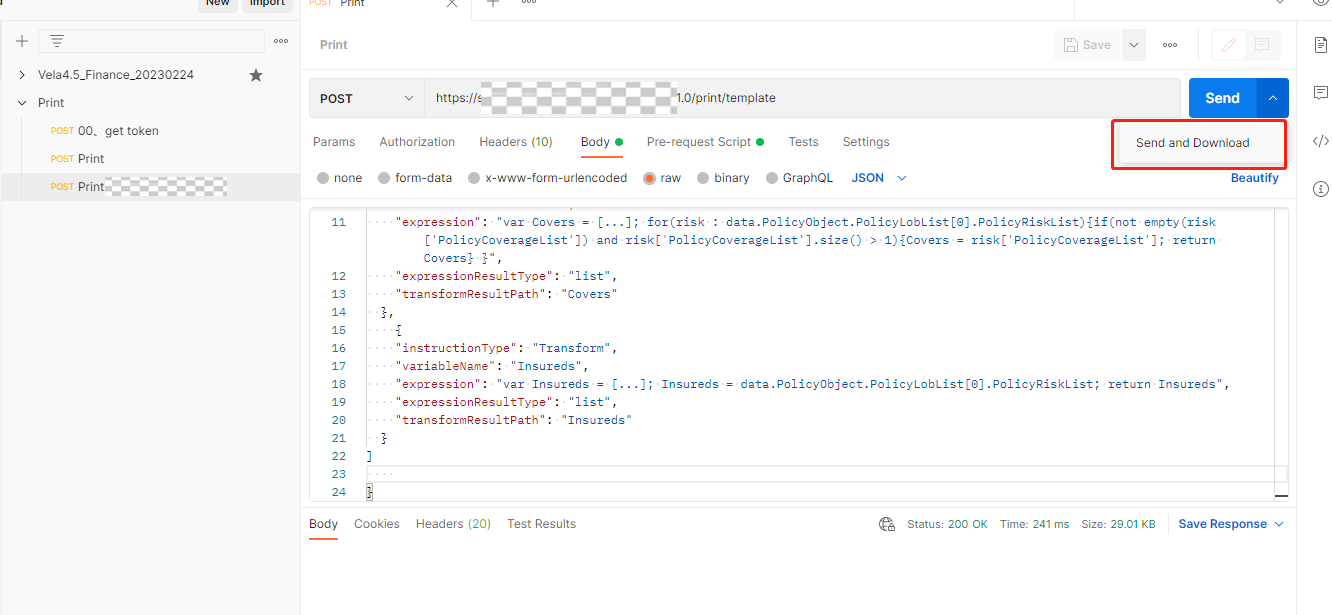
If you click the Send button directly, the returned data will be garbled.
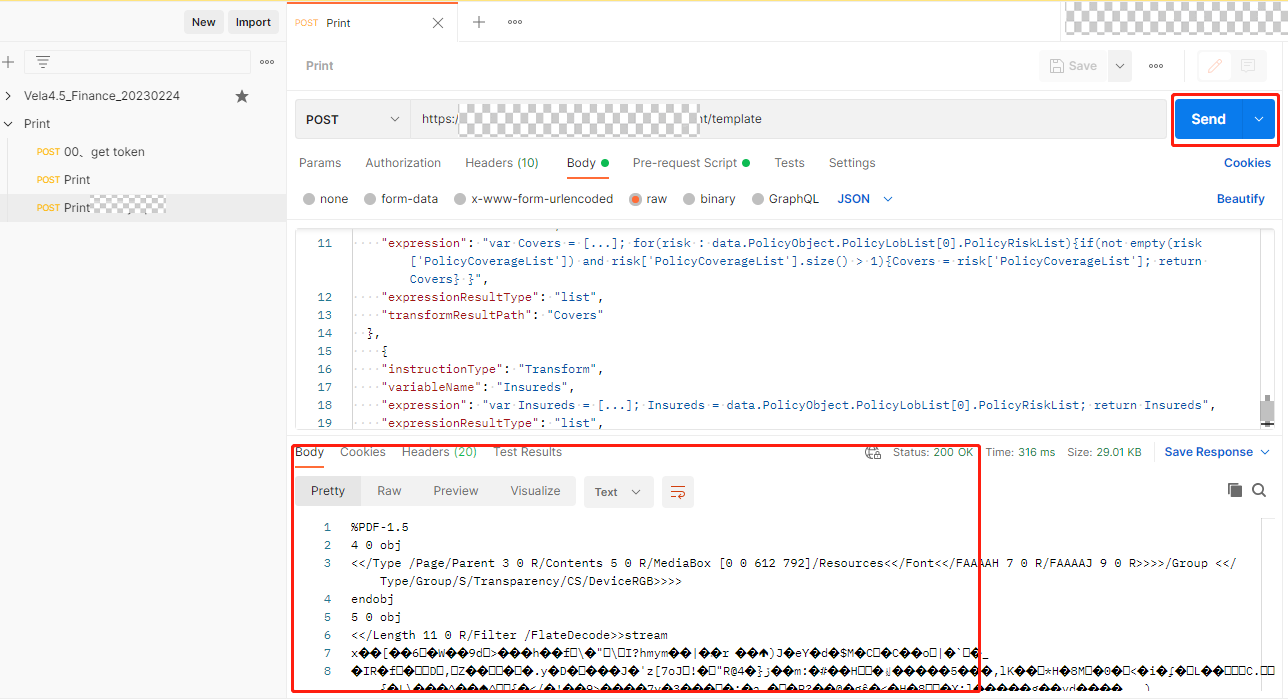
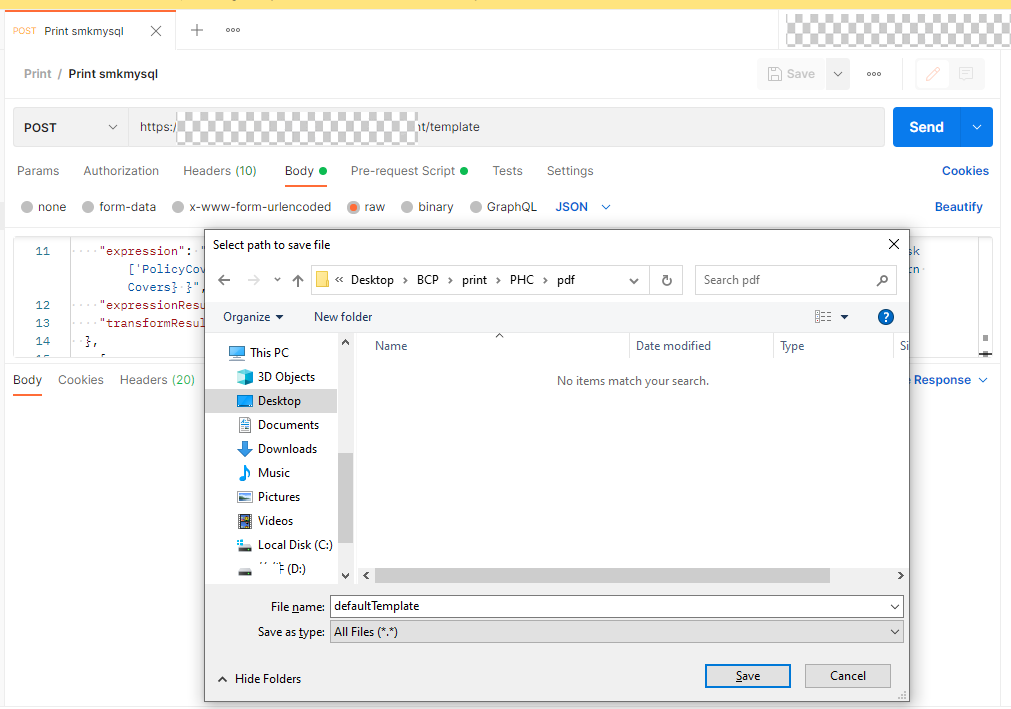
If you click the Send and Download button, the system will automatically generate a PDF from the returned data.
Add Aspose Template into Data Import/Export Files
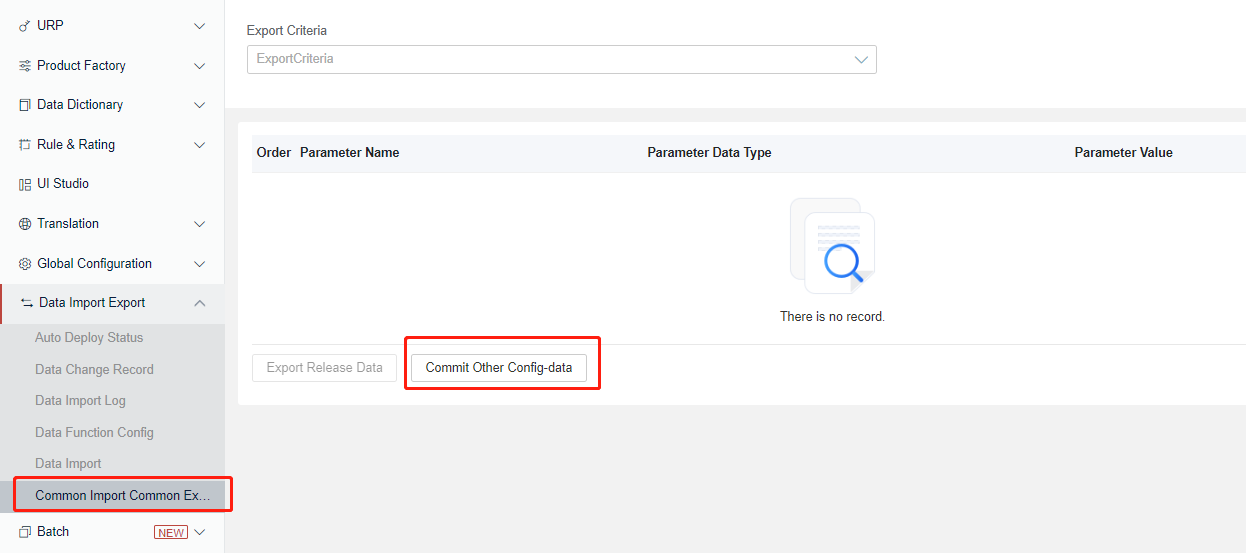
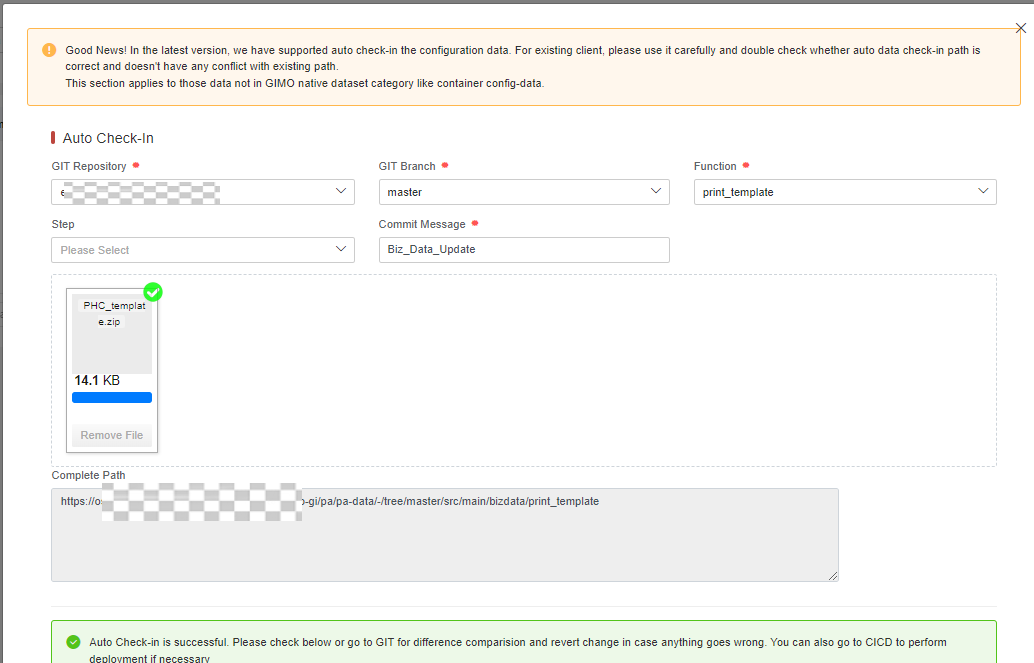
The operation must be conducted in MC/Portal environment and use CI/CD to deploy runtime.
Submit the template to tenant gimc as follows:
Change Configuration Table to Map New Product Code with Aspose Template
The operation must be conducted in MC/Portal environment and use CI/CD to deploy runtime.
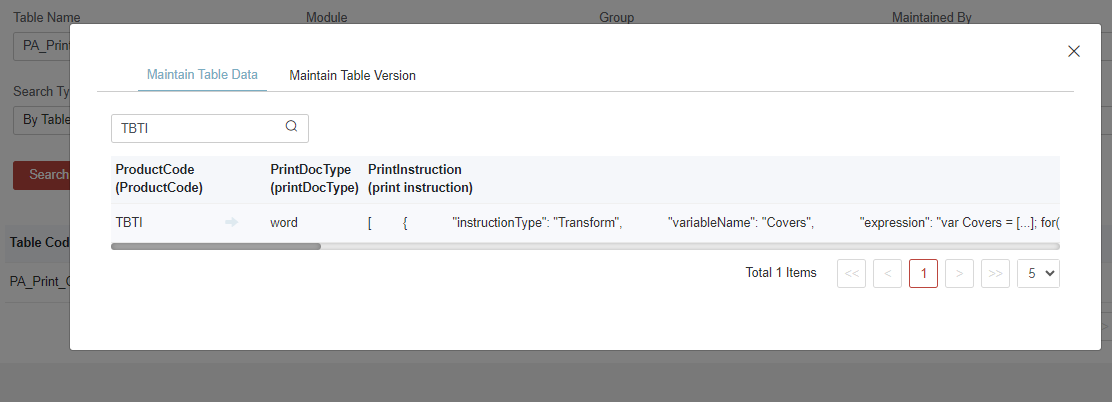
Sample Config-Table: PA_Print_Config
It’s suggested to develop a similar table structure for product and template mapping so that there’s no need to change the program code for each new product.
Test the Whole Flow in Runtime
Sometimes the printing process may be triggered automatically after policy issuance, while sometimes users need to access the print task menu to print out manually.
Convert Code Table
One tip here for you: if you are using InsureMO GI policy API for printing, you can leverage our DD capabilities to quickly convert code tables, as long as you have once configured all the code tables attached to the DD field binding.
When you invoke the print service, you can load policy instead of calling basic load APIs like /proposal/v1/ or /endo/v1/, and you can call policy load API with code values like /proposal/v1/loadWithCodeDesc and /endo/v1/loadWithCodeDesc. This approach ensures that all code values will be automatically translated.