Definition
Event Bridge is an event bus service designed to use events to connect applications. It employs standardized events to help tenants build loosely coupled, distributed event-driven architectures easily.
It’s extremely helpful to enable third-party applications to extend the behavior without impacting the core business flow.
Case Study
- Scenario 1 - Product Management
Product management is a key module from InsureMO, offering a set of product APIs at the platform level. There is a requirement for the claim system to be notified and to receive complete product information upon product updates to quickly get claim parameters created.
Ideally, there can be three ways to achieve it:
- Application to wrap a BFF to combine updated product and inform claim API two actions together.
- Claim side to design a regular job to load product information.
- Event to be published from the product side for the claim side to listen.
Compared to option 1,2, the event bridge solution is better because once the platform team publishes such an event, the claim team only needs to listen and implement the integration logic in real-time without need to set up a BFF or even take a UI that triggers the BFF.
- Scenario 2 - Batch Alert
Users can define regular execution jobs in the batch module. In the event of a batch failure, users need to be notified via email to take prompt actions.
The event bridge is also used in such a scenario to facilitate email sending. By default, the InsureMO email service can be employed to dispatch a standard batch alert template. However, given the presence of the platform event, if the client has specific requirements for a different email service or an email notification template, the client BFF can also disable the platform event and listen to the event to customize the platform’s behavior.
Key Concepts
- Event: The carrier of data.
- [Event Bus](#Event Bus): A relay station for events, responsible for the intermediate dumping of events.
- [Event Source](#Event Source): The source of the event, responsible for producing the event.
- [Event Rule](#Event Rule): Used to monitor specific types of events. When a matching event occurs, the event is routed to the event target associated with the event rules.
- [Event Trace](#Event Trace): Event Trace.
- Integration: Integrate with third-party systems.
- Schema: Define the structure of an event. Event Bridge provides a schema for all events generated by the event source. You can customize a schema for events sent to a custom event bus. The above schemas are stored in the schema registry, and event targets can download event schemas from the schema registry to achieve fast access to events.
Event
- Definition: Events are data records of state changes.
- Example: The following is an example event:
{
    "data": {
        "UserName": "James",
        "Email": "James@mail.com",
        "Telephone": "1333333333333",
        "RealName": "James",
        "DefaultLang": "011"
    },
    "source": "gimo:urp",
    "subject": "gimo:urp:ui:test",
    "time": "2023-11-19T21:04:41",
    "type": "urp:User:CreateUser",
    "id": "e414341e-32af-4a4f-864b-d2c9268f602a",
    "dataContentType": "application/json;charset=utf-8",
    "dataSchemaId": 1234,
    "eventBusName": "GimoBus"
}
Parameter Description
| Parameter | Data Type | Mandatory | Example | Description |
|---|---|---|---|---|
| id | String | Yes | e414341e-32af-4a4f -864b-d2c9268f | Event ID is a unique value that identifies the event. The sending segment must ensure that the source and ID are unique. If an event is resent due to network or other reasons, it may result in duplicate events with the same source and ID, which will be treated as such by the receiving segment. |
| source | String | Yes | gimo:urp | Event source provides event services and identifies the content of the event that occurred. It usually includes the type of event source, the mechanism for publishing events, or the process of producing events. |
| type | String | Yes | urp:User:CreateUser | Event type describes the event types related to the event source. This parameter is used for routing, event querying, and policy execution. The format, as defined by the producer, includes information such as the version. |
| datacontenttype | String | Yes | application/json; charset=utf-8 | The content form of parameter data, only supports application/JSON. |
| dataschemaid | Long | No | NA | The pattern followed by parameter data. |
| subject | String | No | gimo:urp:ui:test | When the source contains substructures, using only source may not be able to define specific events clearly. |
| time | LocalDateTime | No | 2020-11-19T21:04:41 | The time when the event occurred. |
| data | Structure | No | { “UserName”:“James”, “Email”:”James@mail.com“, “Telephone”:“1333333333333”, “RealName”:“James”, “DefaultLang”:“011” } | Event content is the JSON object whose content is determined by the service that initiates the event. Cloud Events may contain the context given by the event producer when the event occurs, which is encapsulated in data. |
Event Bus
- The event bus is responsible for receiving events from event sources.
- Pre-configured bus: The GIMO dedicated line is a pre-set configuration that tenants cannot change. It can receive GIMO event sources and GIMO event sources can only be sent to GIMO dedicated line.
- The event bus of Event Bridge includes the following types:
- Platform Bus:
- GIMO
- LIMO
- Baseline Bus
- Gemini
- GBalife
- Autoshop
- Tenant Customized Bus
- The Tenant-defined bus is used to receive events from tenant applications, and tenant events can only be published to the tenant’s custom bus.
- Platform Bus:
Event Source
The Event Source is the source of the event, responsible for publishing the event to the Event Bridge. The Event Bridge supports the following event sources:
-
GIMO Event Source
By configuring predefined event sources, event types, and event targets, events can be published from the event source to the GIMO dedicated line. After filtering through event patterns, events can be routed to the event targets.
-
Baseline/Tenant event sources
-
Customized applications can be configured to use the SDK to access Event Bridge. By setting up a custom bus, defining specific event patterns, and specifying event targets, events generated by these applications will be published to the custom bus, filtered according to the defined patterns, and routed to the specified targets.
-
Events can be published to Event Bridge by requesting a Webhook.
-
Event Type
Event Bridge supports publishing GIMO events as event sources to the event bus, which serves as a unified entry point for processing and distributing these events.
Examples
- urp:User:CreateUser
- product:Product:CreateProduct
- batchv2:Alter:JobAlter
Event Rule
- Event rules are used to filter and transform events.
- Including:
- Event Pattern: Filter Pattern
- Event Content Conversion: Event Content Conversion
- Event Target: Rule Target
Filter Pattern
The event filter is a pattern definition used by Event Bridge to filter related events. Event Bridge filters events through event patterns and routes them to event targets, which must have the same structure as the matching events.
Matching principle
- The event must contain all the field names listed in the event pattern, and the field names in the event pattern must have the same nested structure as the field names in the event.
- The event pattern is precisely matched character by character, and attention to capitalization. During the matching process, no standardized operations will be performed on the string.
- The values to be matched follow JSON rules: Strings and numbers are enclosed in quotation marks, and keywords such as true, false, and null are not enclosed in quotation marks.
- The event pattern supports the semantics of OR, and in event pattern matching, each Key supports AND semantics. The value of Key supports the semantics of array OR.
Filter Type
- [Specified Value Matching](#Specified Value Matching)
- [Prefix Matching](#Prefix Matching)
- [Suffix Matching](#Suffix Matching)
- [Exclusion Matching](#Exclusion Matching)
- [Numeric Matching](#Numeric Matching)
- [IP Address Matching](#IP Address Matching)
- [Multi Pattern Matching](#Multi Pattern Matching)
- [Array Matching](#Array Matching)
- [Null Matching](#Null Matching)
- [Existing Matching](#Exist Matching (exists))
- [equals-ignore-case Matching](#Equals-ignore-case Matching (equals-ignore-case))
- [Wildcard Matching](#Wildcard Matching(
*?))
Specified Value matching
You can specify the value of a certain field for matching. For example, the following example event pattern only matches events where source is gimo: urp.
| Events received from source | Event Filter | Events filtered by pattern |
|---|---|---|
| { “data”:{ “UserName”:“James”, “Email”:”James@mail.com“, “Telephone”:“1333333333333”, “RealName”:“James”, “DefaultLang”:“011” }, “source”:“gimo:urp”, “subject”:“gimo:urp:user:test”, “time”:“2023-11-19T21:04:41”, “type”:“urp:UserEvent:CreateUser”, “dataContentType”:“application/json;charset=utf-8”, “dataSchemaId”:1234, “eventBusName”:“gimo” } | { “source”:[ “gimo:urp” ] } | { “data”:{ “UserName”:“James”, “Email”:”James@mail.com“, “Telephone”:“1333333333333”, “RealName”:“James”, “DefaultLang”:“011” }, “source”:“gimo:urp”, “subject”:“gimo:urp:user:test”, “time”:“2023-11-19T21:04:41”, “type”:“urp:UserEvent:CreateUser”, “dataContentType”:“application/json;charset=utf-8”, “dataSchemaId”:1234, “eventBusName”:“gimo” } |
Prefix Matching
You can specify the prefix of a field’s value for matching. For example, the following example event pattern only matches events starting with gimo in the source field.
| Events received from source | Event Filter | Events after filtered by pattern |
|---|---|---|
| { “data”:{ “UserName”:“James”, “Email”:”James@mail.com“, “Telephone”:“1333333333333”, “RealName”:“James”, “DefaultLang”:“011” }, “source”:“gimo:urp”, “subject”:“gimo:urp:user:test”, “time”:“2023-11-19T21:04:41”, “type”:“urp:UserEvent:CreateUser”, “dataContentType”:“application/json;charset=utf-8”, “dataSchemaId”:1234, “eventBusName”:“gimo” } | { “source”: [ { “prefix”: “gimo” } ] } | { “data”:{ “UserName”:“James”, “Email”:”James@mail.com“, “Telephone”:“1333333333333”, “RealName”:“James”, “DefaultLang”:“011” }, “source”:“gimo:urp”, “subject”:“gimo:urp:user:test”, “time”:“2023-11-19T21:04:41”, “type”:“urp:UserEvent:CreateUser”, “dataContentType”:“application/json;charset=utf-8”, “dataSchemaId”:1234, “eventBusName”:“gimo” } |
Suffix Matching
You can specify the suffix of a field’s value for matching. For example, the following example Event Filter only matches events in subject with prefix gimo: urp: user, suffix is . jpg, or . txt.
| Events received from source | Event Filter | Events after filtered by pattern |
|---|---|---|
| { “data”:{ “UserName”:“James”, “Email”:”James@mail.com“, “Telephone”:“1333333333333”, “RealName”:“James”, “DefaultLang”:“011” }, “source”:“gimo:urp”, “subject”:“gimo:urp:user:test.jpg”, “time”:“2023-11-19T21:04:41”, “type”:“urp:UserEvent:CreateUser”, “dataContentType”:“application/json;charset=utf-8”, “dataSchemaId”:1234, “eventBusName”:“gimo” } { “data”:{ “UserName”:“James”, “Email”:”James@mail.com“, “Telephone”:“1333333333333”, “RealName”:“James”, “DefaultLang”:“011” }, “source”:“gimo:urp”, “subject”:“gimo:urp:user:hello.png”, “time”:“2023-11-19T21:04:41”, “type”:“urp:UserEvent:CreateUser”, “dataContentType”:“application/json;charset=utf-8”, “dataSchemaId”:1234, “eventBusName”:“gimo” } | { “subject”:[ { “prefix”:“gimo:urp:user” }, { “suffix”:“.txt” }, { “suffix”:“.jpg” } ] } | { “data”:{ “UserName”:“James”, “Email”:”James@mail.com“, “Telephone”:“1333333333333”, “RealName”:“James”, “DefaultLang”:“011” }, “source”:“gimo:urp”, “subject”:“gimo:urp:user:test.jpg”, “time”:“2023-11-19T21:04:41”, “type”:“urp:UserEvent:CreateUser”, “dataContentType”:“application/json;charset=utf-8”, “dataSchemaId”:1234, “eventBusName”:“gimo” } |
Exclusion Matching
anything-but
You can specify any value of a field to match, except for the provided value. You can use anything but with strings and numerical values. For example, the following example Event Filter only matches all events where state is not initializing and x-limit is not ‘123’.
| Events received from source | Event Filter | Events after filtered by pattern |
|---|---|---|
| { “data”: { “name”: “test”, “scope”: 100, “state”: “running”, “x-limit”: 456 }, “source”: “gimo:test”, “subject”: “gimo:test:hello.png”, “time”: “2023-11-19T21:04:41”, “type”: “urp:TestEvent:Test”, “dataContentType”: “application/json;charset=utf-8”, “dataSchemaId”: 5566, “eventBusName”: “gimo” } { “data”: { “name”: “test”, “scope”: 100, “x-limit”: 456 }, “source”: “gimo:test”, “subject”: “gimo:test:hello.png”, “time”: “2023-11-19T21:04:41”, “type”: “urp:TestEvent:Test”, “dataContentType”: “application/json;charset=utf-8”, “dataSchemaId”: 5566, “eventBusName”: “gimo” } | { “data”:{ “state”:[ { “anything-but”:“initializing” } ], “x-limit”:[ { “anything-but”:123 } ] } } | { “data”: { “name”: “test”, “scope”: 100, “state”: “running”, “x-limit”: 456 }, “source”: “gimo:test”, “subject”: “gimo:test:hello.png”, “time”: “2023-11-19T21:04:41”, “type”: “urp:TestEvent:Test”, “dataContentType”: “application/json;charset=utf-8”, “dataSchemaId”: 5566, “eventBusName”: “gimo” } |
The following example Event Filter only matches state events that are not ’stopped’ and ’overloaded‘.
| Events received from source | Event Filter | Events after filtered by pattern |
|---|---|---|
| { “data”: { “name”: “test”, “scope”: 100, “state”: “terminated” }, “source”: “gimo:test”, “subject”: “gimo:test:hello.png”, “time”: “2023-11-19T21:04:41”, “type”: “urp:TestEvent:Test”, “dataContentType”: “application/json;charset=utf-8”, “dataSchemaId”: 5566, “eventBusName”: “gimo” } { “data”: { “name”: “test”, “scope”: 100, “state”: “stopped” }, “source”: “gimo:test”, “subject”: “gimo:test:hello.png”, “time”: “2023-11-19T21:04:41”, “type”: “urp:TestEvent:Test”, “dataContentType”: “application/json;charset=utf-8”, “dataSchemaId”: 5566, “eventBusName”: “gimo” } | { “data”:{ “state”:[ { “anything-but”:[ “stopped”, “overloaded” ] } ] } } | { “data”: { “name”: “test”, “scope”: 100, “state”: “terminated” }, “source”: “gimo:test”, “subject”: “gimo:test:hello.png”, “time”: “2023-11-19T21:04:41”, “type”: “urp:TestEvent:Test”, “dataContentType”: “application/json;charset=utf-8”, “dataSchemaId”: 5566, “eventBusName”: “gimo” } |
The following example Event Filter only matches x-limit events that are not ‘100’, ‘200’, and ‘300’.
| Events received from source | Event Filter | Events after filtered by pattern |
|---|---|---|
| { “data”: { “name”: “test”, “scope”: 100, “x-limit”: 456 }, “source”: “gimo:test”, “subject”: “gimo:test:hello.png”, “time”: “2023-11-19T21:04:41”, “type”: “urp:TestEvent:Test”, “dataContentType”: “application/json;charset=utf-8”, “dataSchemaId”: 5566, “eventBusName”: “gimo” } { “data”: { “name”: “test”, “scope”: 100, “x-limit”: 200 }, “source”: “gimo:test”, “subject”: “gimo:test:hello.png”, “time”: “2023-11-19T21:04:41”, “type”: “urp:TestEvent:Test”, “dataContentType”: “application/json;charset=utf-8”, “dataSchemaId”: 5566, “eventBusName”: “gimo” } | { “data”: { “x-limit”: [ { “anything-but”: [ 100, 200, 300 ] } ] } } | { “data”: { “name”: “test”, “scope”: 100, “x-limit”: 456 }, “source”: “gimo:test”, “subject”: “gimo:test:hello.png”, “time”: “2023-11-19T21:04:41”, “type”: “urp:TestEvent:Test”, “dataContentType”: “application/json;charset=utf-8”, “dataSchemaId”: 5566, “eventBusName”: “gimo” } |
The following example Event Filter only matches events with a prefix of state that is not init.
| Events received from source | Event Filter | Events after filtered by pattern |
|---|---|---|
| { “data”: { “name”: “test”, “scope”: 100, “state”: “pending” }, “source”: “gimo:test”, “subject”: “gimo:test:hello.png”, “time”: “2023-11-19T21:04:41”, “type”: “urp:TestEvent:Test”, “dataContentType”: “application/json;charset=utf-8”, “dataSchemaId”: 5566, “eventBusName”: “gimo” } { “data”: { “name”: “test”, “scope”: 100, “state”: “initializing” }, “source”: “gimo:test”, “subject”: “gimo:test:hello.png”, “time”: “2023-11-19T21:04:41”, “type”: “urp:TestEvent:Test”, “dataContentType”: “application/json;charset=utf-8”, “dataSchemaId”: 5566, “eventBusName”: “gimo” } | { “data”: { “state”: [ { “anything-but”: { “prefix”: “init” } } ] } } | { “data”: { “name”: “test”, “scope”: 100, “state”: “pending” }, “source”: “gimo:test”, “subject”: “gimo:test:hello.png”, “time”: “2023-11-19T21:04:41”, “type”: “urp:TestEvent:Test”, “dataContentType”: “application/json;charset=utf-8”, “dataSchemaId”: 5566, “eventBusName”: “gimo” } |
The following example Event Filter only matches events where source is not a gimo product.
| Events received from source | Event Filter | Events after filtered by pattern |
|---|---|---|
| { “data”: { “name”: “test”, “scope”: 100, “state”: “pending” }, “source”: “gimo:test”, “subject”: “gimo:test:hello.png”, “time”: “2023-11-19T21:04:41”, “type”: “urp:TestEvent:Test”, “dataContentType”: “application/json;charset=utf-8”, “dataSchemaId”: 5566, “eventBusName”: “gimo” } { “data”: { “name”: “test”, “scope”: 100, “state”: “initializing” }, “source”: “gimo:product”, “subject”: “gimo:product:create”, “time”: “2023-11-19T21:04:41”, “type”: “product:TestEvent:Test”, “dataContentType”: “application/json;charset=utf-8”, “dataSchemaId”: 7788, “eventBusName”: “gimo” } | { “source”: [ { “anything-but”: [ “gimo:product” ] } ] } | { “data”: { “name”: “test”, “scope”: 100, “state”: “pending” }, “source”: “gimo:test”, “subject”: “gimo:test:hello.png”, “time”: “2023-11-19T21:04:41”, “type”: “urp:TestEvent:Test”, “dataContentType”: “application/json;charset=utf-8”, “dataSchemaId”: 5566, “eventBusName”: “gimo” } |
The following example Event Filter only matches events where source is not a gimo.
| Events received from source | Event Filter | Events after filtered by pattern |
|---|---|---|
| { “data”: { “name”: “test”, “scope”: 100, “state”: “pending” }, “source”: “gimo:test”, “subject”: “gimo:test:hello.png”, “time”: “2023-11-19T21:04:41”, “type”: “urp:TestEvent:Test”, “dataContentType”: “application/json;charset=utf-8”, “dataSchemaId”: 5566, “eventBusName”: “gimo” } { “data”: { “name”: “test”, “scope”: 100, “state”: “initializing” }, “source”: “gimo:product”, “subject”: “gimo:product:create”, “time”: “2023-11-19T21:04:41”, “type”: “product:TestEvent:Test”, “dataContentType”: “application/json;charset=utf-8”, “dataSchemaId”: 7788, “eventBusName”: “gimo” } | { “source”: [ { “anything-but”: { “prefix”: “gimo” } } ] } | NA |
Numeric Matching
You can specify the numerical value or range of a certain field. For example, the following example Event Filter only matches events where c-count is greater than 0 but less than or equal to 5(>0 && <=5), d-count is less than 10, and x-limit is equal to 301.8.
| Events received from source | Event Filter | Events after filtered by pattern |
|---|---|---|
| { “data”: { “name”: “test”, “c-count”: 5, “d-count”: 7, “x-limit”: 301.8 }, “source”: “gimo:test”, “subject”: “gimo:test:hello.png”, “time”: “2023-11-19T21:04:41”, “type”: “urp:TestEvent:Test”, “dataContentType”: “application/json;charset=utf-8”, “dataSchemaId”: 5566, “eventBusName”: “gimo” } { “data”: { “name”: “test”, “c-count”: 5, “d-count”: 7, “x-limit”: 300 }, “source”: “gimo:test”, “subject”: “gimo:test:hello.png”, “time”: “2023-11-19T21:04:41”, “type”: “urp:TestEvent:Test”, “dataContentType”: “application/json;charset=utf-8”, “dataSchemaId”: 5566, “eventBusName”: “gimo” } | { “data”: { “c-count”: [ { “numeric”: [ "", 0, ”<=“, 5 ] } ], “d-count”: [ { “numeric”: [ ”<“, 10 ] } ], “x-limit”: [ { “numeric”: [ ”=“, 301.8 ] } ] } } | { “data”: { “name”: “test”, “c-count”: 5, “d-count”: 7, “x-limit”: 301.8 }, “source”: “gimo:test”, “subject”: “gimo:test:hello.png”, “time”: “2023-11-19T21:04:41”, “type”: “urp:TestEvent:Test”, “dataContentType”: “application/json;charset=utf-8”, “dataSchemaId”: 5566, “eventBusName”: “gimo” } |
IP Address Matching(cidr)
You can specify the IP address of the field in data. For example, in the following example Event Filter, only events with source ip as ‘10.0.0.0/24’are matched.
| Events received from source | Event Filter | Events after filtered by pattern |
|---|---|---|
| { “data”: { “name”: “test”, “source-ip”: “192.168.0.123” }, “source”: “gimo:test”, “subject”: “gimo:test:hello.png”, “time”: “2023-11-19T21:04:41”, “type”: “urp:TestEvent:Test”, “dataContentType”: “application/json;charset=utf-8”, “dataSchemaId”: 5566, “eventBusName”: “gimo” } { “data”: { “name”: “test”, “source-ip”: “10.0.0.123” }, “source”: “gimo:test”, “subject”: “gimo:test:hello.png”, “time”: “2023-11-19T21:04:41”, “type”: “urp:TestEvent:Test”, “dataContentType”: “application/json;charset=utf-8”, “dataSchemaId”: 5566, “eventBusName”: “gimo” } | { “data”: { “source-ip”: [ { “cidr”: “10.0.0.0/24” } ] } } | { “data”: { “name”: “test”, “source-ip”: “10.0.0.123” }, “source”: “gimo:test”, “subject”: “gimo:test:hello.png”, “time”: “2023-11-19T21:04:41”, “type”: “urp:TestEvent:Test”, “dataContentType”: “application/json;charset=utf-8”, “dataSchemaId”: 5566, “eventBusName”: “gimo” } |
Multi Pattern Matching
Multiple rules can be combined into more complex Event Filters. For example, the following example Event Filter combines prefix matching, exclusion matching, IP address matching, and numerical matching.
| Events received from source | Event Filter | Events after filtered by pattern |
|---|---|---|
| { “data”: { “name”: “test”, “c-count”: 5, “d-count”: 7, “x-limit”: 301.8, “state”: “pending”, “source-ip”: “10.0.0.123” }, “source”: “gimo:test”, “subject”: “gimo:test:hello.png”, “time”: “2023-11-19T21:04:41”, “type”: “urp:TestEvent:Test”, “dataContentType”: “application/json;charset=utf-8”, “dataSchemaId”: 5566, “eventBusName”: “gimo” } { “data”: { “name”: “test”, “c-count”: 5, “d-count”: 7, “x-limit”: 301.8, “state”: “initializing”, “source-ip”: “192.168.0.123” }, “source”: “gimo:test”, “subject”: “gimo:test:hello.png”, “time”: “2023-11-19T21:04:41”, “type”: “urp:TestEvent:Test”, “dataContentType”: “application/json;charset=utf-8”, “dataSchemaId”: 5566, “eventBusName”: “gimo” } | { “source”: [ { “prefix”: “acs.” } ], “data”: { “state”: [ { “anything-but”: “initializing” } ], “source-ip”: [ { “cidr”: “10.0.0.0/24” } ], “c-count”: [ { “numeric”: [ "", 0, ”<=“, 5 ] } ], “d-count”: [ { “numeric”: [ ”<“, 10 ] } ], “x-limit”: [ { “anything-but”: [ 100, 200, 300 ] } ] } } | { “data”: { “name”: “test”, “c-count”: 5, “d-count”: 7, “x-limit”: 301.8, “state”: “pending”, “source-ip”: “10.0.0.123” }, “source”: “gimo:test”, “subject”: “gimo:test:hello.png”, “time”: “2023-11-19T21:04:41”, “type”: “urp:TestEvent:Test”, “dataContentType”: “application/json;charset=utf-8”, “dataSchemaId”: 5566, “eventBusName”: “gimo” } |
Array Matching
The value of each field in the Event Filter is an array. If any value in the array matches the value in the event, the pattern matches. If the values in the event are also arrays, as long as the intersection with the array of Event Filter is not an empty set, the pattern matches.
| Events received from source | Event Filter | Events after filtered by pattern |
|---|---|---|
| { “data”: { “name”: “test”, “c-count”: 5, “d-count”: 7, “x-limit”: 301.8, “state”: “initializing”, “source-ip”: “192.168.0.123” }, “source”: “gimo:test”, “subject”: “gimo:test:hello.png”, “time”: “2023-11-19T21:04:41”, “type”: “urp:TestEvent:Test”, “dataContentType”: “application/json;charset=utf-8”, “dataSchemaId”: 5566, “eventBusName”: “gimo” } { “data”: { “name”: “test”, “c-count”: 5, “d-count”: 7, “x-limit”: 301.8, “state”: “initializing”, “source-ip”: “192.168.0.123” }, “source”: “gimo:test”, “subject”: [ “gimo:test:hello.jpg”, “gimo:prodct:create” ], “time”: “2023-11-19T21:04:41”, “type”: “urp:TestEvent:Test”, “dataContentType”: “application/json;charset=utf-8”, “dataSchemaId”: 5566, “eventBusName”: “gimo” } | { “subject”: [ “gimo:test:hello.jpg”, “gimo:test:hello.png”, “gimo:243/123.jpg” ] } | { “data”: { “name”: “test”, “c-count”: 5, “d-count”: 7, “x-limit”: 301.8, “state”: “initializing”, “source-ip”: “192.168.0.123” }, “source”: “gimo:test”, “subject”: “gimo:test:hello.png”, “time”: “2023-11-19T21:04:41”, “type”: “urp:TestEvent:Test”, “dataContentType”: “application/json;charset=utf-8”, “dataSchemaId”: 5566, “eventBusName”: “gimo” } { “data”: { “name”: “test”, “c-count”: 5, “d-count”: 7, “x-limit”: 301.8, “state”: “initializing”, “source-ip”: “192.168.0.123” }, “source”: “gimo:test”, “subject”: [ “gimo:test:hello.jpg”, “gimo:prodct:create” ], “time”: “2023-11-19T21:04:41”, “type”: “urp:TestEvent:Test”, “dataContentType”: “application/json;charset=utf-8”, “dataSchemaId”: 5566, “eventBusName”: “gimo” } |
Null Matching
You can create an Event Filter to match events that contain null values or empty strings.
| Events received from source | Event Filter | Events after filtered by pattern |
|---|---|---|
| { “data”: { “name”: “test”, “c-count”: 5, “d-count”: 7, “x-limit”: 301.8, “state”: “initializing”, “source-ip”: “192.168.0.123”, “version”:"" }, “source”: “gimo:test”, “subject”: [ “gimo:test:hello.jpg”, “gimo:prodct:create” ], “time”: “2023-11-19T21:04:41”, “type”: “urp:TestEvent:Test”, “dataContentType”: “application/json;charset=utf-8”, “dataSchemaId”: 5566, “eventBusName”: “gimo” } { “data”: { “name”: “test”, “c-count”: 5, “d-count”: 7, “x-limit”: 301.8, “state”: “initializing”, “source-ip”: “192.168.0.123”, “version”:“1” }, “source”: “gimo:test”, “subject”: [ “gimo:test:hello.jpg”, “gimo:prodct:create” ], “time”: “2023-11-19T21:04:41”, “type”: “urp:TestEvent:Test”, “dataContentType”: “application/json;charset=utf-8”, “dataSchemaId”: 5566, “eventBusName”: “gimo” } | { “data”: { “version”: [ "" ] } } | { “data”: { “name”: “test”, “c-count”: 5, “d-count”: 7, “x-limit”: 301.8, “state”: “initializing”, “source-ip”: “192.168.0.123”, “version”:"" }, “source”: “gimo:test”, “subject”: [ “gimo:test:hello.jpg”, “gimo:prodct:create” ], “time”: “2023-11-19T21:04:41”, “type”: “urp:TestEvent:Test”, “dataContentType”: “application/json;charset=utf-8”, “dataSchemaId”: 5566, “eventBusName”: “gimo” } |
| Events received from source | Event Filter | Events after filtered by pattern |
|---|---|---|
| { “data”: { “name”: “test”, “c-count”: 5, “d-count”: 7, “x-limit”: 301.8, “state”: “initializing”, “source-ip”: “192.168.0.123”, “version”:“1”, “test”:null }, “source”: “gimo:test”, “subject”: [ “gimo:test:hello.jpg”, “gimo:prodct:create” ], “time”: “2023-11-19T21:04:41”, “type”: “urp:TestEvent:Test”, “dataContentType”: “application/json;charset=utf-8”, “dataSchemaId”: 5566, “eventBusName”: “gimo” } { “data”: { “name”: “test”, “c-count”: 5, “d-count”: 7, “x-limit”: 301.8, “state”: “initializing”, “source-ip”: “192.168.0.123”, “version”:“1”, “test”:“test” }, “source”: “gimo:test”, “subject”: [ “gimo:test:hello.jpg”, “gimo:prodct:create” ], “time”: “2023-11-19T21:04:41”, “type”: “urp:TestEvent:Test”, “dataContentType”: “application/json;charset=utf-8”, “dataSchemaId”: 5566, “eventBusName”: “gimo” } | { “data”: { “test”: null } } | { “data”: { “name”: “test”, “c-count”: 5, “d-count”: 7, “x-limit”: 301.8, “state”: “initializing”, “source-ip”: “192.168.0.123”, “version”:“1”, “test”:null }, “source”: “gimo:test”, “subject”: [ “gimo:test:hello.jpg”, “gimo:prodct:create” ], “time”: “2023-11-19T21:04:41”, “type”: “urp:TestEvent:Test”, “dataContentType”: “application/json;charset=utf-8”, “dataSchemaId”: 5566, “eventBusName”: “gimo” } |
Exist Matching (exists)
You can specify whether a field exists in data.
| Events received from source | Event Filter | Events after filtered by pattern |
|---|---|---|
| { “data”: { “name”: “test”, “scope”: 100 }, “source”: “gimo:test”, “subject”: “gimo:test:hello.jpg”, “time”: “2023-11-19T21:04:41”, “type”: “urp:TestEvent:Test”, “dataContentType”: “application/json;charset=utf-8”, “dataSchemaId”: 5566, “eventBusName”: “gimo” } { “data”: { “name”: “test”, “scope”: 100, “state”: “terminated” }, “source”: “gimo:test”, “subject”: “gimo:test:hello.jpg”, “time”: “2023-11-19T21:04:41”, “type”: “urp:TestEvent:Test”, “dataContentType”: “application/json;charset=utf-8”, “dataSchemaId”: 5566, “eventBusName”: “gimo” } | { “data”: { “state”: [ { “exists”: false } ] } } | { “data”: { “name”: “test”, “scope”: 100 }, “source”: “gimo:test”, “subject”: “gimo:test:hello.jpg”, “time”: “2023-11-19T21:04:41”, “type”: “urp:TestEvent:Test”, “dataContentType”: “application/json;charset=utf-8”, “dataSchemaId”: 5566, “eventBusName”: “gimo” } |
Equals-ignore-case Matching (equals-ignore-case)
You can specify the value of a certain field to match regardless of capitalization.
| Events received from source | Event Filter | Events after filtered by pattern |
|---|---|---|
| { “data”: { “name”: “TEST”, “scope”: 100 }, “source”: “gimo:test”, “subject”: “gimo:test:hello.jpg”, “time”: “2023-11-19T21:04:41”, “type”: “urp:TestEvent:Test”, “dataContentType”: “application/json;charset=utf-8”, “dataSchemaId”: 5566, “eventBusName”: “gimo” } | { “data”: { “name”: [ { “equals-ignore-case"":“test” } ] } } | { “data”: { “name”: “TEST”, “scope”: 100 }, “source”: “gimo:test”, “subject”: “gimo:test:hello.jpg”, “time”: “2023-11-19T21:04:41”, “type”: “urp:TestEvent:Test”, “dataContentType”: “application/json;charset=utf-8”, “dataSchemaId”: 5566, “eventBusName”: “gimo” } |
Wildcard Matching( * ?)
*can specify any number of wildcard characters in a given string value. However, continuous wildcard characters are not supported.?can specify a wildcard character in a given string value.
| Events received from source | Event Filter | Events after filtered by pattern |
|---|---|---|
| { “data”: { “name”: “test”, “scope”: 100, “state”: “terminated”, “fileName”: “/Users/dir/dir/dir/dir/dir/dir/doc.txt” }, “source”: “gimo:test”, “subject”: “gimo:test:hello.jpg”, “time”: “2023-11-19T21:04:41”, “type”: “urp:TestEvent:Test”, “dataContentType”: “application/json;charset=utf-8”, “dataSchemaId”: 5566, “eventBusName”: “gimo” } | { “data”: { “FileName”: [ { “wildcard”: “/Users/*/dir/dir/dir/dir/dir/doc.txt” } ] } } | { “data”: { “name”: “test”, “scope”: 100, “state”: “terminated”, “fileName”: “/Users/dir/dir/dir/dir/dir/dir/doc.txt” }, “source”: “gimo:test”, “subject”: “gimo:test:hello.jpg”, “time”: “2023-11-19T21:04:41”, “type”: “urp:TestEvent:Test”, “dataContentType”: “application/json;charset=utf-8”, “dataSchemaId”: 5566, “eventBusName”: “gimo” } |
| Events received from source | Event Filter | Events after filtered by pattern |
|---|---|---|
| { “data”: { “name”: “test”, “scope”: 100, “state”: “terminated”, “fileName”: “/Users/dir/dir/dir/dir/dir/doc.txt” }, “source”: “gimo:test”, “subject”: “gimo:test:hello.jpg”, “time”: “2023-11-19T21:04:41”, “type”: “urp:TestEvent:Test”, “dataContentType”: “application/json;charset=utf-8”, “dataSchemaId”: 5566, “eventBusName”: “gimo” } | { “data”: { “FileName”: [ { “wildcard”: “/User?/dir/dir/dir/dir/dir/doc.txt” } ] } } | { “data”: { “name”: “test”, “scope”: 100, “state”: “terminated”, “fileName”: “/Users/dir/dir/dir/dir/dir/doc.txt” }, “source”: “gimo:test”, “subject”: “gimo:test:hello.jpg”, “time”: “2023-11-19T21:04:41”, “type”: “urp:TestEvent:Test”, “dataContentType”: “application/json;charset=utf-8”, “dataSchemaId”: 5566, “eventBusName”: “gimo” } |
Event Convert
- Event Bridge converts an event into an event type that the event target can receive before it is routed to the event target.
- Conversion Type
Complete Event
When the conversion type is a Complete Event, Event Bridge does not convert the event and routes the complete structure of native Cloud Events to the event target.
| Before Converting | Conversion Type | After Converting |
|---|---|---|
| { “data”:{ “UserName”:“James”, “Email”:”James@mail.com“, “Telephone”:“1333333333333”, “RealName”:“James”, “DefaultLang”:“011” }, “source”:“gimo:urp”, “subject”:“gimo:urp:user:test”, “time”:“2023-11-19T21:04:41”, “type”:“urp:UserEvent:CreateUser”, “dataContentType”:“application/json;charset=utf-8”, “dataSchemaId”:1234, “eventBusName”:“gimo” } | Complete Event | { “data”:{ “UserName”:“James”, “Email”:”James@mail.com“, “Telephone”:“1333333333333”, “RealName”:“James”, “DefaultLang”:“011” }, “source”:“gimo:urp”, “subject”:“gimo:urp:user:test”, “time”:“2023-11-19T21:04:41”, “type”:“urp:UserEvent:CreateUser”, “dataContentType”:“application/json;charset=utf-8”, “dataSchemaId”:1234, “eventBusName”:“gimo” } |
Partial Event
When the Conversion Type is a partial event, Event Bridge extracts parameters from Cloud Events through JSONPath and routes the specified event content to the event target.
| Before Converting | Conversion Type | After Converting |
|---|---|---|
| { “data”:{ “UserName”:“James”, “Email”:”James@mail.com“, “Telephone”:“1333333333333”, “RealName”:“James”, “DefaultLang”:“011” }, “source”:“gimo:urp”, “subject”:“gimo:urp:user:test”, “time”:“2023-11-19T21:04:41”, “type”:“urp:UserEvent:CreateUser”, “dataContentType”:“application/json;charset=utf-8”, “dataSchemaId”:1234, “eventBusName”:“gimo” } | $.data.UserName | James |
Constant
When the conversion type is Constant, the event only acts as a trigger. And regardless of the content of the event, Event Bridge routes the constant to the event target.
| Before Converting | Conversion Type | After Converting |
|---|---|---|
| { “data”:{ “UserName”:“James”, “Email”:”James@mail.com“, “Telephone”:“1333333333333”, “RealName”:“James”, “DefaultLang”:“011” }, “source”:“gimo:urp”, “subject”:“gimo:urp:user:test”, “time”:“2023-11-19T21:04:41”, “type”:“urp:UserEvent:CreateUser”, “dataContentType”:“application/json;charset=utf-8”, “dataSchemaId”:1234, “eventBusName”:“gimo” } | $.data.UserName | James |
Template
When the conversion type is Template, by customizing the template and defining the variables required in the template, Event Bridge extracts the parameters from Cloud Events through JSONPath, stores these values in the variables, and then routes them to the event target in the format defined by the template. The template supports the following types:
- Simple String
- Simple JSON
- JSON with Mixed Variables and Constants
- Nested JSON
Simple String
| Before Converting | Conversion Type | After Converting |
|---|---|---|
| { “data”:{ “UserName”:“James”, “Email”:”James@mail.com“, “Telephone”:“1333333333333”, “RealName”:“James”, “DefaultLang”:“011” }, “source”:“gimo:urp”, “subject”:“gimo:urp:user:test”, “time”:“2023-11-19T21:04:41”, “type”:“urp:UserEvent:CreateUser”, “dataContentType”:“application/json;charset=utf-8”, “dataSchemaId”:1234, “eventBusName”:“gimo” } | template variable { “name”: ” $.data.UserName”,“constant”: “Please check.” } template User ${name} has been created, ${constant} | User James has been created, Please check. |
Simple JSON
| Before Converting | Conversion Type | After Converting |
|---|---|---|
| { “data”:{ “UserName”:“James”, “Email”:”James@mail.com“, “Telephone”:“1333333333333”, “RealName”:“James”, “DefaultLang”:“011” }, “source”:“gimo:urp”, “subject”:“gimo:urp:user:test”, “time”:“2023-11-19T21:04:41”, “type”:“urp:UserEvent:CreateUser”, “dataContentType”:“application/json;charset=utf-8”, “dataSchemaId”:1234, “eventBusName”:“gimo” } | template variable { “name”: ” $.data.UserName”,“telephone”: ” $.data.Telephone”} template { “name”: ” ${name}“, “telephone”: ” ${telephone}”} | { “name”: “James”, “telephone”: “13333333333” } |
JSON with Mixed Variables and Constants
| Before Converting | Conversion Type | After Converting |
|---|---|---|
| { “data”:{ “UserName”:“James”, “Email”:”James@mail.com“, “Telephone”:“1333333333333”, “RealName”:“James”, “DefaultLang”:“011” }, “source”:“gimo:urp”, “subject”:“gimo:urp:user:test”, “time”:“2023-11-19T21:04:41”, “type”:“urp:UserEvent:CreateUser”, “dataContentType”:“application/json;charset=utf-8”, “dataSchemaId”:1234, “eventBusName”:“gimo” } | template variable { “name”: ” $.data.UserName”,“telephone”: ” $.data.Telephone”} template { “name”: ” ${name}“,“state”: [ 9, ” ${telephone}“,true ], “Transformed”: “Yes” } | { “name”: “James”, “state”: [ 9, “1333333333333”, true ], “Transformed”: “Yes” } |
Nested JSON
| Before Converting | Conversion Type | After Converting |
|---|---|---|
| { “source”: “gimo:urp”, “subject”: “gimo:urp:test”, “time”: “2023-11-19T21:04:41”, “type”: “urp:TestEvent:Test”, “dataContentType”: “application/json;charset=utf-8”, “dataSchemaId”: 1234, “eventBusName”: “gimo”, “data”: { “ProjectName”: “test_project”, “DatasetName”: “test_dataset”, “RequestId”: “D2A3AE88-D17C-4CCC-B149-6651115C****“, “StartTime”: “2021-07-22T14:03:15.489885+08:00”, “EndTime”: “2021-07-22T14:05:15”, “Message”: “InvalidParameter”, “Success”: false, “Files”: [ { “URI”: “aws://bucket/file”, “CustomId”: “defaultId”, “CustomLabels”: { “Key1”: “Val1”, “Key2”: “Val2” }, “Error”: “InternalError” } ] } } | template variable { “ProjectName”:” $.data.ProjectName”, “Files”:”$.data.Files” } template { “ProjectName”:” ${ProjectName}“,“Files”: ${Files}} | { “ProjectName”: “test_project”, “Files”: [ { “URI”: “aws://bucket/file”, “CustomId”: “defaultId”, “CustomLabels”: { “Key1”: “Val1”, “Key2”: “Val2” }, “Error”: “InternalError” } ] } |
Environment Variable
When the conversion type is an environment variable, Event Bridge extracts parameters from the configuration center and routes the specified event content to the event target.
| Before Converting | Conversion Type | After Converting |
|---|---|---|
| { “data”:{ “UserName”:“James”, “Email”:”James@mail.com“, “Telephone”:“1333333333333”, “RealName”:“James”, “DefaultLang”:“011” }, “source”:“gimo:urp”, “subject”:“gimo:urp:user:test”, “time”:“2023-11-19T21:04:41”, “type”:“urp:UserEvent:CreateUser”, “dataContentType”:“application/json;charset=utf-8”, “dataSchemaId”:1234, “eventBusName”:“gimo” } | container.service.mail.account | insuremo-portal@insuremo.com |
| item in configuration center container.service.mail.account=insuremo-portal@insuremo.com |
Event Target(Rule Target)
- The event target is the processing terminal responsible for consuming the event.
- Target Type
- Retries and dead messages
Event Target Type
Currently, below target types are supported:
- [Insuremo Mail Service](#InsureMO Mail Service)
- [Platform RabbitMq](#Platform Rabbitmq)
- [Preset Http Client](#Preset HTTP Client)
- [Api Destination](#API Destination)
- [User Message](#Ui Message Box)
InsureMO Mail Service
| ResourceKey | Is Mandatory For Transfer | form | value | template |
|---|---|---|---|---|
| SUBJECT | Yes | CONSTANT | Subject | NA |
| ACCOUNT | Yes | CONSTANT ENV_PARAM | Sent From | NA |
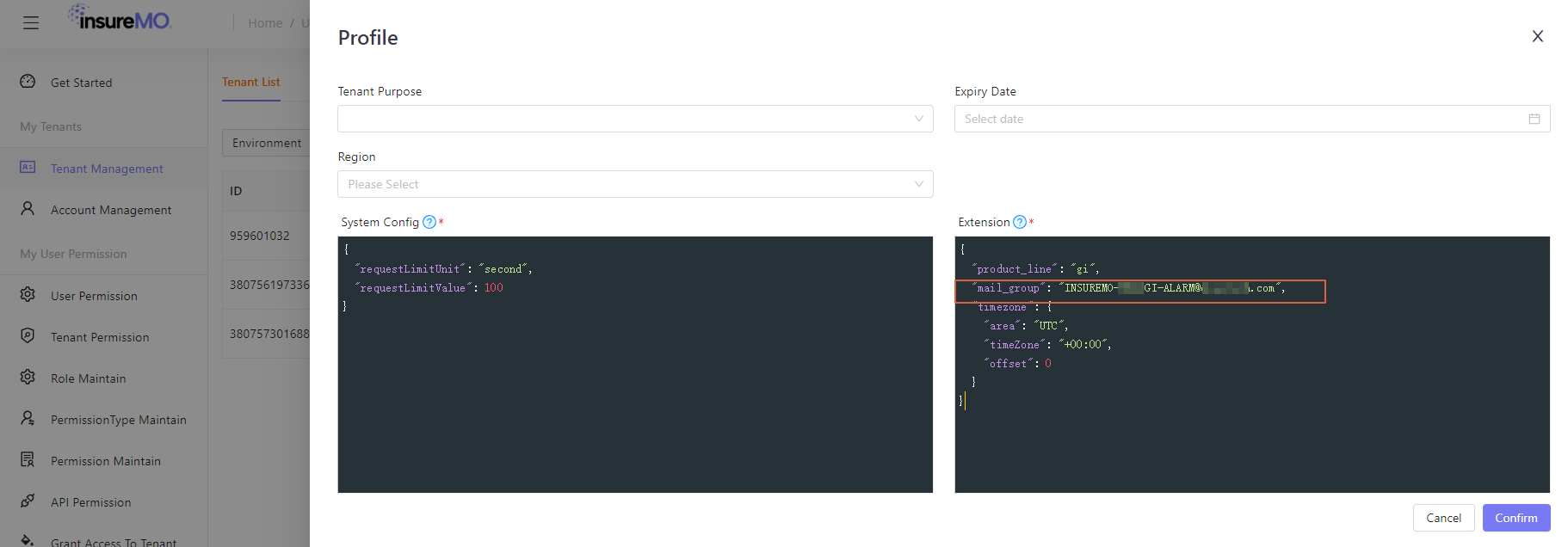
| TO | Yes | CONSTANT JSONPATH TENANT_PROFILE | Sent To | NA |
| CC | No | CONSTANT JSONPATH | Carbon Copy | NA |
| PRIORITY | No | CONSTANT | Priority | NA |
| CONTENT | Yes | TEMPLATE | Define the Key and Value of a Template | Define the template for the message body |
- Target Sample
    {
        "Id":1234,
        "TypeId":123,
        "PushRetryStrategy":"BACKOFF_RETRY",
        "ErrorTolerance":"ALL",
        "DeadLetterRecord":false,
        "Params":[
            {
                 "Value": "{\"test\":\"test\"}",
                "ResourceKey":"CONTENT",
                "Form":"TEMPLATE",
            	"Template":"${test}"
            },
            {
                "Value":"test",
                "ResourceKey":"SUBJECT",
                "Form":"CONSTANT"
            },
            {
                "Value":"container.service.mail.account",
                "ResourceKey":"ACCOUNT",
                "Form":"ENV_PARAM"
            },
            {
                "Value":"lib-admin@insuremo.com",
                "ResourceKey":"TO",
                "Form":"CONSTANT"
            },
            {
                "Value":"PBU-ENGINEERING-COMMON@insuremo.com",
                "ResourceKey":"CC",
                "Form":"CONSTANT"
            },
             {
                "Value":"false",
                "ResourceKey":"PRIORITY",
                "Form":"CONSTANT"
            }
        ]
    }
Please note that if form is “Tenant Profile”, it will go to container tenant management to find tenant support mail group configuration. If you don’t have it, please check with the SiteOps team.
Platform RabbitMq
| ResourceKey | Is Mandatory For Transfer | Form | Value | Template |
|---|---|---|---|---|
| SEND_TYPE | Yes | CONSTANT | Send Type,APP/BROADCAST | NA |
| APP_NAME | No,Mandatory when SEND_TYPE=APP. | CONSTANT | Service name for receiving messages | NA |
| BODY | Yes | TEMPLATE/ORIGINAL | Message Body | If the Form is selected as TEMPlate, configure the template here. |
| TOPIC | Yes | CONSTANT/TEMPLATE/JSONPATH | The subject of the message | NA |
- Target Sample: Sending to Applications
   {
       "Id":1234,
       "TypeId":123,
       "PushRetryStrategy":"BACKOFF_RETRY",
       "ErrorTolerance":"ALL",
       "DeadLetterRecord":false,
       "Params":[
           {
               "ResourceKey":"BODY",
               "Form":"ORIGINAL"
           },
           {
               "Value":"APP",
               "ResourceKey":"SEND_TYPE",
               "Form":"CONSTANT"
           },
           {
               "Value":"$.data.testKey",
               "ResourceKey":"TOPIC",
               "Form":"JSONPATH"
           },
           {
               "Value":"platform-pub,dd",
               "ResourceKey":"APP_NAME",
               "Form":"CONSTANT"
           }
       ]
}-
Target Sample: Broadcasting
    {
        "Id":1234,
        "TypeId":123,
        "PushRetryStrategy":"BACKOFF_RETRY",
        "ErrorTolerance":"ALL",
        "DeadLetterRecord":false,
        "Params":[
            {
                "Value":"{\"age\":\"26\"}",
                "ResourceKey":"BODY",
                "Form":"TEMPLATE",
            	"Template":"{\"test\": \"test\", \"age\":${age}}"
            },
            {
                "Value":"$.data.testKey",
                "ResourceKey":"TOPIC",
                "Form":"JSONPATH"
            },
            {
                "Value":"BROADCAST",
                "ResourceKey":"SEND_TYPE",
            "Form":"CONSTANT",
            }
        ]
    }
Preset HTTP Client
| ResourceKey | Is Mandatory For Transfer | Form | Value | Template |
|---|---|---|---|---|
| SERVICE_NAME | Yes | CONSTANT/ENV_PARAM | Send to the corresponding service | NA |
| Body | Yes | TEMPLATE/JSONPATH/ORIGINAL/CONSTANT | Message Body | If the Form is selected as TEMPLATE, configure the template here. |
- Target Example
    {
        "Id":1234,
        "TypeId":123,
        "PushRetryStrategy":"BACKOFF_RETRY",
        "ErrorTolerance":"ALL",
        "DeadLetterRecord":false,
        "Params":[
            {
                "Value":"{\"test\":\"test\"}",
                "ResourceKey":"BODY",
                "Form":"TEMPLATE",
            	"Template":"${test}"
            },
            {
                "Value":"platform-pub",
                "ResourceKey":"SERVICE_NAME",
                "Form":"CONSTANT",
            }
        ]
    }
API Destination
| ResourceKey | Is Mandatory For Transfer | Form | Value | Template |
|---|---|---|---|---|
| NAME | Yes | CONSTANT | the API endpoint’s name | NA |
| HEADER_PARAMS | No | TEMPLATE | Request header parameters | Configure templates here |
| BODY_PARAMS | No | TEMPLATE | Request body parameters | Configure templates here |
| QUERY_STRING_PARAMS | No | TEMPLATE | Request path parameters | Configure templates here |
- Target Sample
    {
        "Id": 1234,
        "TypeId": 222,
        "Endpoint": "http://test/test333",
        "ErrorsTolerance": "ALL",
        "PushRetryStrategy": "BACKOFF_RETRY",
        "DeadLetterRecord":false,
        "Params": [
            {
                "ResourceKey": "NAME",
                "Form": "CONSTANT",
                "Value": "test333"
            },
            {
                "ResourceKey": "HEADER_PARAMS",
                "Form": "TEMPLATE",
                "Value": "{\"headerKey1\":\"Content-Type\",\"headerValue1\":\"multipart/form-data\",\"headerKey2\":\"$.data.name\",\"headerValue2\":\"1\",\"headerKey3\":\"$.data.name\",\"headerValue3\":\"$\",\"headerKey4\":\"$.data.name\",\"headerValue4\":\"$.data.name\"}",
                "Template": "{\"${headerKey1}\":\"${headerValue1}\",\"${headerKey2}\":\"${headerValue2}\",\"${headerKey3}\":\"${headerValue3}\",\"${headerKey4}\":\"${headerValue4}\"}"
            },
            {
                "ResourceKey": "BODY_PARAMS",
                "Form": "TEMPLATE",
                "Value": "{\"bodyKey1\":\"sdd\",\"bodyValue1\":\"33\",\"bodyKey2\":\"$.data.test\",\"bodyValue2\":\"$\",\"bodyKey3\":\"$.data.vali\",\"bodyValue3\":\"$.data.fire\"}",
                "template": "{\"${bodyKey1}\":\"${bodyValue1}\",\"${bodyKey2}\":\"${bodyValue2}\",\"${bodyKey3}\":\"${bodyValue3}\"}"
            },
            {
                "ResourceKey": "QUERY_STRING_PARAMS",
                "Form": "TEMPLATE",
                "Value": "{\"queryKey1\":\"$.data.name\",\"queryValue1\":\"$.data.age\",\"queryKey2\":\"$.data.gender\",\"queryValue2\":\"2\"}",
                "Template": "{\"${queryKey1}\":\"${queryValue1}\",\"${queryKey2}\":\"${queryValue2}\"}"
            }
        ]
    }
UI Message Box
| ResourceKey | Is Mandatory For Transfer | Form | Value | Template |
|---|---|---|---|---|
| MESSAGE_TYPE | No | CONSTANT | Message type | NA |
| MESSAGE_LEVEL | No | CONSTANT | Message level | NA |
| PRODUCT_LINE | No | CONSTANT | Business Line | NA |
| MESSAGE_CATEGORY | No | CONSTANT | Message Category | NA |
| BODY | Yes | TEMPLATE/JSONPATH /ORIGINAL/CONSTANT | Message Body | If the Form is selected as TEMPLARTE, configure the template here. |
- Target Sample
    {
        "Id": 1234,
        "TypeId": 222,
        "ErrorsTolerance": "ALL",
        "PushRetryStrategy": "BACKOFF_RETRY",
        "Params": [
           {
                "Value":"{\"test\":\"test\"}",
                "ResourceKey":"BODY",
                "Form":"TEMPLATE",
            	"Template":"${test}"
            }
        ]
    }
Retry and Dead Message
-
Retry strategy
- Backoff retry (default): The maximum number to retry is 3, and the time interval between each retry is a random value between 10 and 20 seconds.
- Exponential decay retry: The maximum number to retry is 176, and the time interval between each retry increases exponentially to 512 seconds, with a total retry duration of 1 day. The specific interval for each retry is 1, 2, 4, 8, 512 seconds.
-
Fault tolerance strategy
- Allow fault tolerance (recommended): Allow exception fault tolerance. When an exception occurs, it will not block execution. If the maximum number of retries is exceeded, the message will be stored in the dead message queue or directly discarded according to the configuration(item in configuration center??).
- Prohibit fault tolerance: Fault tolerance is not allowed, and execution will be blocked when an exception occurs and exceeds the retry times(item in configuration center??).
-
Dead Message queue
- The dead message queue will be restricted based on the task dimension. In case of an inability to process or exceed the retry count, the failed raw data will be placed into the dead message queue record unchanged.
Event Trace
By using the event tracking function, you can view the content of events published to Event Bridge, including event details, as well as the processing trajectory of events in Event Bridge.
-
Query method
- Query by Event ID
- Query by time range
-
Time trajectory
-
Receiving events:
You can see the time when Event Bridge received the event, as well as the source and type of the received event.
-
Filter events:
You can see the rule matching done by Event Bridge for events.
-
Delivery Event:
You can see the time and status of Event Bridge delivering events to the event target.
-
Integration
Assist in calling the HTTP interface of third-party systems without the need for additional architecture to complete interface calls. With the help of HTTP endpoints, it is easy to build and connect SaaS applications, and breakthrough data silos, provide cross-product and cross-platform connectivity capabilities, and promote the integration of cloud products, applications, and SaaS services.
Multiple APIs can share a set of connection configurations, providing convenient and pluggable authentication capabilities.
- [API Destinations](#Api Destination)
- Connection
API Destination
The HTTP endpoint defines the metadata of the API. When creating event rules, different HTTP endpoints can be referenced to access different third-party systems, and different rules can also reference the same HTTP endpoint.
Support the splicing of URL by reading configuration parameters or Jsonpath
for example: ${alert.server}${alert.urls}
NOTE: API Destination is only responsible for delivering events to consumers, so the timeout is 5s
Connection
-
Connection is mainly used to achieve connectivity between external services and the current HTTP endpoint.
-
The Connection contains authentication configuration information, and Event Bridge has selected the three most commonly used authentication methods currently available
- Basic Auth
- When using, the username and password need to be verified to access data resources. The username and password are prefixed with a Basic space and sent together to the target service. After the target server passes the authentication, it will respond to the request of Event Bridge. If the authentication fails, it will directly call back.
- Bearer Token
- You can use the current user’s token or read it through the configuration parameters and Jsonpath. for example:
${alert.token}
- You can use the current user’s token or read it through the configuration parameters and Jsonpath. for example:
- OAuth
- OAuth has four authorization methods, namely authorization code, hidden, password, and client credentials. Event Bridge uses a client credential authorization method. In this mode, it is necessary to configure the information required to obtain client credentials in Event Bridge, including OAuth Service address, client ID, client password, etc. Event Bridge supports both GET/POST methods to obtain client credentials.
- API Key
- You can customize the KeyName and KeyValue accessed by the API, and Event Bridge will transmit them to the server for authentication through HttpHeader
- Basic Auth
Schema
-
Schema is used to define the data format of event bodies and achieve reliable data exchange in heterogeneous systems.
-
Schema is a version control specification that describes the format and content of data, used to define the data format of event bodies.
NOTE: The schema version cannot be modified after creation.
-
The initial definition of a schema must be JSON text that complies with the OpenAPI 3.0 specification.
-
Example
   {
           "openapi": "3.0.0",
           "info": {
               "title": "Input the schema descrition here",
               "version": "1.0.0"
           },
           "paths": {},
           "components": {
               "schemas": {
                   "Cloudevents": {
                       "type": "object",
                       "required": [
                           "id",
                           "source",
                           "subject",
                           "time",
                           "type",
                           "data"
                       ],
                       "properties": {
                           "id": {
                               "type": "string"
                           },
                           "source": {
                               "type": "string"
                           },
                           "subject": {
                               "type": "string"
                           },
                           "time": {
                               "type": "string"
                           },
                           "type": {
                               "type": "string"
                           },
                           "data": {
                               "ref": "#/components/schemas/<bizdatastructure>"
                           },
                           "publishtime": {
                               "type": "string"
                           },
                           "eventbusname": {
                               "type": "string"
                           },
                           "publishaddr": {
                               "type": "string"
                           }
                       }
                   },
                   "bizdatastructure": {}
               }
           }
       }
UI Operation
Add Bus
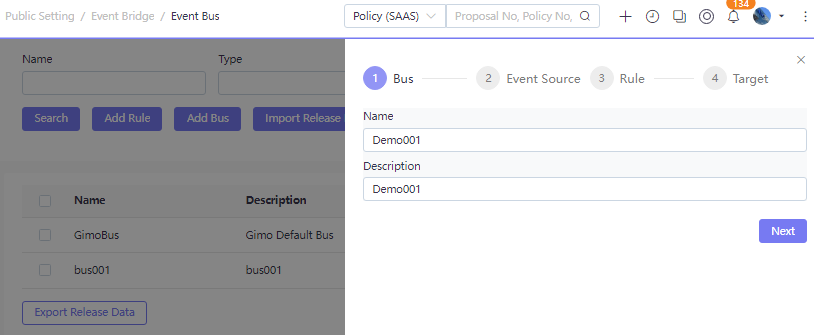
- Select menu Public Setting > Event Bridge > Event Bus.
- Click “Add Bus”. Input the bus defination info.
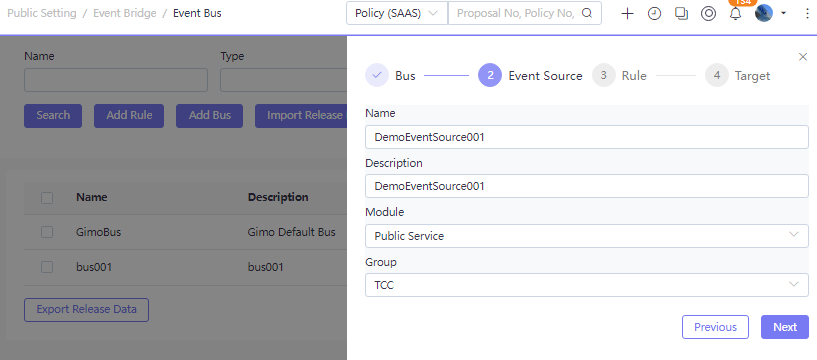
- New Event Resource for the bus.
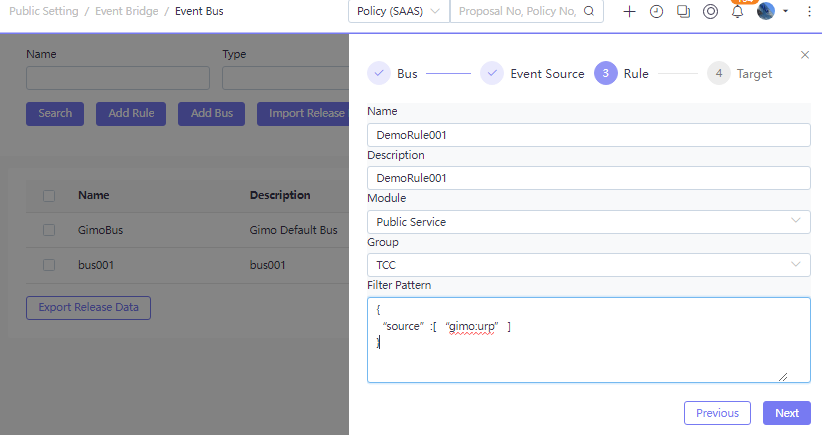
- New Rule for the bus. More details about the rule, please refer to Event Rule.
The “Filter Pattern”, please refer to Filter Type.
- New Target for the bus. More details about the event target, please refer to Event Target.
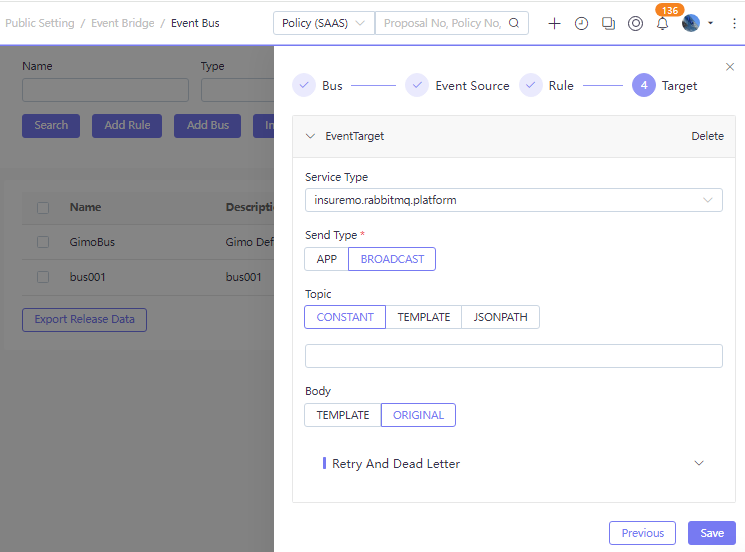
Event Trace
After the bus is created, you can find it in search result list.
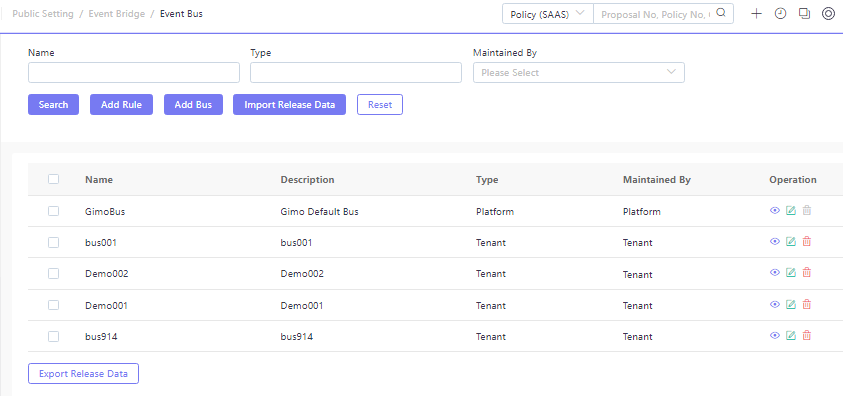
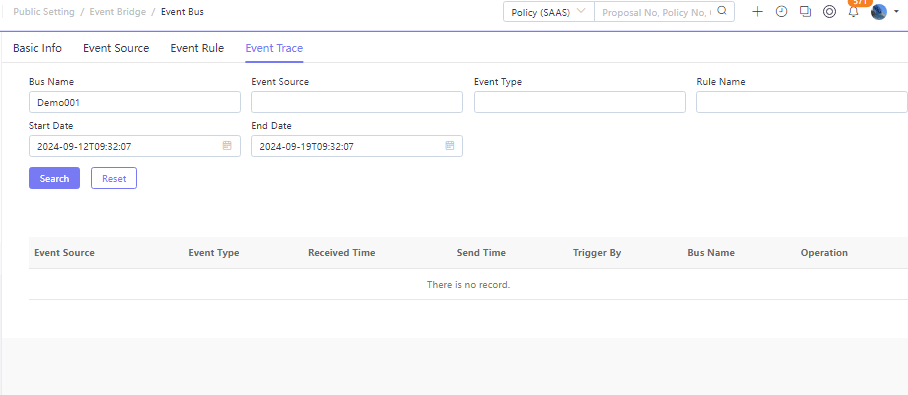
Click “Edit” or “View”, you can see the bus defination details. Switch to tab “Event Trace”, you can see the trace details after the bus is used.
Development Reference
- [SDK Dependency](#SDK Dependency) - [Send Event](#Send Event) - [Receive Event](#Receive Event), use it when the target type is Reset HTTP Client.
- [URL Request](#URL Request)
SDK Dependency
Send Event
- pom Dependency
       <dependency>
           <groupId>com.ebao.vela</groupId>
           <artifactId>vela-event-support</artifactId>
</dependency>- Java Example
       	   @Autowired
           private EventPutService eventPutService;


           public void test(){
               User user = new User();
               user.setUserName("James");
               user.setEmail("James@email.com");
               user.setTelephone("13333333333");
               user.setRealName("James");
               user.setDefaultLang("011");
               CloudEvent cloudEvent = EventBuilder.newBuilder()
                       .withId(UUID.randomUUID().toString())
                       .withEventBus("GimoBus")
                       .withSource("gimo:urp")
                       .withType("urp:config:CreateUser")
                       .withSubject("gimo:urp:api:test")
                       .withTime(LocalDateTime.now())
                       .withData(user).build();
           eventPutService.put(cloudEvent);
           }
Receive Event
- pom Dependency
       <dependency>
           <groupId>com.ebao.vela</groupId>
           <artifactId>vela-event-support</artifactId>
</dependency>- Java Example
       @Service
       public class TestEventRevice<T> implements EventReceivedRest<T> {

           @Override
           public void receivedEvent(T a) {
            // business logic...
           }
       }
URL Request
-
url:
http://{{server}}/api/platform/platform-pub/eventBridge/event/v1/putEvent
-
method:
post
-
request body
       {
           "data":{
               "UserName":"James",
               "Email":"James@mail.com",
               "Telephone":"1333333333333",
               "RealName":"James",
               "DefaultLang":"011"
           },
           "id":"e414341e-32af-4a4f-864b-d2c9268f232",
           "source":"gimo:urp",
           "time":"2023-11-19T21:04:41",
           "type":"urp:User:CreateUser",
           "dataContentType":"application/json;charset=utf-8",
           "eventBusName":"GimoBus"
       }