Basic Concept
Traditionally, data structure has been represented more in form of physical table structure. However, it has become increasingly inappropriate because the actual data usage at a logical layer changes constantly, and becomes more different from the physical table.
There are some scenarios where you want to extend the system data structure without changing the physical table and source code structure. Such logical modelling data is also called meta-data. Data Dictionary (DD) is designed to maintain meta-data in a centralized manner.
User Scenario
For anybody who wants to extend the data model or to view the latest data model status and information.
Composition of Data Dictionary
Module Division, Grouping and Context
A key distinction for understanding DD is between its role as a Configuration Tool and the actual business data which is Configuration Data configured within the tool.
DD is a technical configuration tool that can maintain any particular business module and data models of all system modules.
For example, the policy administration can be the Module that uses DD most frequently. For the policy administration, it may further have policy common data models to maintain the elements such as policy customers and policy payments, and may also have product-related models to maintain the elements such as policy risks or coverage, which may depend on whether it is an auto accident or a marine product.
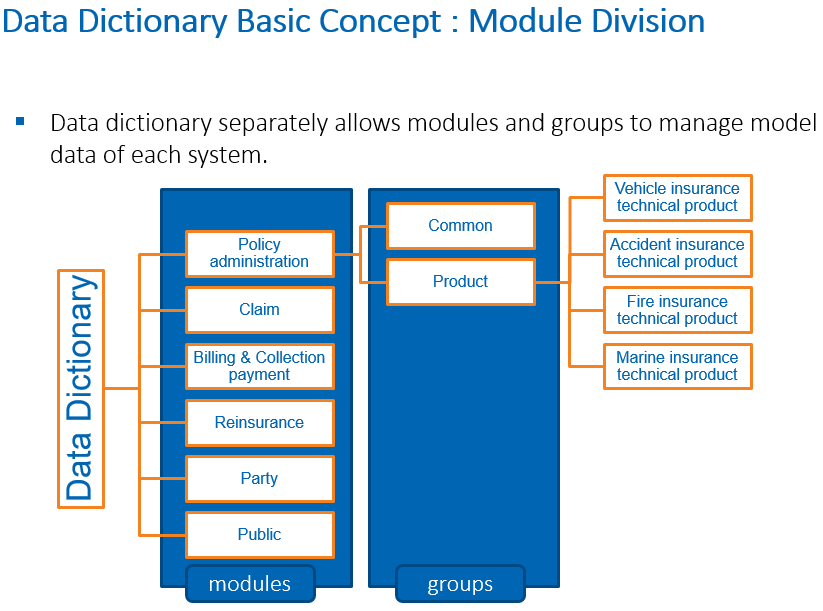
In addition to the policy administration, the Party models and the modules such as Claim, Billing and Collection Payment can also be maintained through DD.
Sometimes these modules can be also referred to as Business Domain. DD is a tool used to maintain data models of these domains.
For better management, each domain can further have sub-domain, which is also called Configuration Group.
Initially, DD was designed to cater for the general insurance scenarios because a super flexible structure is highly demanded to launch different general lines of business (LOBs).
There are also many use cases of new life business which adopt DD to maintain the data models as well.
Besides module/group as one dimension, our system also allows product code or Context as another separate dimension to indicate the data model differences caused by different lines of products.
In general, there is a concept of context and module/group that categorize objects into different groups.
Overview of Basic Elements
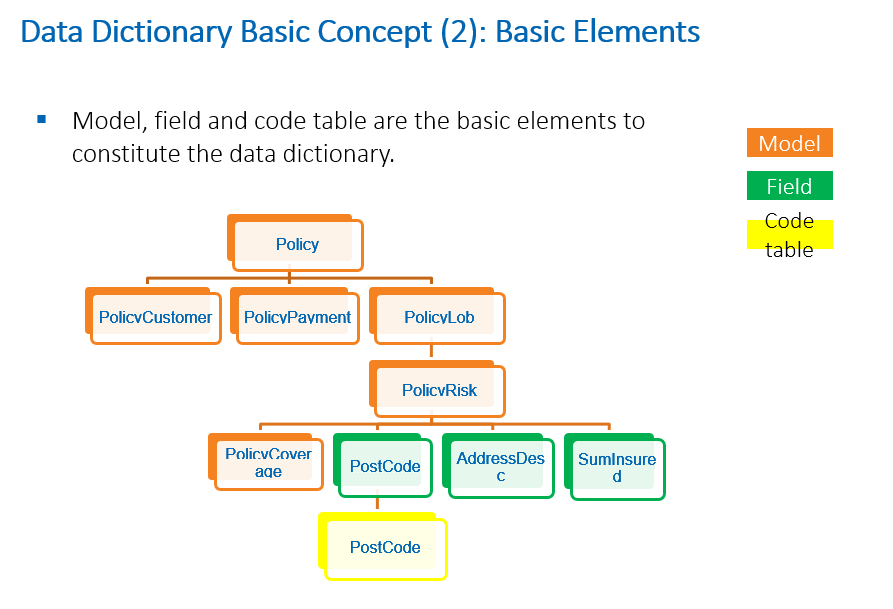
DD consists of the following key basic elements:
- Data model
- Data field
In terms of the policy area, DD consists of different business entities, including:
- Policy customers
- Policy payments
- Policy products (which may further include policy risks or coverages)
From a technical perspective, all these specific business-related entities can be seen as the business model to maintain the data.
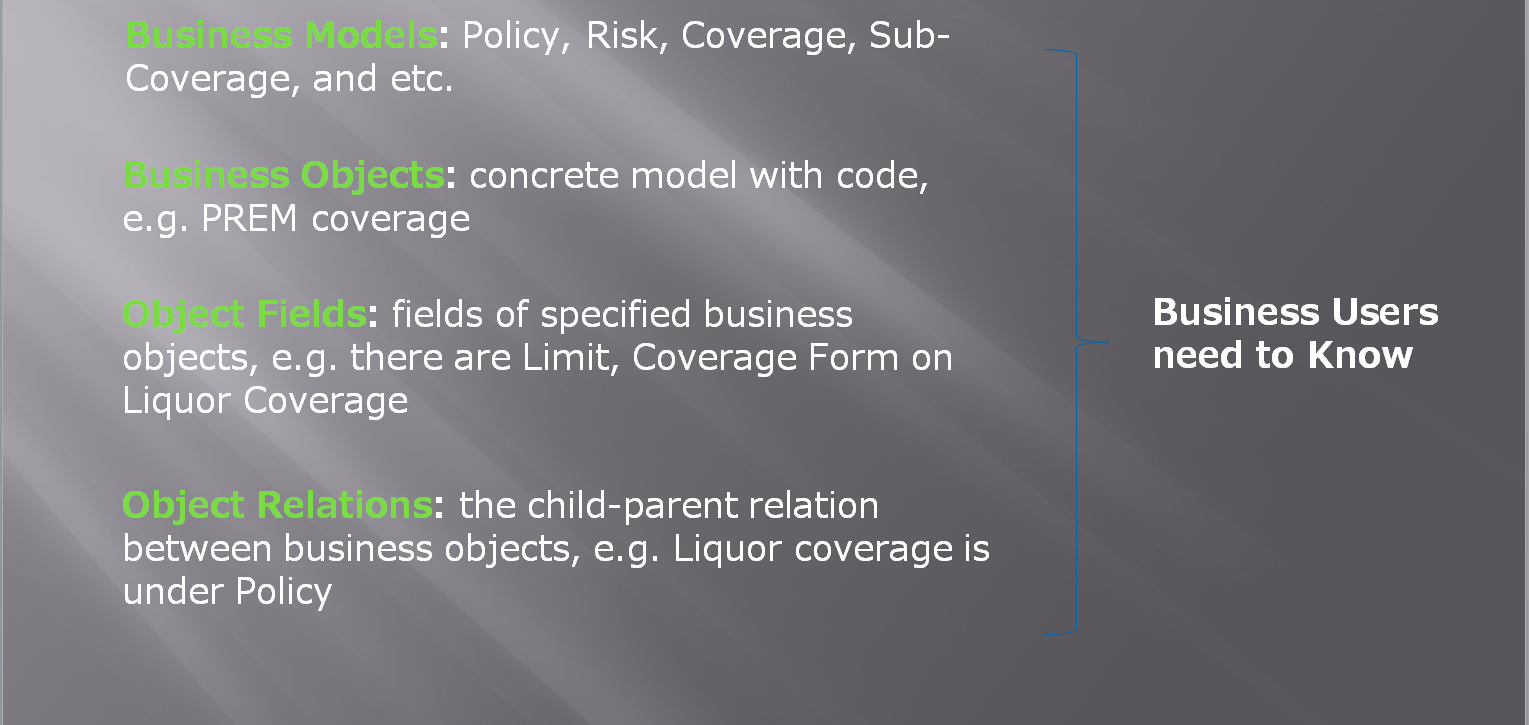
In addition, there will be some relationships between these models. For example, there can be coverage under risk to illustrate the situation where one risk instance has multiple coverages, or benefits under coverage to illustrate the situation where one coverage instance has multiple benefits.
Each model can have different fields, such as postcode, address description, and the sum insured attached to the homeowner’s insurance location. Some fields may be simple numeric inputs such as customer name, while some fields may have a pre-defined list of values, such as the postcode with national postcode database as part of the pre-defined data. The list of data is called as a code table. You can also attach a code table to the field. For example, attach an address code table to a postcode field.
Model, Object, Object Relation and Field Binding
The same as the programming principle, we name different business entities as different system objects. A system object represents each different domain or model entity from a business perspective.
Conceptually, to further analyze business model, DD consists of two elements:
- Business Model: the classification category.
- Business Object: a real entity.
There are some fields attached to the model and object. The attachment process can be called as Field Binding.
You can extend and maintain objects in DD. Different relationships can also be defined for different objects between them, which is called Object Relation.
GI Policy as an Example to Understand Data Dictionary
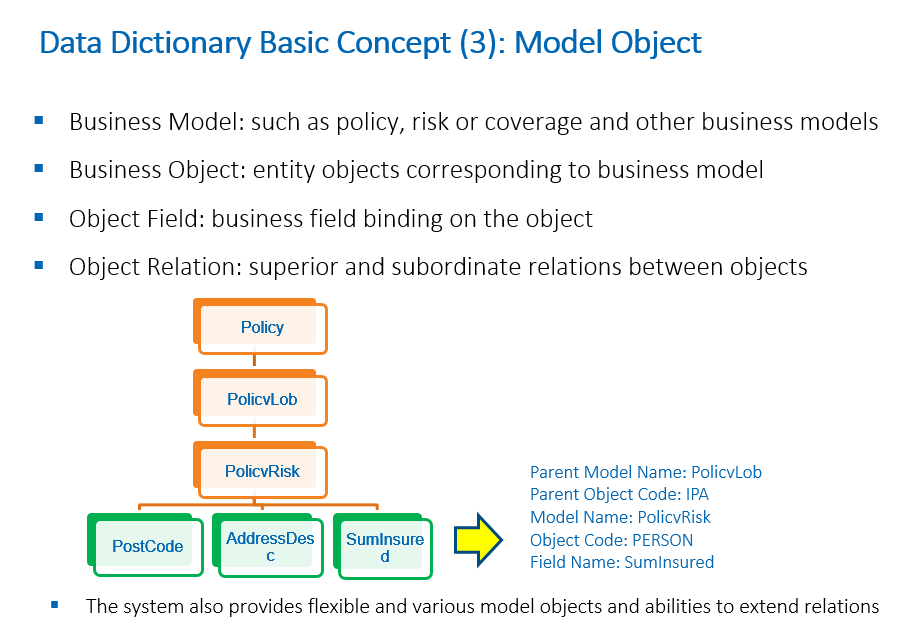
Take the GI policy domain as an example, we can technically illustrate how to describe an insurance risk object in a policy.
At first, we should understand the policy, which is an independent business domain distinct from others like claim or party.
As for the business model, it is the PolicyRisk. For the object, a separate object code PERSON will be assigned, where the risk model is positioned to have model and object.
Any business object has its superior or subordinate relationships. For PolicyRisk, it can have PolicyLob or Policy as its superior and PolicyCoverage as its subordinate. The superior or subordinate model will also have a business model and business objects. Therefore, if we can describe both the current model and its superiors, it will be more accurate to position the system.
One business object has multiple specific fields bound to it. Field name is a unique identifier for a field. One field name can only have one field type but it can be overridden at field binding level.
For different types, different field names must be defined.
In summary, in order to locate a field which represents the value of sum insured, we can describe it as follows:
- SumInsured is the field name.
- SumInsured is bound to the PolicyRisk model and PERSON object.
- PolicyRisk model and PERSON object have a superior PolicyLob model and an IPA object.
Unique Data Access
In summary, by using DD, each field in the policy can be uniquely located by three important inputs: “Field Name”, “Model” and “Object Code”:
- Field Name is the name in the Data Dictionary.
- Model is the name of the domain model in the product structure, such as Policy, PolicyCoverage, PolicyCustomer.
- Object Code, as mentioned above, is the domain object code used to differentiate items in the same domain object class, such as LOB code and risk code.
All field usage across all functionalities, such as UI save and load, rule and rating, will follow this basic common identification mechanism. The detailed grammar may vary.
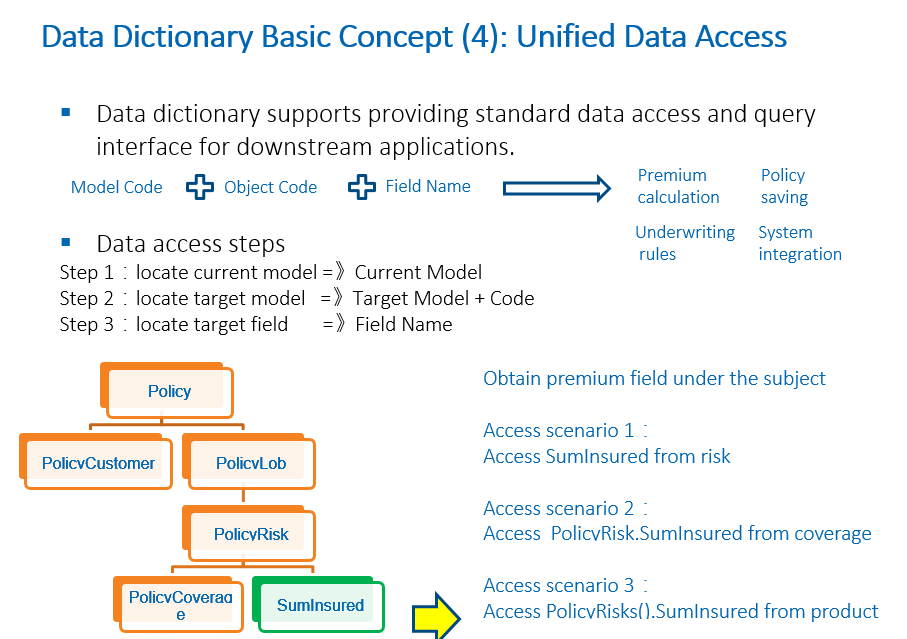
One of the greatest advantages of DD is its capability to provide standard data access and query.
If you want to access system data for premium calculation, policy persistence, rule underwriting or system integration, you can follow the direction of DD and locate respective field definition inside it.
DD can be used as a pure documentation guidance for the data. It can also expose certain standard interface for access by front-end programs.
By means of the DD mechanism, there are multiple ways to implement current target level concepts when you try to obtain model fields. For example, if you want to obtain a risk-bound coverage sum insured, you can get it directly from the risk, or from a higher level, such as the policy LOB level, or from a lower level, such as the coverage under the risk.
If you want to obtain the policy risk coverage sum insured from the policy coverage, you should start from the current level of policy coverage, aiming to achieve the goal of getting the policy risk.
If the current level and the target level are the same, or if the current level is a child of the target level, logically, there will always be a one-to-one relationship. However, if the current level is from the parent to the target, there will be a list of data involved.
Model Inheritance
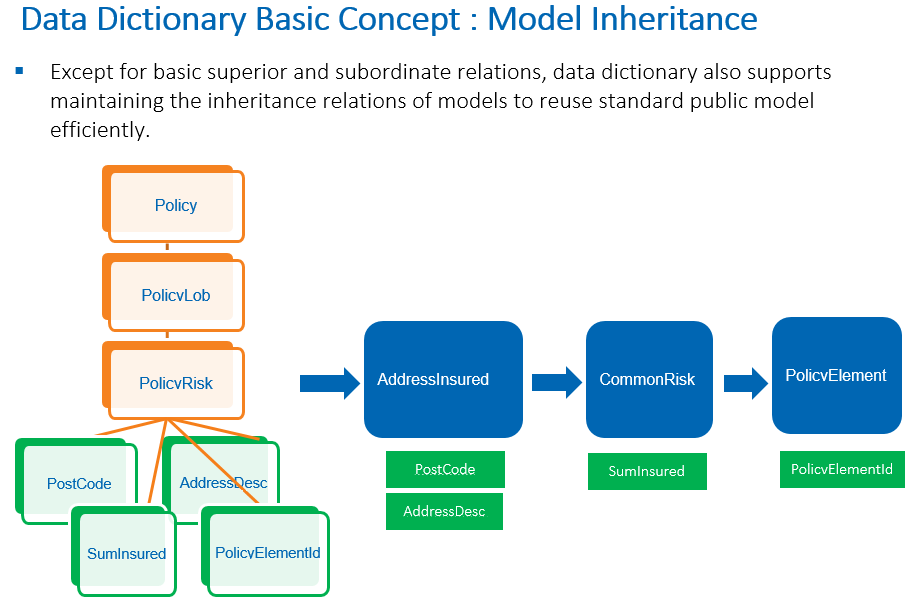
To encourage more standardization and re-usage, DD also provides inheritance mechanism to manage the model.
In the case of PolicyRisk, there may be many business fields that are captured as risks. If it is an address-related risk, there can be fields that are only relevant to this particular product or field that applies to the address of all product lines, such as postcode and address name.
For such common fields, you can define them in a common data model from which risk objects under multiple products are inherited. Both Property location risk and family location risks can be inherited, although they may be separate models belonging to different technical products.
Currently, during the product configuration, there are selections of insured category, schedule category and product category for respective policy models to inherit from the common setting. The policy administration service provides a set of pre-defined business models which includes some inherited relationships based on the market experience.
Field and Code Table Binding
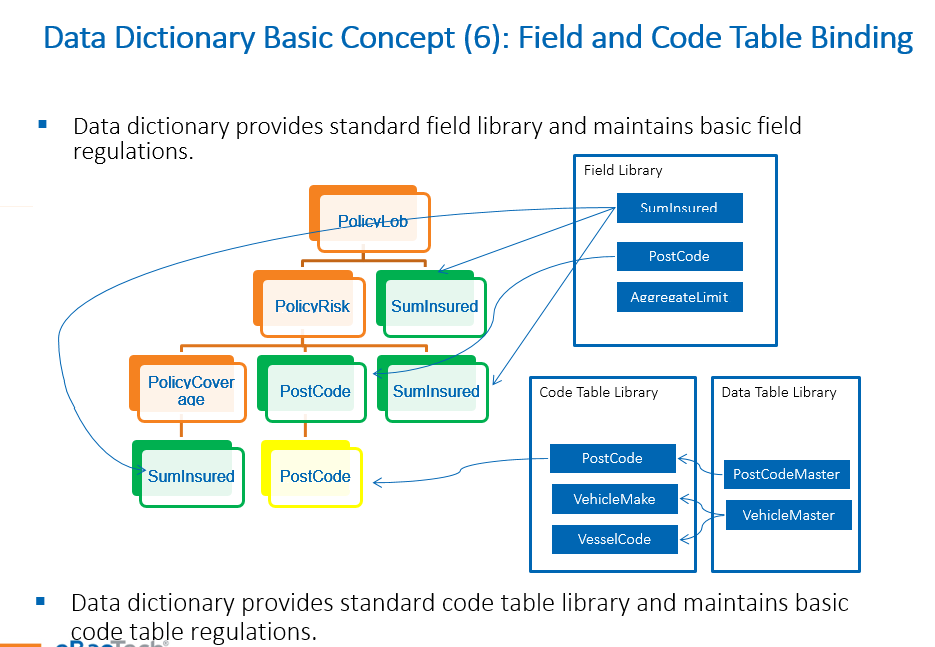
In addition to the data model, there is also a field library in DD for standardization, just like component library in the product configuration.
After creating and associating all data models, you need to assign the individual field to each model. This assignment process is also referred to as “Data Binding”.
Each field has a unique name and can have only one field type at field library level but can be overridden at binding level. The underlying principle is to facilitate “Field Accumulation” which is not a once-for-all job but is accumulated during the implementation.
In the back-end, the system has both physical and dynamic fields. Physical fields are those that are already provided at platform level and mapped to a physical column. Dynamic fields are those that can be dynamically extended in each tenant.
When extending fields for a specific object, you do not need to create the field from scratch. The system allows fields to be selected from the field library before binding them to the data model. This is to allow for the scenario where there is one single sum insured field in the field library, but it can be added to the product, risk, or coverage level.
Similarly, code table also has a library. You can bind one single code table from the code table library to a specific field or multiple fields.
The field library aims to standardize fields usage in the system, while code table library ensures standardization in code table acquisition.
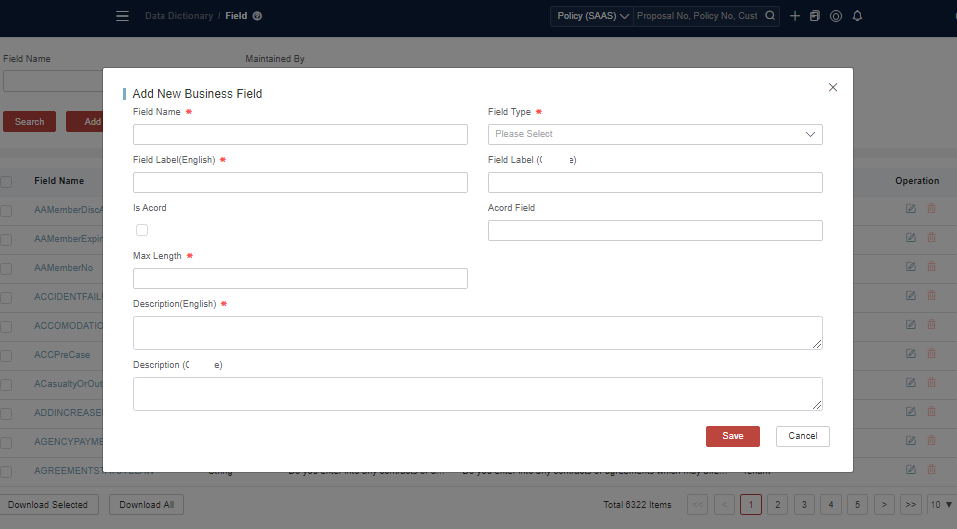
Benefits of Using Data Dictionary
By extending a standard DD interface, any business module can enjoy the benefits of DD, such as:
- Centralized management or query of codes and fields
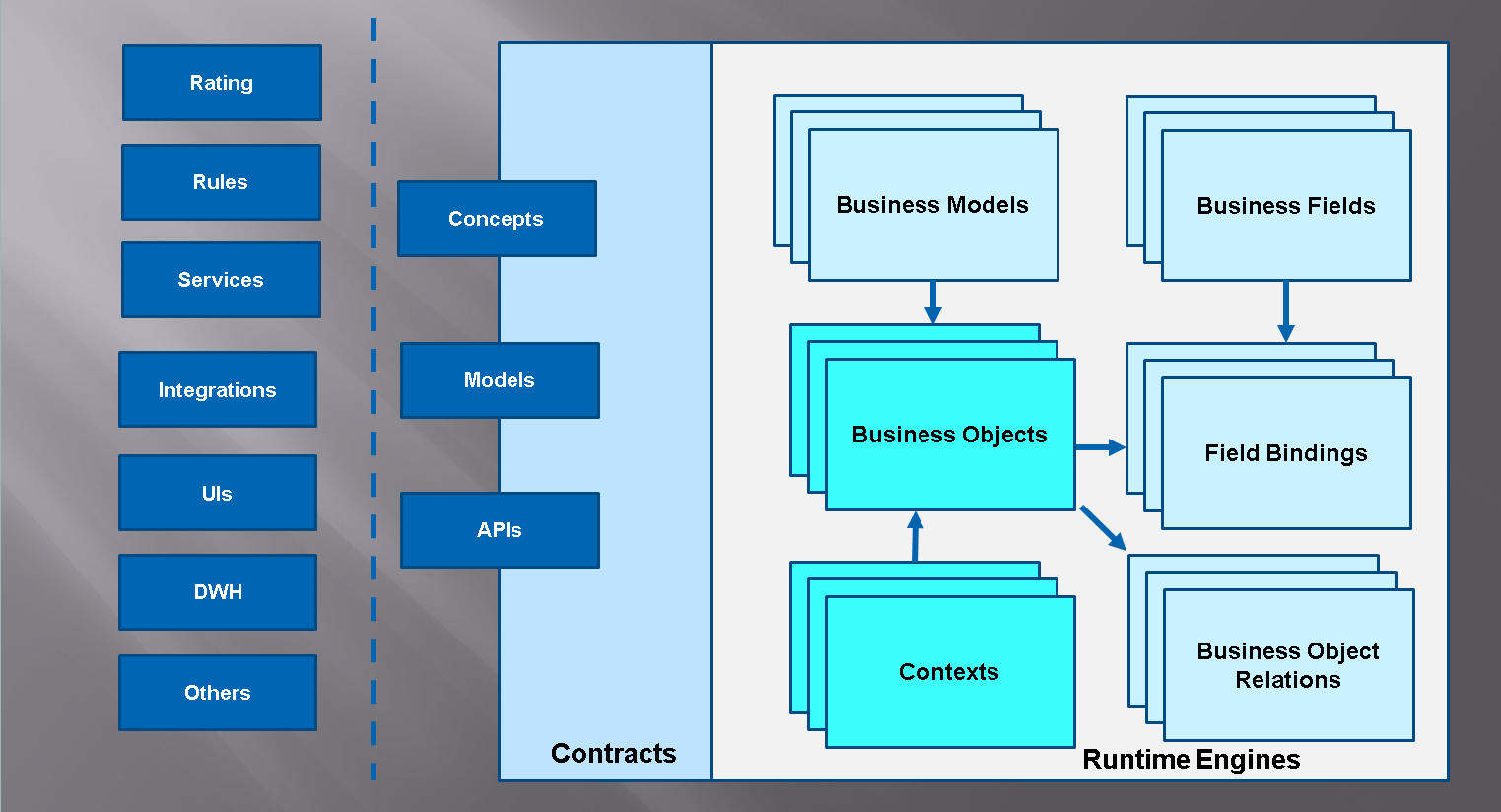
- Consistent data access across the system for configurations and programs
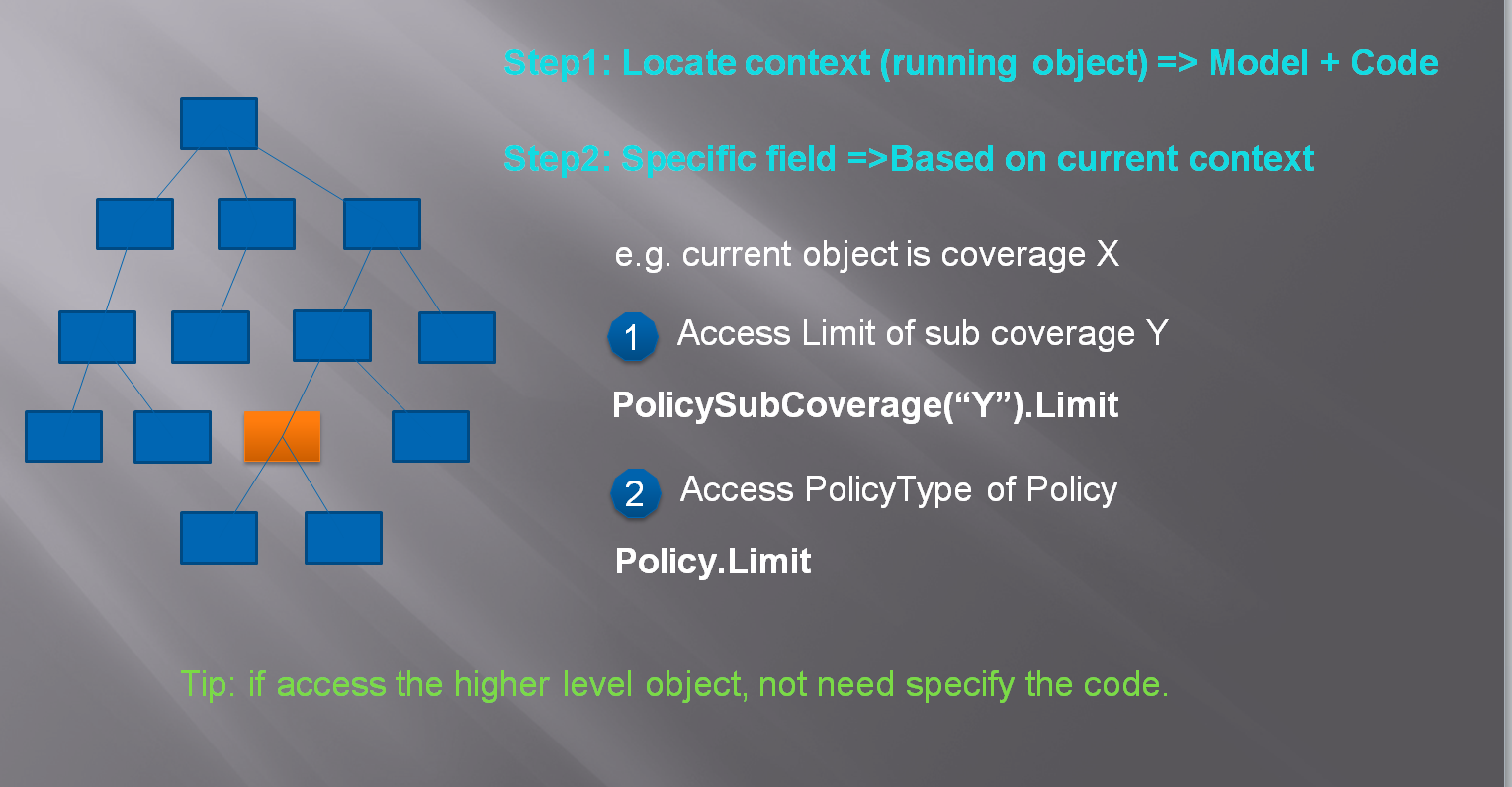
- Easy and simple data access from both business and technical perspectives
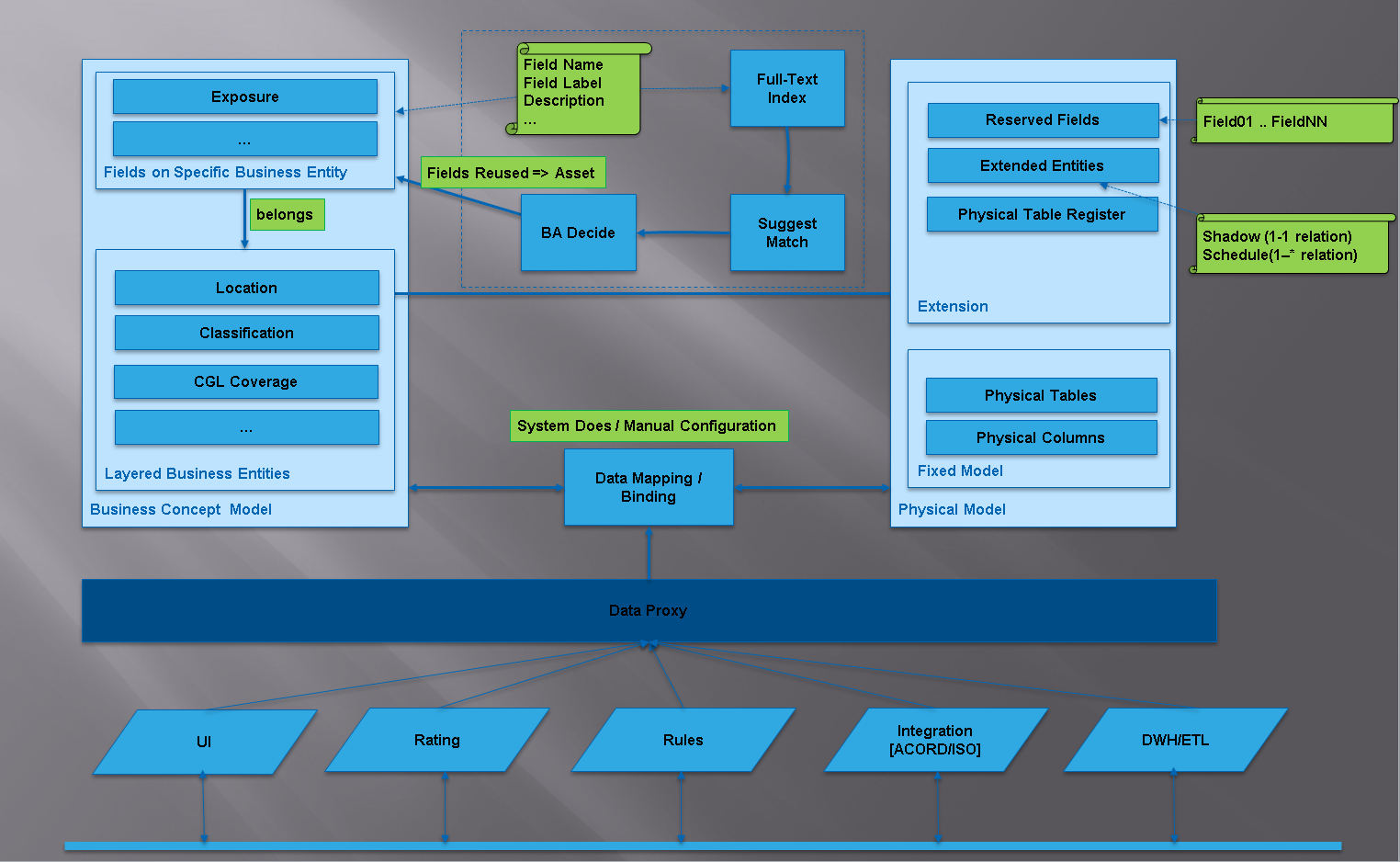
- Isolate the business fields from complex technical details
- Flexible dynamic field extensions and layered data management
Data Dictionary UI Operation Guidance
- All operations in this text need to be performed in the Master Configuration environment (MC env) on InsureMO Portal. They are not allowed in other environments unless for troubleshooting purposes.
- Please make sure you have both read and write authority to make the operation beforehand.
For the first operation, it is advisable to follow the steps below, which will help you to have a basic understanding of the product management module.
Log in to the home page and click Data Dictionary on the left menu bar.
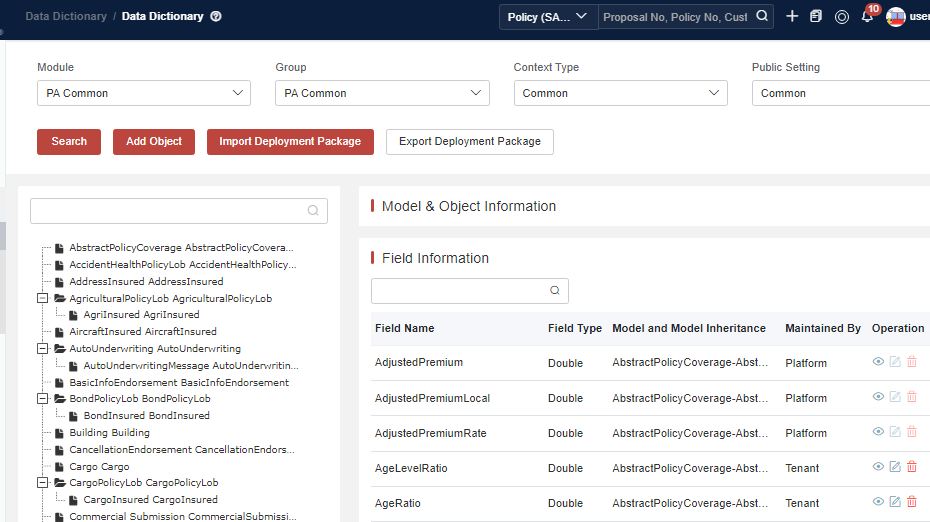
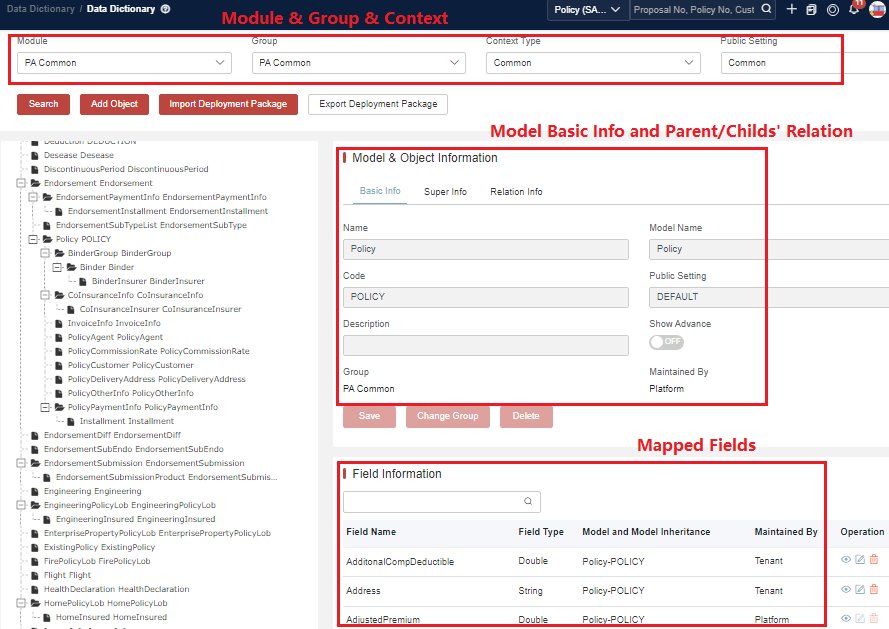
As mentioned in Chapter 1 regarding cross-module management, the system allows selecting modules such as policy administration, claim, customer, and channel management.
If necessary, you can create some sub-divisions, such as different sub-systems or some special categories. Some modules are maintained at the common level, while some need to be maintained at a specific technical product level. This segregation between common and product level is also called context type.
Search and View Object
Basic Information About the Object
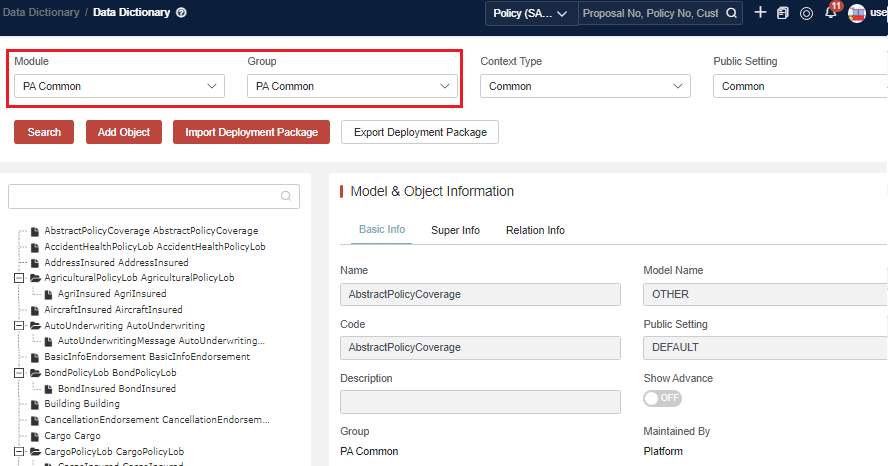
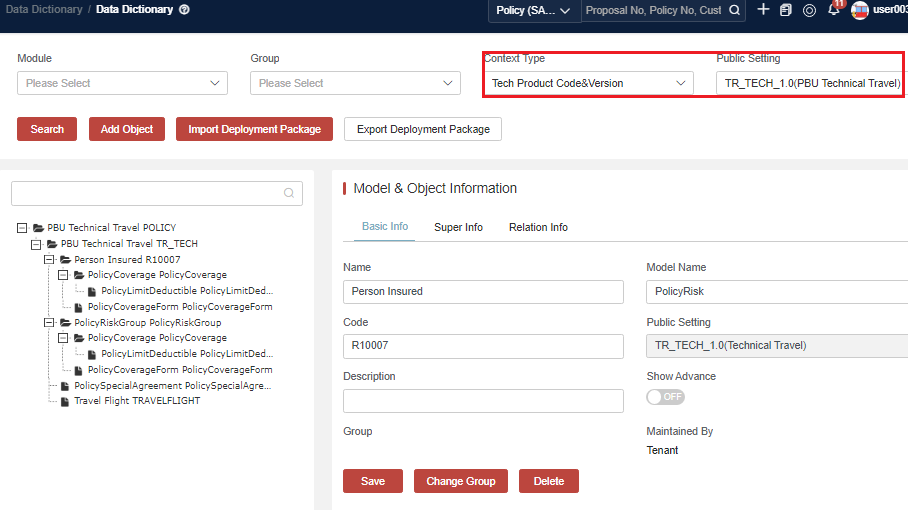
Select the context information, click Search and select the object in the object tree.
Take general insurance as an example. Usually the data model will be separated into two selection types:
- Common DD across all product lines: Select Module, and then select Context under Common.
- Technical Product DD by different product lines: Select Context under Product Version.
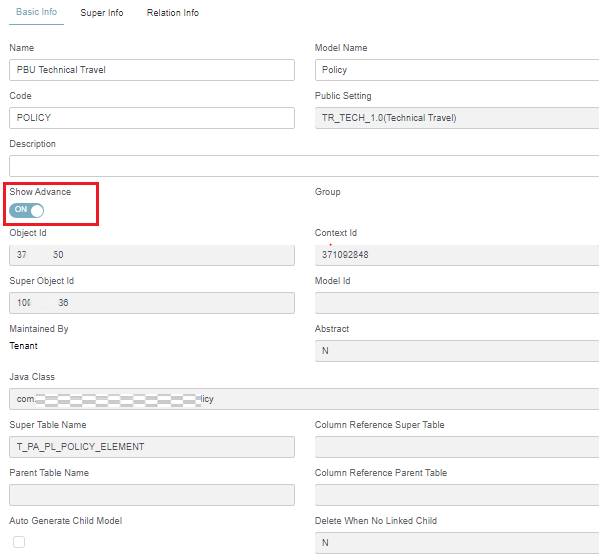
Show Advance
Some information is more of technical usage and collapses by default.
Click OFF or ON to hide or show advanced information of the object.
Super Object Information
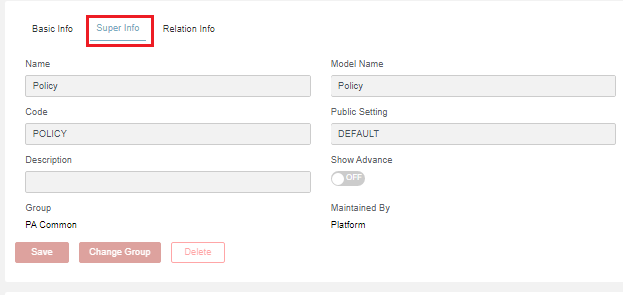
Most of the objects can have inheritance relationship and the inherited object can be viewed in this section.
Click Super Info to display the information inherited from the object.
Relation Information
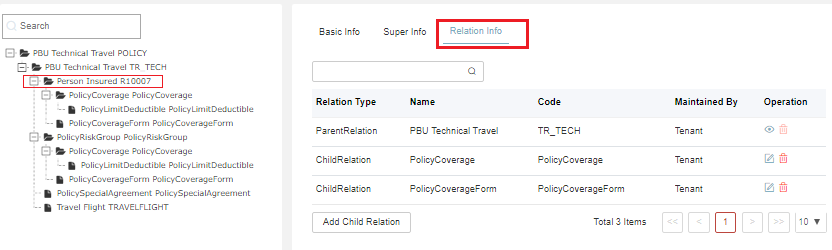
Click Relation Info to display the information of the parent and child objects.
Field Binding Search
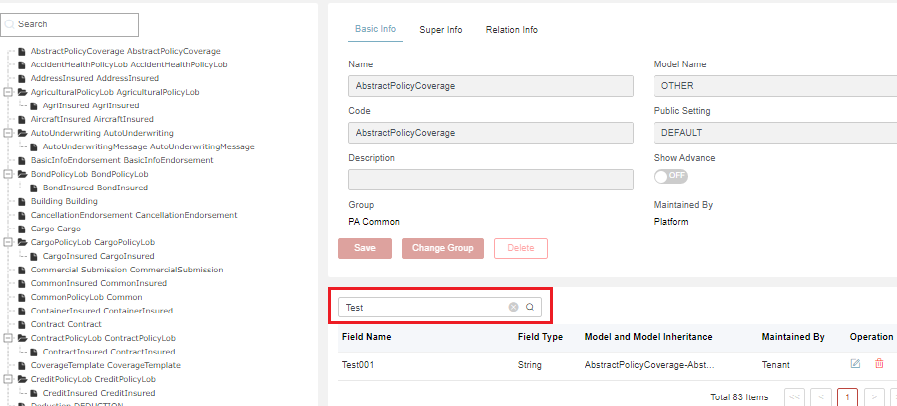
Enter keywords in the search box for a fuzzy query.
Add New Object
Display the Add Object dialog and enter the key information for a new object.

Click Add to display the object edit dialog.
Enter key information in the object edit dialog.
The system only allows to add/edit/delete product relation objects and schedules as described in Add a New Dynamic Schedule to a Policy and Add a New Dynamic Object to Claim.
Add a New Dynamic Schedule to a Policy (GI Business Only)
Sometimes it is essential to extend the generic object due to business requirements. For policy administration, you can use the PolicySchedule model for extensions.
Through the following steps, a new schedule can be added to the policy domain. It can either be attached to the policy model tree or be a standalone module for inheritance purposes.
-
Locate the correct module/group/context and click Add Object.
-
Find and input the correct Super Object (PolicySchedule) to inherit. Set the Module and Group for it. Then click Save to save the new object.
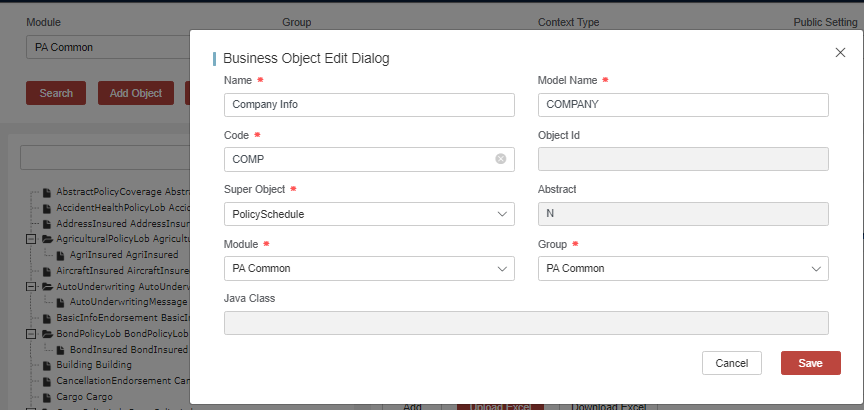
- Name: Self-defined
- Model Name: Self-defined
- Code: Self-defined
- Super Object: The current object needs to inherit from the super object. Select one super object from the drop-down list.
- Module and Group: Select the expected one.
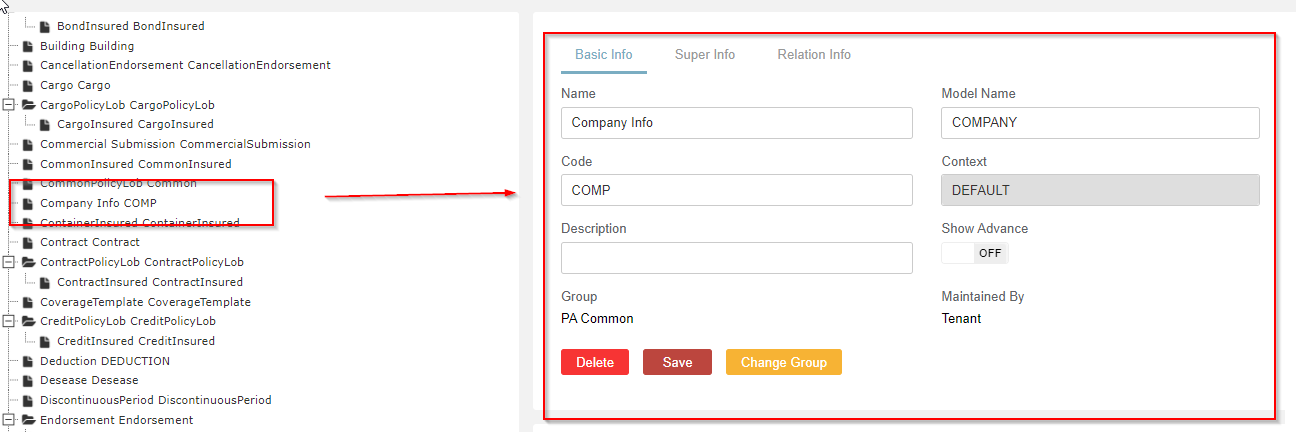
- Confirm that the object is successfully added.
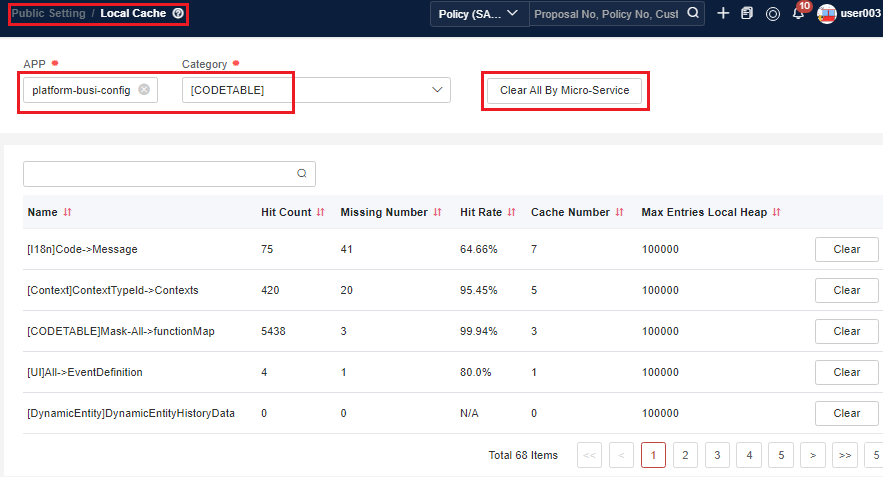
- Enter Public Setting > Local Cache menu, and select platform-busi-config > [CODETABLE]. Then click Clear All By Micro-Service to clear the cache.
-
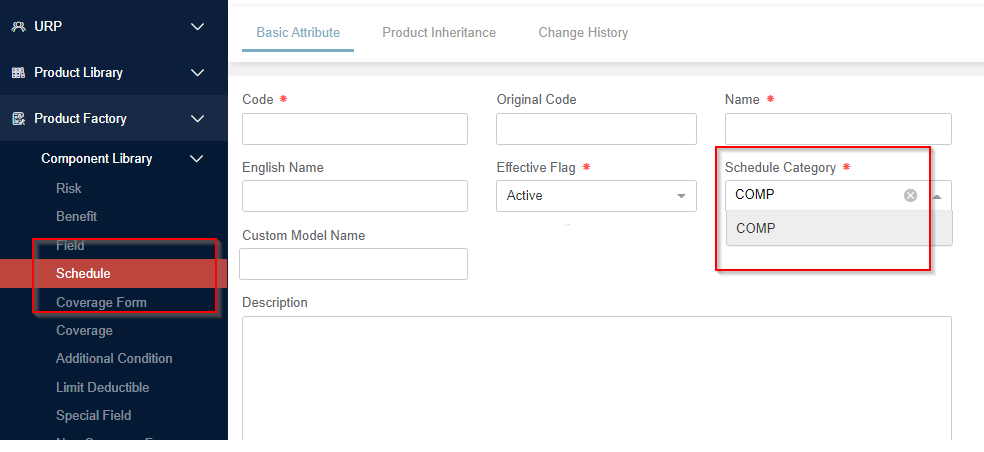
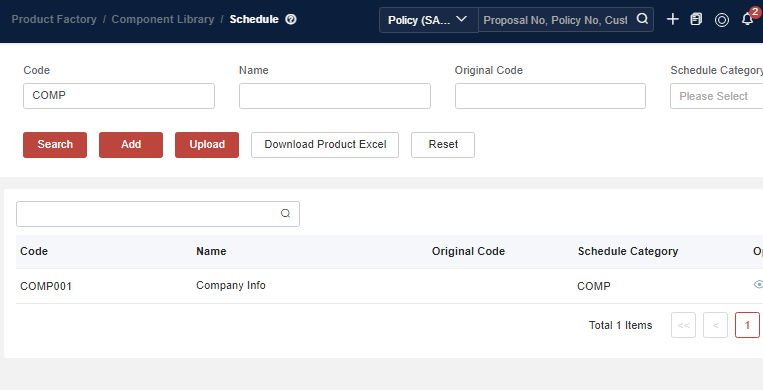
Make sure that the schedule category is added to the schedule library inside the product factory.
-
Add a schedule with the defined category, and then add the schedule to the target technical product and market product. In this way, you can find the DD object with the defined code.
Add a New Dynamic Object to Claim (GI Business Only)
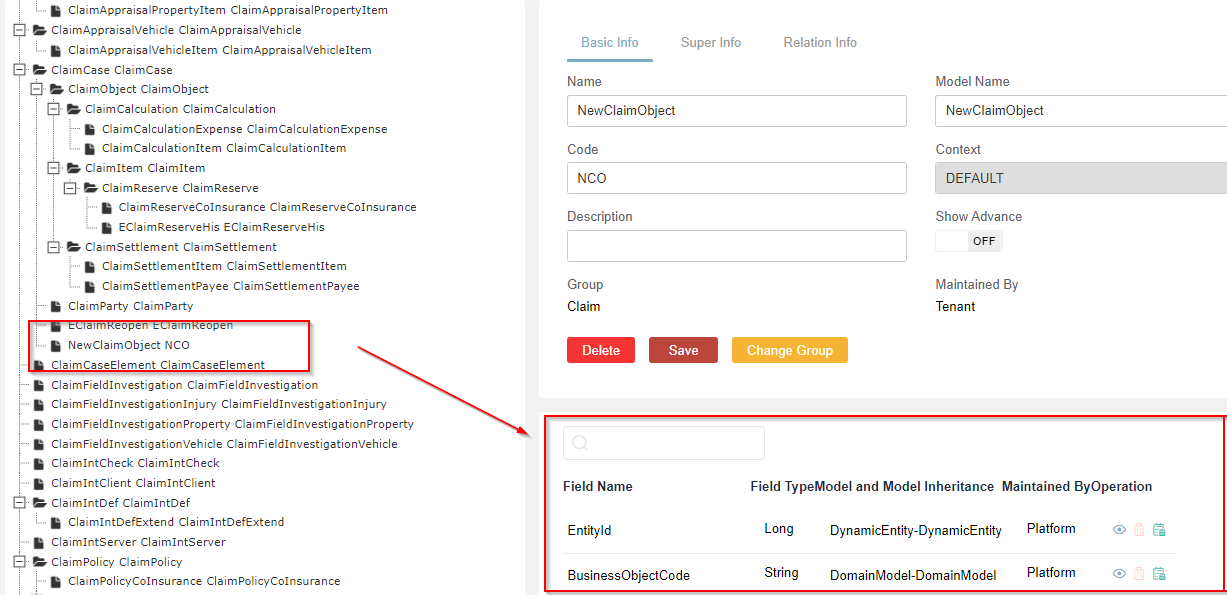
Sometimes, it is essential to extend the generic object due to business requirements. Add a new object under an existing object as follows:
Please note that the dynamic object must be attached under the claim case model tree.
- Locate the correct module/group/context and click Add Object.
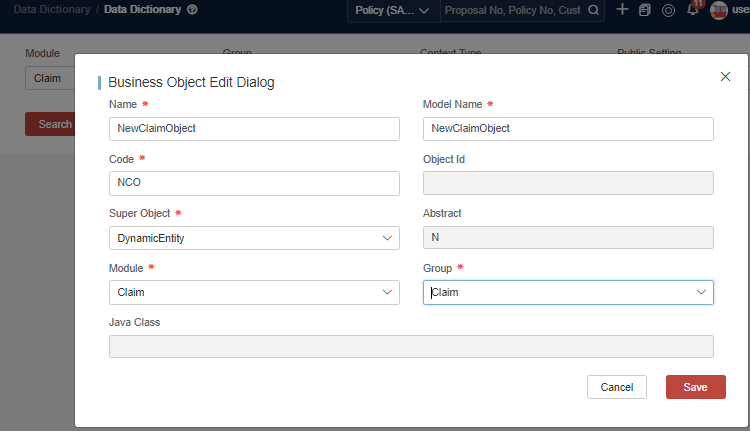
- Confirm that the object is added and fetch the Object Id.
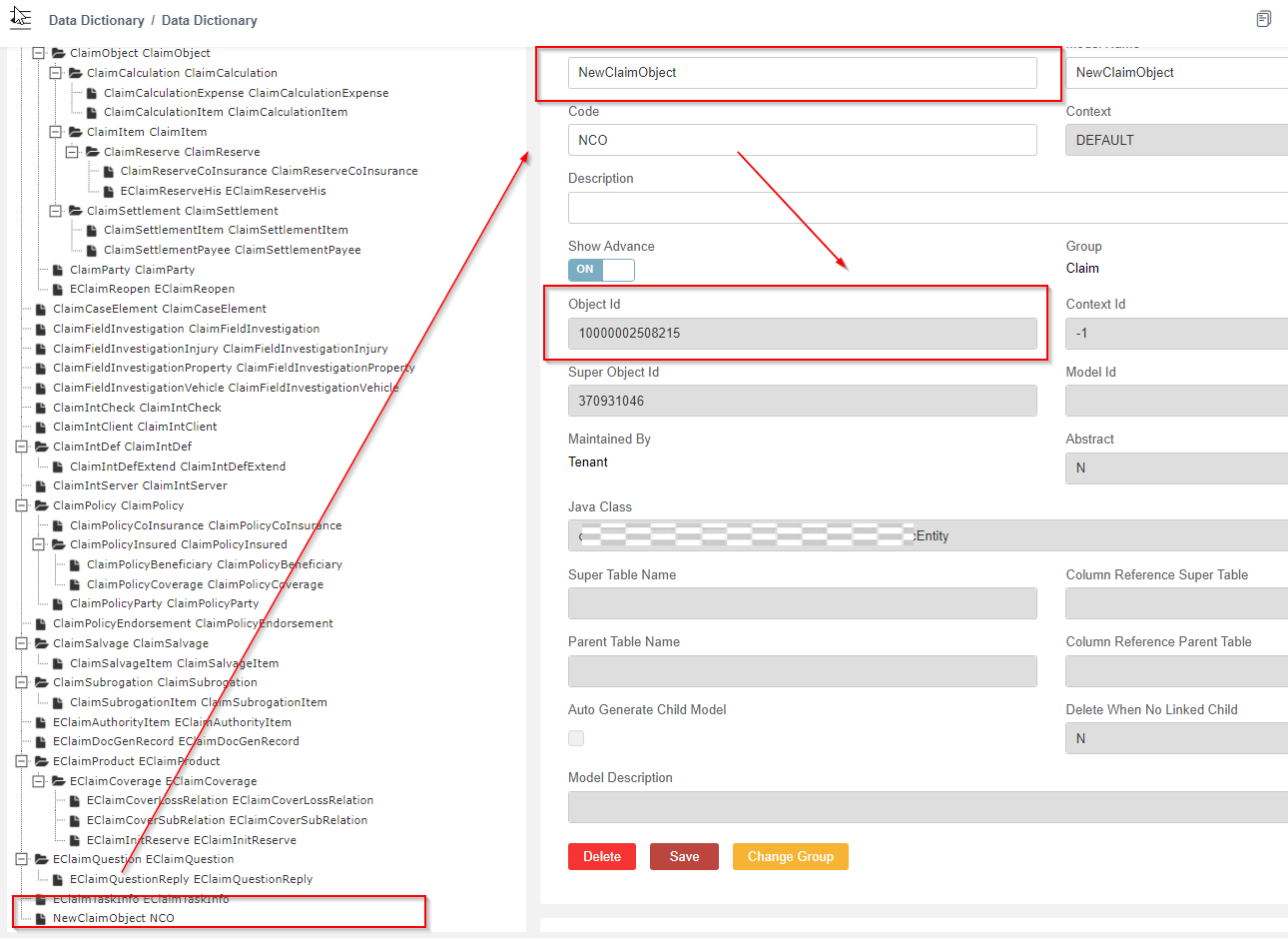
- Locate the parent object and add a new object relation.
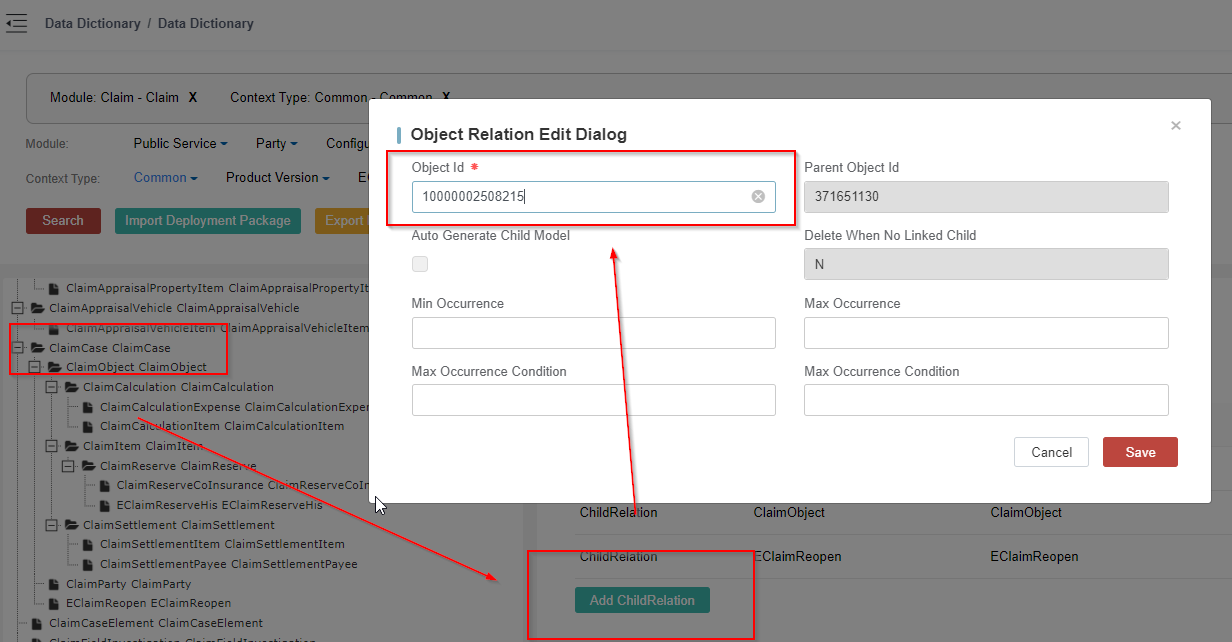
- Complete the process.
Update Object
The objects maintained by the platform cannot be updated by the tenant.
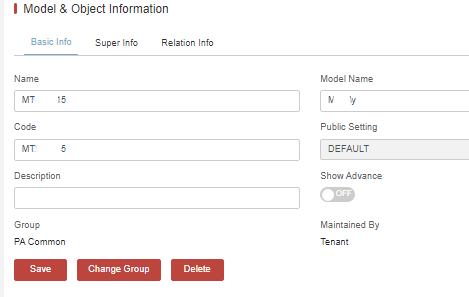
Update the Basic Information of the Object
Only tenant-owned objects are allowed to be updated, while platform-owned objects are NOT allowed to be updated by tenant.
Update the basic information and click Save.
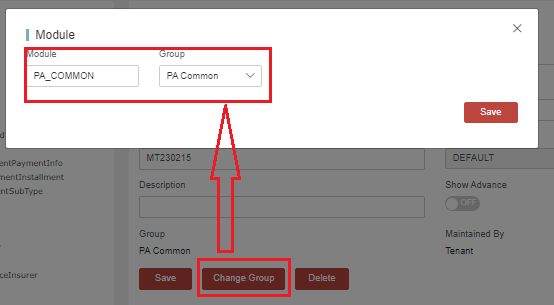
Update Object Group Information
Update object context (group) information and click Save.
Update Object for Field Binding
-
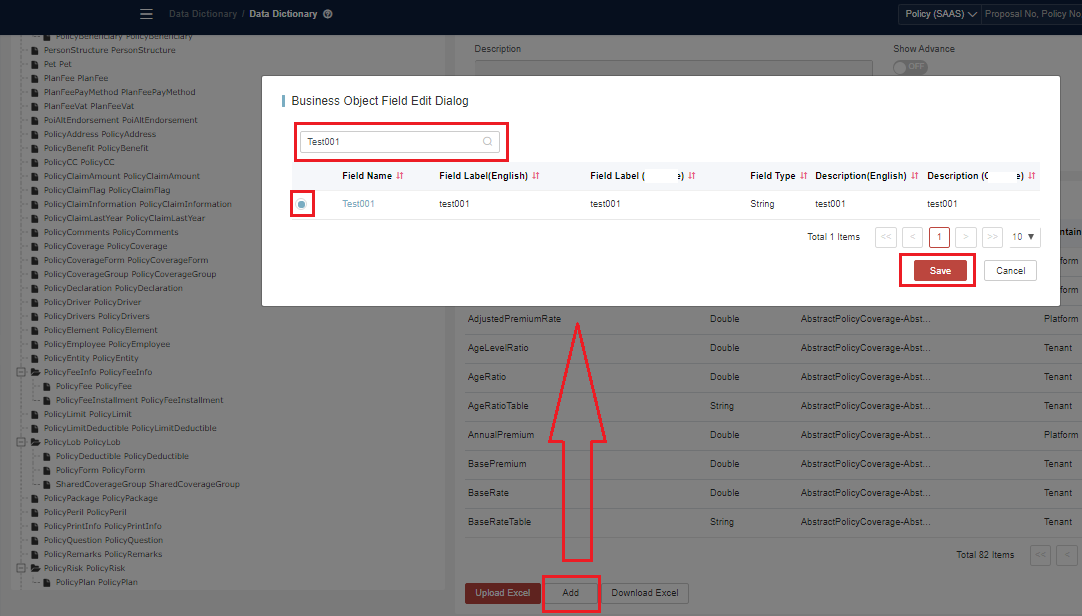
Add Field Binding
Click Add to display the add binding dialog.
Search and select a field, and click Save to display the binding field edit dialog.
Edit the binding field information and click Save.
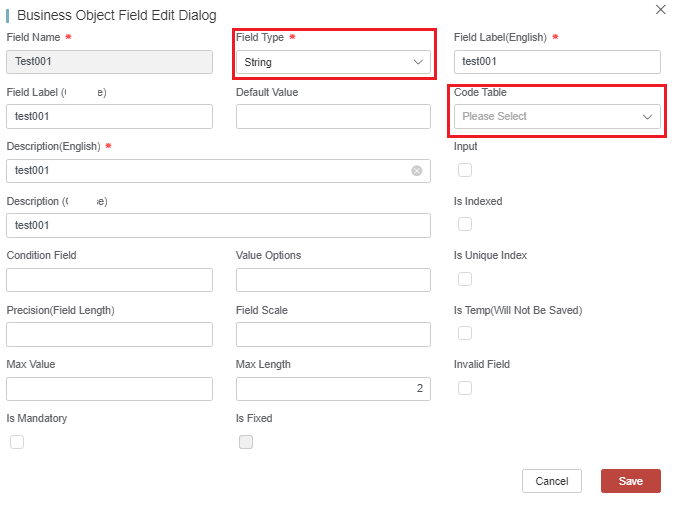
Related tabs on the UI:
- Field Type: Allowed to be changed when mapping it to model. The validation API will check the field’s data type.
- Code Table: The associated code table of the field. If set, the input value of field must be within the range of the code table ID. Otherwise, the validation will fail. The validation API will check whether the field’s value is in code table. If the code table is a large table (with more than 1000 data records), it will not be validated.
- Condition Field: Marks the relevant condition field. For example, for a vehicle, “make” can be set as the condition field of “model”. It is just used to mark information.
- Value Options: Options for the field. They are just for mark, not used during validating the input values.
- Precision: Sets the length of numeric field. If set, the input value of the field must match the set precision. Otherwise, the validation will fail. The validation API will check it.
- Field Scale: Sets the decimal places of numeric field. If set, the input value of the field must match the set scale. Otherwise, the validation will fail. The validation API will check it.
- Max Value: Sets the maximum value of the numeric field. If set, the input value of the field must be less than or equal to the maximum value. Otherwise, the validation will fail. The validation API will check it.
- Max Length: Sets the maximum value of the string field. If set, the length of the input value of the field must be less than or equal to the maximum length. Otherwise, the validation will fail. The validation API will check it.
- Input: Flags whether the field is entered in the request or output in the response.
- Is Indexed: Flags that the field will be used as an index field.
- Is Unique Index: Marks the field as unique index. It can only work when ”Is Indexed” is set as Yes. For Policy, after field set to be unique index, the field’s value must be unique. It will be checked during the saving of a quotation/proposal.
- Invalid Field: Indicates the field is not recommended now.
- Is Temp: Flags that the field will not be saved to the DB. The temp fields are always used to store intermediate value for ratings/rules.
- Is Mandatory: Flags that the field is mandatory. If it is selected, you must enter it in the request. Otherwise, the validation will fail. The validation API will check it.
- Is Fixed: By default, there is no need to set it. It is always used by application developers to flag fixed fields.
info- Field Scale and Precision are two settings for digital field. Precision determines the total number of digits and Scale represents the number of digits after the decimal point.
- Set Precision=3,Scale=1,and the data range for this field is [-99.9 , 99.9]. If the number of data exceed the scale, the data will be rounded. For example, 99.94 will be rounded to 99.9, while 99.95 indicates overflow (100.0), and 99.949 will also be rounded to 99.9. (Note that this is not the rounding logic: 99.949=>99.95=>100.0. Just look at the digit after the scale.)
- For the number “-4.75”, set Precision=3 and Scale=2. The minus sign has nothing to do with precision or scale.
-
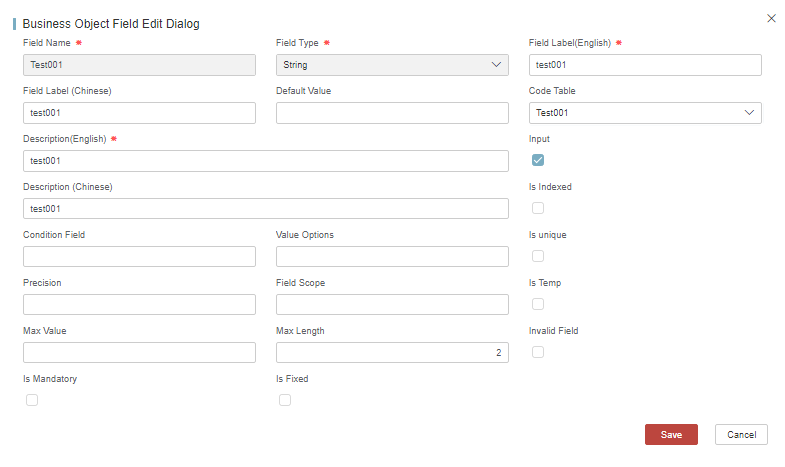
Update Field Binding
Click
 at the end of each line to display the binding field edit dialog.
Edit the binding field information and click Save.
-
Delete Field Binding
Click
 at the end of each line to display the confirmation dialog.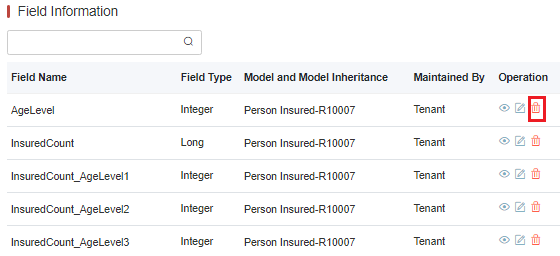
Click Yes to confirm.
Delete Object
-
Delete an object
noteBefore deleting an object, the relation of the target object to parent should be deleted.
Click Delete to display the confirmation dialog.
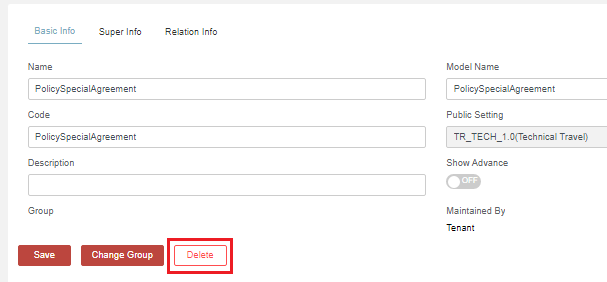
Click Yes to confirm.
Field and Code Table Binding (Mapping) to Object
-
Click Add to display the add binding dialog.
-
Fill in search fields and select the desired one. Click Save to display the binding field edit dialog.
-
Edit the binding field information and click Save.
For the related tabs on the UI, see Add Field Binding.
Field and Code Table Binding (Mapping) to Object - Override
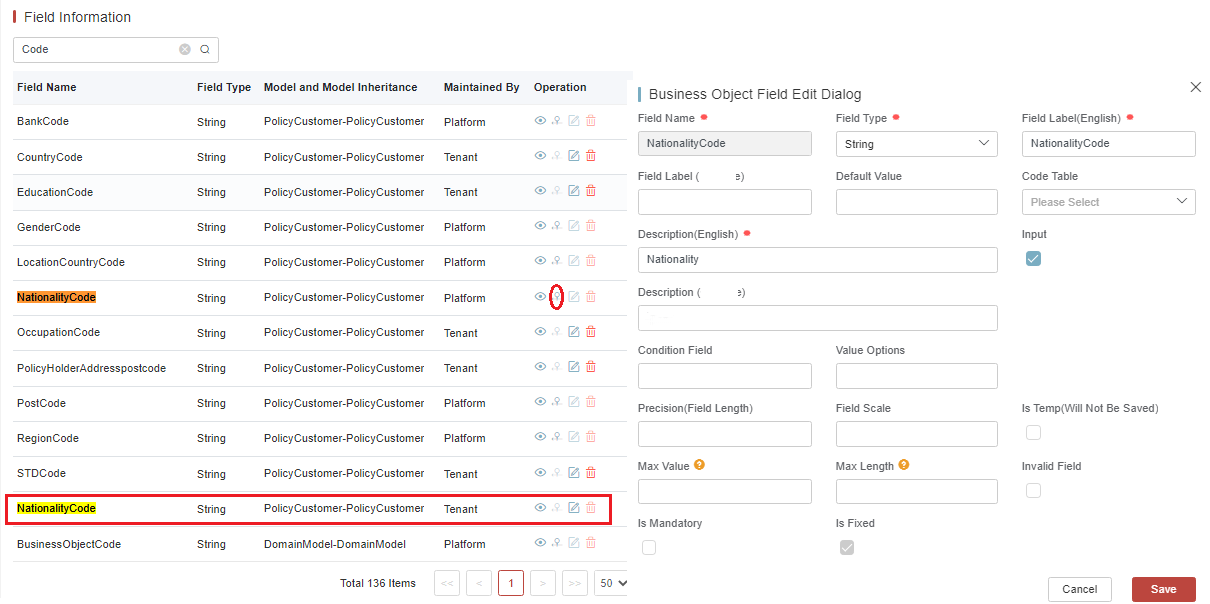
From Version 23.03, our system supports overriding the platform-owned field mapping and making it in tenant level. After being overridden, the mapped code table and the limit can be updated. Especially for overriding code table binding, it will help bypass code table range check imposed in platform validation API.
For the UI related label description, see Update Object for Field Binding
If the overridden field is fixed, it means it is the key words to make the system run. Please do not change the Max Length property. Otherwise, the change can not work and will even cause some issues.
The image below explains how to override a platform field binding and make it a tenant specific field binding.
Map the Objects to Policy Related Model Layers
After creating an object, sometimes you need to map it to a policy-related layer (Policy/PolicyLob/PolicyRisk/PolicyCoverage).
-
Get the Object Id of the newly added object.
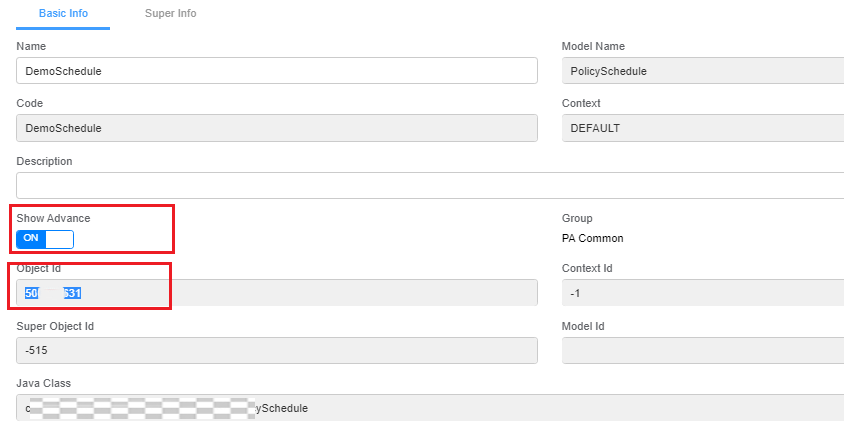
-
Map to the target mapping object. Take the Policy as an example.
a. Select the target parent (super) object, Policy.
b. Click Relation Info.
c. Click Add Child Relation. Enter the newly added Object Id, and click Save.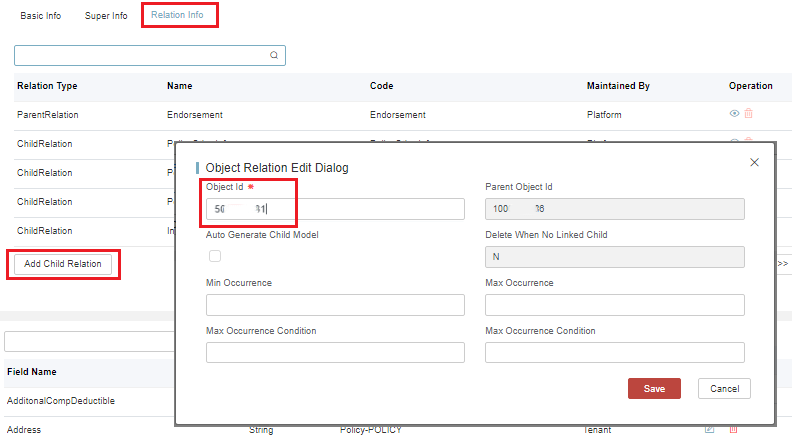
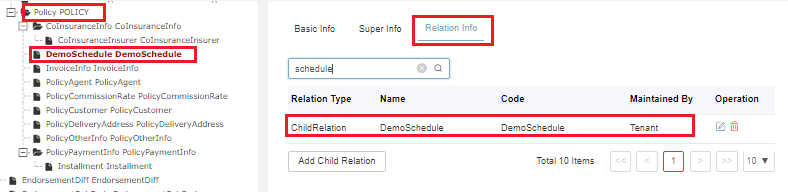
d. Then you can see the tree updated with the expected objects under the Policy and find the child object in the relation list.
Import and Export Object
Export
Select the context and click Search to query the exported data.
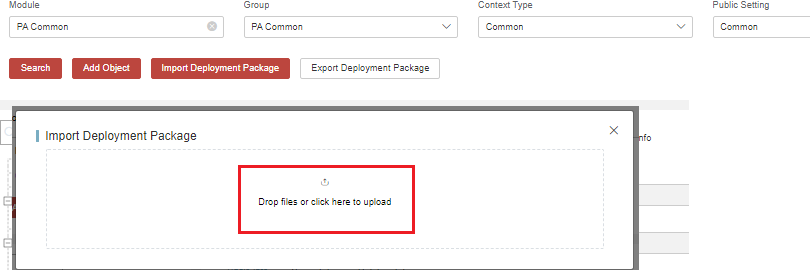
Click Export Deployment Package to get a zip file.

Import
Click Import Deployment Package to display file upload dialog.
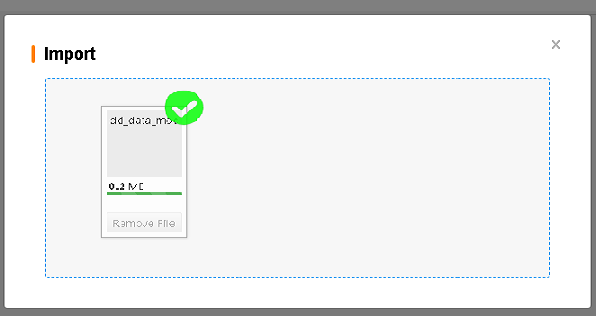
Import the zip file successfully by placing it into the area.
Field Maintenance
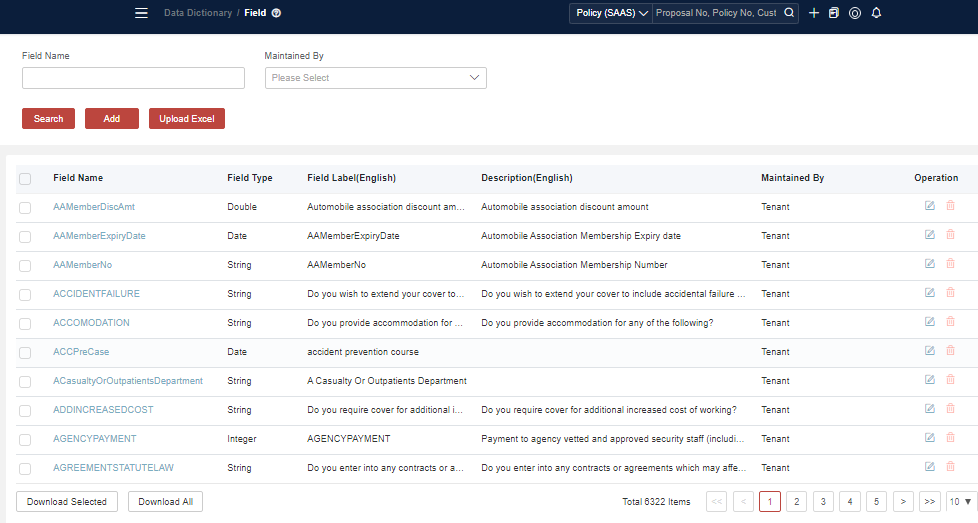
Field library refers to the centralized pool for all fields where you can perform some retrieval on fields like sum insured and other business data.
Some basic field names are currently defined in the system.
Search Fields
-
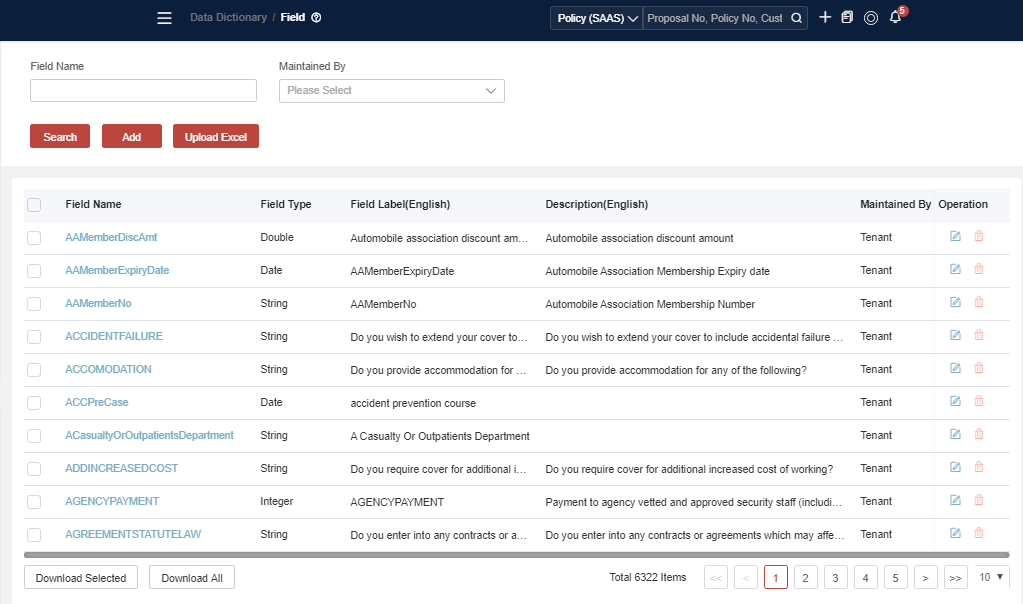
Search fields
Click Search directly.
-
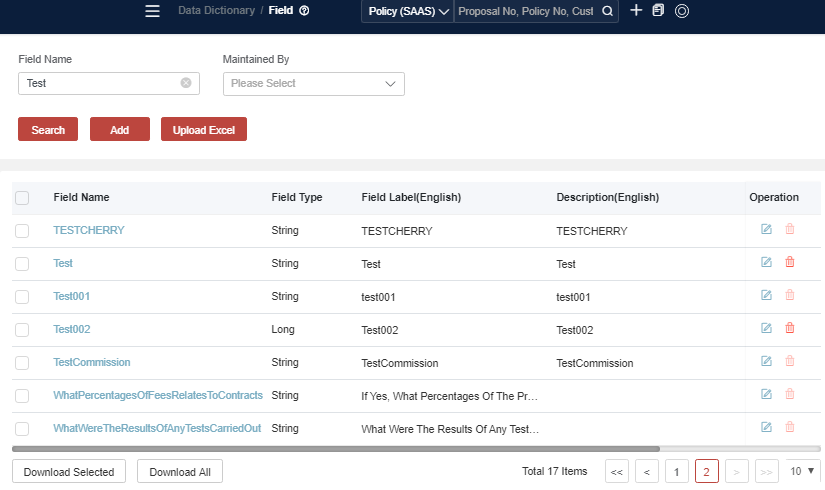
Fuzzy search for fields
Input keywords and click Search.
-
Get the details of the field
Click
at the end of each line to display the details dialog.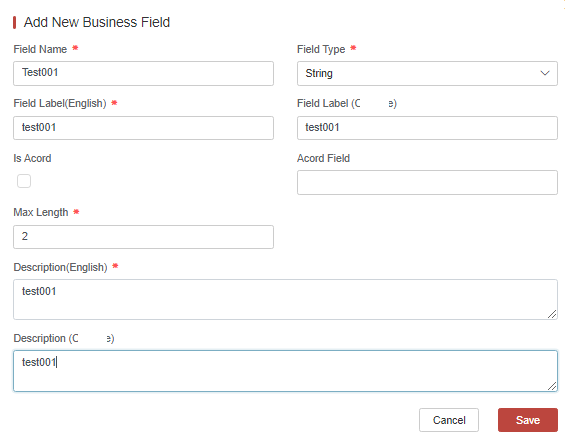
Add a New Field
-
Click Add to display the new field dialog.
-
Enter the field information and click Save.
- Field Name: self-defined
- Field Type: data type of the field.
- Field Label: the expect label showing on UI.
- Is Acord: flags to label it Acord or not.
- Acord Field: when “Is Acord” is flagged, Acord Field needs to be set.
- Max Length: field value’s maximum length. If value’s length exceeds it, the validation will fail.
- Description: marks information for it.
System Keyword Fields
The following system keywords are used by convert/revert mapping. Please do not use them as business fields.
{
        SpecialFields.add("@pk");
        SpecialFields.add("@_type");
        SpecialFields.add("parentPK");
        SpecialFields.add("ConvertObjectCode");
        SpecialFields.add("Product");
    }
Update Fields
-
Click
at the end of each line to display the edit dialog. -
Update the field information and click Save.
Download and Upload Fields
- Select the existing fields you want to download.
- Click Download Excel.
- Edit it locally to add the required fields.
- Click Upload Excel.
After uploading, if the field exists, it will be updated. If it does not exist, it will be added.
Field Naming Rule
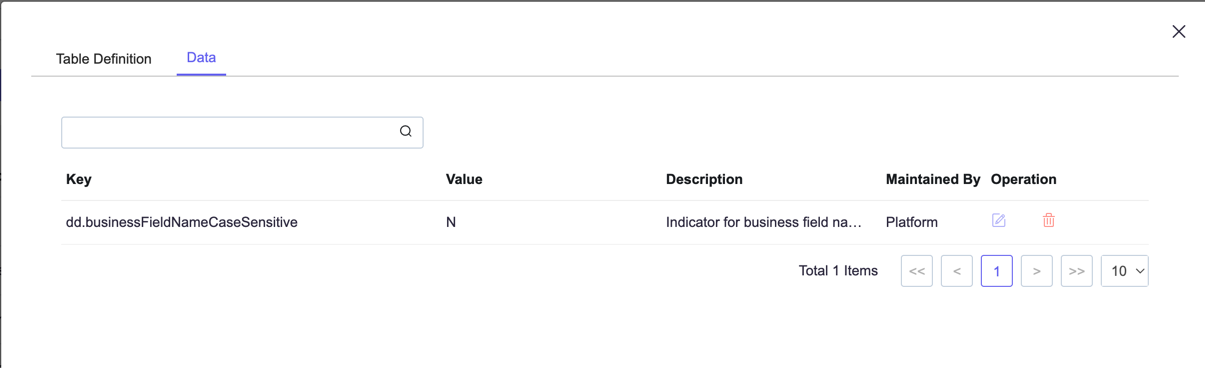
To avoid confusion caused by case-sensitive names, the platform will validate field names when creating fields. The default rule is case-insensitive. If you do need to create case-sensitive fields, please set the global parameter accordingly.
Go to Global Parameter, and find BusinessConfigTable, override the config item dd.businessFieldNameCaseSensitive value to Y
Scenario Study
Field Binding Creation
-
Comprehend the EXACT meaning of the field and which model it will bind to.
-
Search whether the field or a similar field has been bound to the target model, see Field and Code Table Binding (Mapping) to Object. If it is bound, it can be used in the front-end directly. Otherwise, go to the next step.
-
Search whether the field is defined in the field library, see Search Fields. If it is not defined, it needs to be created, see Add a New Field.
-
Create a new field binding in the target model, see Field and Code Table Binding (Mapping) to Object with the field identified in the previous step.
Field Validation
When a field is mapped to an object, we always define the code table with its maximum length. The system supports validating it when calling validation APIs.
- The value of the field does not match the defined data type.
- The value is not in the code table (ID column).
- The value length does not match the defined one.
- The structure is inconsistent with the market product. For example, the benefit is set as an incorrect coverage, or it is not defined in the market product.
- Some system-required rules like the PolicyLob should be there and Risk should be under the PolicyLob.
Case Study General Insurance Policy Model
DD is most commonly applied within general insurance policy management. To understand the policy model, you need to first distinguish between a product and a policy.
Every product has a specific definition. For example, a fire product has a risk definition equivalent to the type of location with some basic clauses and coverage attached. However, when the end customer selects or purchases a product, it is an individual decision.
For one product, 10 customers may insure 10 individual policies. One policy has one risk definition, but there might be multiple instances of risk on a single policy. Each risk may have multiple different clauses and coverage. Sometimes, we can also refer to a product as a definition data, while there is a policy product as the instance data.
While a set of fields is used in the product definition process and can also be maintained in DD, it is vitally important for DD to consider what it does for the policy. Almost all rule checks and premium calculations rely on the policy. For example, in the underwriting rules configuration, some values must always be obtained from the policy for check.
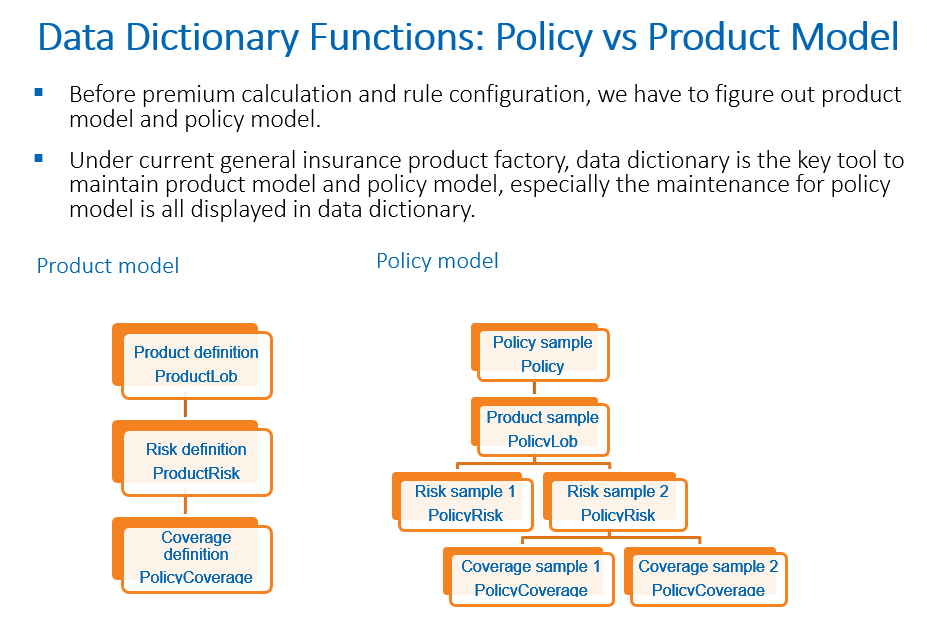
Therefore, you can see the data model relationship between product definitions and policies in the following way.
First, there is a product definition model which maintains all product attributes filled during the product configuration. It usually follows a standardized format and requires minimal customization.
Once the product has been configured, the system allows for the generation of the appropriate policy product model based on the product structure. Currently, all policy product models are generated at the technical product level. It means that if the technical product configuration is complete, it will be synchronized to DD to help generate the policy product models.
Meanwhile, there can be some generic models for policies, such as customer payments, which can be reused regardless of the actual product. For example, all products will share the same set of fields for payment methods or customers.
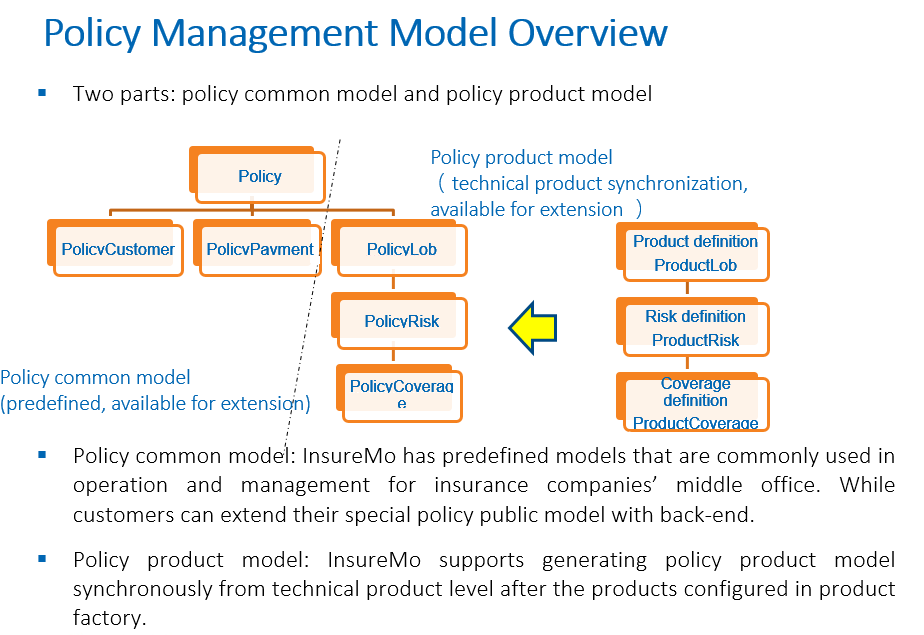
To further understand the relationship between products and policies, see Product Factory.
FAQs
If I need to practice DD configuration, what is the most practical way to start?
We recommend following this guide and starting with a policy-based generic model. In over 80% of scenarios, our work will focus on the policy domain and deal with the models mentioned here.
First, for the scope of operations, look at the policy commons area and understand the models such as policy commons, invoices, agents, customers and commission rates. It also involves examining the list of fields associated with each model and comprehending their descriptions.
Second, look at the sample configured technical product and understand the differences between the technical product structure and the policy structure, such as that between policy risk and product risk, and between policy coverage and product coverage.
Third, look at the data tables and code sheets. Here are some platform-level embedded tables for quick understanding and reference.
What is the difference between a data dictionary (DD) and a field library?
DD is user-oriented. All fields on a policy need to be bound in DD to be used in the policy domain.
In some scenarios, there are common fields such as annual premiums, pre-tax premiums and commissions that apply to policy coverage and policy risk. If we can define the name and description of the commission, and whether the commission type is text or numeric in the field library, it will greatly reduce the redundancy in the field.
During DD configuration, it is always necessary to define the field library first and then bind the fields to specific objects in DD for use in the policy.
I have wrongly created an property object under policyCoverage object. How to delete it?
All object deletion operation needs to be done manually. Please follow these steps:
- Click on policyCoverage, then go to the “Relation Info” tab.
- Find the model (“property”) you want to delete and first remove its relationship with policyCoverage (click the delete icon in the relationship row).
- Then find the model (“property”) again, click on this model and press the delete button to permanently delete it.
Please be extremely careful when operating the object deletion especially when there’s business data already generated in any environment. Data recovery is extremely difficult and troublesome.