Basic Concept
Search Index is a module that offers users the capabilities to perform data related actions such as adding, updating, deleting, and querying data on top of our InsureMO search engine. By use of search engine, not only DB pressure can be greatly reduced, but also the user will be able to perform all kinds of query method which cannot be well supported via DB script.
Now most platform domains now feature some search API that interacts with the search engine. Also, with the help of index management UI, the user will be able to dynamically expand index fields for more search criteria.
This document will provide comprehensive introduction as to how to search data via search engine and how to maintain the data in the search engine.
User Scenario
This feature is designed for anyone who wishes to use our platform to expand or customize search criteria.
Composition of Index Management
Index Management primarily consists of two main components:
- Index represents a search domain itself, such as policy, claim, or sales channel.
- Index Field refers to individual search fields within the index.
It differs from the underlying platform’s Search microservice, which maintains the index and implements index-based search functionality.
On the backend, we utilize Elastic Search (ES) Engine, the industry’s most widely used search engine.
Index Management
Upon tenant creation, a series of pre-embedded indexes and APIs become available on the platform for domain-based business queries. These include:
- Policy
- Endorsement
- Claim
- Accounts Receivables/Payable (AR/AP)
- Collection
- Payment
- Sales Channel
- Plan
If the provided fields are insufficient, you can dynamically extend index fields using a data dictionary-based index field configuration.
For special cases where new field data needs to be indexed and searched, we can assist in creating a new index. For more information, contact the platform team.
For large amounts of configuration data, we also offer the ESCodeTable mechanism, which functions as a dynamic index allowing users to write and retrieve data.
Performance Considerations
From a business perspective, ES is ideal for transactions involving large datasets and fuzzy search requirements. However, we do not recommend using ES for all scenarios, particularly for low-frequency transactions such as commission or agent statements, which are only generated monthly. In these cases, DB search is a more suitable approach.
To ensure performance, each index is query-limited at the platform level to return only the maximum number of records, enhancing search safety and stability.
The Search API is currently limited to returning a maximum of 1,000 records. Here’s how it works:
If there are 134 records:
- Searching with PageNo=1 and PageSize=100 returns the first 100 records.
- Searching with PageNo=2 and PageSize=100 returns the next 34 records.
- Searching with PageNo=3 and PageSize=100 returns no records.
If there are 1340 records:
- Searching with PageNo=1 and PageSize=500 returns the first 500 records.
- Searching with PageNo=2 and PageSize=500 returns the second 500 records.
- Searching with PageNo=3 and PageSize=500 exceeds 1,000-record limit and prompts an error message Current search reaches max result count: 1000,message:Current search reaches max result count: 1000.
This 1,000-record limit is sufficient for UI display and selection, as users cannot browse through such a large number of records and must specify clearer criteria for operations.
In cases where users need to generate reports with more than 1,000 records using search engine-powered APIs, iteration logic must be implemented to process records in batches. For example, to search for the latest 340 policy records, users can use policy ID as a search criterion, sort by policy ID first. Then, add a criterion requiring the policy ID to be greater than the maximum policy ID from the first search result in subsequent searches.
Please note that similar limitations are imposed in our Rainbow UI framework. Users will not be able see records more than 1,000. For instance, if there are 1,020 records and 30 rows per page, users will only see a table with a maximum of 33 pages.
UI Operation Guide
All operations outlined in this guide must be executed within the Master Configuration (MC) portal environment. They are prohibited in other environments, except for troubleshooting purposes.
Maintaining Index Field
In most scenarios, you’ll only interact with the platform’s default indexes and extended index fields. Once you’ve located the index and click Edit, you will encounter the following interface.
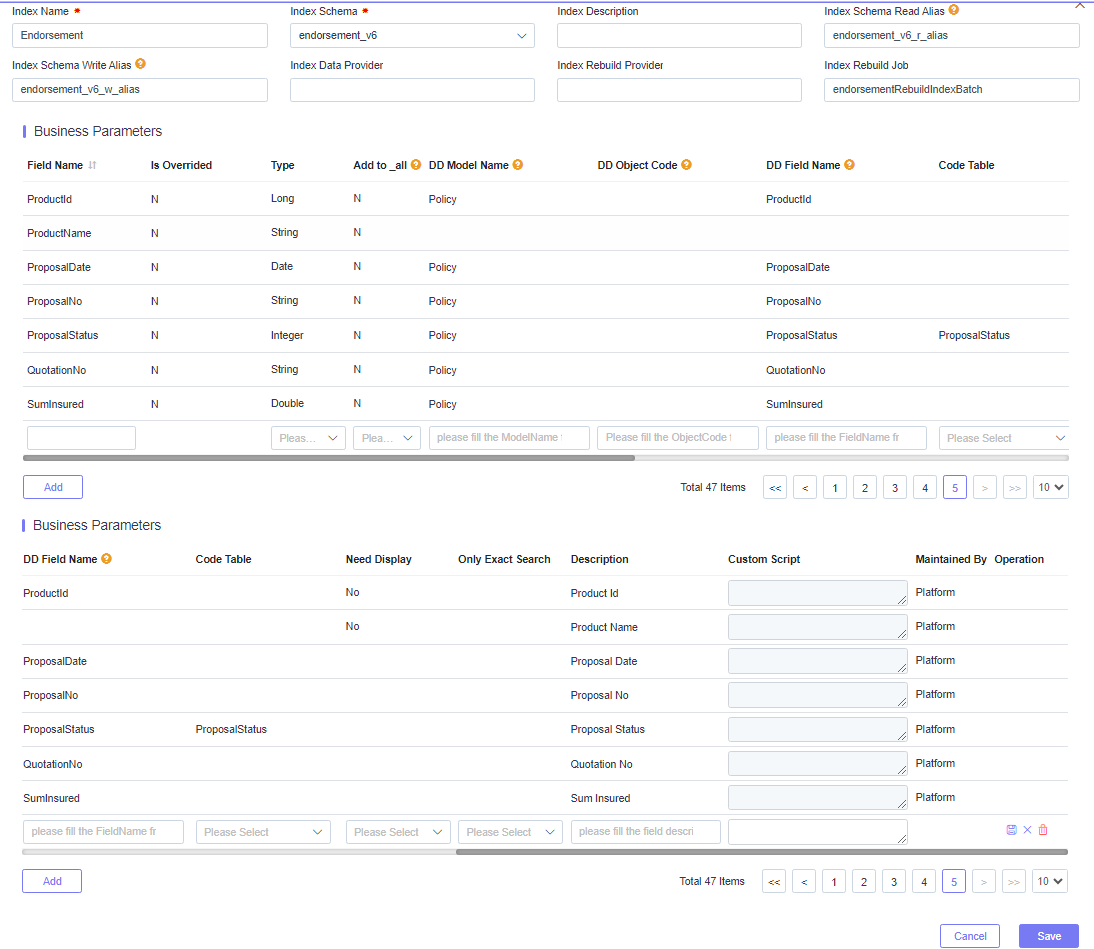
Field Overview:
- Field Name: The name of the index field.
- Is Overridden: Automatically set by the system. If index field has already been set by the platform, then when the tenant adds the same field, it will be set as Yes.
- Type: The index field data type.
- Add to_all: Select Y if this field needs to be added to a common field (the common field is used to search by one common field).
- DD Model Name: Map to the data dictionary, or leave blank if not required.
- DD Object Code: Map to the data dictionary, or keep blank if not required.
- DD Field Name: Map to the data dictionary, or keep blank if not required.
- Only Exact Search: If Yes, then the field only supports exact search. If the field is queried by fuzzy conditions, no result will be returned.
- Code Table: If Yes, the platform’s PAAS Query will display it as as a dropdown list.
- Need Display: If Yes, the platform’s PAAS Query will display it as an automatic display column.
- Description: If set to a non-null value, the platform’s PAAS Query will display it as a UI label.
- Custom Script: If the field can not be gotten by Model + Field, then you can try to code a script here.
- Operation: Delete the field (only used when adding an index or a new field).
For Custom Script, there’s a requirement to set the PolicyHolderIdNo as the PolicyCustomer with “IsPolicyHolder” set to ‘Y’. Here’s the script:
def policyHolders = binding.model.lookupChildObjectListCascadeByExpression("PolicyCustomer", "IsPolicyHolder == 'Y'")
def policyHolderIdNo = null
if (policyHolders.size > 0) {
   policyHolderIdNo = policyHolders[0].lookupVariableDirectly("IdNo")
}
return policyHolderIdNo
Adding A New Index Schema and Index
Before adding a new index, please contact the InsureMO operations team for guidance, as it requires advanced technical skills.
An index schema is the same as tables in a Database (DB), and only related indexes can be created in the same schema. Typically, a new index schema is necessary before adding a new index.
If you need a new index schema, create it first.
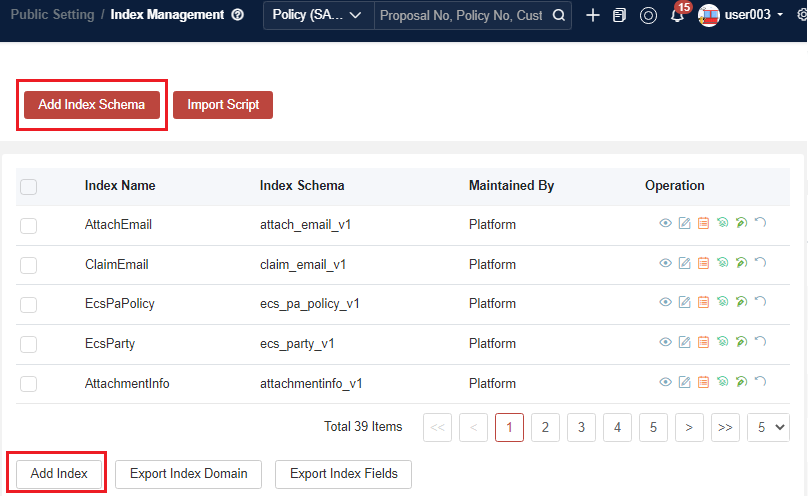
To add a new index, only the Add Index step is needed. For rebuilding an index, other steps are needed.
Before selecting an index schema, you must fill in the index name, model name (sourced from the data dictionary or use arbitrary numbers if not needed), and main analyzer (select edge for now, and it will be removed in the future).
The index data provider, index rebuilding provider, and index rebuilding job are specific to Policy indexes; they are not required for new indexes.
The rebuild status field does not need to be filled in.
Select N for the Sign field (this option will be removed in the future).
Rebuild Index Data
The index data of Policy/Proposal is generated from the index fields that exist at that time, so the index data cannot be updated after a new index field is added to Policy/Proposal.
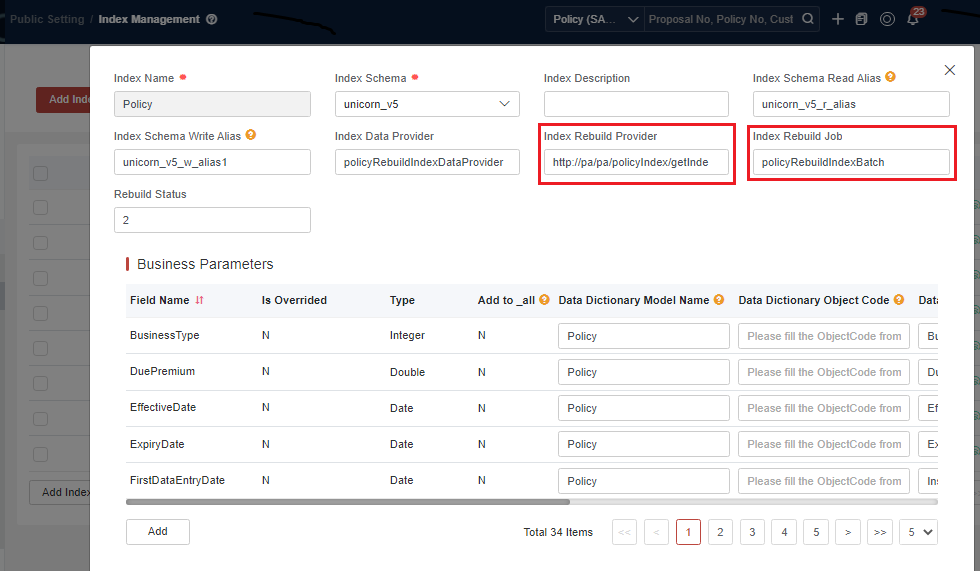
There is only one way to update the index data of a Policy/Proposal, that is, to rebuild the procedure about the index batch, named policyRebuildIndexBatch or policyAdminRebuildIndexBatch for policies.(policyRebuildIndexBatch is renamed to policyAdminRebuildIndexBatch from Version V23.04, it can rebuild policy, endorsement, and group policy risk/schedule index.)
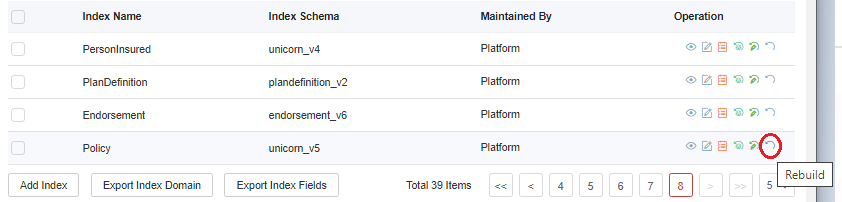
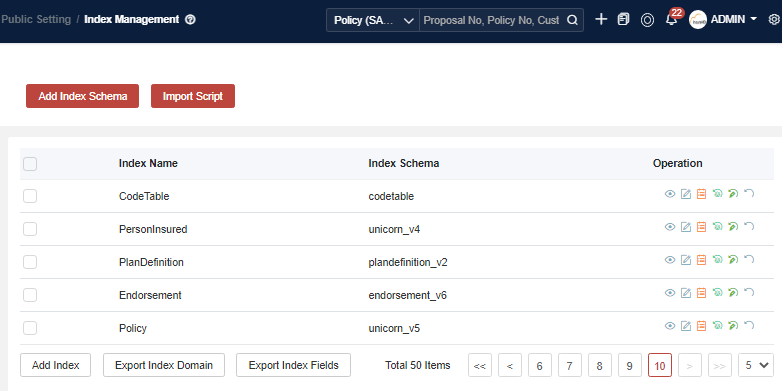
For how to rebuild the index data, take policy as an example:
- The label of the batch job that triggers policyRebuildIndexBatch.
The index related batch as below,
- Policy: policyRebuildIndexBatch or policyAdminRebuildIndexBatch
- Endorsement: endorsementRebuildIndexBatch or policyAdminRebuildIndexBatch
- SalesChanel: salesChannelIndexRebuildJob
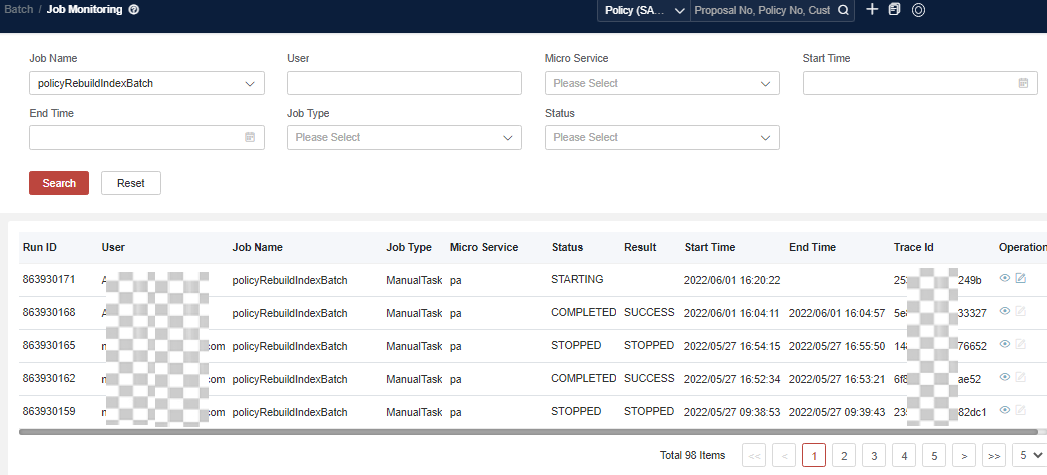
- Monitor job status and view job logs.
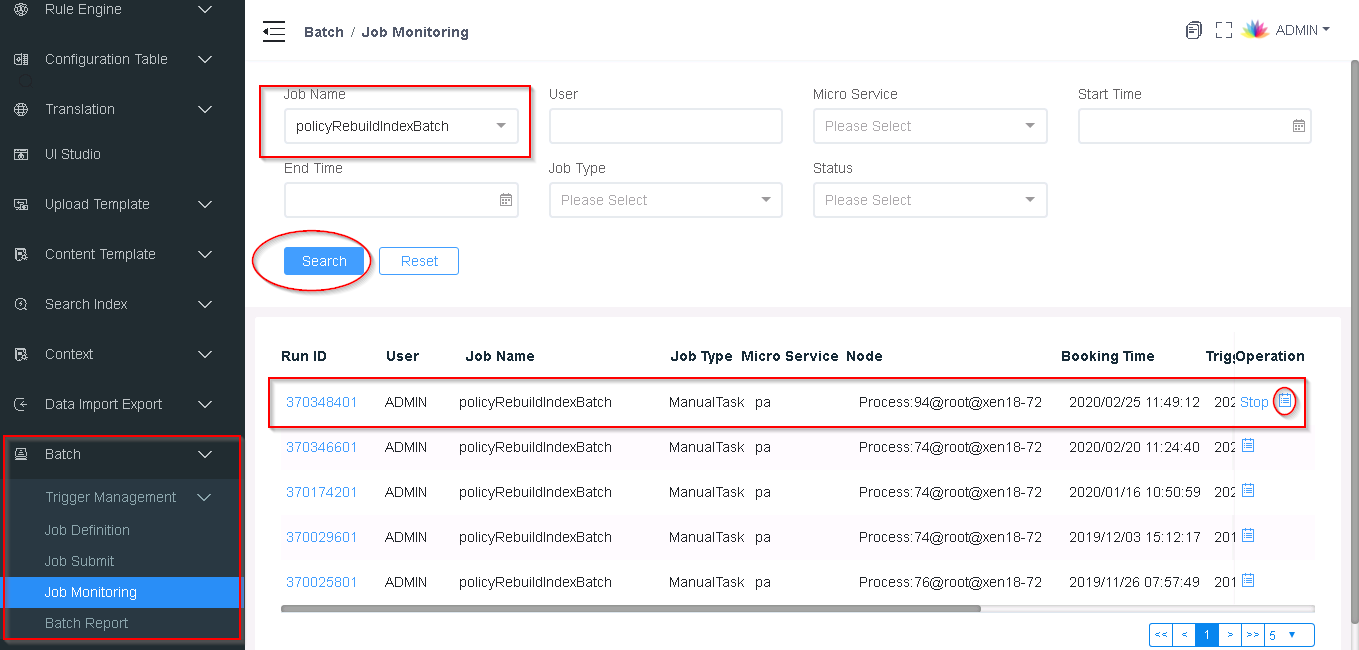
- Confirm job successfully by job time and job status, and confirm that the policy index data is renewed.
Rebuild Index Structure (Deprecate)
If you need to change the field type or delete the field, you need to rebuild the index. Check through Copy.
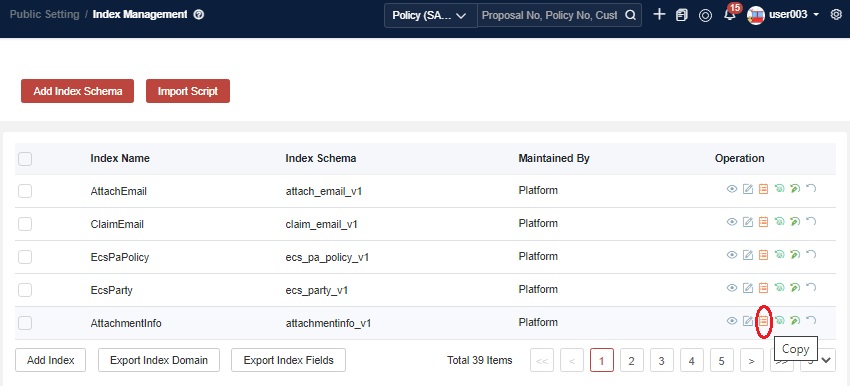
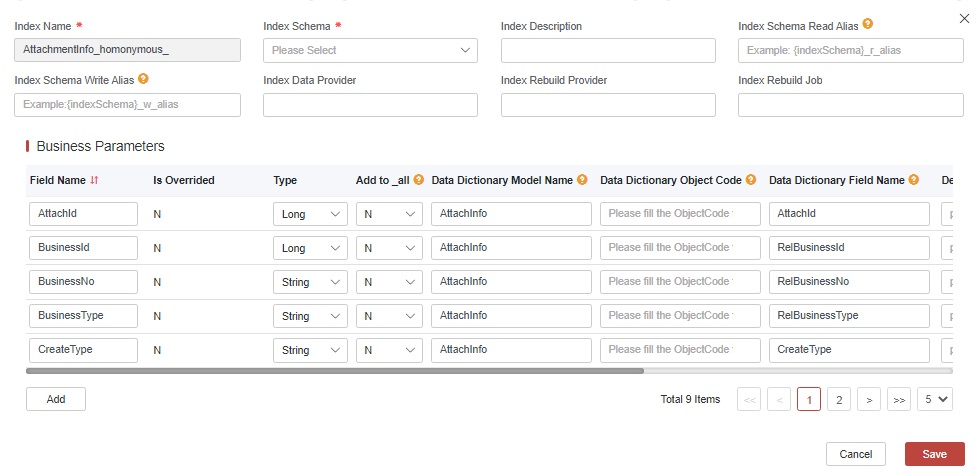
As you can see, you have permission to change the existing fields. When you have dealt with the changes, save them, and then check the migration.
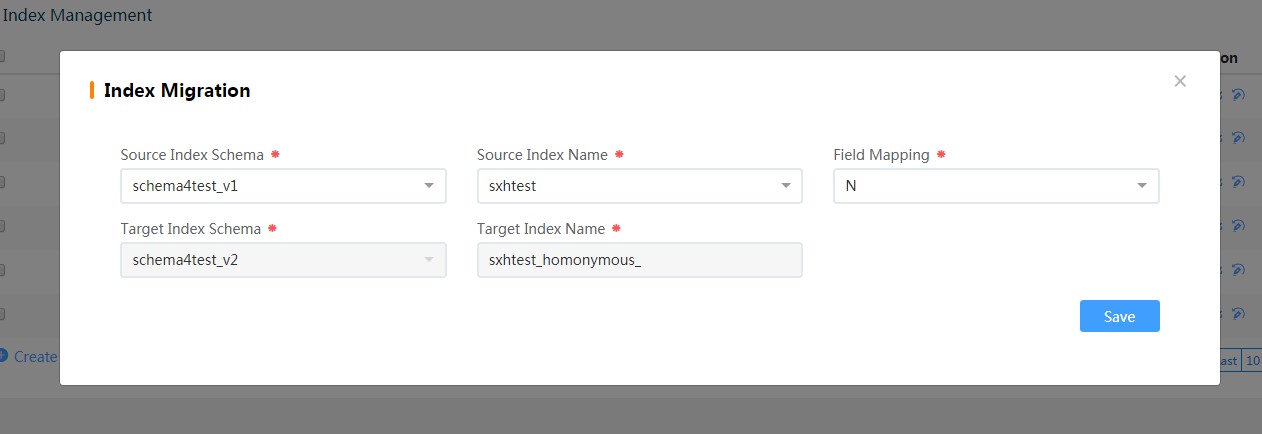
Source index schema and source index name are the indexes you need to change before. Then the data will be copied to the new index. Finally, the indexes will be swapped.
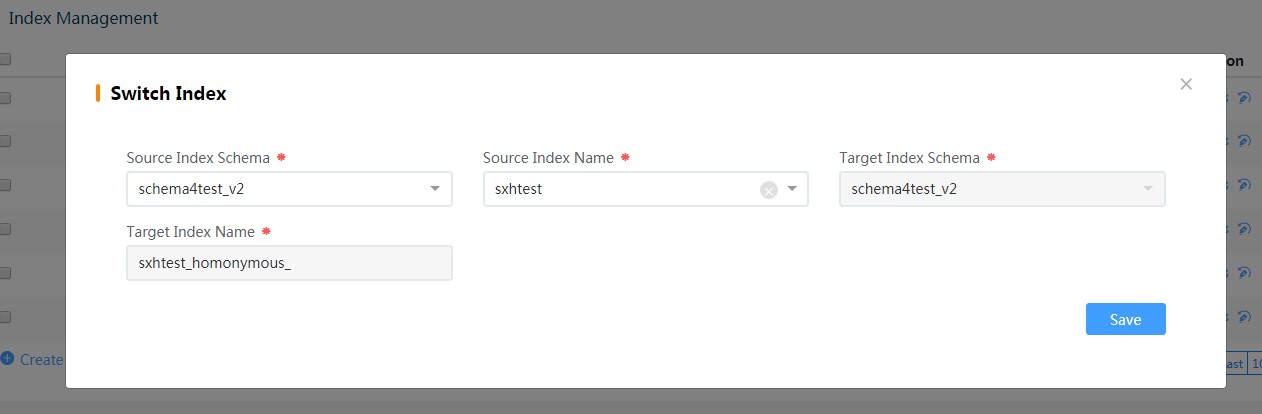
This step only changes the index name to the new one and finishes rebuilding the index structure.
Configuration Data Import and Export
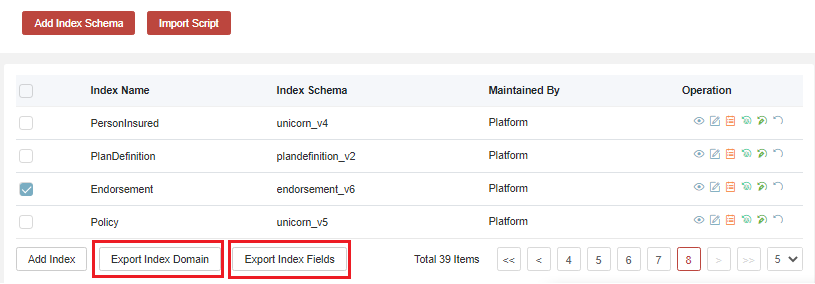
Once you make all the changes, you will need to Export Index Domain first to export index definition data, then Export Index Field to export index mapped fields.
Comparison Between Base Query and Advanced Query
Comparison of searchRuntimeService
| Base Query | Advance Query |
|---|---|
| searchRuntimeService.queryBaseResult(searchCondition) | searchRuntimeService.advancedQuery(searchConditionRequest) |
Comparison of Structure
| Base Query | Advance Query | Comments |
|---|---|---|
| Conditions | conditions | - |
| fuzzyConditions | fuzzyConditions | - |
| inConditions | inConditions | - |
| notInConditions | notInConditions | - |
| ExistFields | ExistFieldsConditions | - |
| NotExistFields | NotExistFieldsConditions | - |
| fromRangeConditions | gteRangeConditions | Greater than or equal. |
| toRangeConditions | lteRangeCondition | Less than or equal. |
| OrConditions | OrSearchConditionsList | OrSearchConditionsList in advanced Query can implement all "OR" situations in base Query. |
| OrConditionsList | ||
| OrFuzzyConditions | ||
| OrFuzzyConditionsList | ||
| OrInConditions | ||
| SortFieldAndTypeList | SortFieldAndTypeList | - |
| AggConditions | AggConditions | - |
| GroupField | GroupField | - |
| IncludeFields | IncludeFields | - |
| GtRangeConditions | Greater than. | |
| LtRangeConditions | Less than. | |
| InFuzzyConditions | - | |
| NotInFuzzyConditions | - | |
| NotSearchConditionsList | - |
Backend Development & API Usage Guide
Dependency
Please add this dependency to your source code project first:
<dependency>
	<groupId>com.ebao.vela</groupId>
	<artifactId>vela-search-runtime</artifactId>
	<version>${project.version}</version>
</dependency>
Base Query Search Criteria Illustration
searchRuntimeService.queryBaseResult(searchCondition)RESTful API: {domain}/search/public/query/v1/result —the RESTful removed at 20.0.12
SearchCondition Structure
public class SearchCondition
	private Map<String, Object> conditions;
	private Map<String, Object> fuzzyConditions;
	private Map<String, Object> orConditions;
	private List<Map<String, Object>> orConditionsList;
	private Map<String, Object> orFuzzyConditions;
	private Map<String, List<?>> inConditions;
	private Map<String, List<?>> notInConditions;
	private Map<String, Object> fromRangeConditions;
	private Map<String, Object> toRangeConditions;
	private List<Map<String, Object>> orFuzzyConditionsList;
	private String module;
	private int pageNo;
	private int pageSize;
	private String sortField;
	private String sortType;
	private List<Map<String, String>> sortFieldAndTypeList;
Conditions
Exact query, like the term query for ES. For example, query the policy from the policy Index where the policy number is “PCE201809223587”.
JSON Example
{
    "Conditions": {
        "PolicyNo": "PCE201809223587"
}
}
SQL Example
select * from Policy where PolicyNo="PCE201809223587";Groovy Example
setConditions(["PolicyNo": "PCE201809223587"])fuzzyConditions
Fuzzy query, like ES wildcard query. Please note that it can only be used for string type (text types in ES) and fuzzy search flag should be put as “Yes”. For example, query the policies from the policy index where the policy number contains ‘CE20’ and the insured ID number is ‘233455210075’
JSON Example
{
    "Conditions": {
        "InsuredIdNo": 233455210075
    },
    "FuzzyConditions": {
        "PolicyNo": "CE20"
    }
}
SQL Example
select * from Policy where InsureId=-233455210075 and PolicyNo like "%CE20%"Groovy Example
setConditions(["InsuredIdNo": 233455210075])
setFuzzyConditions(["PolicyNo": "CE20"])
On pre-fuzzing, since we use an edge analyzer, it does not lose much query performance, but requires more space to store.
orConditions
Or query, like bool should be in ES query. Please note that these orConditions use internally or externally. For example, query the policies from the policy index where the policy number contains ‘CE20’ and the insured ID number is ‘233455210075’ while also policy types needs to be 1 or print status needs to be 2.
JSON Example
{
    "Conditions": {
        "InsuredId": 233455210075
    },
    "FuzzyConditions": {
        "PolicyNo": "CE20"
    },
    "OrConditions": {
        "PolicyType": 1,
        "PrintStatus": 2
    }
}
SQL Example
select * from Policy where InsureId=-233455210075 and PolicyNo like "%CE20%" and (PolicyType=1 or PrintStatus=2)Groovy Example
setConditions(["InsuredId": 233455210075])
setFuzzyConditions(["PolicyNo": "CE20"])
setOrConditions(["PolicyType": 1,"PrintStatus": 2])
orConditionsList
Or query (support field merge or query), like bool should be in ES query. It is like List < orConditions > which supports multiple orConditions working together.
JSON Example
{
    "Conditions": {
        "InsuredId": 233455210075
    },
    "OrConditionsList": [
        {
        "PolicyType": 1,
        "PrintStatus": 2
        },
        {
        "PolicyType": 2,
        "ProjectName": "Wildlife"
        },
    ]
}
SQL Example
select * from Policy where InsureId=-233455210075 and (PolicyType=1 or PrintStatus=2) and (PolicyType=1 or ProjectName="Wildlife")Groovy Example
setConditions(["InsuredId": 233455210075])
setOrConditionsList([
    [
        "PolicyType": 1,
        "PrintStatus": 2
    ],
    [
        "PolicyType": 2,
        "ProjectName": "Wildlife"
    ]
])
orFuzzyConditions
Or fuzzy query, like bool should be an ES wildcard query.
JSON Example
{
    "Conditions": {
        "InsuredId": 233455210075
    },
    "orFuzzyConditions": {
        "ProductName": "dbc",
        "ProjectAddress": "AddressSample2"
    }
}
SQL Example
select * from Policy where InsureId=-233455210075 and (ProductName like "%dbc%" or ProjectAddress like "%AddressSample2%")Groovy Example
setConditions({
    "InsuredId": 233455210075
})
setOrFuzzyConditions({
    "ProductName": "dbc",
    "ProjectAddress": "AddressSample2"
})
inConditions
In query, like ES query is a key-value mapping, and the values need to be a list. If there are multiple conditions defined, it will be treated as “and” operation.
JSON Example
{
    "Conditions": {
        "InsuredId": 233455210075
    },
    "InConditions": {
        "ProductName": ["dbc","CSQ"],
        "ProjectAddress": ["AddressSample1","AddressSample2","AddressSample3"]
    }
}
SQL Example
select * from Policy where InsureId=-233455210075 and ProductName in ("dbc","CSQ") and ProjectAddress in ("AddressSample1","AddressSample2","AddressSample3")Groovy Example
setConditions([
    "InsuredId": 233455210075
])

setInConditions([
    "ProductName": ["dbc", "CSQ"],
    "ProjectAddress": ["AddressSample1", "AddressSample2", "AddressSample3"]
])
orInConditions
The difference is linked by or than inConditions. If there are multiple conditions defined, it will be treated as “or” operation.
JSON Example
{
    "Conditions": {
        "InsuredId": 233455210075
    },
    "OrInConditions": {
        "ProductName": ["dbc","CSQ"],
        "ProjectAddress": ["AddressSample1", "AddressSample2", "AddressSample3"]
    }
}
SQL Example
select * from Policy where InsureId=-233455210075 and (ProductName in ("dbc","CSQ") or ProjectAddress in ("AddressSample1", "AddressSample2", "AddressSample3"))Groovy Example
setConditions({
    "InsuredId": 233455210075
})

setOrInConditions({
    "ProductName": ["dbc", "CSQ"],
    "ProjectAddress": ["AddressSample1", "AddressSample2", "AddressSample3"]
})
notInConditions
It is not in query, such as not in the ES query.
JSON Example
{
    "Conditions": {
        "InsuredId": 233455210075
    },
    "NotInConditions": {
        "ProductName": ["dbc","CSQ"],
        "ProjectAddress": ["AddressSample1", "AddressSample2", "AddressSample3"]
    }
}
SQL Example
select * from Policy where InsureId=-233455210075 and ProductName not in ("dbc","CSQ") and ProjectAddress not in ("AddressSample1", "AddressSample2", "AddressSample3")Groovy Example
setConditions([
    "InsuredId": 233455210075
])

setNotInConditions([
    "ProductName": ["dbc", "CSQ"],
    "ProjectAddress": ["AddressSample1", "AddressSample2", "AddressSample3"]
])
FromRangeConditions
It forms a range query, which represents greater than or equal to the value just like the range query of ES. If user want to form a range query for date or number, it’s better to adopt it together with ToRangeConditions.
JSON Example
{
    "Conditions": {
        "InsuredId": 233455210075
    },
    "FromRangeConditions": {
        "CommonPolicyStatus": 2,
        "EffectiveDate": "2024-01-01T00:00:00"
}
}
SQL Example
select * from Policy where InsureId=-233455210075 and CommonPolicyStatus >= 2 and EffectiveDate >= '2024-01-01T00:00:00'Groovy Example
setConditions({
    "InsuredId" = 233455210075
})

setFromRangeConditions({
"CommonPolicyStatus" = 2,
 "EffectiveDate" = "2024-01-01T00:00:00"
})
ToRangeConditions
Range query, like ES range query, means less than or equal to the value. If user want to form a range query for date or number, it’s better to adopt it together with FromRangeConditions.
JSON Example
{
    "Conditions": {
        "InsuredId": 233455210075
    },
    "ToRangeConditions": {
        "CommonPolicyStatus": 2,
        "EffectiveDate": "2023-12-31T23:59:59"
    }
}
SQL Example
select * from Policy where InsureId=-233455210075 and CommonPolicyStatus <= 2 and EffectiveDate <= '2024-12-31T23:59:59'Groovy Example
setConditions({
    "InsuredId" = 233455210075
})

setToRangeConditions({
"CommonPolicyStatus" = 2,
"EffectiveDate" = "2023-12-31T23:59:59"
})
orFuzzyConditionsList
Or fuzzy query list, like bool should be an ES wildcard query. It is like List < orFuzzyConditions > which supports multiple FuzzyConditions working together.
JSON Example
{
    "Conditions": {
        "InsuredId": 233455210075
    },
    "orFuzzyConditionsList": [
        {
        "ProductName": "dbc",
        "ProjectAddress": "AddressSample2"
    	},
        {
        "ProductName": "ASQ",
        "ProjectAddress": "AddressSample1"
    	}
    ]
}
SQL Example
select * from Policy where InsureId=-233455210075 and (ProductName like "%dbc%" or ProjectAddress like "%AddressSample2%") and (ProductName like "%ASQ%" or ProjectAddress like "%AddressSample1%")Groovy Example
setConditions([
    "InsuredId": 233455210075
])

setOrFuzzyConditionsList([
    [
        "ProductName": "dbc",
        "ProjectAddress": "AddressSample2"
    ],
    [
        "ProductName": "ASQ",
        "ProjectAddress": "AddressSample1"
    ]
])
existFields
It only searches for existing fields, like bool must exist for query in ES.
JSON Example
{
    "Conditions": {
        "InsuredId": 233455210075
    },
"ExistFields":["DuePremium","ProductName"]
}
SQL Example
select * from Policy where InsureId=-233455210075 and DuePremium is not null and ProductName is not nullGroovy Example
setExistFields(["DuePremium", "ProductName"])notExistFields
It only searches for fields that do not exist, like bool cannot exist ES query.
JSON Example
{
    "Conditions": {
        "InsuredId": 233455210075
    },
"NotExistFields":["ProposalDate","ProposalNo"]
}
SQL Example
select * from Policy where InsuredId =-233455210075 and ProposalDate is null and ProposalNo is nullGroovy Example
setNotExistFields(["ProposalDate", "ProposalNo"])AggConditions
Aggregate queries can accept aggregation conditions to perform operations such as summation or averaging. The example below calculates the sum and average of DuePremium.
JSON Example 1
{
"AggConditions":{
"SumFields":["DuePremium"],
"AvgFields":["DuePremium"]
}
Postman Example 1
-
url POST /api/platform/proposal-v2/v1/query
-
request body
{
    "InConditions":{
    },
    "Conditions": {},
    "FuzzyConditions": {},
    "OrFuzzyConditions": {},
    "FromRangeConditions": {"IssueDate": "2025-01-01T00:00:00"},
    "ToRangeConditions": {"IssueDate": "2025-01-31T23:59:59"},
    "PageNo": 1,
    "PageSize": 10,
    "SortField": "index_time",
    "SortType": "desc",
    "Module": "Policy",
    "AggConditions":{
        "AvgFields": [
            "DuePremium"
        ],
        "SumFields": [
            "DuePremium"
        ]
    }
}- response body
{
    "AggConditions": {
        "AvgFields": [
            "DuePremium"
        ],
        "SumFields": [
            "DuePremium"
        ]
    },
    "Aggs": {
        "Avg_DuePremium": 31297.569047619047,
        "Sum_DuePremium": 657248.95
    },
    "GroupField": "entity_type",
    "PageNo": 1,
    "PageSize": 10,
    "Results": [
        {
            "EsDocs": [
            ],
            "GroupTotalNum": 21,
            "GroupValue": "Policy"
        }
    ],
    "Total": 21
}
The above query can be converted into the following SQL statement:
select sum(DuePremium), avg(DuePremium) from Policy where IssueDate >= '2025-01-01T00:00:00' and IssueDate <= '2025-01-31T23:59:59';Groovy Example 1
setAggConditions([
    "SumFields": ["DuePremium"],
    "AvgFields": ["DuePremium"]
])
We also support scenarios where grouping is performed before aggregation. The example below uses each product as the grouping condition and calculates the sum and average of DuePremium after grouping.
JSON Example 2
"AggConditions":{
    "GroupFields":["ProductCode"],
    "AvgFields": [
        "DuePremium"
    ],
    "SumFields": [
        "DuePremium"
    ]
}
Postman Example 2
-
url POST /api/platform/proposal-v2/v1/query
-
request body
{
    "InConditions":{
    },
    "Conditions": {},
    "FuzzyConditions": {},
    "OrFuzzyConditions": {},
    "FromRangeConditions": {"IssueDate": "2025-01-01T00:00:00"},
    "ToRangeConditions": {"IssueDate": "2025-01-31T23:59:59"},
    "PageNo": 1,
    "PageSize": 10,
    "SortField": "index_time",
    "SortType": "desc",
    "Module": "Policy",
    "AggConditions":{
        "GroupFields":["ProductCode"],
        "AvgFields": [
            "DuePremium"
        ],
        "SumFields": [
            "DuePremium"
        ]
    }
}- response body
{
    "AggConditions": {
        "AvgFields": [
            "DuePremium"
        ],
        "GroupFields": [
            "ProductCode"
        ],
        "SumFields": [
            "DuePremium"
        ]
    },
    "Aggs": {
        "GroupResult": [
            {
                "Avg_DuePremium": 5222.67,
                "ProductCode": "RG001",
                "Sum_DuePremium": 47004.03,
                "docCount": 9
            },
            {
                "Avg_DuePremium": 556.59,
                "ProductCode": "TBTI",
                "Sum_DuePremium": 3339.54,
                "docCount": 6
            },
            {
                "Avg_DuePremium": 18.19,
                "ProductCode": "PLANTEST01",
                "Sum_DuePremium": 36.38,
                "docCount": 2
            },
            {
                "Avg_DuePremium": 0,
                "ProductCode": "CGHP",
                "Sum_DuePremium": 0,
                "docCount": 1
            },
            {
                "Avg_DuePremium": 6750,
                "ProductCode": "PAPP",
                "Sum_DuePremium": 6750,
                "docCount": 1
            },
            {
                "Avg_DuePremium": 119,
                "ProductCode": "PRPCON",
                "Sum_DuePremium": 119,
                "docCount": 1
            },
            {
                "Avg_DuePremium": 600000,
                "ProductCode": "RLOCK",
                "Sum_DuePremium": 600000,
                "docCount": 1
            }
        ]
    },
    "GroupField": "entity_type",
    "PageNo": 1,
    "PageSize": 10,
    "Results": [
        {
            "EsDocs": [

            ],
            "GroupTotalNum": 21,
            "GroupValue": "Policy"
        }
    ],
    "Total": 21
}
The above query can be converted into the following SQL statement:
select sum(DuePremium), avg(DuePremium) from Policy where IssueDate >= '2025-01-01T00:00:00' and IssueDate <= '2025-01-31T23:59:59' group by ProductCode;JSON Example 3
{
"AggConditions":{
"SumFields":[
    {
        "Field": "SumActiveTime",
        "Script": "(doc['ExpiryDate'].value.millis - doc['EffectiveDate'].value.millis)/86400000"
    }   //will return a new field named SumActiveTime
],
"AvgFields":[
    {
        "Field": "AvgActiveTime",
        "OperationFields":["ExpiryDate","EffectiveDate"],
        "Operation":"SUB"
    }  //will return a new field named AvgActiveTime, Operation support ADD(+), SUB(-), MUL(*), DIV(/)
],
"GroupFields":[
    {
        "Field":"IsRenewalPolicy",
        "Missing":"undefined"
    }  //missing will return a undefined group when lose the field IsRenewalPolicy
]
}
}
SQL Example 3
select sum(ExpiryDate - EffectiveDate) as SumActiveTime, avg(ExpiryDate - EffectiveDate) as AvgActiveTime, IsRenewalPolicy, count(1) from Policy group by IsRenewalPolicyGroovy Example 3
setAggConditions([
    "SumFields": [
        [
            "Field": "SumActiveTime",
            "Script": "(doc['ExpiryDate'].value.millis - doc['EffectiveDate'].value.millis)/86400000"
        ]
    ],
    "AvgFields": [
        [
            "Field": "AvgActiveTime",
            "OperationFields": ["ExpiryDate", "EffectiveDate"],
            "Operation": "SUB"
        ]
    ],
    "GroupFields": [
        [
            "Field": "IsRenewalPolicy",
            "Missing": "undefined"
        ]
    ]
])
Module
The definition of index name at Search UI, like the table name at DB.
includeFields
It only returns the fields including these.
pageNo
PageNo defaults to be 1 and cannot be more than 100.
pageSize
PageSize defaults to be 10 and pageNo * pageSize cannot be more than 1000.
sortField
This field is used to sort.
sortType
DESC or ASC.
sortFieldAndTypeList
Multi-sort fields are sequential.
JSON Example
{
    "FuzzyConditions": {
        "PolicyNo": "YEI",
    },
    "Module": "Policy",
    "PageNo": 1,
    "PageSize": 10,
    "SortField": "index_time",
    "SortType": "desc",
    "SortFieldAndTypeList":[
        {
            "SortField": "BusinessType",
            "SortType": "desc"
        },
        {
            "SortField": "ExpiryDate",
            "SortType": "desc"
        }
    ]

}
SQL Example
select * from Policy where PolicyNo like "%YEI%" order by index_time desc, BusinessType desc, ExpiryDate descGroovy Example
searchCondition.setModule("Policy")
searchCondition.setPageNo(1)
searchCondition.setPageSize(10)
searchCondition.setSortField("index_time")
searchCondition.setSortType("desc")

List<Map<String, String>> sortFieldAndTypeList = []
sortFieldAndTypeList.add(["SortField": "BusinessType", "SortType": "desc"])
sortFieldAndTypeList.add(["SortField": "ExpiryDate", "SortType": "desc"])
searchCondition.setSortFieldAndTypeList(sortFieldAndTypeList)

Map<String, Object> fuzzyConditions = ["PolicyNo": "YEI"]
searchCondition.setFuzzyConditions(fuzzyConditions)
Advance Query Search Criteria Illustration
searchRuntimeService.advancedQuery(searchConditionRequest)SearchConditionRequest structure:
public class SearchConditionRequest
	private QueryCondition queryCondition;
	private String index;
	private String module;
	private int pageNo;
	private int pageSize;
	private String sortField;
	private String sortType;
	private LinkedHashMap<String,String> sortFieldsAndTypes;
	private String[] includeFields;
	private String groupField;
	private String groupMethod;
public class QueryCondition
private Map<String, Object> conditions;
private Map<String, Object> fuzzyConditions;
private Map<String, List<?>> inConditions;
private Map<String, List<?>> inFuzzyConditions;
private Map<String, List<?>> notInConditions;
private Map<String, List<?>> notInFuzzyConditions;
private Map<String, Object> gtRangeConditions; // Greater than
private Map<String, Object> ltRangeConditions; // Less than
private Map<String, Object> gteRangeConditions; // Greater than or equal
private Map<String, Object> lteRangeConditions; // Less than or equal
private List<String> existFieldsConditions;
private List<String> notExistFieldsConditions;
private List<QueryCondition> andSearchConditionsList;
private List<QueryCondition> orSearchConditionsList;
private List<QueryCondition> notSearchConditionsList;QueryCondition
The queryCondition is the same as the base query method, but it supports nested querycondition, which is linked to and, or or not.
Example:
{
    "QueryCondition": {
        "Conditions": {
            "PolicyHolder": "Customer"
        },
        "InConditions": {
            "PolicyType": ["1","2","3"],
            "PolicyStatus": [2,3,4]
        },
        "LteRangeConditions": {
            "IssueDate": "2020-06-14"
        },
        "AndSearchConditionsList": [
            {
                "ExistFieldsConditions": ["DuePremium"]
            }
        ],
        "OrSearchConditionsList": [
            {
                "ExistFieldsConditions": ["ProductName"]
            }
        ],
        "NotSearchConditionsList": [
            {
                "ExistFieldsConditions": [
                    "DuePremium"
                ],
                "NotSearchConditionsList": [
                    {
                        "Conditions": {
                            "ProposalNo": "PTBTI0000000806"
                        }
                    }
                ]
            }
        ]
    },
    "PageNo": 1,
    "PageSize": 10,
    "SortField": "index_time",
    "SortType": "desc",
    "Module": "Policy"
}
Convert to SQL
select * from Policy where PolicyHolder = 'Customer' and PolicyType in ('1','2','3') and PolicyStatus in (2,3,4) and IssueDate <= '2020-06-14' and DuePremium is not null and (ProductName is not null) and not (DuePremium is not null and not (ProposalNo = 'PTBTI0000000806')) order by index_time desc, BusinessType desc, ExpiryDate descOrSearchConditionsList
Support various “OR” queries. Various types of “OR” queries in base query, such as OrCodintions, OrFuzzyConditions, you can use OrSearchConditionestList. Additionally, basic query methods such as conditions, fuzzyConditions, and GteRangeConditions can be nested within OrSearchConditionsList.
JSON Example
{
    "QueryCondition": {
        "fuzzyConditions": {
            "ReceiptNo": "2024"
        },
        "orSearchConditionsList": [
            {
                "Conditions": {
                    "CollectionStatus": "1"
                }
            },
            {
                "gteRangeConditions": {
                    "ReceiveTime": "2023-04-30"
                },
                "lteRangeConditions": {
                    "ReceiveTime": "2024-06-09"
                }
            },
            {
                "gteRangeConditions": {
                    "Amount": "1000"
                },
                "lteRangeConditions": {
                    "Amount": "2000"
                }
            }
        ]
    },
    "PageNo": 1,
    "PageSize": 10,
    "SortField": "index_time",
    "SortType": "desc",
    "Module": "Collection"
}
SQL Example
SELECT *
FROM t_bcp_collection a
WHERE a.RECEIPT_NO LIKE '%2024%' AND
(a.COLLECTION_STATUS = '1' OR a.RECEIVE_TIME BETWEEN DATE'2023-04-30' AND DATE'2024-06-09' OR a.AMOUNT BETWEEN 1000 AND 2000)
ES CodeTable Search Criteria Illustration
Method
searchRuntimeService.queryGetCodeTable(CodeTableName, keyWord, queryMap, inKeys, notInKeys, pageNo, pageSize)Parameter
| Parameters | Type | Required | Description |
|---|---|---|---|
| codeTableName | String | True. | Codetable name. |
| keyWord | String | False. | Query condition. |
| queryMap | String | False. | JSON map query condition. |
| inKeys | String | False. | Split by comma. |
| notInKeys | String | False. | Split by comma. |
| pageNo | String | False. | When it is not filled, it is 0. Do not fill more than 100. |
| pageSize | String | False. | When it is not filled, it is 20. Do not fill more than 1000. |
Add, Update and Delete Business Data via Search API
It is about extending a new query API based on the search service, which will happen sacredly as the query API related to the platform domain is provided for developers to use, with regard to most business domains like policy and claim.
Add, Update and Use this Class and Method
searchDocRuntimeService.doIndexWithMap(doIndexDataVo)DoIndexDataVo structure is:
public class DoIndexDataVo implements Serializable
    private String schema;
    private Map<String,Object> dataEntity;
Schema: The index name about data definition.
DataEntity: The data which needs to be saved or updated. Please note that it must include entity_id field, which is the primary key of unicorn-search and on which additions or updates depend.
Example:
{
    "DataEntity": {
        "AerospaceInsuredName": null,
        "Age": 28,
        "BenefitModeCode": "1",
        "CheckInDate": null,
        "EffectiveDate": "2018-11-29",
        "EndoFlag": "-1",
        "EndoId": "2717381589000",
        "ExpiryDate": "2019-11-28T23:59:59",
        "FlightNo": null,
        "GlobalSort": "129382405254000",
        "IdNo": "3453453",
        "IdType": "113",
        "IndiGenderCode": "2",
        "InsuredId": "271738203",
        "OccupationCode": "0001001",
        "OccupationType": "01",
        "PolHolderInsuredRelaCode": "10",
        "PolicyId": "2717140635318",
        "PolicyStatus": "1",
        "SequenceNumber": "2",
        "entity_id": "2717381589000"
    },
    "Schema": "InsuredEndo"
}
Delete Method
searchDocRuntimeService.deleteIndexDataById(doIndexDataVo)DoIndexDataVo structure is:
public class DoIndexDataVo implements Serializable
    private String schema;
    private String delId;
Schema: the index name about data definition.
DelId: the entity_id of the data to be deleted.
Example:
{
 	"Schema":"InsuredEndo",
 	"DelId":"2717381589000"
}
Add and Update ES Code Table Data via Search API
Method
ClientUtilRestfulService.upsertCodeTable(CodeTableEntity codeTableEntity)Parameter
| Parameters | Type | Required | Description |
|---|---|---|---|
| id | String | True | Codetable name. |
| codeTableName | String | True | Query condition. |
| code | String | False | Like codetable code. |
| description | String | False | Like codetable description. |
| esId | String | False | CodeTableName + ”_” + id |
| otherParams | String | False | Other parameters if need. |
Example:
{
	"CodeTableName":"SalesChannel",
	"Id":"PTY37001960111",
	"Code":"PTY37001960111",
	"Description":"PTY37001960111",
	"OtherParams":{
		"verificationFlag":"Y"
	}
}
Synonyms Query
From Version 25.02, system supports synonym-based queries. For example, you may want search results to include both US and UK spellings, or both lowercase and uppercase variants.
Setup
Go to iTables > Global Parameter and open the TextSynonymForIndex table.
- Key: Enter the policy name (e.g., “Policy”).
- Value: Enter a JSON object where keys are the “standard” terms, and values are arrays of synonyms (including case, regional spelling, or phonetic variants).
Example value for English scenarios:
{
  "color": ["color", "colour"],
  "center": ["center", "centre"],
  "analyze": ["analyze", "analyse"],
  "i": ["i", "I"],
  "theater": ["theater", "theatre"]
}
How it works
- A search for “color” will also return results containing “colour”.
- A search for “theater” will include “theatre” in results.
initEsScript
After the table related info configuration done, please call the API initEsScript to make the configuration work.
{{server}}/{{apigw-platform-url}}/search/index/management/v1/initEsScript
Afer initEsScript, the index related synonyms query can work. You can create the data with synonyms words or rebuild the existed data. Then you can see the result with synonyms word.
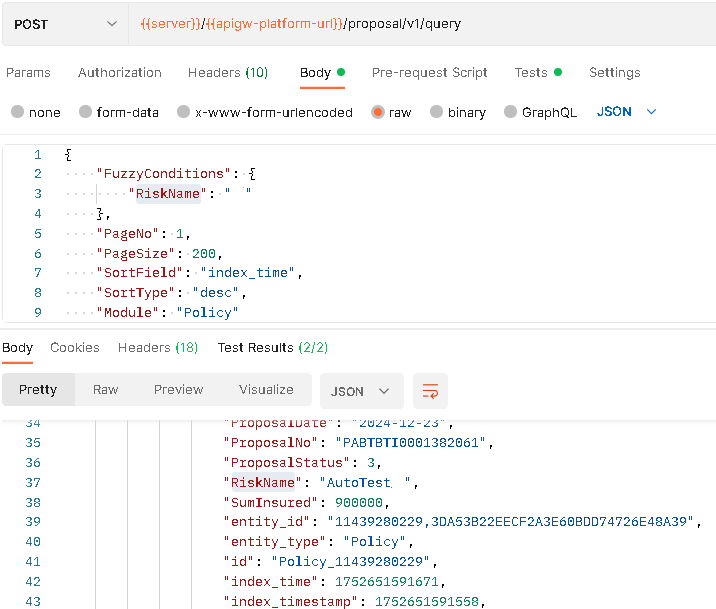
Specific Scenario Study
Business Query UI Auto Generation
There are some of the attributes during index field configuration which are not used by index module but for query module to have a configurable query experience
If the user is using the index management along with GI business API, the user can refer to Policy PAAS Query to understand its potential usage.
Query Condition Without Case Sensitive
By default, we query data match condition case sensitive. If we want query data match condition without case sensitive, we can use ”.caseInsensitive“.
Case Sensitive
Take RiskName": "riskname" for example, if case sensitive, there is no result returned.
Request
{
    "Conditions": {
        "ProductCode": "TBTI",
        "RiskName": "riskname"
    },
    "PageNo": 1,
    "PageSize": 100,
    "SortField": "index_time",
    "SortType": "desc",
    "Module": "Policy"
}
Response
{
    "GroupField": "entity_type",
    "PageNo": 1,
    "PageSize": 100,
    "Total": 0
}
Without Case Sensitive
If you want to set RiskName to be not case sensiticve, you can use the condition RiskName.caseInsensitive": "riskname", and the result will be returned.
Request
{
    "Conditions": {
        "ProductCode": "TBTI",
        "RiskName.caseInsensitive": "riskname"
    },
    "PageNo": 1,
    "PageSize": 100,
    "SortField": "index_time",
    "SortType": "desc",
    "Module": "Policy"
}
Response
{
    "GroupField": "entity_type",
    "PageNo": 1,
    "PageSize": 5,
    "Results": [
        {
            "EsDocs": [
                {
                    "DuePremium": 38.52,
                    "EffectiveDate": "2024-05-10",
                    "ExpiryDate": "2024-05-24",
                    "FirstDataEntryDate": "2024-05-17T10:12:39.097",
                    "FullOrgCode": "10002\n10001",
                    "IdNo": "IdNo",
                    "IdType": "1",
                    "InsuredCustomerNo": "",
                    "InsuredIdNo": "IdNo",
                    "InsuredIdType": "1",
                    "InsuredName": "RiskName",
                    "IssueDate": "2024-05-17T10:12:39",
                    "MaxUwLevelCode": "0",
                    "OrgCode": "10002",
                    "PolicyHolder": "Customer",
                    "PolicyHolderIDNo": "IdNo",
                    "PolicyId": "24291282877,09AC20AAF75525834F0C8FDE4B1E577F",
                    "PolicyNo": "POTBTI00024978",
                    "PolicyStatus": 2,
                    "PolicyType": "1",
                    "ProductCode": "TBTI",
                    "ProductId": 351925022,
                    "ProductName": "Oversea Travel (PBU for Auto Test)",
                    "ProposalDate": "2019-04-22",
                    "ProposalNo": "PTBTI-202405-0000000425",
                    "ProposalStatus": 3,
                    "RiskName": "RiskName",
                    "SumInsured": 900000,
                    "entity_id": "24291282877,09AC20AAF75525834F0C8FDE4B1E577F",
                    "entity_type": "Policy",
                    "id": "Policy_24291282877",
                    "index_time": "2024-05-17T02:12:40.246Z",
                    "index_timestamp": 1715911959751,
                    "owned_org_code": "10002",
                    "tenant_code": "xxxxxx",
                    "TempData": {
                        "Mask-IdNo": "Jmf1vghdrScrTdpdeyKu7w==",
                        "IdNo": "Jmf1vghdrScrTdpdeyKu7w==",
                        "MaskAfter-IdNo": "IdNo",
                        "Mask-InsuredIdNo": "Jmf1vghdrScrTdpdeyKu7w==",
                        "InsuredIdNo": "Jmf1vghdrScrTdpdeyKu7w==",
                        "MaskAfter-InsuredIdNo": "IdNo"
                    }
                },
                {
                    "DuePremium": 38.52,
                    "EffectiveDate": "2024-05-06",
                    "ExpiryDate": "2024-05-20",
                    "FirstDataEntryDate": "2024-05-13T09:32:18.212",
                    "FullOrgCode": "10002\n10001",
                    "IdNo": "IdNo",
                    "IdType": "1",
                    "InsuredCustomerNo": "",
                    "InsuredIdNo": "IdNo",
                    "InsuredIdType": "1",
                    "InsuredName": "RiskName",
                    "IssueDate": "2024-05-13T09:32:19",
                    "OrgCode": "10002",
                    "PolicyHolder": "Customer",
                    "PolicyHolderIDNo": "IdNo",
                    "PolicyId": "24289552863,4FDFE2972D51A53C11DE167F7E3BD88A",
                    "PolicyNo": "POTBTI00024870",
                    "PolicyStatus": 2,
                    "PolicyType": "1",
                    "ProductCode": "TBTI",
                    "ProductId": 351925022,
                    "ProductName": "Oversea Travel (PBU for Auto Test)",
                    "ProposalDate": "2019-04-22",
                    "ProposalNo": "PTBTI-202405-0000000209",
                    "ProposalStatus": 3,
                    "RiskName": "RiskName",
                    "SumInsured": 900000,
                    "entity_id": "24289552863,4FDFE2972D51A53C11DE167F7E3BD88A",
                    "entity_type": "Policy",
                    "id": "Policy_24289552863",
                    "index_time": "2024-05-13T01:32:19.828Z",
                    "index_timestamp": 1715563939273,
                    "owned_org_code": "10002",
                    "tenant_code": "xxxxxx",
                    "TempData": {
                        "Mask-IdNo": "Jmf1vghdrScrTdpdeyKu7w==",
                        "IdNo": "Jmf1vghdrScrTdpdeyKu7w==",
                        "MaskAfter-IdNo": "IdNo",
                        "Mask-InsuredIdNo": "Jmf1vghdrScrTdpdeyKu7w==",
                        "InsuredIdNo": "Jmf1vghdrScrTdpdeyKu7w==",
                        "MaskAfter-InsuredIdNo": "IdNo"
                    }
                },
                {
                    "DuePremium": 38.52,
                    "EffectiveDate": "2024-05-04",
                    "ExpiryDate": "2024-05-18",
                    "FirstDataEntryDate": "2024-05-11T10:34:10.068",
                    "FullOrgCode": "10002\n10001",
                    "IdNo": "IdNo",
                    "IdType": "1",
                    "InsuredCustomerNo": "",
                    "InsuredIdNo": "IdNo",
                    "InsuredIdType": "1",
                    "InsuredName": "RiskName",
                    "IssueDate": "2024-05-11T10:34:10",
                    "OrgCode": "10002",
                    "PolicyHolder": "Customer",
                    "PolicyHolderIDNo": "IdNo",
                    "PolicyId": "24288992876,4A6A2ED3B3FCEF73CF6B359845CD2D36",
                    "PolicyNo": "POTBTI00024826",
                    "PolicyStatus": 2,
                    "PolicyType": "1",
                    "ProductCode": "TBTI",
                    "ProductId": 351925022,
                    "ProductName": "Oversea Travel (PBU for Auto Test)",
                    "ProposalDate": "2019-04-22",
                    "ProposalNo": "PTBTI-202405-0000000177",
                    "ProposalStatus": 3,
                    "RiskName": "RiskName",
                    "SumInsured": 900000,
                    "entity_id": "24288992876,4A6A2ED3B3FCEF73CF6B359845CD2D36",
                    "entity_type": "Policy",
                    "id": "Policy_24288992876",
                    "index_time": "2024-05-11T02:34:11.036Z",
                    "index_timestamp": 1715394850592,
                    "owned_org_code": "10002",
                    "tenant_code": "xxxxxx",
                    "TempData": {
                        "Mask-IdNo": "Jmf1vghdrScrTdpdeyKu7w==",
                        "IdNo": "Jmf1vghdrScrTdpdeyKu7w==",
                        "MaskAfter-IdNo": "IdNo",
                        "Mask-InsuredIdNo": "Jmf1vghdrScrTdpdeyKu7w==",
                        "InsuredIdNo": "Jmf1vghdrScrTdpdeyKu7w==",
                        "MaskAfter-InsuredIdNo": "IdNo"
                    }
                },
                {
                    "DuePremium": 38.52,
                    "EffectiveDate": "2024-05-03",
                    "ExpiryDate": "2024-05-17",
                    "FirstDataEntryDate": "2024-05-10T10:08:21.899",
                    "FullOrgCode": "10002\n10001",
                    "IdNo": "IdNo",
                    "IdType": "1",
                    "InsuredCustomerNo": "",
                    "InsuredIdNo": "IdNo",
                    "InsuredIdType": "1",
                    "InsuredName": "RiskName",
                    "IssueDate": "2024-05-10T10:08:22",
                    "OrgCode": "10002",
                    "PolicyHolder": "Customer",
                    "PolicyHolderIDNo": "IdNo",
                    "PolicyId": "24288482890,F0C6C4E4CF907A5F72456F855B1892ED",
                    "PolicyNo": "POTBTI00024789",
                    "PolicyStatus": 2,
                    "PolicyType": "1",
                    "ProductCode": "TBTI",
                    "ProductId": 351925022,
                    "ProductName": "Oversea Travel (PBU for Auto Test)",
                    "ProposalDate": "2019-04-22",
                    "ProposalNo": "PTBTI-202405-0000000142",
                    "ProposalStatus": 3,
                    "RiskName": "RiskName",
                    "SumInsured": 900000,
                    "entity_id": "24288482890,F0C6C4E4CF907A5F72456F855B1892ED",
                    "entity_type": "Policy",
                    "id": "Policy_24288482890",
                    "index_time": "2024-05-10T02:08:22.807Z",
                    "index_timestamp": 1715306902426,
                    "owned_org_code": "10002",
                    "tenant_code": "xxxxxx",
                    "TempData": {
                        "Mask-IdNo": "Jmf1vghdrScrTdpdeyKu7w==",
                        "IdNo": "Jmf1vghdrScrTdpdeyKu7w==",
                        "MaskAfter-IdNo": "IdNo",
                        "Mask-InsuredIdNo": "Jmf1vghdrScrTdpdeyKu7w==",
                        "InsuredIdNo": "Jmf1vghdrScrTdpdeyKu7w==",
                        "MaskAfter-InsuredIdNo": "IdNo"
                    }
                },
                {
                    "DuePremium": 38.52,
                    "EffectiveDate": "2024-05-02",
                    "ExpiryDate": "2024-05-16",
                    "FirstDataEntryDate": "2024-05-09T17:55:40.751",
                    "FullOrgCode": "10002\n10001",
                    "IdNo": "IdNo",
                    "IdType": "1",
                    "InsuredCustomerNo": "",
                    "InsuredIdNo": "IdNo",
                    "InsuredIdType": "1",
                    "InsuredName": "RiskName",
                    "IssueDate": "2024-05-09T17:55:41",
                    "OrgCode": "10002",
                    "PolicyHolder": "Customer",
                    "PolicyHolderIDNo": "IdNo",
                    "PolicyId": "24287852889,C88A5F63FADA085E0792D613DF8315A7",
                    "PolicyNo": "POTBTI00024751",
                    "PolicyStatus": 2,
                    "PolicyType": "1",
                    "ProductCode": "TBTI",
                    "ProductId": 351925022,
                    "ProductName": "Oversea Travel (PBU for Auto Test)",
                    "ProposalDate": "2019-04-22",
                    "ProposalNo": "PTBTI-202405-0000000090",
                    "ProposalStatus": 3,
                    "RiskName": "RiskName",
                    "SumInsured": 900000,
                    "entity_id": "24287852889,C88A5F63FADA085E0792D613DF8315A7",
                    "entity_type": "Policy",
                    "id": "Policy_24287852889",
                    "index_time": "2024-05-09T09:55:41.928Z",
                    "index_timestamp": 1715248541434,
                    "owned_org_code": "10002",
                    "tenant_code": "xxxxxx",
                    "TempData": {
                        "Mask-IdNo": "Jmf1vghdrScrTdpdeyKu7w==",
                        "IdNo": "Jmf1vghdrScrTdpdeyKu7w==",
                        "MaskAfter-IdNo": "IdNo",
                        "Mask-InsuredIdNo": "Jmf1vghdrScrTdpdeyKu7w==",
                        "InsuredIdNo": "Jmf1vghdrScrTdpdeyKu7w==",
                        "MaskAfter-InsuredIdNo": "IdNo"
                    }
                }
            ],
            "GroupTotalNum": 6,
            "GroupValue": "Policy"
        }
    ],
    "Total": 6
}
Whether to Allow Fuzzy Search by Default
By default, we will not allow fuzzy search to save the ES resource for any newly created fields. Of course, there can be three scenarios:
- Field Type is not String—generically fuzzy search is not applicable.
- Field Type is String and it’s code value—fuzzy search is not required for this scenario either like status or branch code which only requires exact search based on exact code.
- Field Type is String and it’s a business code or name—fuzzy search is required for this scenario for example customer name or policy number.
If the scenario is 3, users can choose to change “Only Exact Search” in index field management UI from “Yes” to “No” to enable the fuzzy search.
- If it’s changed during index field creation, then it’s perfectly fine.
- If it’s changed after index field created and business data is already created, then users need to conduct a index rebuild to rebuild the business data.
- If the user needs to change from No back to Yes, then it will not take effect unless entire index is removed and re-created again.
How to Save and Search Multiple Values for one Index Field
Normally, let’s say we have one index field CustomerName, it will be a single value inside.
There can be scenarios where one policy can have multiple customers and users want to put multiple customer names into one single index field.
Once that happens, during index field creation, users can point the index field to a policycustomerlist then during policy saving, if the policycustomerlist contains multiple values, they will be saved together in the index with format like "CustomerName": "Jason\nJohn\nMary".
Then if users want to query them, there can be two options:
-
If user to use exact search criteria like “Conditions” or “InConditions”, then users must add “multiLineExact” at the end to search, e.g.,
"Conditions": {"CustomerName.multiLineExact": "John"}or"InConditions": {"RiskIdNo.multiLineExact": ["Z7126117","C915562A","V600163A"]}. -
Otherwise, users can use fuzzy search criteria to support it. (Please double check to make sure the allow fuzzy search for the field is switched on.)
ES Update Timeliness
The index data in the Elasticsearch server is updated asynchronously. The time it takes for updates to be reflected depends on the system load—under low load, updates are reflected quickly, whereas under high load, it may take longer.
If refresh=wait_for is used, index operations on the application side can experience significant delays, and under heavy load, this may lead to issues.
Therefore, queries on ES indexes are recommended only for UI purposes and are not advised for direct access by backend processes, especially when dealing with newly generated data.
For reporting-related functionality, it is recommended to access the data directly from the database or to utilize the DataMO module.
Search Business Data Deploy Check (Private Cloud Only)
When deploying Business Data in the wrong step, it may make the deployed ES mapping wrong, so it is better to ask TS to check the ES mapping after deployment.
Call
GET http://{ESIP}:{ESHTTPPort}/_cat/indicesThen, if you see some indexes that include the word alias, they are the wrong ones. If you need to keep the data in it, clone the index and delete it, and restart the search server. If you do not need to keep, delete and restart it.
MC index Maintain Issue Handle
When maintaining an index field in MC, if you delete some index fields, there is always an error that pops as below when adding an index field or query.
{
    "timestamp": "2024-02-07T12:38:32",
    "timestampServer": "2024-02-07T07:08:32",
    "status": 500,
    "error": "Internal Server Error",
    "path": "/customer/org",
    "traceId": "33b0e3615a069253",
    "traceIdContainer": null,
    "rawMessage": "Commit global transaction failed, error:500 ,call [http://platform-pub/seata-rm/commitBranch/TCC/searchEngineAddDoc] failed, detail:commit TCC resource error: [ElasticsearchStatusException: Elasticsearch exception [type=strict_dynamic_mapping_exception, reason=mapping set to strict, dynamic introduction of [PANNumberr] within [_doc] is not allowed]], xid:894381652, branchId:894378688, resourceId:searchEngineAddDoc",
    "exception": "java.lang.RuntimeException",
    "code": "MO-PLATFORM-COMMON-E9999",
    "message": "Exception has been thrown, check it in ELK with trace id: 33b0e3615a069253, message content is: Commit global transaction failed, error:500 ,call [http://platform-pub/seata-rm/commitBranch/TCC/searchEngineAddDoc] failed, detail:commit TCC resource error: [ElasticsearchStatusException: Elasticsearch exception [type=strict_dynamic_mapping_exception, reason=mapping set to strict, dynamic introduction of [PANNumberr] within [_doc] is not allowed]], xid:894381652, branchId:894378688, resourceId:searchEngineAddDoc"
}
Please copy the below curl script to postman to run the API-initEsScript .
GET https://xx-mc.insuremo.com/api/platform/platform-pub/index/management/v1/initEsScript
curl --location 'https://xx-mc.insuremo.com/api/platform/platform-pub/index/management/v1/initEsScript' \
--header 'Accept-Encoding: gzip, deflate' \
--header 'Connection: keep-alive' \
--header 'Postman-Token: f7433f7c-a7df-40af-9c37-1436a4a2d621,d0897366-0cbd-479d-a62f-7a4805a432a8' \
--header 'accept: application/json' \
--header 'accept-language: en-US,en;q=0.9' \
--header 'authorization: Bearer LzJ98sJLQ6e-ZijGnjXjfQ' \
--header 'cache-control: no-cache,no-cache' \
--header 'content-type: application/json; charset=UTF-8' \
--header 'pragma: no-cache' \
--header 'sec-ch-ua: "Not A(Brand";v="99", "Google Chrome";v="121", "Chromium";v="121"' \
--header 'sec-ch-ua-mobile: ?0' \
--header 'sec-ch-ua-platform: "Windows"' \
--header 'sec-fetch-dest: empty' \
--header 'sec-fetch-mode: cors' \
--header 'sec-fetch-site: same-origin' \
--header 'user-agent: Mozilla/5.0 (Windows NT 10.0; Win64; x64) AppleWebKit/537.36 (KHTML, like Gecko) Chrome/121.0.0.0 Safari/537.36' \
--header 'x-mo-env: portal' \
--header 'x-mo-module-permission-code: CONF-SYYQ' \
--header 'x-mo-tenant-id: xx' \
--header 'x-mo-user-identity: xxxx@insuremo.com' \
--header 'x-mo-user-name: xxxx@insuremo.com'
Q&A
If I want to get a data which will be much more than 50K, maybe 300K and keep growing, how can I do it? Any performance concern?
- There is no specific limit on the response size for a single API call.
- For query APIs, the total number of records returned for a paginated query with the same filter conditions cannot exceed 1000 (i.e.,
page_size * page_number <= 1000). This limit is in place to prevent abuse and reduce system load. - To retrieve more than 1000 records, you must modify the query conditions for subsequent requests. For example, if sorting by
claimId, use the last retrievedclaimIdas a starting point for the next query (e.g.,claimId >= last_retrieved_id). This technique is known as keyset pagination. - While you can make multiple queries and merge the results before returning them to the client, be aware of the iComposer API timeout limit (2 minutes, enforced by the load balancer and gateway).
- For long-running processes, an asynchronous approach is recommended:
- Immediately return a
referenceIdto the caller. - Process the data in the background, merge the results, and upload the final dataset to cloud storage (cloud disk API).
- Provide a separate API endpoint for the client to poll the status of the job using the
referenceId. Once complete, this endpoint should return a download link for the results.
During endorsement carrier removed one field from customer object, but policy search still gives OLD record, why?
Now we are using OpenSearch as the ES engine which does not support remove a field from document.
If you want to clear it, you have to update it to a blank string like a space "", or some string you have agreement with like “NA”.
Please note that since we are using upsert mode when using opensearch, and support update several fields while leave the un-mentioned fields untouched. So it is impossible to get a field with empty value in the response payload.
So either not to have field in payload or consider NA as empty and you can update address to NA to mean it is empty.