Basic Concept
In the insurance business, there are different numbers, including quotation numbers, policy numbers, and claim numbers.
Different clients have distinct numbering rules. For example, some clients might require the inclusion of a product code within the policy number while others prefer not.
The configuration of such numbering is essential to cope with diverse business requirements.
User Scenario
For anybody who wants to use our platform to configure a number rule.
Numbering Template UI Operation
- All operations in this text need to be performed in the portal master configuration environment (MC env). They are not allowed in other environments unless for troubleshooting purposes.
- Please make sure you have full read and write authority to make the operation beforehand.
Users can modify the Numbering Template by navigating to Public Setting > Numbering Template.
Several variables are predefined in the code, such as PRODUCT_CODE, TRANS_YEAR, and TRANS_MONTH, which can be used directly. The undefined in the code needs to be obtained through rule-writing logic.
Before start, it’s important to differentiate the following three concepts first:
- Support variables that affect the numbering in the numbering template.
- Support variables that affect the numbering sequence to share a set of numbering sequences.
- Support sequence factors that affect the numbering to control numbering sequence through rules.
For example, rules can be set to return odd or even numbers or to skip numbers with the digit 4.
Number Template Field Description
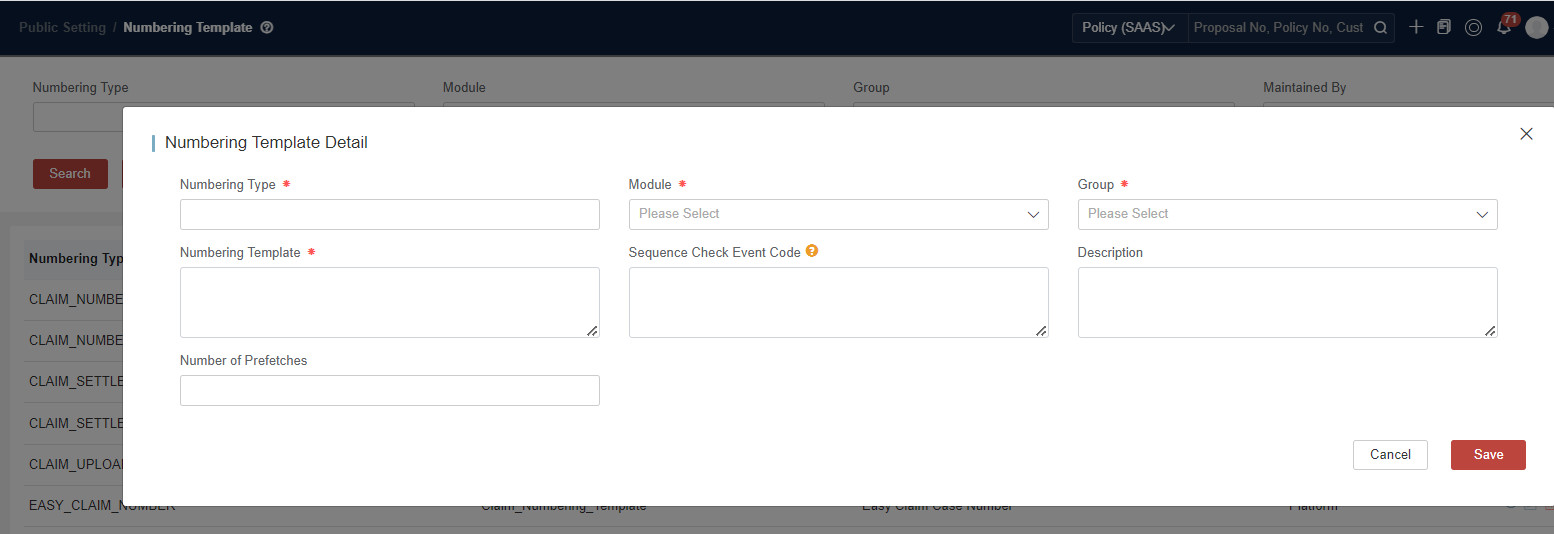
| Field Name | Description |
|---|---|
| Numbering Type | Customization |
| Module | Context information |
| Group | Context information |
| Numbering Template | Template, Variables are represented by {}. |
| Sequence Check Event Code | Customized event in rule driver to trigger the rule for numbering logic. For more details, see Scenario 3. If an event code is set, the generateByTypeAndNumberFactors API will not work. |
| Description | Description |
| Number of Prefetches | Number’s count to generate at one time. When the business volume is relatively large, users can set the value for this field. If the value is set to 100, the system will generate 100 numbers at a time, and then store them in the cache. Once users call API to generate numbers, the system will generate them directly from the cache one by one. Once all the cached 100 numbers are fetched, the system will generate another 100 numbers again. |
For Policy Numbers, Proposal Numbers, and Quotation Numbers, the maximum allowed length is 40 characters. To ensure compatibility and proper system functioning, please avoid exceeding this limit.
Numbering Template & Applicable API
Core API - generateByTypeAndNumberFactors
The API generateByTypeAndNumberFactors is designed to generate all the numbers based on the numbering template. The business-related APIs are used to generate numbers automatically. If users want to generate numbers separately and use them as input in business-related APIs, users can invoke the following API.
- {{server}}/platform-pub/public/numbering/v1/generateByTypeAndNumberFactors?numberingType={{template}}
Relevant API Adopted in GI Business
| Numbering Template | API | Default Event | Mark |
|---|---|---|---|
| QUOTATION_NUMBER | /quotation/v1/persist, /quotation/v1/quotationWithPersistence | QuotationNoFactor | the system automatically generates and returns with the QuotationNo that matches the defined template |
| PROPOSAL_NUMBER | /proposal/v1/create | ProposalNoFactor | the system automatically generates and returns with the ProposalNo that matches the defined template |
| POLICY_NUMBER | /proposal/v1/issuePolicy, /proposal/v1/issuePolicyWithFullBody, /proposal/v1/submitPolicy | PolicyNoFactor | the system automatically generates and returns with the PolicyNo that matches the defined template |
If the QuotationNo, ProposalNo, PolicyNo, or EndoNo is input in the request, the system will use it directly without new generating.
The configuration mentioned in this document does not support EndoNo. So EndoNo is fixed and does not support using variables via rules. If the tenant needs to modify this logic, they will need to customize it themselves.
Example 1 - Variables & Sequence
Create a template SEQ_TEST as,
{PRODUCT_CODE}-{TRANS_YEAR}-{TRANS_MONTH}-1{SEQUENCE}{{server}}/platform-pub/public/numbering/v1/generateByTypeAndNumberFactors?numberingType=SEQ_TEST
The request data is:
{
    "SequenceFactors": {
        "PRODUCT_CODE": "TBTI",
        "TRANS_YEAR": "2023",
        "TRANS_MONTH": "05"
    },
    "OtherFactors": {}
}
response:
"TBTI-2023-05-1"
"TBTI-2023-05-2"
"TBTI-2023-05-3"
...
"TBTI-2023-05-9"
"TBTI-2023-05-0"   //when the sequence is exhausted, it will reset to 0 again. So please make sure the length is proper.
"TBTI-2023-05-1"
Example 2 -Variables & Sequence with Event
If a template is defined as:
{NotSeqFlg:CODCOMPANY}{NotSeqFlg:ISSUING_BRANCH_CODE}{INSURANCE_PORTIFOLIO}{SERVICE}6{SEQUENCE}The request data is:
{
    "SequenceFactors": {
        "SERVICE":"SERVICEA",
        "INSURANCE_PORTIFOLIO": "333"
    },
    "OtherFactors": {
        "CODCOMPANY":"222",
        "ISSUING_BRANCH_CODE":"TEST"
    }
}
The returned number is like ”222TEST333SERVICEA000001“.
If any rule logic is defined for the template, users need to invoke the API ”/pa/v1/invokeRuleEvent?eventCode={{eventCode}}” first. The request data for invokeRuleEvent is the same as the business request data. The response returned as follows. The Code under the MessageList is expected to be the input values for generateByTypeAndNumberFactors request factors.
{
    "MessageList": [
        {   // highlight-next-line
            "Code": "{CODCOMPANY=222, ISSUING_BRANCH_CODE=TEST, INSURANCE_PORTIFOLIO=333, SERVICE=A}",
            "Message": "{CODCOMPANY=222, ISSUING_BRANCH_CODE=TEST, INSURANCE_PORTIFOLIO=333, SERVICE=A}",
            "RuleName": "PolicyNoFactor_Hans"
        }
    ],
    "Model": {
    // policy info
    },
    "Result": {
        "ExecuteEndTime": "2023-04-04T15:40:35",
        "ExecuteStartTime": "2023-04-04T15:40:35",
        "GroupExecutionResultList": [
            {
                "Group": {
                    "@pk": 533139267,
                    "BusinessUUID": "PolicyNumberHans",
                    "Code": "PolicyNumberHans",
                    "Description": "added for hdibrazil",
                    "GroupId": 533139267,
                    "GroupRuleMappingList": [
                        {
                            "@pk": 533139268,
                            "BusinessUUID": "533139267_PolicyNoFactor_Hans",
                            "GroupId": 533139267,
                            "MappingId": 533139268,
                            "Priority": 1,
                            "RecordUsage": 5,
                            "RuleId": 533139264
                        }
                    ],
                    "Name": "PolicyNumberHans",
                    "PubGroupId": 533139266,
                    "RecordUsage": 5
                },
                "RuleExecutionResultList": [
                    {
                        "RuleName": "PolicyNoFactor_Hans",
                        "RuleObjectExecutionResultList": [
                            {
                                "ScriptLog": [
                                    "1:val() get ProductCode value: TBTI",
                                    "2:val() get ProductVersion value: 1.0",
                                    "33:val() get IssuingBranchCode value: TEST"
                                ],
                                "ScriptResult": {
                                    "CODCOMPANY": "222",
                                    "INSURANCE_PORTIFOLIO": "333",
                                    "ISSUING_BRANCH_CODE": "TEST",
                                    "SERVICE": "A"
                                },
                                "Status": "SUCCEED"
                            }
                        ],
                        "Status": "SUCCEED"
                    }
                ],
                "Status": "SUCCEED"
            }
        ],
        "RuleContext": {
            "_$CURRENT_USER": {}
        },
        "Status": "SUCCEED"
    },
    "Status": "FAIL"
}
Scenario 1: Variables Affecting the Numbering
Take the Proposal No template as an example.
Requirement A: One Tenant has 2 different numbering templates to generate the proposal number, and the sequence length is inconsistent.
- Product HOME: **{X}6{SEQUENCE} **
- Other Products:** P{PRODUCT_CODE}8{SEQUENCE}**
If the length is defined as a variable, the system will interpret it solely as a variable, instead of the sequence length. In this case, it cannot be completed through pure configuration. It requires writing logic in the Backend for the Frontend.
Requirement B: One Tenant has 2 different numbering templates to generate the proposal number, and the sequence length is consistent.
- Product HOME: **{X}6{SEQUENCE} **
- Other Products: P{PRODUCT_CODE}6{SEQUENCE}
In this case, the template is {DiffProduct}6{SEQUENCE}. Users can set rules to get DiffProduct.
For more details about rule, see rule.
-
Rule Management
Context Type binding Common - Common and Rule Level binding corresponding level.
def Code=Policy().ProductCode.valdef POCode="P"+ Codedef X="INSUREMO"def map = [:]if(Code =="HOME"){map=['DiffProduct':X]return (map)}else{map=['DiffProduct': POCode]return (map)} -
Configure Rule Group
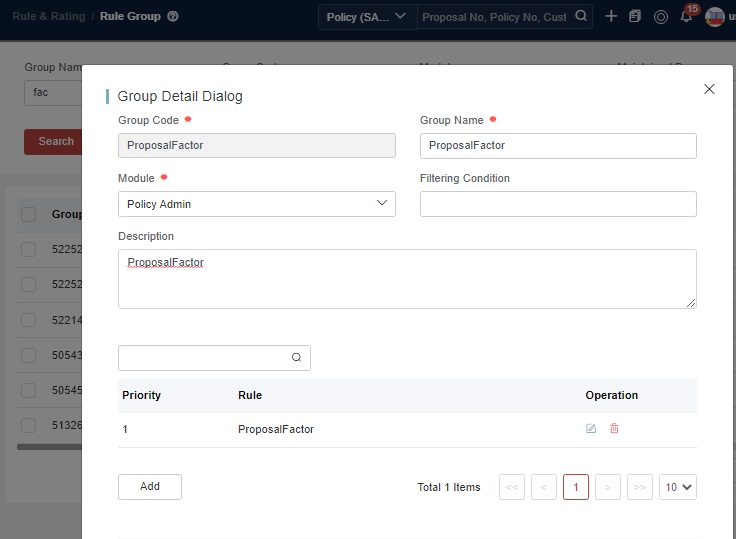
Create a new Rule Group, and bind the Rule to Corresponding Rule Group.
-
Configure Rule Event
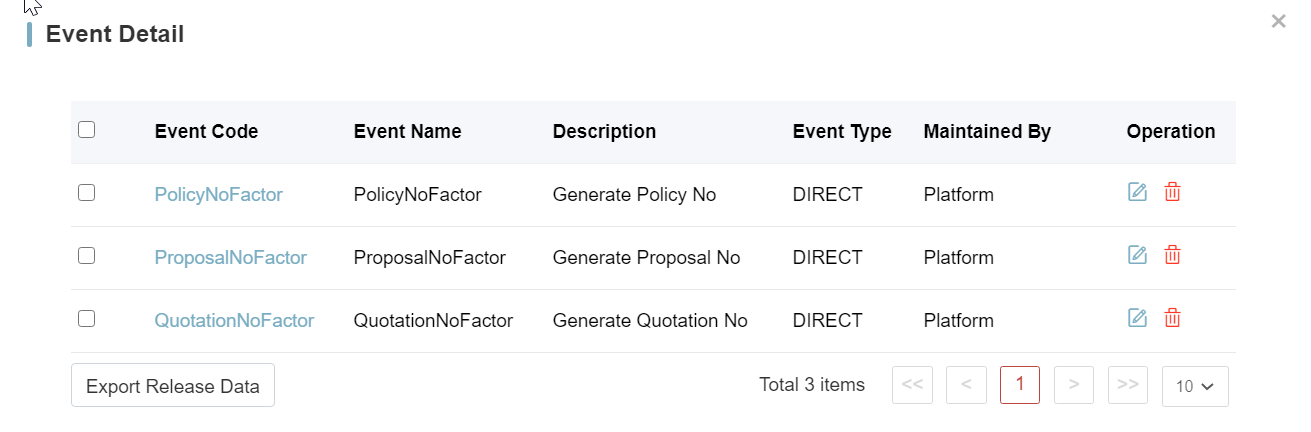
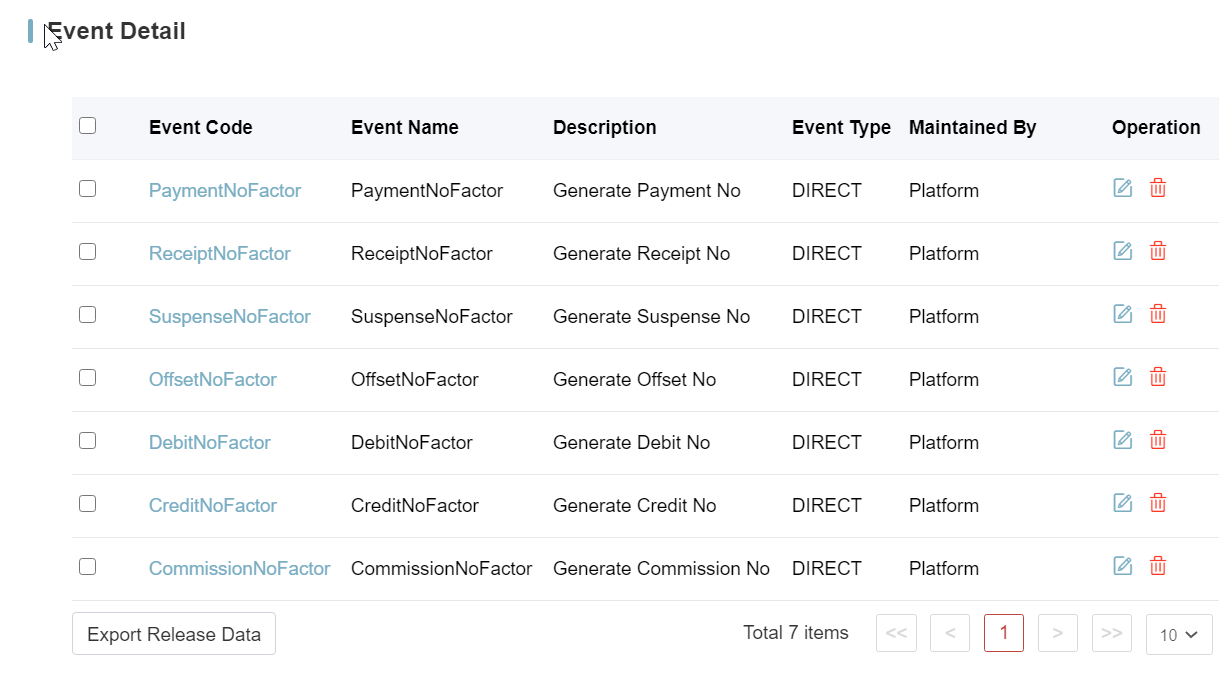
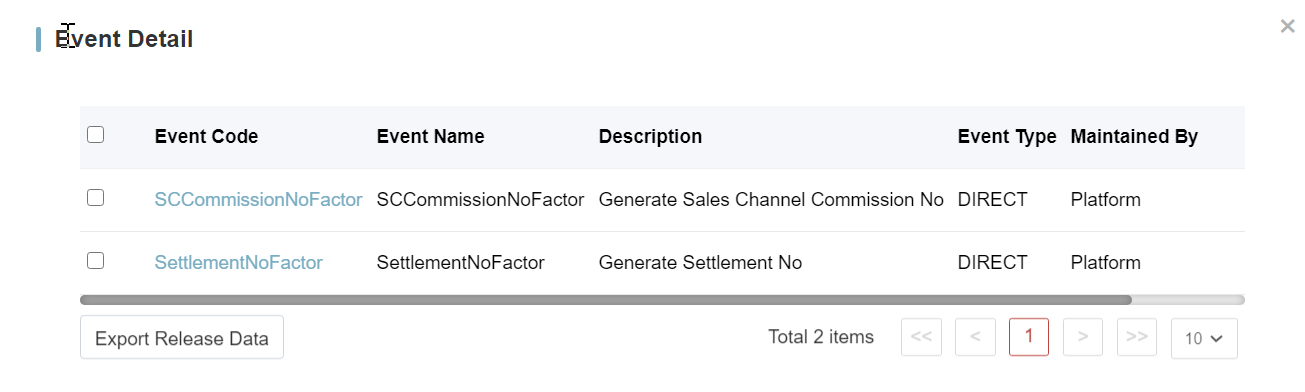
The platform offers some predefined rule events if variables are involved.
-
PANumberingServiceDriver
-
BCPNumberingServiceDriver
-
SCNumberingServiceDriver
-
-
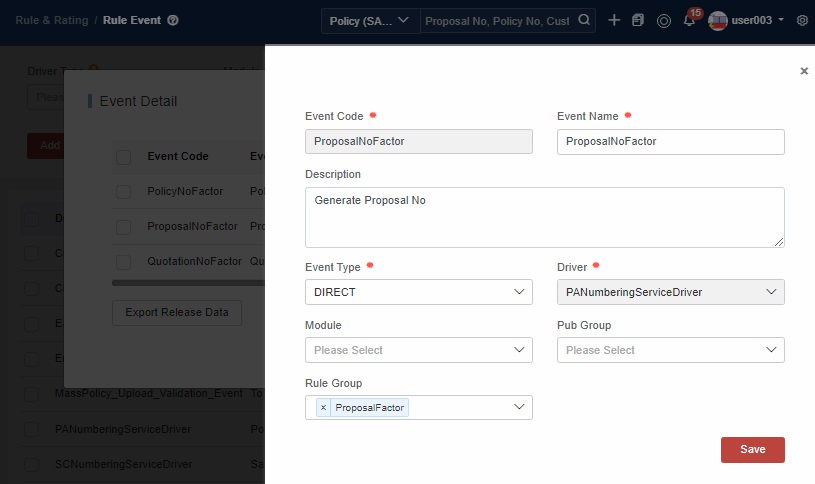
For variables affecting the numbering scenarios, bind the Rule Group to the corresponding existing Event.
-
Test through API (/proposal/v1/create)
- PROPOSAL_NUMBER: {DiffProduct}6{SEQUENCE}
- Product:HOME/PEI/TBTI/MI
Test the API 6 times, and the returned ProposalNo is like below. Since the DiffProduct is not labeled as ”NotSeqFlg”, for each DiffProduct, the numbers continue with each sequence.
-
INSUREMO000001
-
INSUREMO000002
-
PPEI000001
-
PPEI000002
-
PTBTI000001
-
PMI000001
Scenario 2: Variables Affecting the Numbering Sequence
It is independent of the scenarios above. It can be used alone or superimposed.
Take the Proposal No template as an example.
Requirement A: Template is P{PRODUCT_CODE}6{SEQUENCE}, and all products share a set of numbering sequences.
In this case Template is P{NotSeqFlg:PRODUCT_CODE}6{SEQUENCE}.
NotSeqFlg is the predefined keyword. Variables with this keyword share a set of numbering sequences.
There is no variable information to be obtained. Modify the template directly, and it can take effect.
- PTBTI000001
- PTBTI000002
- PPEI000003
- PAUTO001000004
Requirement B: One Tenant has 2 different numbering templates to generate the proposal number, and all products share a set of numbering sequences.
- Product HOME:{X}6{SEQUENCE}
- Other Products:P{PRODUCT_CODE}6{SEQUENCE}
In this case Template is {NotSeqFlg:DiffProduct}6{SEQUENCE}.
NotSeqFlg is the predefined keyword. Variables with this keyword share a set of numbering sequences.
-
Set These Variables through the Rule.
- Groovy Rule, Context Type binding Common - Common, and Rule Level binding corresponding level. Here is a simple example:
def Code=Policy().ProductCode.valdef POCode="P"+ Codedef X="INSUREMO"def map = [:]if(Code =="HOME"){map=['DiffProduct':X]return (map)}else{map=['DiffProduct': POCode]return (map)} -
Configure Rule Group
Add Rule Group and bind the Rule to Corresponding Rule Group.
-
Configure Rule Event
For variables affecting the numbering sequence scenarios, bind the Rule Group to the Corresponding existing Event.
-
Test through API (/proposal/v1/create)
- PROPOSAL_NUMBER: {NotSeqFlg:DiffProduct}6{SEQUENCE}
- Product:HOME/PEI/TBTI/MI**
Test the API 6 times, and Returned ProposalNo is like below. Since DiffProduct is not labeled as NotSeqFlg, the sequence numbers should increment consecutively for each distinct DiffProduct.
- INSUREMO000001
- PPEI000002
- PPEI000003
- PTBTI000004
- PMI000005
- INSUREMO000006
Scenario 3: Sequence Factor Affecting the Numbering Scenarios
This is only prepared for sequence skipping.
Take the Proposal No template as an example:
Requirement: The template is P{PRODUCT_CODE}6{SEQUENCE}. The sequence for the HOME product is an Even number while the sequence for the PEI product is an Odd number. Sequences for other products follow the standard pattern.
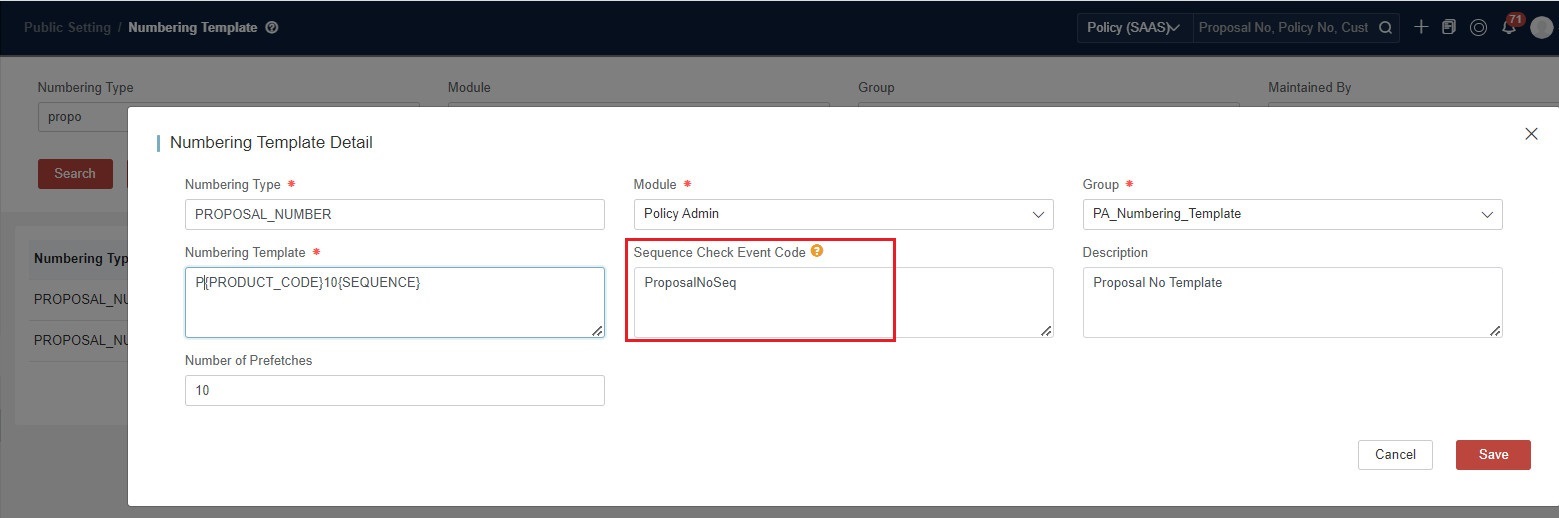
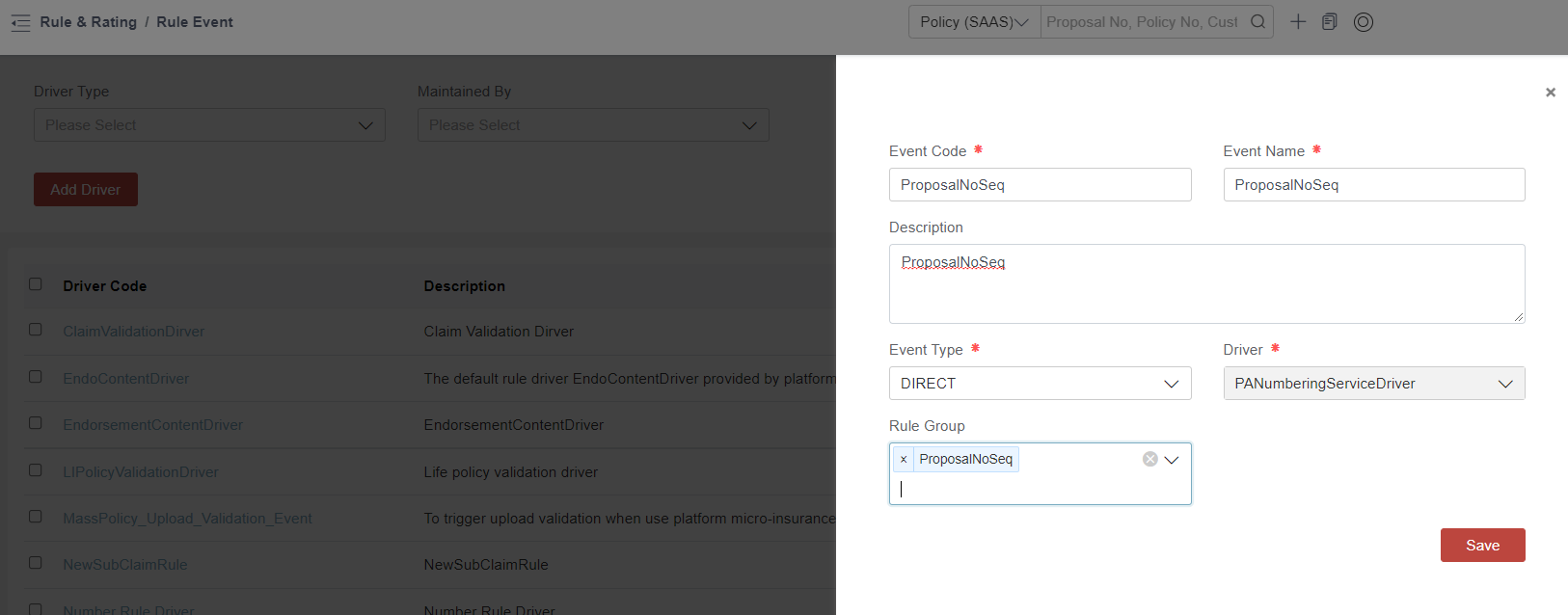
In this case Template is P{PRODUCT_CODE}6{SEQUENCE}. Sequence Check Event Code: ProposalNoSeq (This event code is user-defined to trigger the rule).
-
Pass in the Sequence Logic through Rule.
In Rule Management, bind the Context Type to “Common” and set the Rule Level to “OTHER”. In this scenario, the Rule Level is fixed.
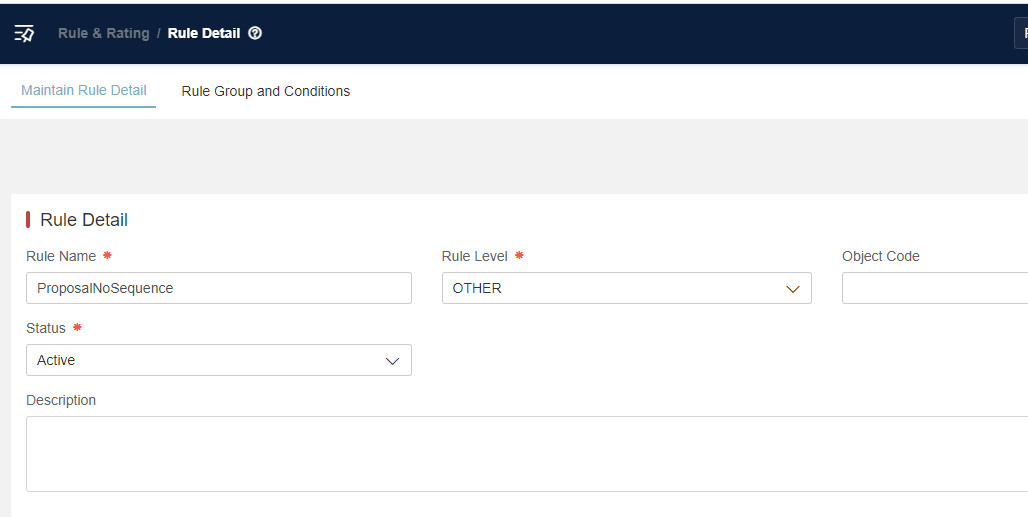
This function depends on the complexity of the rule logic.
Here is a simple example:def SeqFactor=context.get("PRODUCT_CODE") //Obtaining method of factor: context.get("FactorName")def Num=context.get("seqNum") //seqNum is predefined and it indicates the current numbering sequence number to check.if((SeqFactor == "HOME" && (Num%2 !=0)) || (SeqFactor == "PEI" && (Num%2 !=1))){return 1}else{return 0} -
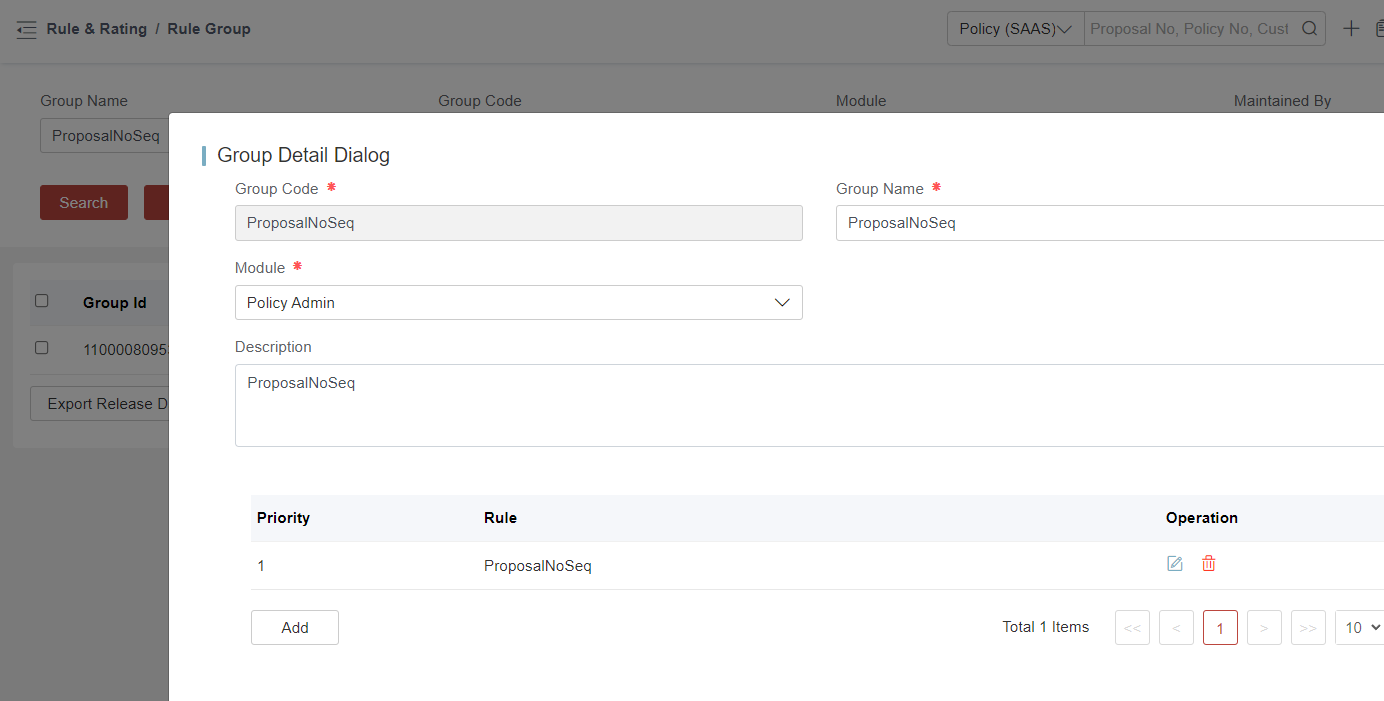
Configure Rule Group
Add a Rule Group and bind the Rule to the Corresponding Rule Group.
-
Configure Rule Event
Add a new event code whose name must be consistent with the Sequence Event Code in the Numbering Template. Bind the Rule Group to this Event.
-
Test through API (/proposal/v1/create)
- PROPOSAL_NUMBER: P{PRODUCT_CODE}6{SEQUENCE}
- Product: HOME/PEI/TBTI/MI
HOME Product Even number
- PHOME000002
- PHOME000004
- PHOME000006
PEI Product Odd number
- PPEI000001
- PPEI000003
- PPEI000005
Other Products:
- PTBTI000001
- PTBTI000002
- PMI000001
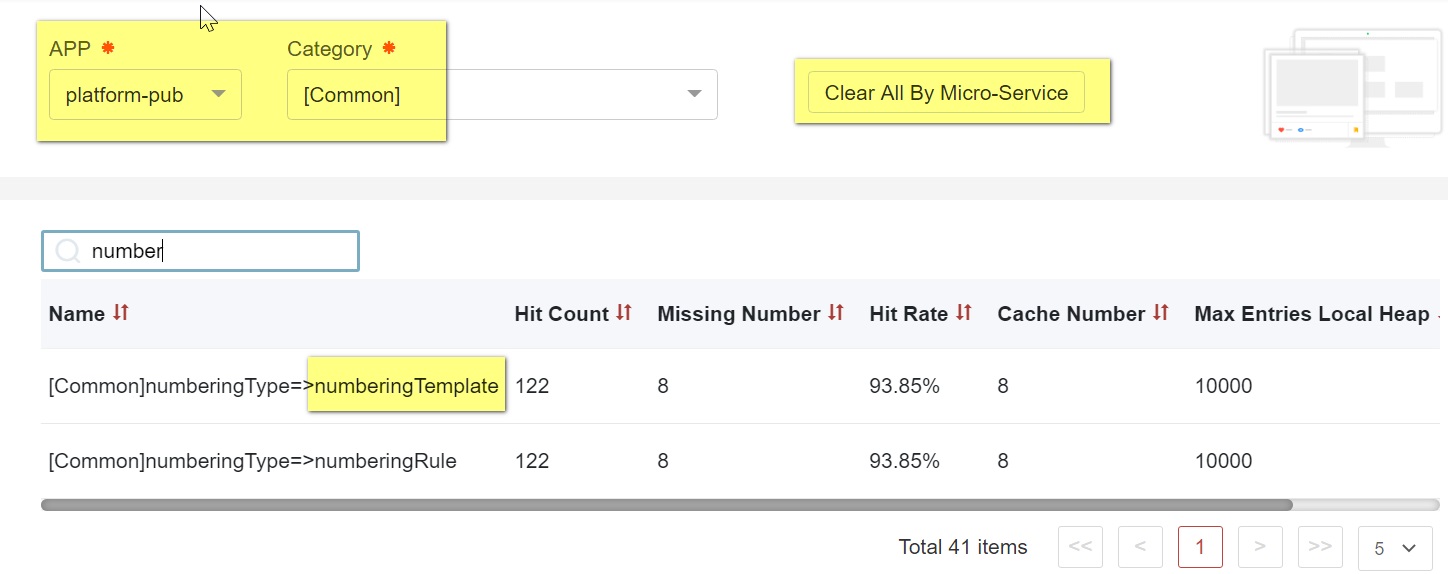
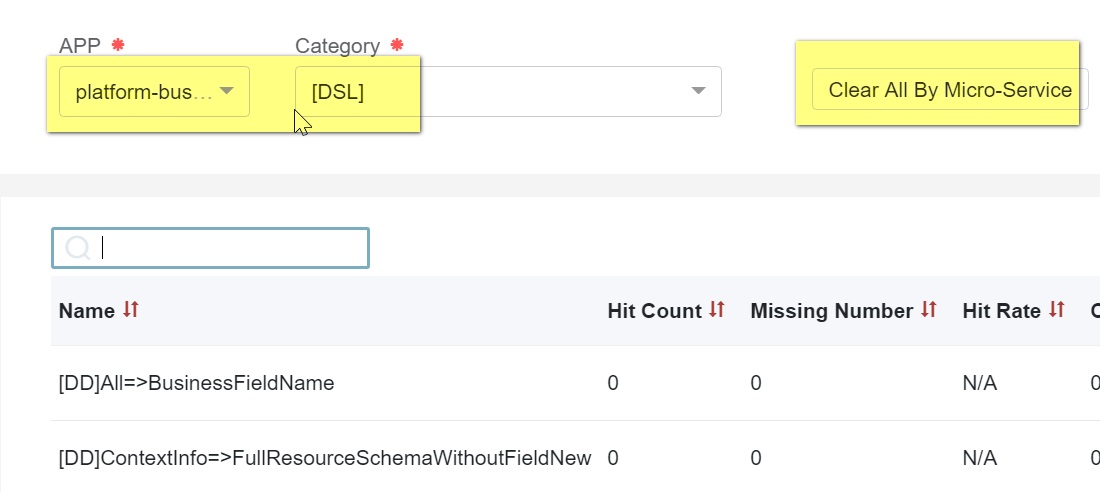
Clear Cache
If the configuration does not take effect, please try to clear the cache under the menu Public Setting > Clear Cache.
For UI configuration, we will continue to optimize the automatic cache clearing internally.
-
Clear Platform-pub/Common cache
-
Clear Platform-busi-config/DSL cache
Export & Check in
Export
-
Numbering Template
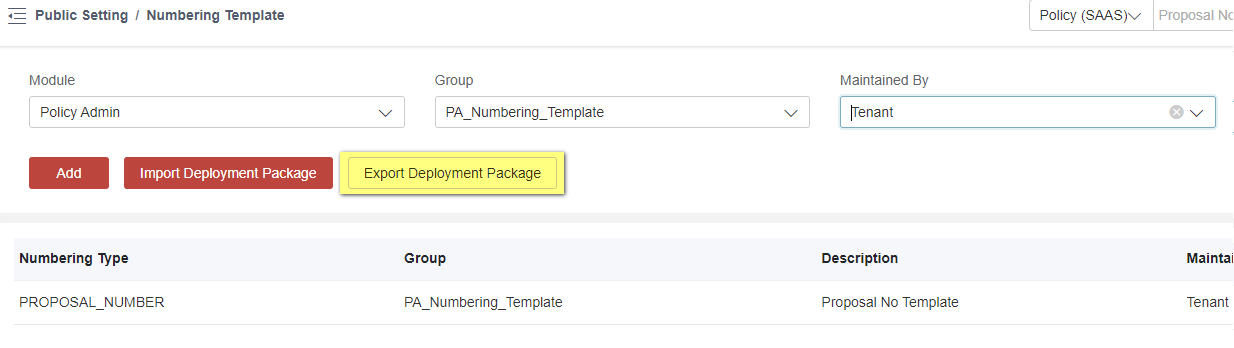
-
Rule by Screening Conditions
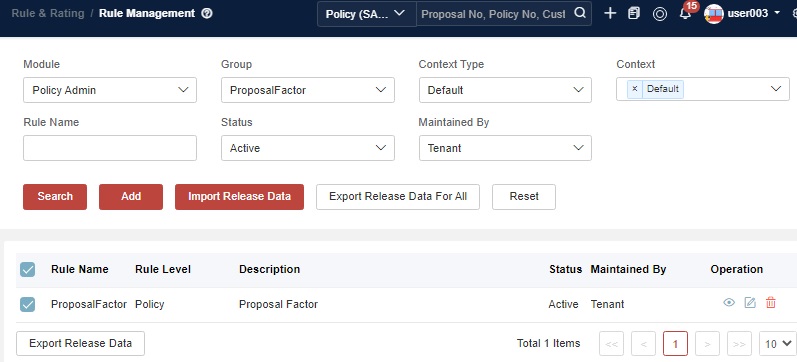
-
Rule Group by Module
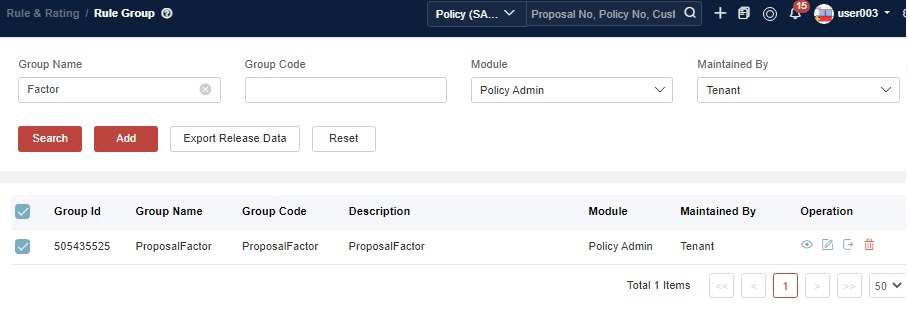
Check in
-
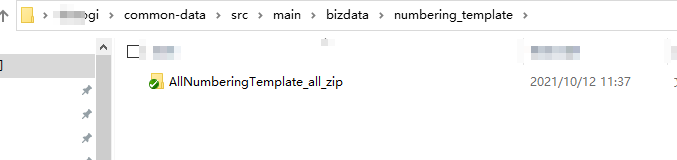
Numbering Template
Create a new folder for the following business data, and name it in lowercase letters such as numbering_template.
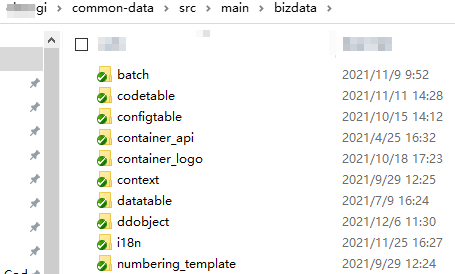
Name it clearly and put it in the numbering_template folder.
-
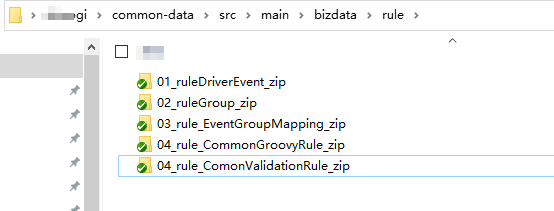
Rule and Rule Group
Name it clearly and put it in the rule folder.
Numbering Sequence Maintenance
Each numbering template has its own numbering sequence. By default, the sequence starts at 0 and increments by one each time the numbering template is deployed and the corresponding numbering API is invoked.
There might be some cases in which clients want to numbering sequence to start from a user-defined number and increment. If that happens, users need to follow the steps:
-
Submit a request to SiteOps to get platform DB access information for the PUB schema in a development environment.
-
Locate your numbering sequence with the provided script as an example.
SELECT * FROM t_pub_numbering_seq t WHERE t.NUMBERING_TYPE ='INDI_CUST_NUMBER';
- Prepare a script to update the numbering sequence according to business requirements.
UPDATE t_pub_numbering_seq set SEQ_NUM=7500000000 WHERE NUMBERING_TYPE ='INDI_CUST_NUMBER' AND NUMBERING = '10{SEQUENCE}'
The above script means that you want to:
- locate numbering template =‘INDI_CUST_NUMBER’
- locate number sequence in the template = 10{SEQUENCE} - This must follow numbering sequence in numbering template configuration.
- set SEQ_NUM to 7500000001 or 7500000000.
- Execute script
Please note that since it’s relevant to platform DB. In some cases, especially for environments like UAT & PROD, you might need to delegate the script to SiteOps for the whole execution.
Code Logic to Generate Number
The following code shows the logic to invoke RuleEvent to get the factors for ReceiptNo, and then generate numbers by using these factors.
public String generateReceiptNo() {
		String pdcReceiptNo = null;
		NumberingProvider service = SpringContextUtils.getBean(NumberingProvider.class);
		try {
			Collection collection = new Collection();
			Map<String, String> seqFactors = service.getSequenceFactorsByRule(EVENT_NAME__RECEIPT_NO_SEQ_FACTORS, collection, null);
			seqFactors.putAll(getNumberFactors());
			pdcReceiptNo = service.generateNumber(NumberingType.FN_RECEIPT_NUMBER.value(), seqFactors);
		} catch (Exception e) {
			throw new RuntimeException("ReceiptNo can not be generated", e);
		}
		return pdcReceiptNo;
	}
FAQ
1. API Cannot Return Rule Logic
Question:
Why doesn’t the API /platform-pub/public/numbering/v1/generateByTypeAndNumberFactors?numberingType=xxxxxx support rule logic?
Answer: The API only generates numbers and does not trigger rule events. For example:
- Template:
{MASTER_POLICY_NO}12{SEQUENCE}- In SequenceFactors: Resets sequence when
MASTER_POLICY_NOchanges (e.g., A0001, B0001, C0001). - In OtherFactors: Shares a single sequence regardless of changes (e.g., A0001, B0002, C0003).
- In SequenceFactors: Resets sequence when
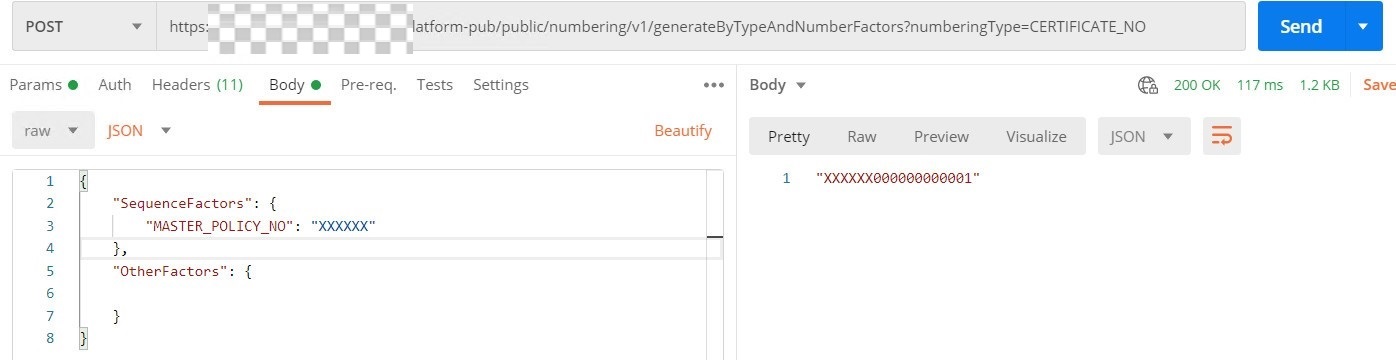
If you fill in Sequence Check Event Code, atomic API ‘generateByTypeAndNumberFactors’ can drive the event code. However, this is only prepared for sequence skipping, which means that your rules must include logic to handle sequence skipping. For details, see Scenario 3.
2. Non-Consecutive Numbering
Question: I found my business number is not in consecutive order and there might be some number skipped and not being used in any place. Is that correct?
Answer: Yes, this is expected. Due to our microservices architecture, consecutive numbering is not guaranteed.
The underlying reason is because to ensure data integrity after a transaction, we apply a global transaction mechanism when invoking APIs across multiple microservices. During this process, a TransactionNo may be retrieved or generated; however, it could ultimately be rolled back if the global transaction fails.
Because the generation of TransactionNo is atomic and non-blocking, meaning it does not prevent others from generating new numbers. As a result, even if the transaction associated with a TransactionNo fails, the number will not be rolled back. So far, there’s no the possibility of reusing or reassigning skipped numbers and no such pooling mechanism in place.
3. Pre-allocated Policy Number Low-Stock Alert
Question: For one carrier, policy numbers are pre-allocated externally and imported into our system. Before the available pool is exhausted, we need an early-warning mechanism: once the remaining count drops below a configurable threshold, the system will automatically alert the carrier so they can supply a new range. What implementation approach would you recommend for this requirement?
Answer: Policy numbers are pre-allocated by the insurer and stored in a dedicated number pool. At policy insurance, the system sequentially pulls a number from the pool and assigns it to the policy.
The entire solution can be implemented with iComposer:
- Persist the insurer-provided number ranges in IComposerDbDataUtils.
- Run a lightweight nightly batch job to count the remaining available numbers.
- When the remaining quantity falls below a configurable threshold, the system automatically sends an email alert to the insurer (including the current range and remaining count, etc.), prompting them to supply a new range.
This achieves proactive inventory management of number ranges without manual monitoring.