Overview
Policy payment is a common business scenario. Once the policy term is determined, policyholders need to pay for the effectiveness of policy. Policyholders have to decide on the billing type, pay mode and installment frequency (e.g., lump sum or installment) for premium payments before the policy is issued.
All these information capture and generation requirements can be addressed based on our platform’s API and configuration capabilities.
Payment and Installment
Concept
There are two key concepts involved from both business and system perspectives:
-
Payment defines the payment method chosen by policy holders. The most crucial information includes the payment mode, whether installments are needed and the installment period.
-
Installments define the detailed installment information, such as installment periods and their respective due dates.
Data Model
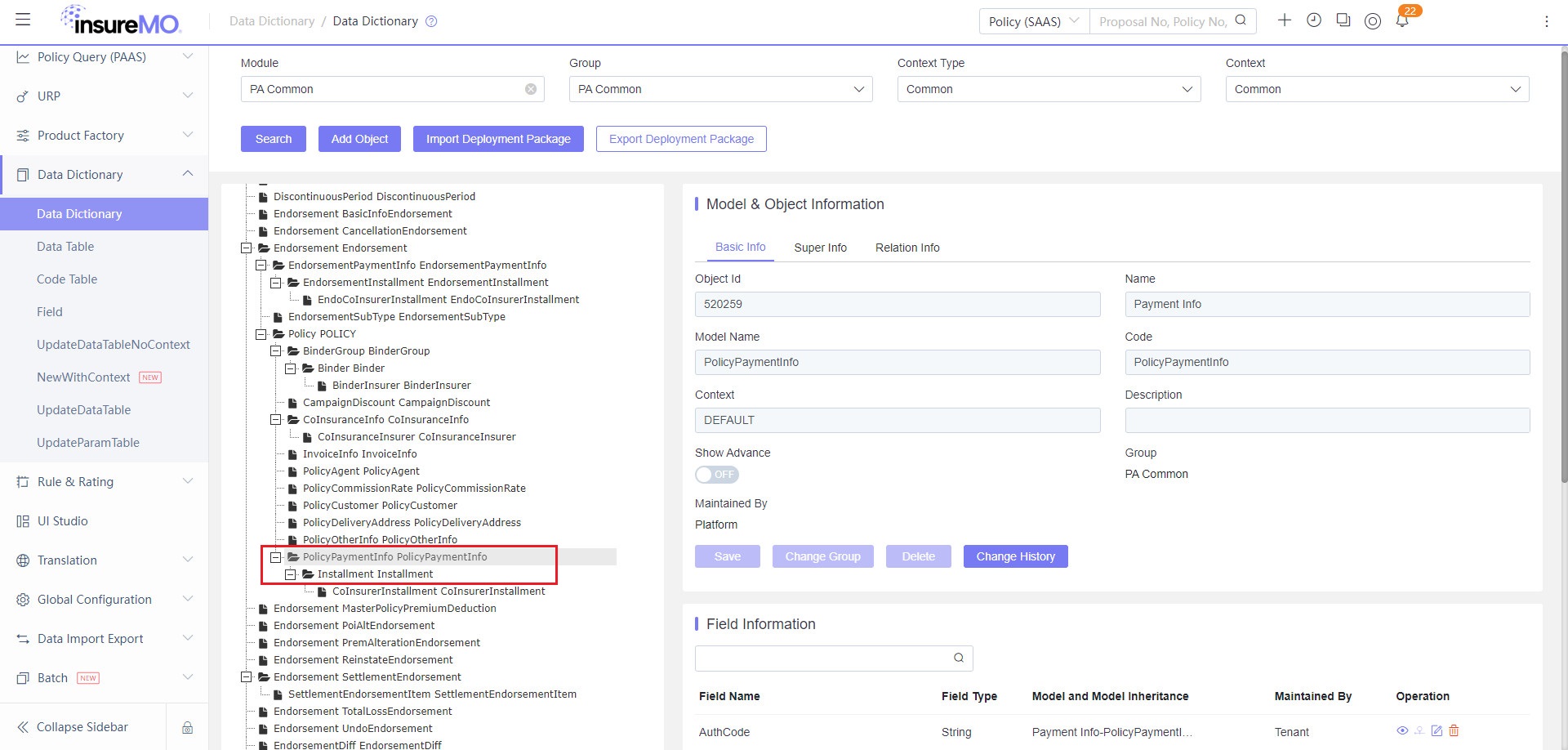
You can find the PolicyPaymentInfo and InstallmentInfo models in the data dictionary. These models are part of the policy object.
API Implementation
Scenarios
There are three scenarios where APIs can be effectively utilized:
-
Automatic installment calculation
Auto installment calculation involves scenarios where you simply input your desired installment payment period, and the system subsequently calculates all the installment premium details.
In this case, you need to follow the steps below:
-
Before calling the proposal calculate API, you need to input the PolicyPaymentInfo model primarily and fill in some payment plan information fields, such as payment method, whether installments are needed, and the number of installment periods. If the existing fields cannot meet your requirements, you can add dynamic fields to the model.
-
During the calculation API process, the system will automatically generate the corresponding number of installment periods and the installment model based on the payment plan.
-
Thereafter, the system will automatically invoke the rating engine, enabling you to configure key information, such as the installment due date and installment premium based on business logic.
-
Finally, the API response will include both payment and installment models with key information generated by the API and rating configuration.
-
-
Manual installment calculation
Manual installment calculation pertains to scenarios where, for some commercial product cases, underwriters might want to adjust the installment period manually rather than relying on the system’s calculation.
Under the circumstances, before calling the proposal calculate API, you can include both payments and installments within the policy object, bypassing the need to configure the rating logic. Consequently, the system will respond to the contents of the request without any internal behavior.
notePlease ensure the installment type is set to “Custom” and the number of installment records matches the Installment period field.
-
Without installment
As all policies require payments, a payment model is the indispensable information captured by any API. If there are no installments, you can indicate in the payment model that no installment is required.
In this case, the system will still generate an installment record even if there is no installment. This ensures data consistency, enabling you to consistently utilize the installment model for all downstream fee integrations.
API Request and Response Sample
API URL: {{server}}/proposal/core/proposal/v1/calculate.
Suppose that there is a scenario where policy POI spans one year, and the payment frequency is set to every half year. Therefore, two installment periods are required from a business perspective.
-
Request body (partial)
Please provide PolicyPaymentInfoList model and InstallmentType field to indicate that the installment is Half Yearly.
{"EffectiveDate": "2024-07-05","ExpiryDate": "2025-07-04T23:59:59","ProductCode": "TBTI","PolicyLobList": [{"PolicyRiskList": [{"RiskName": "XXXXX","PolicyCoverageList": [],"ProductElementCode": "R10001"}],"ProductCode": "TBTI"}],"PolicyPaymentInfoList": [{"PayModeCode": 30,"IsInstallment": "Y","InstallmentType": "3","BankCode": "CITI","BillingType": "1","CreditCardNo": "88888888","CreditCardType": "1","ExpiryDate": "2025-05-05T23:59:59"}]} -
Response body (partial)
-
The system generates the InstallmentPeriodCount in the payment model by the platform’s embedded auto-calculation logic. Given that the POI is for one year and the installment frequency is half-yearly, the value should be displayed as 2.
-
Subsequently, the system creates the InstallmentList model with two records based on the InstallmentPeriodCount.
-
Finally, the system will invoke rating configuration to generate additional related fields, such as the period sequence (InstallmentPeriodSeq) and due date (InstallmentDate) based on the configuration.
"PolicyPaymentInfoList": [{"BankCode": "CITI","BillingType": "1","BusinessObjectId": 520259,"CreditCardNo": "88888888","CreditCardType": "1","ExpiryDate": "2025-05-05T23:59:59","InstallmentList": [{"BeforeVatPremium": 90,"BeforeVatPremiumLocal": 90,"BusinessObjectId": 200001394,"Commission": 6.3,"CommissionLocal": 6.3,"DuePremium": 97.2,"DuePremiumLocal": 97.2,"FeeSeq": 1,"InstallmentAmount": 98.17,"InstallmentAmountLocal": 98.17,"InstallmentDate": "2024-05-06","InstallmentPeriodSeq": 1,"ParentPolicyElementId": 10443510014,"PolicyElementId": 10443510015,"PolicyId": "10443510005,525692405439DE282762B9A7E7CAFC61","PolicyStatus": 2,"PremiumInterest": 0.9,"PremiumInterestLocal": 0.9,"SequenceNumber": 1,"TaxInterest": 0.07,"TaxInterestLocal": 0.07,"TotalInterest": 0.97,"TotalInterestLocal": 0.97,"Vat": 7.2,"VatLocal": 7.2},{"BeforeVatPremium": 90,"BeforeVatPremiumLocal": 90,"BusinessObjectId": 200001394,"Commission": 6.3,"CommissionLocal": 6.3,"DuePremium": 97.2,"DuePremiumLocal": 97.2,"FeeSeq": 1,"InstallmentAmount": 98.17,"InstallmentAmountLocal": 98.17,"InstallmentDate": "2024-11-06","InstallmentPeriodSeq": 2,"ParentPolicyElementId": 10443510014,"PolicyElementId": 10443510016,"PolicyId": "10443510005,525692405439DE282762B9A7E7CAFC61","PolicyStatus": 2,"PremiumInterest": 0.9,"PremiumInterestLocal": 0.9,"SequenceNumber": 2,"TaxInterest": 0.07,"TaxInterestLocal": 0.07,"TotalInterest": 0.97,"TotalInterestLocal": 0.97,"Vat": 7.2,"VatLocal": 7.2}],"InstallmentPeriodCount": 2,"InstallmentType": "3","IsInstallment": "Y","ParentPolicyElementId": 10443510005,"PayModeCode": "30","PayRate": 1,"PolicyElementId": 10443510014,"PolicyId": "10443510005,525692405439DE282762B9A7E7CAFC61","PolicyStatus": 2,"SequenceNumber": 1}], -
The API includes specific fallback behaviors, with the InstallmentDate generation logic exemplified as follows:
- If IsInstallment is null, the code will not process the InstallmentDate field.
- If IsInstallment is “N” and the period is 1 (indicating no installment), InstallmentDate will then adopt the Policy Effective Date.
- If IsInstallment is “Y”, the installment rating process will be triggered.
- If installmentFlag = “Y” and you proactively pass an InstallmentList, the code and rating engine will overwrite it with the correct values. If the InstallmentDate field is not passed in your request but the rating engine has its own generation logic for InstallmentDate, the InstallmentDate in the response will be returned after calculation by the rating engine.
- If installmentFlag = “N” but you still pass an InstallmentList (with one or more entries), the service will return the first entry exactly as provided. If the InstallmentDate field is not passed in your request, it will not be included in the response either.
Installment Period Calculation Logic
Taking the two-year policy as an example, the relationship between the installment type and installment periods can be clarified as follows:
| Installment Type | Related to Policy Period | Installment Periods |
|---|---|---|
| -1 Custom | No | 1-12 optional, expandable |
| 1 Monthly | Yes | 24 |
| 2 Quarterly | Yes | 8 |
| 3 Half Yearly | Yes | 4 |
| 4 Yearly | Yes | 2 |
| 10 No Installment | No | 1 |
Sample UI Flow
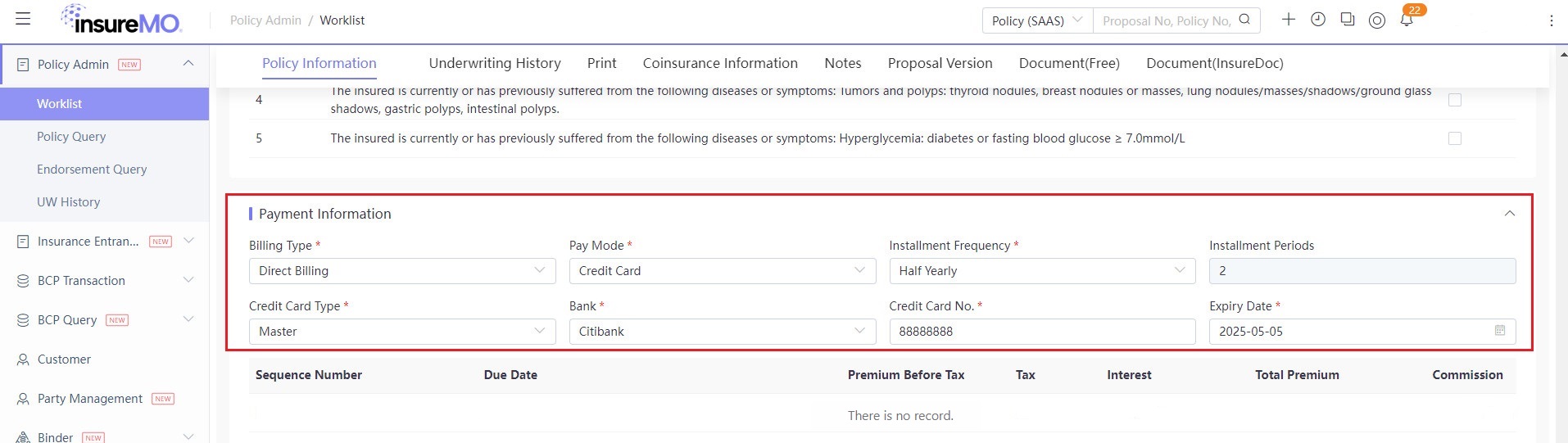
The following is a sample policy UI with auto installment calculations.
Before Calculation
-
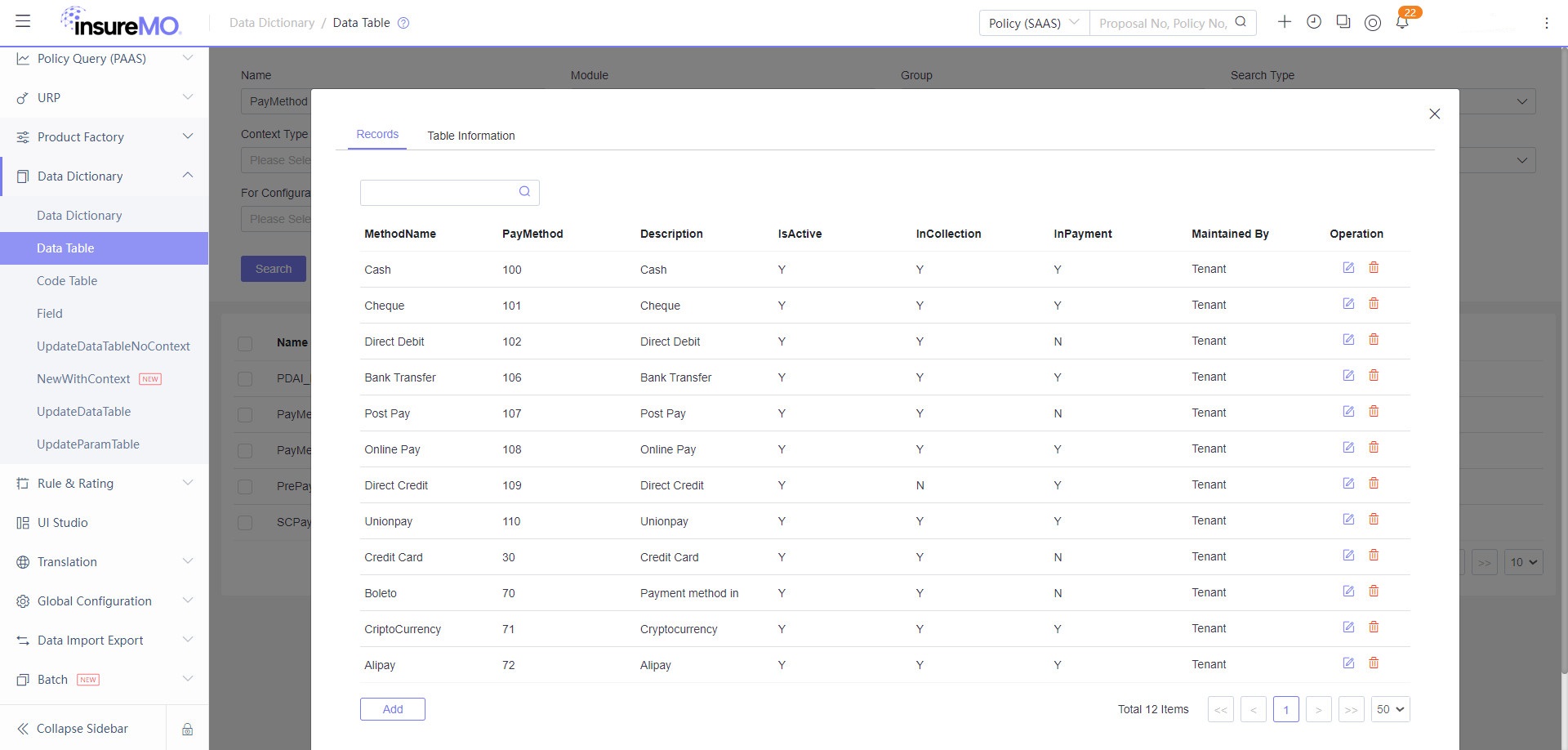
For Pay Mode, the corresponding data table is PayMethod.
-
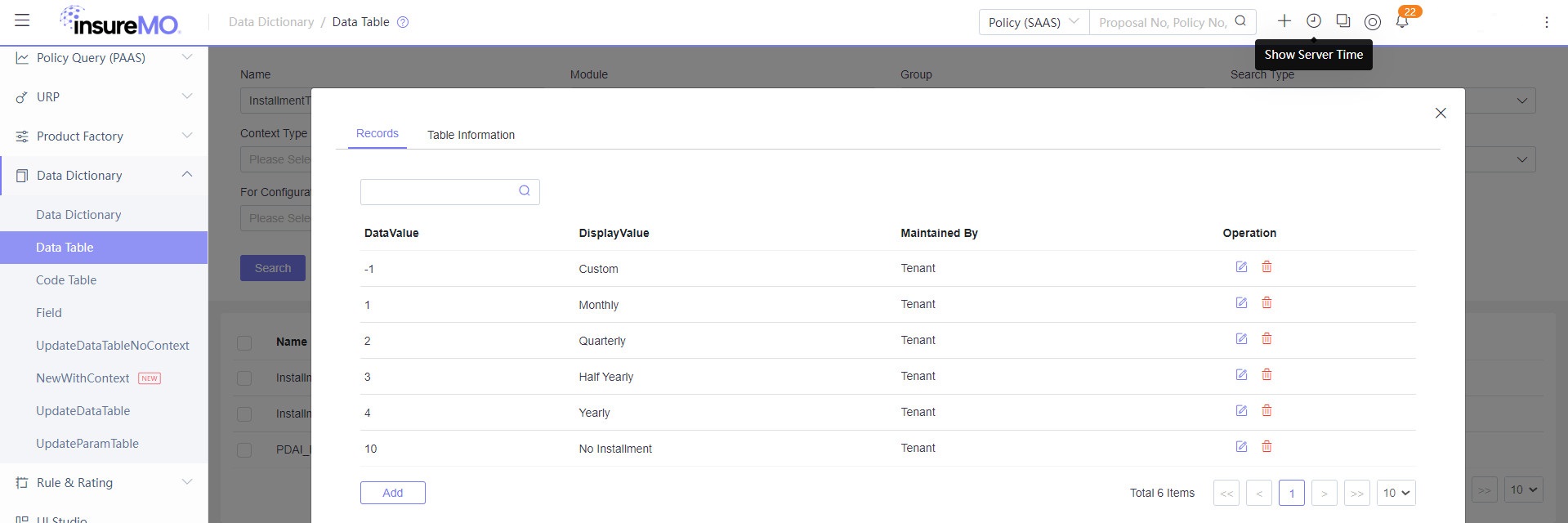
For Installment Frequency, the corresponding data table is InstallmentType.
-
Installment Period is related to the Installment Type.
- When the Installment Type is set to Custom, the Installment Periods can be freely selected, and the number of installments can be extended. The corresponding code table will be InstallmentCount.
- Otherwise, the Installment Periods will be generated by the system.
-
Other fields, such as Credit Card Type and Bank, can be expanded based on specific requirements.
After Calculation
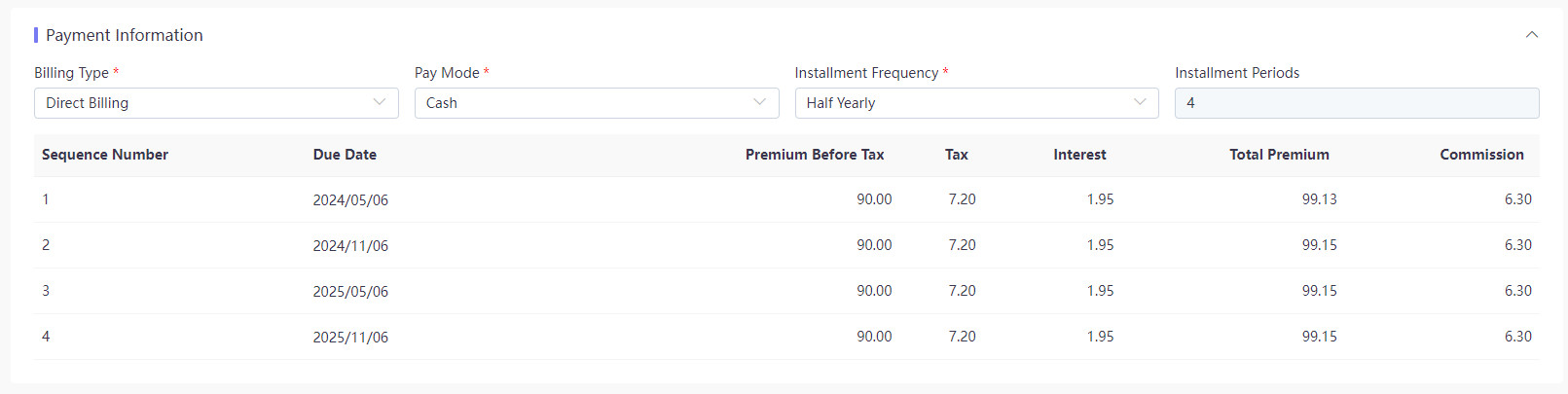
According to the conditions selected within the Payment Information, the system will automatically generate the due date and the actual premium payable for each installment period.
Taking the two-year policy as an example, if the Installment Type is set to Half Yearly, the Installment Periods will be 4 by the system’s calculation. Consequently, the installment list will contain 4 corresponding records.
Sample Rating logic
As previously mentioned, the system will automatically calculate due dates and premiums for each period. Now, let’s delve into how this is actually implemented.
Once the number of installments is determined, the system generates the corresponding number of installments. The value of each installment is also calculated during the rating process and then passed on.
The system calculates due dates and premiums based on the rating configuration logic.
Due Date
The current logic for demonstrating tenants is that the effective date of the policy coincides with the due date for the first premium payment. For example, if the effective date of a policy falls on July 5, 2024, with 12 installments, the due date for the first installment will be July 5, 2024, followed by August 5, 2024 for the second installment due date, and so on. Nonetheless, this logic is flexible and can be adjusted to suit the individual requirements of tenants.
final def BY_MONTH = "1"
final def BY_QUARTER = "2"
final def BY_HALFYEAR = "3"
final def BY_YEAR = "4"
final def BY_CUSTOM = "-1"
final def BY_NOINS = "10"

def count=PolicyPaymentInfo().InstallmentPeriodCount.val
def Seq=InstallmentPeriodSeq.val
def Type=PolicyPaymentInfo().InstallmentType.val

def EDate=Policy().EffectiveDate.val
//convert localDateTime to Date
java.time.ZoneId zoneId = java.time.ZoneId.systemDefault()
java.time.ZonedDateTime zdt = EDate.atZone(zoneId)
//Combines this date-time with a time-zone to create a ZonedDateTime
Date effDate = Date.from(zdt.toInstant())

if(Type.equals(BY_NOINS))
{
InstallmentDate.update(effDate)
}
if(Type.equals(BY_MONTH))
{
Date d= org.apache.commons.lang3.time.DateUtils.addMonths(effDate,Seq-1)
//SimpleDateFormat, convert date format to specified string format.
def dd = sdf.format(d)
InstallmentDate.update(dd)
}
Premium
-
Regular Fee
The current logic for demonstrating tenants involves retrieving the policy level fees for the following fields: BeforeVatPremium, Vat, DuePremium, Commission, and InstallmentAmount.
These fees are then divided equally among the number of installments. In case of incomplete division of expenses for each period, two decimal places will be retained. Meanwhile, the remaining expenses, regardless of whether high or low, will be uniformly counted in one of the periods.
For instance, if the policy is divided into 12 installments, with a total DuePremium of 120.5, the premium for each of the first 11 installments will be 10.04 and the last installment will be 10.06.
def count = PolicyPaymentInfo().InstallmentPeriodCount.valdef curLvl = Installment()def seq = InstallmentPeriodSeq.valcontext["Field_Installment"] = ["BeforeVatPremium","Vat","DuePremium","Commission","InstallmentAmount"]def fieldList = context["Field_Installment"]for(field in fieldList){def fValue = 0if(field =="InstallmentAmount"){fValue = Policy().TotalPremium.val}else{fValue = Policy()[field].val}def fValueInstall = (fValue/count).round(2)if(seq == 1){fValueInstall = fValue - (fValueInstall * (count-1))} -
Dynamic Fee
Tenants have the flexibility to add fee fields based on their individual needs, such as bank transaction interest. This fee can be calculated at the policy level and then distributed to each installment period, ensuring that the overall cost is accurately reflected in each payment.
def curLvl = Installment()def count = PolicyPaymentInfo().InstallmentPeriodCount.valcontext["Field_Installment_Interest"] = ["PremiumInterest","TaxInterest","TotalInterest"]def fieldList2 = context["Field_Installment_Interest"]for(field in fieldList2){def fValue = Policy()[field].valdef fValueInstall = (fValue/count).round(2)curLvl[field].update(fValueInstall)}