<- Back to Overview
Basic Concept
A BCP module, or billing, collection, and payment module, is used in the insurance industry to manage the billing and payment processes for insurance policies.
The system now supports querying all kinds of financial records of all status, and exporting basic information in an Excel format at the platform level.
User Scenario
For anyone who wants to use our platform to query financial data.
BCP Statistics
In this section, user will be able to choose the search criteria such as the product and date range to view the overall transaction summary of the following types:
- Total Number of Transaction: to get an overall understanding of how many cases have been created in the past.
- Total XXX Amount: to get an overall understanding of the amount that have been generated in the past.
- Total XXX Balance: to get an overall understanding of the outstanding balances from past transactions.
- Statistics Report: to get Statistics Report according to the required conditions.
If you want to have more specific tailored dashboard, you can click on the link at the bottom of the page, go to query page to search, and export data in excel format.
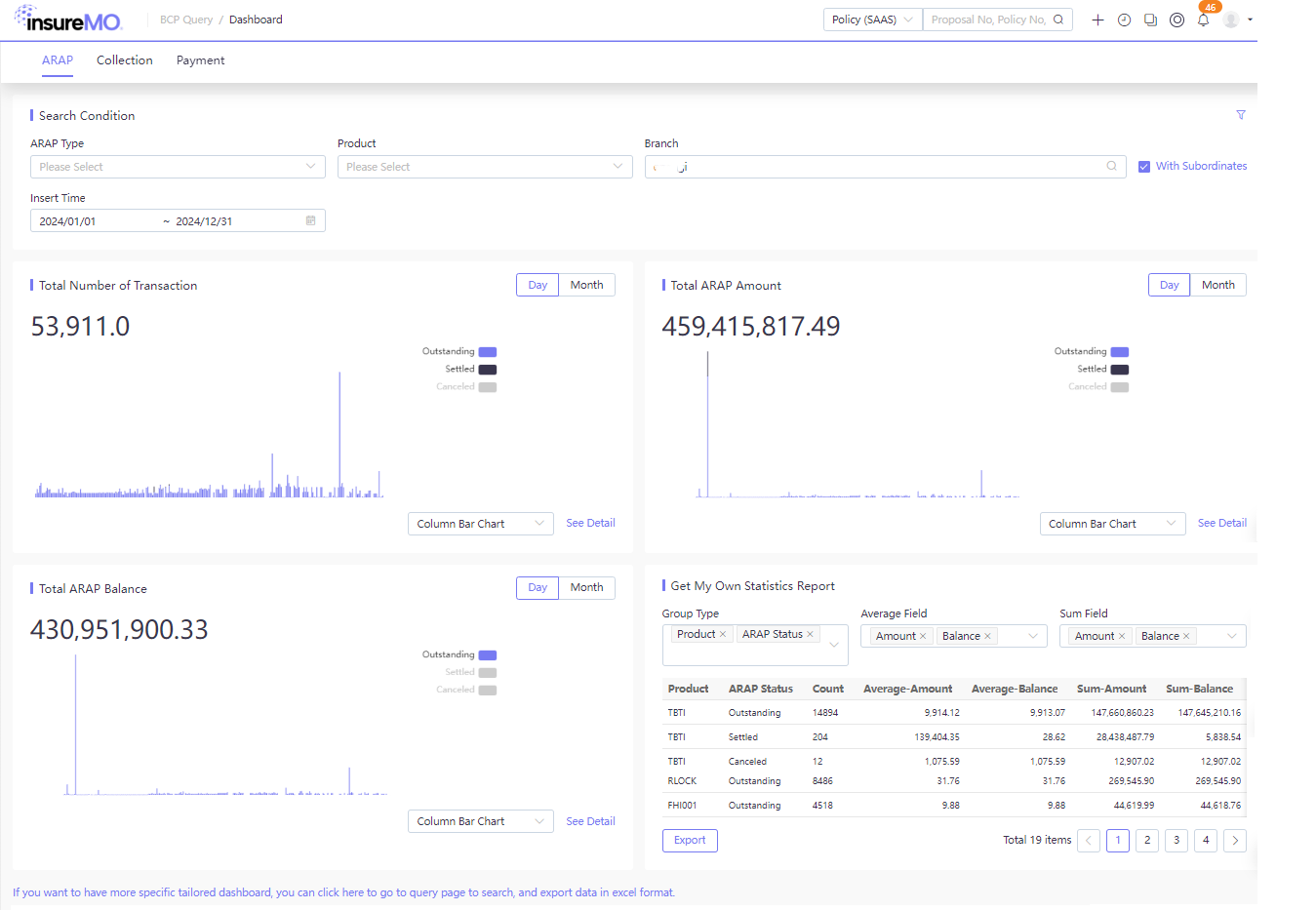
Statistics Search Condition
- By default, platform will provide some available search criteria. User can click on the filter icon which in the upper right corner of the Search Condition Card, to add or remove search conditions on the page.
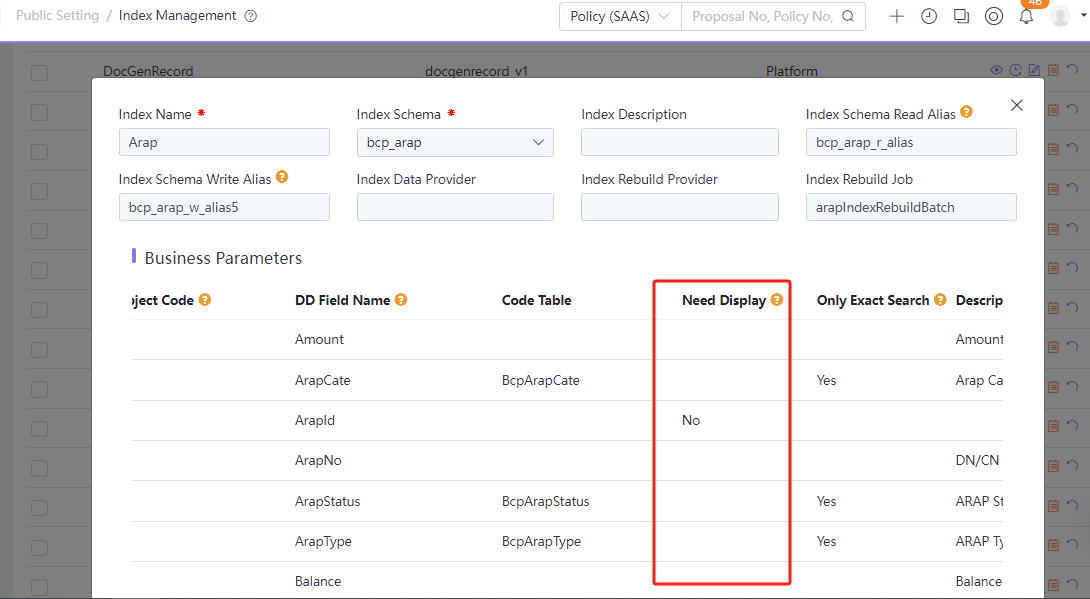
- If user wants to add or hide some criteria in the filter, user can contact development team to configure them in Arap, Collection & BcpPayment index via Index Management module.
- User can also click on the ARAP tab, Collection tab and Payment tab in the upper left corner to obtain the data of the respective business type.
Tabs: ARAP, Collection, and Payment, each showing statistics for the respective business type.
| Field Name | Type | Required | Read Only | Default Value | Data Source | Description |
|---|---|---|---|---|---|---|
| ARAP Type | Dropdown | No | No | — | BcpArapType | Filter by ARAP type. |
| Product | Dropdown | No | No | — | Product | Filter by insurance product. |
| Branch | Dropdown + Checkbox | No | No | Current User Branch | Branch Master | Filter by branch. Tick With Subordinates to include all subordinate branches (multi-level org data). |
| Entry Date | Date Range | No | No | Full current year (e.g. 2024-01-01 ~ 2024-12-31) | — | Filter by ARAP ledger entry (generation) date. From ~ To. |
The following business transaction category filters are also provided for a personalized statistics view:
- Whether it’s ARAP, Collection or Payment
- Whether its status is outstanding, settled, collected, confirmed or paid
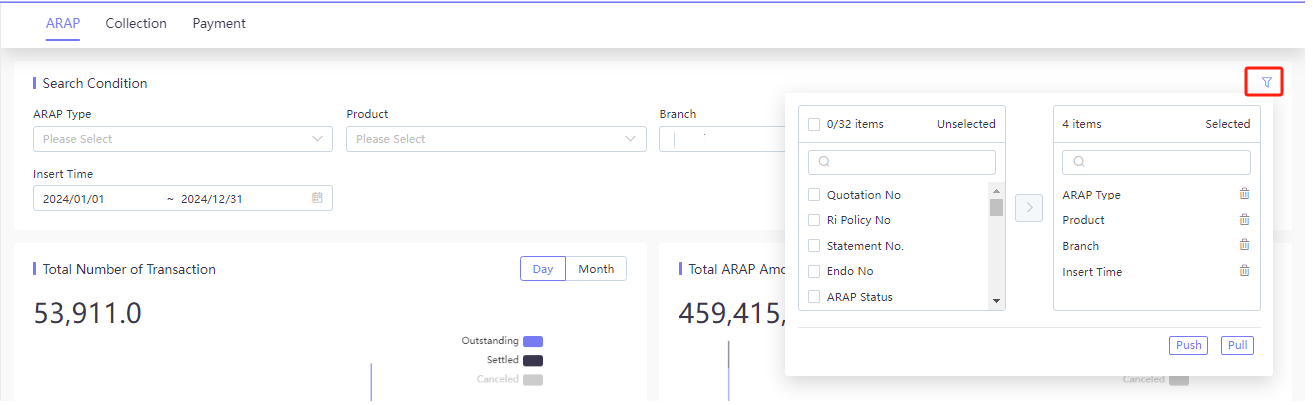
Users can click the filter icon to open a transfer-box configuration panel with 32 available query fields (including Quote No., Reinsurance Policy No., Bill No., Endorsement No., ARAP Status, etc.). The right panel shows the selected query fields. The panel has Push (apply changes) and Pull (reset to defaults) buttons.
| Transfer-Box Section | Description |
|---|---|
| Unselected fields (left) | 32 configurable query fields available to add. |
| Selected fields (right) | Currently active query fields, each removable individually. |
| Push button | Apply the selected field configuration to the search area. |
| Pull button | Reset the configuration back to the 4 default fields. |
The Index Management configuration for ARAP search includes:
- Index schema:
bcp_arap - Read alias:
bcp_arap_r_alias, Write alias:bcp_arap_w_alias5 - Rebuild batch task:
arapIndexRebuildBatch
Field-level rules control search behavior (the table below shows a partial example; more fields can be configured via Index Management):
| Field | Code Table | Need Display | Only Exact Search | Description |
|---|---|---|---|---|
| Amount | — | Pending | No | ARAP amount. |
| ArapCate | BcpArapCate | Pending | Yes | ARAP category. |
| ArapId | — | No | No | ARAP backend unique ID (no business meaning). |
| ArapNo | — | Pending | No | ARAP business number. |
| ArapStatus | BcpArapStatus | Pending | Yes | ARAP status. |
| ArapType | BcpArapType | Pending | Yes | ARAP type. |
| Balance | — | Pending | No | Outstanding balance. |
Dashboard KPI Cards
Below the search condition card are three core KPI cards. Each KPI card supports switching between Day/Month granularity, switching chart types (column bar, line chart), and viewing detail data.
| KPI Card | Description | Sample Value |
|---|---|---|
| Total Number of Transaction | Total ARAP ledger count within the filter period. | 53,911 records |
| Total ARAP Amount | Total ARAP generated amount within the filter period. | 459,415,817.49 |
| Total ARAP Balance | Total outstanding ARAP balance as of the statistic point. | 430,951,900.33 |
Status color mapping used across the KPI charts:
| Status | Meaning |
|---|---|
| Outstanding | Pending transactions (not yet completed). |
| Settled | Completed transactions (fully paid/received). |
| Canceled | Voided transactions. |
Note: The exact color of each status varies by KPI card (see each card below). Switching Day/Month granularity only changes the time-series aggregation; the headline total is always the full-period figure and is not affected by the granularity switch.
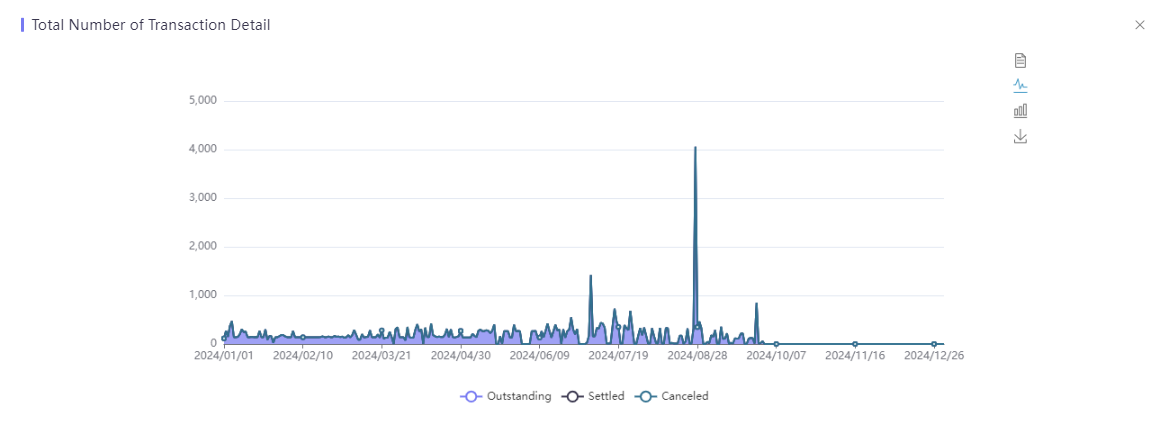
Total Number of Transaction
- User can view the transaction quantity by month or day.
- User can choose outstanding, settled or canceled to view the transaction quantity.
- Both column bar and line charts are provided in case different users might have different favorites.
- User can see the details, and the page displays the date and quantity range, with different colors indicating different status. In the upper right corner, users can also switch between Data View, Column Bar Chart and Line Chart, or Save it as image.
Status colors (transaction count):
- Outstanding (blue): pending transactions
- Settled (dark gray/black): completed transactions
- Canceled (light gray): voided transactions
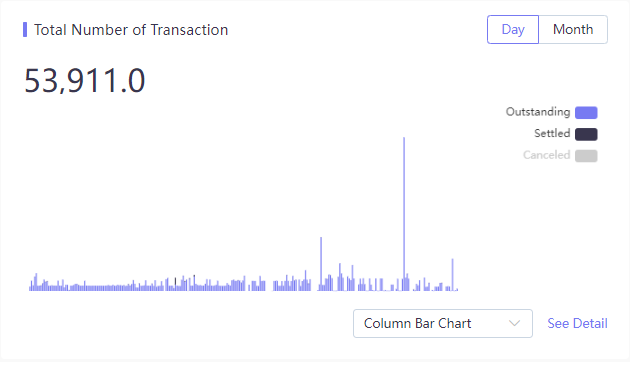
Detail view: Displays a time-series area/line chart covering the full filter period. The right-side toolbar provides: Data View toggle, Line Chart toggle, Column Bar Chart toggle, and Export button.
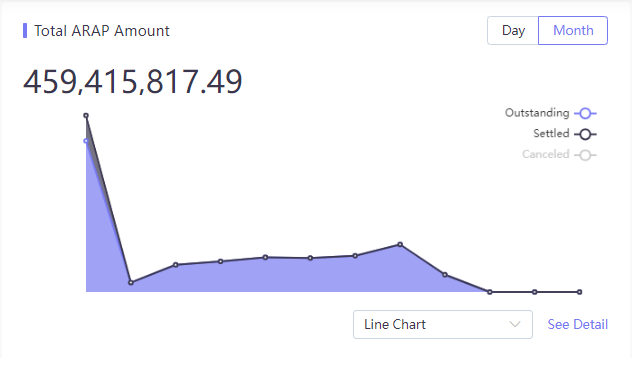
Total ARAP Amount
- User can view the total amount by month or day.
- User can choose outstanding, settled or canceled to view the total amount.
- Both column bar and line charts are provided in case different users might have different favorites.
- User can see the details, and the page displays the date and amount range, with different colors indicating different status. In the upper right corner, users can also switch between Data View, Column Bar Chart and Line Chart, or Save it as image.
Status colors (ARAP amount): Outstanding (light purple, area-filled), Settled (dark gray), Canceled (light gray). The filled line chart highlights the outstanding amount trend over time.
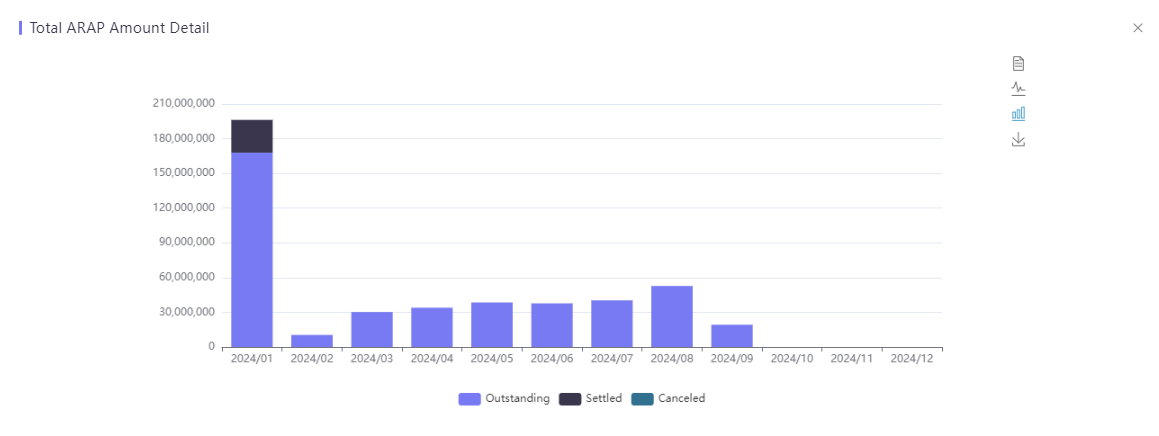
Detail view: Provides a stacked column bar chart by month with the same three status colors. Controls on the right include: Export, Line Chart view, Stacked Column Bar Chart view (default), and Data Download.
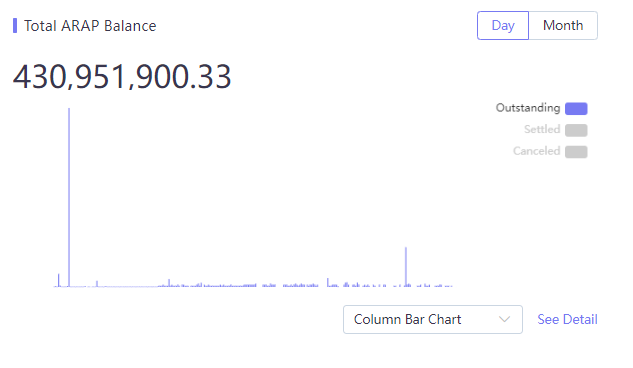
Total ARAP Balance
- User can view the total balance by month or day.
- User can choose outstanding, settled or canceled to view the total balance.
- Both column bar and line charts are provided in case different users might have different favorites.
- User can see the details, and the page displays the date and balance range, with different colors indicating different status. In the upper right corner, users can also switch between Data View, Column Bar Chart and Line Chart, or Save it as image.
Status colors (ARAP balance): Outstanding (purple, dominant), Settled (light gray), Canceled (light gray). In the current period, outstanding balance dominates while settled and canceled balances are negligible.
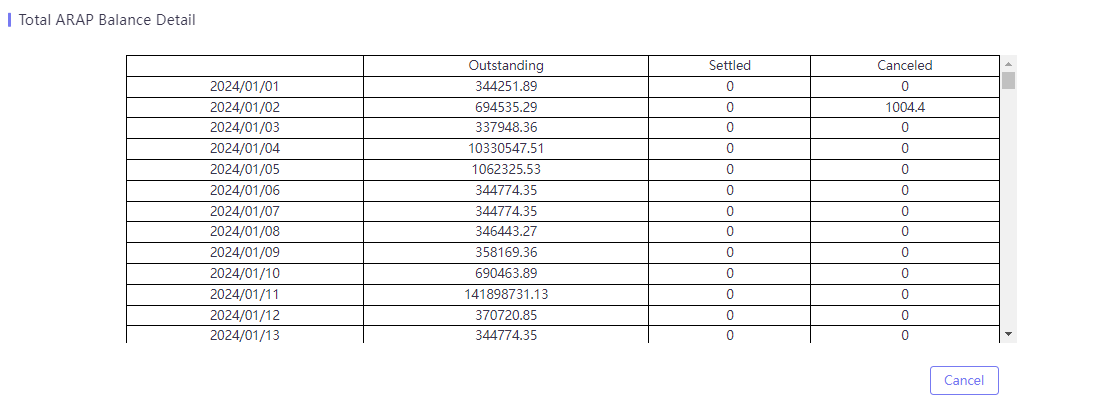
Detail view: Shows a daily breakdown table with the following columns. The reconciliation logic is: previous-day outstanding balance + today’s new ARAP amount = today’s outstanding balance + today’s settled amount + today’s canceled amount.
| Column | Description |
|---|---|
| Date | Statistic date (YYYY/MM/DD). |
| Outstanding Balance | Outstanding AR/AP balance still pending receipt/payment. |
| Settled Amount | Amount settled (received/paid) on that date. |
| Canceled Amount | Amount voided on that date. |
Get My Own Statistics Report (Custom Statistics Report)
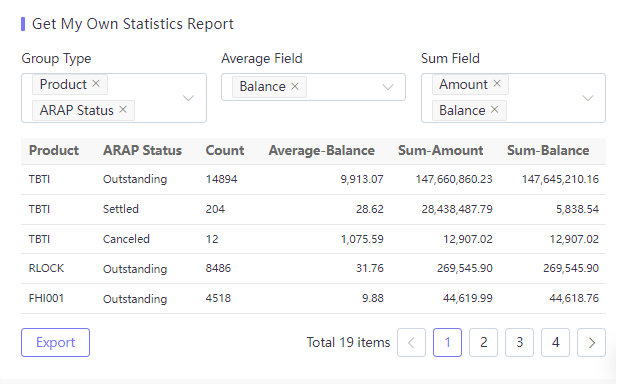
Below the KPI cards is a custom Statistics Report area. It supports configuring Group Type, Average Field, and Sum Field for custom aggregation. Results are displayed in a table with pagination and export capability.
- User can choose the criteria for Group Type, Average Field and Sum Field.
- Group Type is a condition, Average Field and Sum Field is the statistical result calculated based on the condition, which also support export.
- The fields in Group Type, Average Field and Sum Field are configured in Index. If user wants to add or hide some data, user can contact development team to configure them in Arap, Collection & BcpPayment index via Index Management module. If the added field type is string, it displays in Group Type; if the field type is double or long, it displays in Average Field and Sum Field.
Configuration options:
| Configuration | Type | Description |
|---|---|---|
| Group Type | Multi-select (String fields) | Dimensions for cross-grouping (e.g. Product, ARAP Status). |
| Average Field | Multi-select (Numeric fields) | Numeric fields for average calculation (e.g. Balance). |
| Sum Field | Multi-select (Numeric fields) | Numeric fields for sum calculation (e.g. Amount, Balance). |
Result columns:
| Column | Description |
|---|---|
| Product | Insurance product code. |
| ARAP Status | ARAP status (Outstanding / Settled / Canceled). |
| Count | Transaction count under the grouping. |
| Average-Balance | Average balance under the grouping. |
| Sum-Amount | Sum of amount under the grouping. |
| Sum-Balance | Sum of outstanding balance under the grouping. |
Supports pagination and export. The total number of statistical results is shown in the pagination control (e.g. 19 rows in 4 pages).
BCP Query UI Operation
For every transaction with an amount, the system will generate a respective AR or AP. Users can check the status and other information of the ARAP.
Users can query each ARAP/Receipt/payment/application record by different search criteria.
Query ARAP
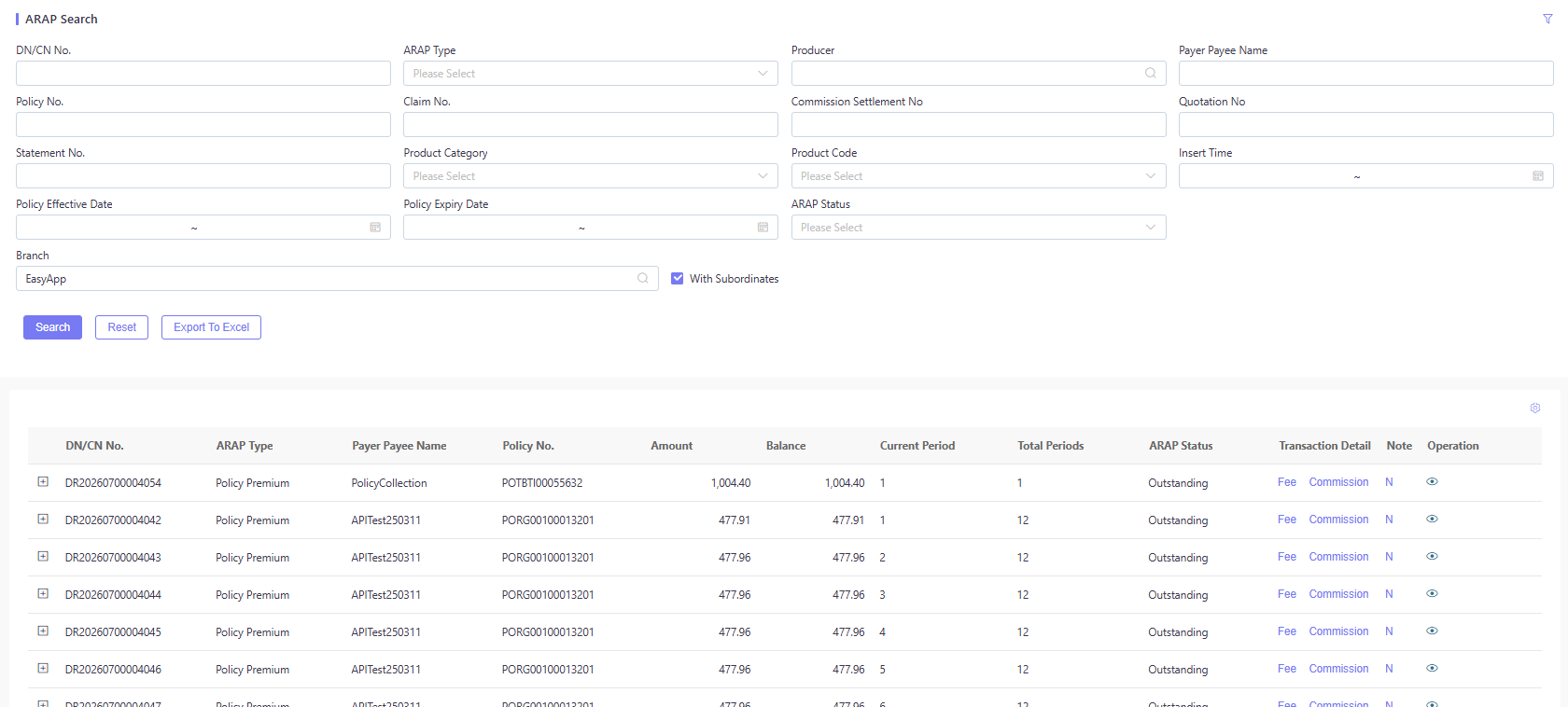
Path: BCP Query / Query ARAP.
- Prerequisites: ARAP records are generated by business transaction.
- Users can search ARAP records by multiple search criteria.
- Users can click + on the left of DN/CN No. to expand and view detailed ARAP information.
- Users can click Fee to view detailed fee information.
- Users can click Commission to view detailed commission information.
- Users can click View Icon on the right to view associated transaction details information.
- Users can click N (Note) to add comments.
- Users can export the ARAP to an excel file to view these records.
Search Criteria:
The default search form is laid out in three columns and is fully customizable via the user preference component (see BCP Query UI Configuration).
| Field Name | Type | Required | Read Only | Default Value | Data Source | Description |
|---|---|---|---|---|---|---|
| DN/CN No. | Text Input | No | No | — | — | Filter by debit/credit note number. |
| Policy No. | Text Input | No | No | — | — | Filter by policy number. |
| Statement No. | Text Input | No | No | — | — | Filter by statement number. |
| Policy Effective Date | Date Range | No | No | — | — | Filter by policy effective date. From ~ To. |
| Branch | Dropdown + Checkbox | No | No | Current User Branch (e.g. EasyApp) | Branch Master | Filter by branch. Tick With Subordinates to include all subordinate branches (multi-level org data). |
| ARAP Type | Dropdown | No | No | — | BcpArapType | Filter by ARAP type (Policy Premium / Claim Settlement / Commission, etc.). |
| Claim No. | Text Input | No | No | — | — | Filter by claim number. |
| Product Category | Dropdown | No | No | — | ProductLine | Filter by product category. |
| Policy Expiry Date | Date Range | No | No | — | — | Filter by policy expiry date. From ~ To. |
| Producer | Search Input | No | No | — | Producer Master | Filter by producer / agent. |
| Commission Settlement No. | Text Input | No | No | — | — | Filter by commission settlement number. |
| Product Code | Dropdown | No | No | — | Product Master | Filter by product code. |
| Insert Time | Date Range | No | No | — | — | Filter by ARAP record insertion time. From ~ To. |
| Payer/Payee Name | Text Input | No | No | — | — | Filter by payer/payee name. |
| Quotation No. | Text Input | No | No | — | — | Filter by quotation number. |
Result Columns:
| Column | Description |
|---|---|
| (Checkbox) | Select ARAP record(s). |
| DN/CN No. | Debit/Credit note number (blue link, click + to expand). |
| ARAP Type | ARAP type (e.g. Policy Premium). |
| Payer/Payee Name | Payer or payee name. |
| Policy No. | Associated policy number. |
| Amount | Original ARAP amount. |
| Balance | Outstanding balance (0 means settled). |
| Current Period | Current installment period. |
| Total Periods | Total installment periods. |
| ARAP Status | ARAP status (e.g. Outstanding). |
| Transaction Detail | Fee, Commission (fee / commission detail entries). |
| Note | “N” link to add a note. |
| (Operation) | View Icon (associated transaction detail). |
Expanded detail fields: Quote No., Reinsurance Policy No., Endorsement No., Currency, Product Name, ARAP Category, Generation Date, Policy Expiry Date, Policyholder Name, Payer/Payee Type, Branch, Agent, etc.
Operation Buttons:
Search (execute search) Reset (clear the search form) Export To Excel (export the ARAP list to an Excel file)
Query Receipt
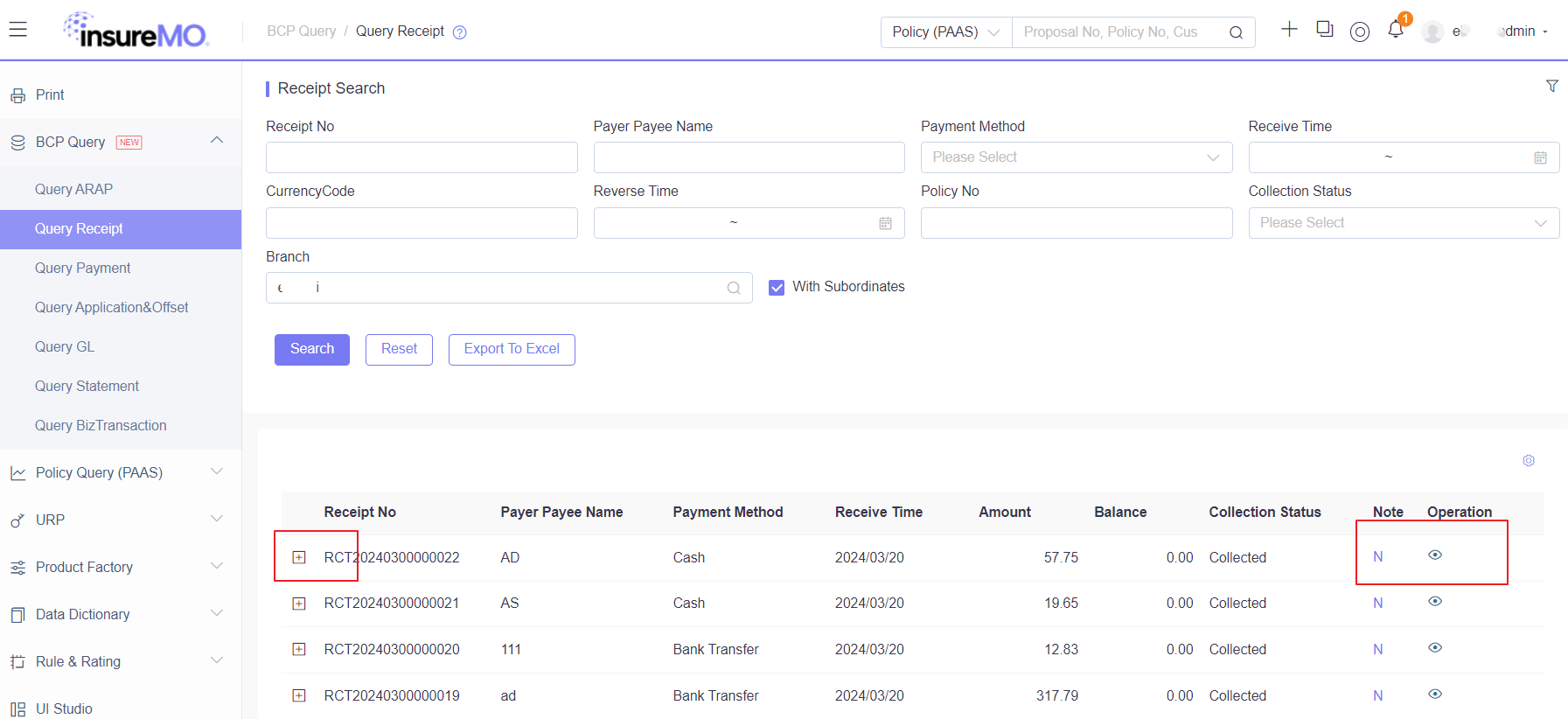
Path: BCP Query / Query Receipt.
- Prerequisites: The collection is performed successfully in the system, and the receipt no. is generated by the system.
- Users can search receipt records by multiple search criteria.
- Users can click + on the left of Receipt No. to expand and view detailed receipt information.
- Users can click View Icon on the right to view associated transaction details information.
- Users can click N (Note) to add comments.
- Users can export the receipt to an Excel file to view these records.
Search Criteria:
| Field Name | Type | Required | Read Only | Default Value | Data Source | Description |
|---|---|---|---|---|---|---|
| Receipt No. | Text Input | No | No | — | — | Filter by receipt number. |
| Payer/Payee Name | Text Input | No | No | — | — | Filter by payer/payee name. |
| Payment Method | Dropdown | No | No | — | BcpPaymentMethod | Filter by payment method (Cash, Bank Transfer, etc.). |
| Receive Time | Date Range | No | No | — | — | Filter by receipt arrival (collection) time. From ~ To. |
| Currency | Dropdown | No | No | — | CurrencySetting | Filter by collection currency. |
| Reverse Time | Date Range | No | No | — | — | Filter by reversal time. From ~ To. |
| Policy No. | Text Input | No | No | — | — | Filter by associated policy number. |
| Collection Status | Dropdown | No | No | — | BcpCollectionStatus | Filter by collection status (Collected / Confirmed / Reversed / Refund). |
| Branch | Dropdown + Checkbox | No | No | Current User Branch | Branch Master | Filter by branch. Tick With Subordinates to include all subordinate branches. |
Result Columns:
| Column | Description |
|---|---|
| (Checkbox) | Select receipt record(s). |
| Receipt No. | Receipt number (blue link, click + to expand). |
| Payer/Payee Name | Payer or payee name. |
| Payment Method | Payment method (e.g. Cash, Bank Transfer). |
| Receive Time | Actual receipt arrival time. |
| Amount | Total receipt amount. |
| Balance | Pending offset balance (0 means fully offset). |
| Collection Status | Collection status (e.g. Collected). |
| Note | “N” link to add a note. |
| (Operation) | View Icon (associated transaction detail). |
Operation Buttons:
Search (execute search) Reset (clear the search form) Export To Excel (export the receipt list to an Excel file)
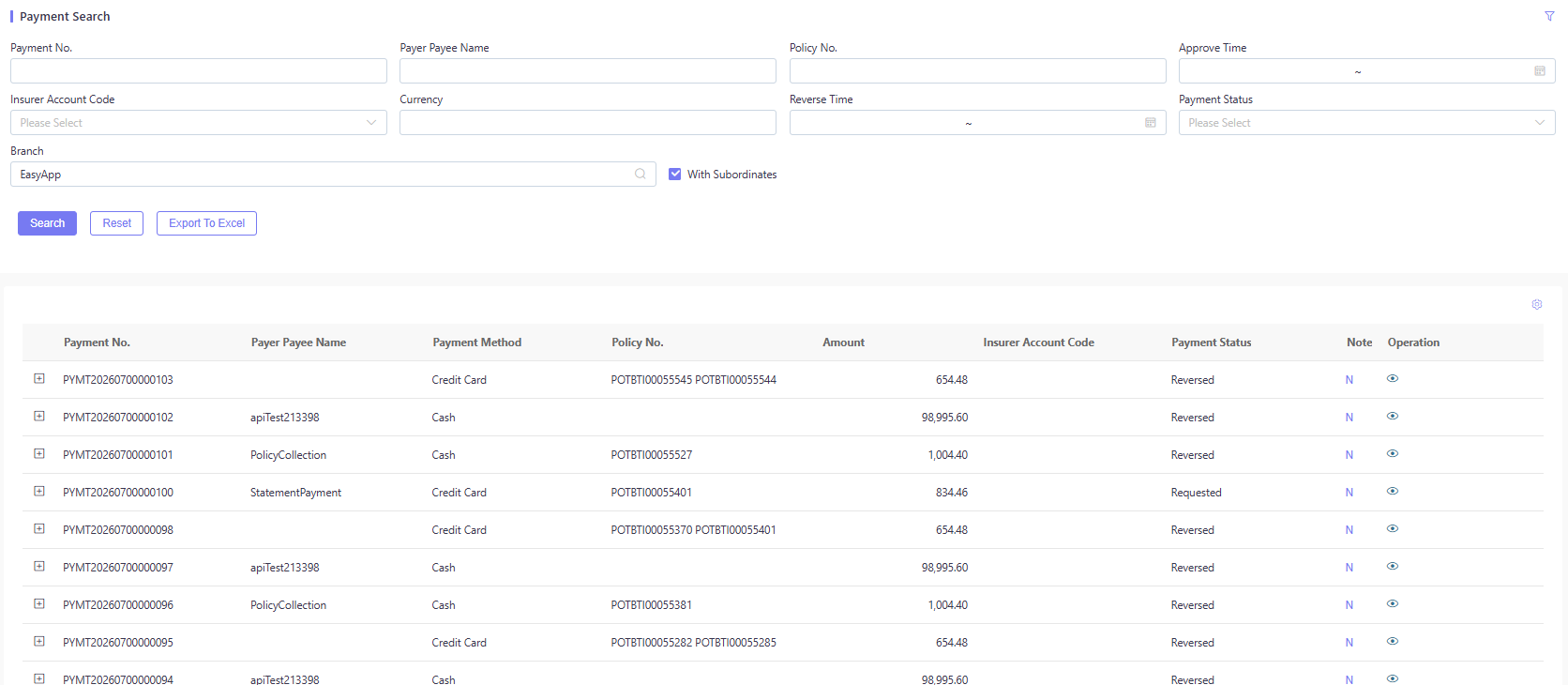
Query Payment
Path: BCP Query / Query Payment.
- Prerequisites: The payment records must be generated.
- Users can search payment records by multiple search criteria.
- Users can click + on the left of Payment No. to expand and view detailed payment information.
- Users can click View Icon on the right to view associated transaction details information.
- Users can click N (Note) to add comments.
- Users can export the payment to an Excel file to view these records.
Search Criteria:
The default search form is laid out in two rows and is fully customizable via the user preference component.
| Field Name | Type | Required | Read Only | Default Value | Data Source | Description |
|---|---|---|---|---|---|---|
| Payment No. | Text Input | No | No | — | — | Filter by payment number. |
| Payer/Payee Name | Text Input | No | No | — | — | Filter by payer/payee name. |
| Policy No. | Text Input | No | No | — | — | Filter by associated policy number. |
| Approve Time | Date Range | No | No | — | — | Filter by payment approval time. From ~ To. |
| Insurer Account Code | Dropdown | No | No | — | BcpBranchAccount | Filter by insurer account code. |
| Currency | Dropdown | No | No | — | CurrencySetting | Filter by transaction currency. |
| Reverse Time | Date Range | No | No | — | — | Filter by reversal time. From ~ To. |
| Payment Status | Dropdown | No | No | — | BcpPaymentStatus | Filter by payment status (e.g. Requested / Paid / Reversed). |
| Branch | Dropdown + Checkbox | No | No | Current User Branch (e.g. EasyApp) | Branch Master | Filter by branch. Tick With Subordinates to include all subordinate branches. |
Result Columns:
| Column | Description |
|---|---|
| (Checkbox) | Select payment record(s). |
| Payment No. | Payment number (blue link, click + to expand). |
| Payer/Payee Name | Payer or payee name. |
| Payment Method | Payment method (e.g. Cash, Credit Card). |
| Policy No. | Associated policy number. |
| Amount | Payment amount. |
| Insurer Account Code | Insurer settlement account code. |
| Payment Status | Payment status (e.g. Requested, Reversed). |
| Note | “N” link to add a note. |
| (Operation) | View Icon (associated transaction detail). |
Expanded detail fields: Quote No., Currency, Endorsement No., Approval Date, etc.
Operation Buttons:
Search (execute search) Reset (clear the search form) Export To Excel (export the payment list to an Excel file)
Query Application Offset
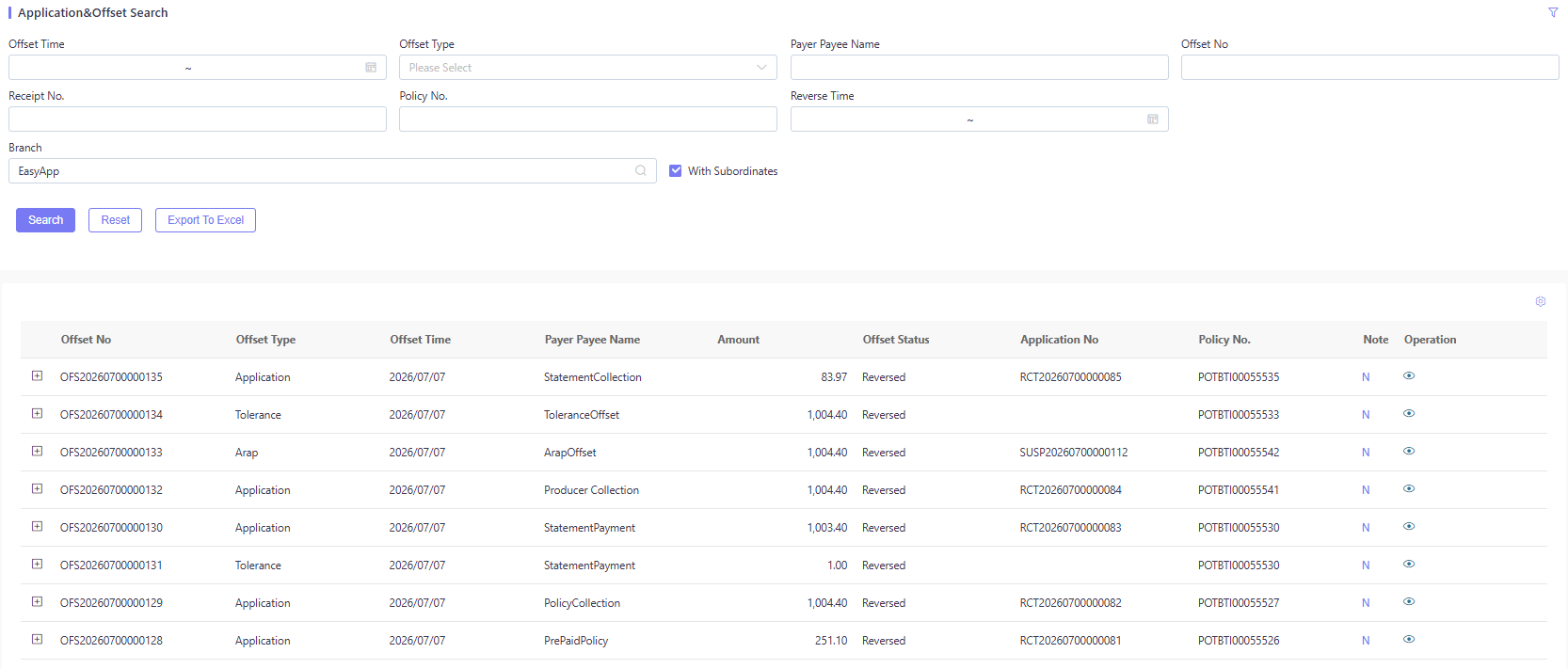
Path: BCP Query / Query Application & Offset.
- Prerequisites: An application or ARAP offset transaction must be performed by a user in the system.
- Users can search for offset records by multiple search criteria.
- Users can click + on the left of Offset No. to expand and view detailed offset information.
- Users can click View Icon on the right to view associated transaction details information.
- Users can click N (Note) to add comments.
- Users can export the offset to an excel file to view these records.
Search Criteria:
| Field Name | Type | Required | Read Only | Default Value | Data Source | Description |
|---|---|---|---|---|---|---|
| Offset Time | Date Range | No | No | — | — | Filter by offset transaction time. From ~ To. |
| Offset Type | Dropdown | No | No | — | BcpOffsetType | Filter by offset type (Arap / Application / Tolerance / Write Off / Commission). |
| Payer/Payee Name | Text Input | No | No | — | — | Filter by payer/payee name. |
| Offset No. | Text Input | No | No | — | — | Filter by offset transaction number. |
| Receipt No. | Text Input | No | No | — | — | Filter by related receipt number. |
| Policy No. | Text Input | No | No | — | — | Filter by associated policy number. |
| Reverse Time | Date Range | No | No | — | — | Filter by offset reversal time. From ~ To. |
| Branch | Dropdown + Checkbox | No | No | Current User Branch (e.g. EasyApp) | Branch Master | Filter by branch. Tick With Subordinates to include all subordinate branches. |
Result Columns:
| Column | Description |
|---|---|
| (Checkbox) | Select offset record(s). |
| Offset No. | Offset transaction number (blue link, click + to expand). Format OFS + 8-digit year-month + 6-digit sequence (e.g. OFS20260700000135). |
| Offset Type | Offset type (observed: Application / Tolerance / Arap; full set: Arap / Application / Tolerance / Write Off / Commission). |
| Offset Time | Offset transaction time. |
| Payer/Payee Name | Payer or payee name (e.g. StatementCollection, PolicyCollection, PrePaidPolicy, Producer Collection). |
| Offset Amount | Offset amount. |
| Offset Status | Offset status (e.g. Offset, Reversed). |
| Application No. | Source application number — RCT (receipt) or SUSP (suspense) prefixed; empty for Tolerance offsets (system-generated, no source document). |
| Policy No. | Associated policy number. |
| Note | “N” link to add a note. |
| (Operation) | View Icon (associated transaction detail). |
Expanded detail fields: Offset Operator, Payer/Payee Code, Statement No., Insert Time, Reverse Operator, Currency Code, Reverse Time, Receipt No., Branch, Booking Currency Code, Direct Writer, Direct Handler, etc.
Operation Buttons:
Search (execute search) Reset (clear the search form) Export To Excel (export the offset list to an Excel file)
Query GL
Path: BCP Query / Query GL.
- Prerequisites: GL voucher data must be generated and transmitted to the GL module.
- Users can search GL records by multiple search criteria.
- Users can export GL records to an Excel file to view these records.
- GL is a complex business process that depends on GL rule configuration. For GL rules configuration, see the data table GLIntegrationMappingRule.
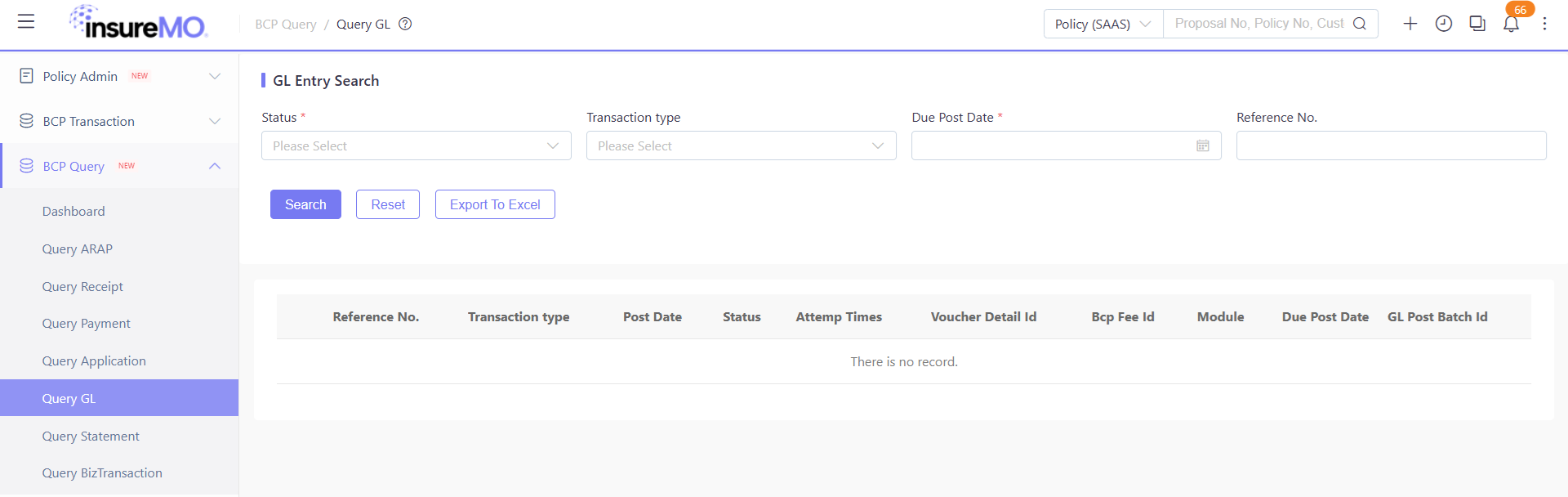
Export Column Configuration: The export function supports specifying which columns to export and the column order. This is configured via the Global Parameter path: BCPConfig → bcp.export.gl.columns. The configuration accepts a comma-separated list of column field names, and the export file will include only the specified columns in the defined order. For example:
bcp.export.gl.columns = GLVoucherNo,PolicyNo,GLDate,Amount,GLStatus,BranchQuery Statement
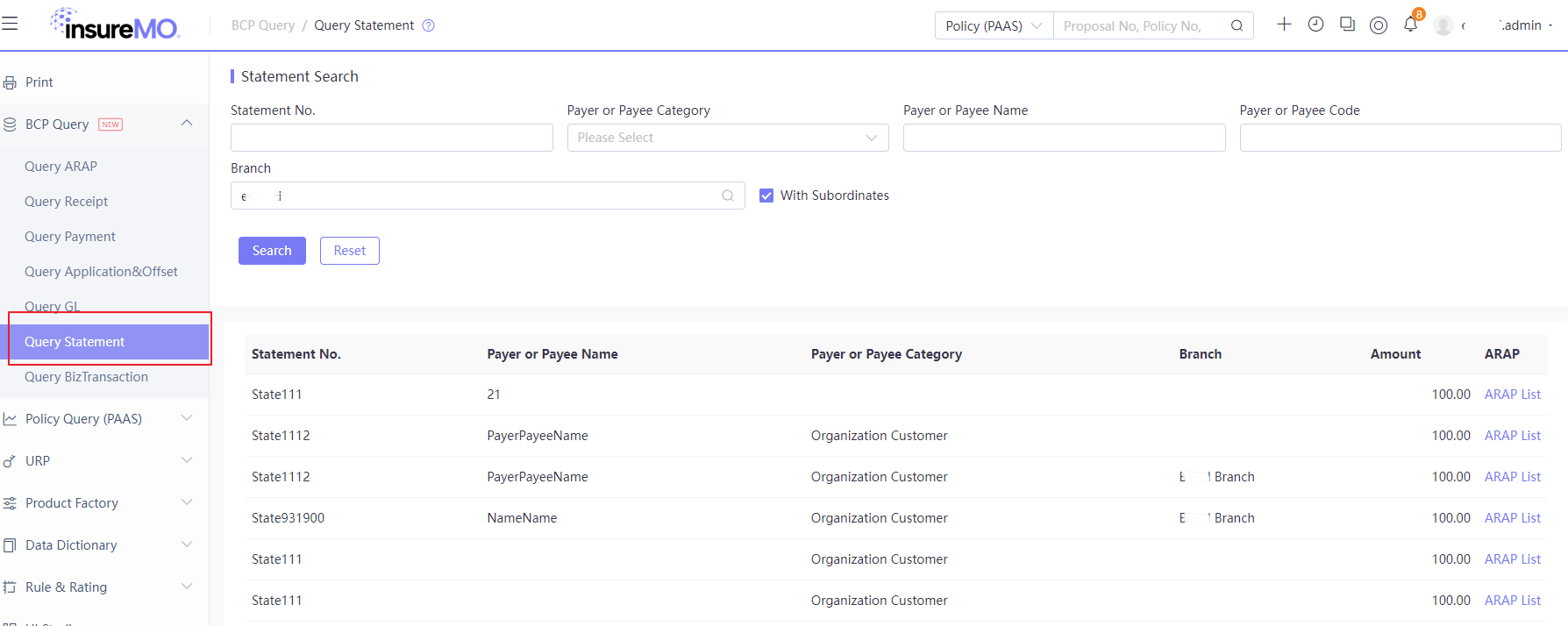
Path: BCP Query / Query Statement.
- Prerequisites: Statement must be generated in the system.
- Users can search statement records by multiple search criteria.
- Users can click ARAP List to view ARAP attached to the statement.
Search Criteria:
| Field Name | Type | Required | Read Only | Default Value | Data Source | Description |
|---|---|---|---|---|---|---|
| Statement No. | Text Input | No | No | — | — | Filter by statement number. |
| Payer/Payee Category | Dropdown | No | No | — | PayerOrPayeeCategory | Filter by payer/payee category (e.g. organization, individual, intermediary). |
| Payer/Payee Name | Text Input | No | No | — | — | Filter by payer/payee name. |
| Payer/Payee Code | Text Input | No | No | — | — | Filter by payer/payee code. |
| Branch | Dropdown + Checkbox | No | No | Current User Branch | Branch Master | Filter by branch. Tick With Subordinates to include all subordinate branches. |
Result Columns:
| Column | Description |
|---|---|
| Statement No. | Statement number. |
| Payer/Payee Name | Payer or payee name. |
| Payer/Payee Category | Payer/payee category. |
| Branch | Owning branch. |
| Amount | Statement amount. |
| ARAP List | Link to view the ARAP attached to the statement. |
Operation Buttons:
Search (execute search) Reset (clear the search form)
Query BizTransaction
Path: BCP Query / Query BizTransaction.
- Prerequisites: Data must be synchronized to BCP via API, which can contain ARAP or not contain ARAP.
- Users can search biz transaction records by multiple search criteria.
- Users can click + on the left of Policy No. to expand and view detailed biz transaction information.
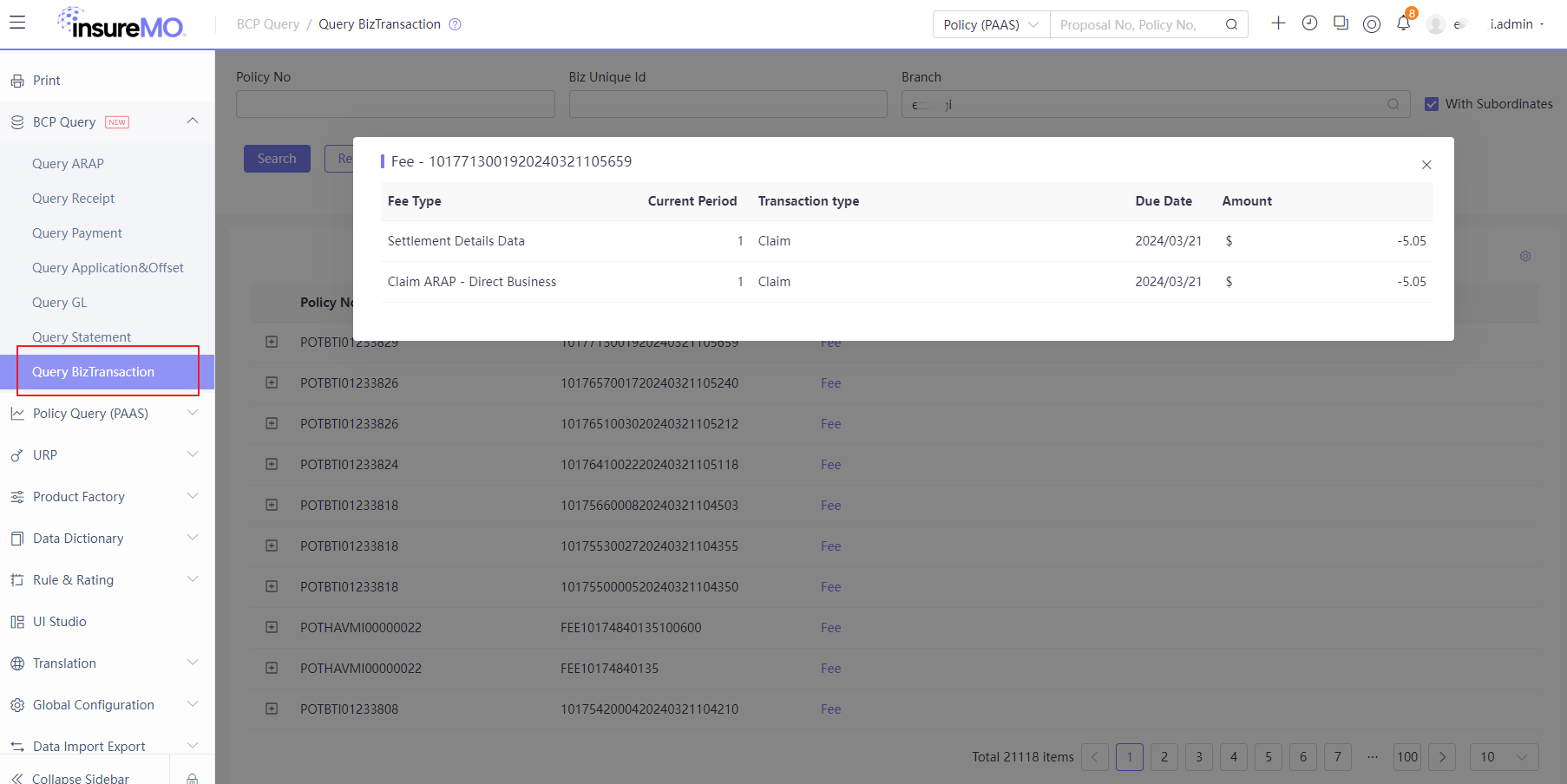
- Users can click Fee in TransactionDetail to view detailed fee information.
Search Criteria:
| Field Name | Type | Required | Read Only | Default Value | Data Source | Description |
|---|---|---|---|---|---|---|
| Policy No. | Text Input | No | No | — | — | Filter by policy number. |
| Biz Unique Id | Text Input | No | No | — | — | Filter by business transaction unique ID. |
| Branch | Dropdown + Checkbox | No | No | Current User Branch | Branch Master | Filter by branch. Tick With Subordinates to include all subordinate branches. |
Result Columns:
| Column | Description |
|---|---|
| (Checkbox) | Select biz transaction record(s). |
| Policy No. | Policy number (blue link, click + to expand). |
| Biz Unique Id | Business transaction unique ID. |
| Transaction Type | Transaction type (e.g. Fee). |
| (Operation) | Fee (view fee detail). |
Fee Detail modal columns:
| Column | Description |
|---|---|
| Fee Type | Fee type (e.g. Settlement Details Data, Claim ARAP - Direct Business). |
| Current Period | Fee installment period (e.g. 1). |
| Transaction Type | Transaction sub-type (e.g. Claim). |
| Due Date | Fee due date. |
| Amount | Fee amount (negative = payable outflow, positive = receivable inflow). |
Operation Buttons:
Search (execute search) Reset (clear the search form) Export To Excel (export the biz transaction list to an Excel file)
BCP Query UI Configuration
User Preference & Display Configuration
Besides the default search criteria and results, the system now supports users in adding more tailored search criteria and results via the user preference component for those ES-search-based UIs.
If users want to add or remove any search criteria and results, they can click on the user preference component (the gear icon in the upper right corner).
For more details about user preference, see User Preference Guide.
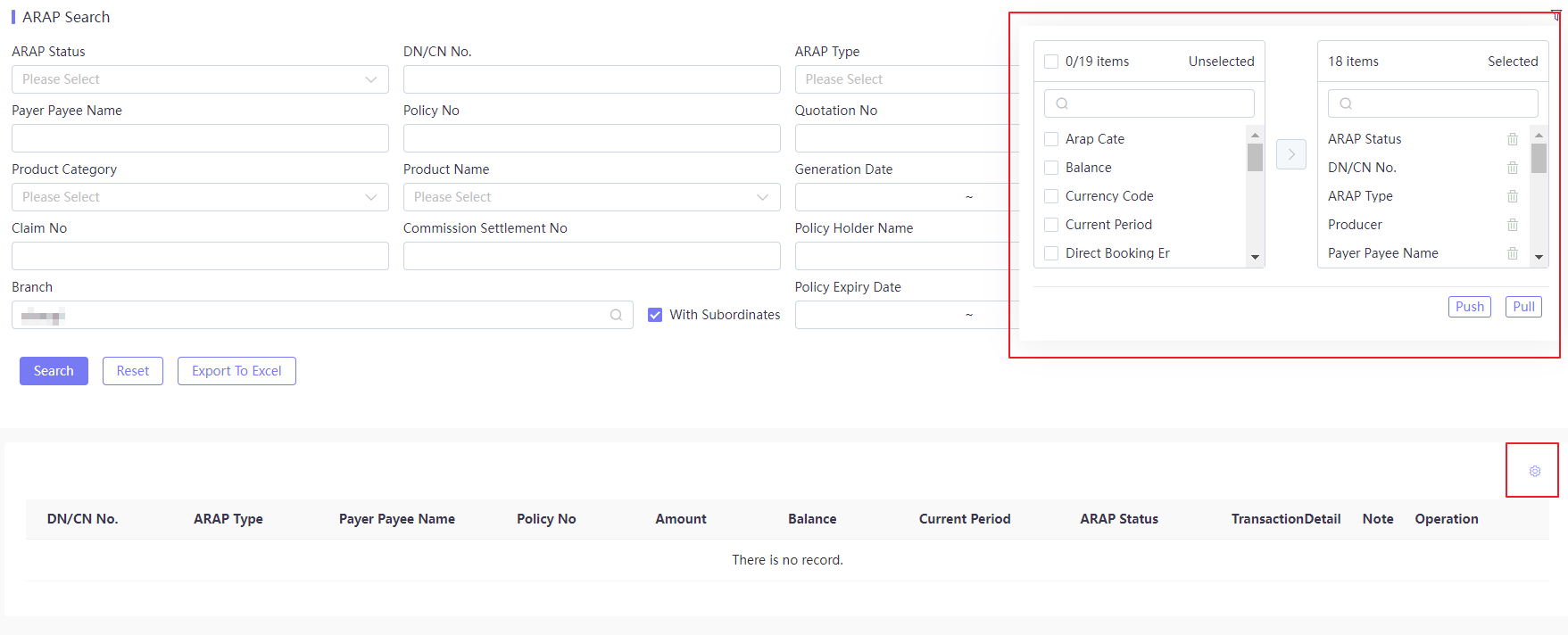
The user preference transfer-box component contains an Unselected fields pool (left) and a Selected fields pool (right). Use Push to add fields to the display, Pull to remove fields back to the available pool. The configuration takes effect only for the current login account.
| Transfer-Box Section | Count | Sample Fields |
|---|---|---|
| Unselected fields (left) | 19 fields | ARAP Category, Balance, Currency Code, Current Period, Direct Writer, etc. |
| Selected fields (right) | 18 fields | ARAP Status, DN/CN No., ARAP Type, Business Handler, Payer/Payee Name, etc. |
| Button | Description |
|---|---|
| Push | Add the selected left-pool fields to the display. |
| Pull | Remove the selected right-pool fields back to the available pool. |
Note: Custom field configuration only applies to the current login account. Different roles can prioritize different columns — e.g. finance roles may show Amount, Balance, Currency first, while operation roles may show Policy, Claim, Policyholder first. Exporting with no query result will produce an empty Excel file.
Index Configuration
Index Management provides configurable search engine indexes for the BCP query screens. Take the Policy index configuration as an example:
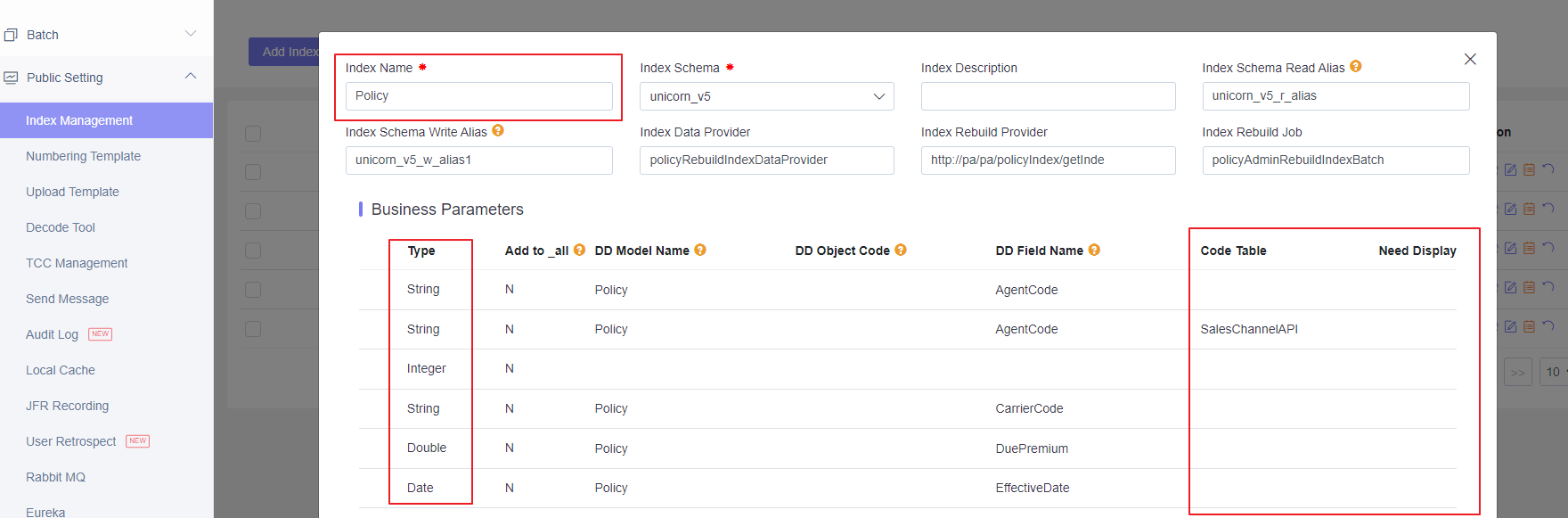
Index-level configuration:
| Configuration | Value | Description |
|---|---|---|
| Index Name | Policy | Business unique identifier. |
| Index Schema | unicorn_v5 | Underlying index structure template. |
| Read Alias | unicorn_v5_r_alias | Logical alias routed for all read (query) requests. |
| Write Alias | unicorn_v5_w_alias1 | Logical alias routed for all write (sync) requests. |
| Data Provider | policyRebuildIndexDataProvider | Index data source loader service. |
| Rebuild Job | policyAdminRebuildIndexBatch | Scheduled full-rebuild batch task identifier. |
Configured field mappings:
| Type | DD Field | Code Table | Add to _all | Need Display | Description |
|---|---|---|---|---|---|
| String | AgentCode | — | N | Pending | Agent code. |
| String | AgentCode | SalesChannelAPI | N | Pending | Agent code translated via Sales Channel API. |
| Integer | — | — | N | Pending | Integer field. |
| String | CarrierCode | — | N | Pending | Carrier code. |
| Double | DuePremium | — | N | Pending | Due premium (numeric, supports range query). |
| Date | EffectiveDate | — | N | Pending | Effective date (supports range query / sort). |
Note:
Add to _all = Nmeans the field does not participate in the global fuzzy search.Need Displaycontrols whether the field is returned to the front-end. Numeric/Date fields must be mapped with the correct type, otherwise range queries and sorting will fail.
Configuration for BCP Load Detail UI
Now, if you expand the selection, you will see a lot of new information related to the transaction.
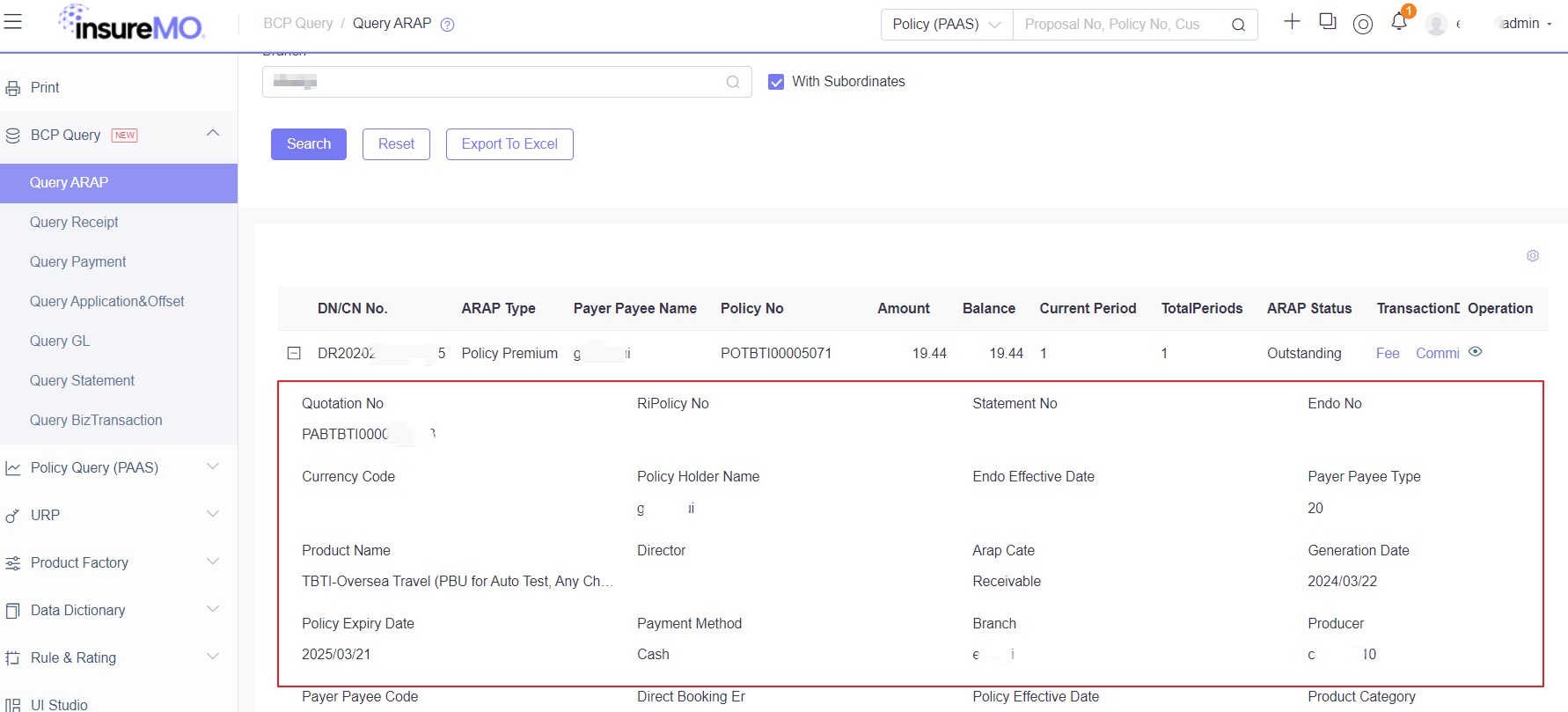
Expanded detail fields: Quote No., Policy No., Endorsement No., Product Name, Policyholder Name, Payment Method, Payer/Payee Type, Generation Date, Policy Expiry Date, Branch, Agent, ARAP Category, Reinsurance Policy No., Statement No., Endorsement Effective Date, Supervisor, etc.
All information here is actually loaded from the respective object model based on the data dictionary definition. So if you want to display more information here, you can configure the respective field in the DD and pass the values via API. The result will automatically appear in the detail screen.
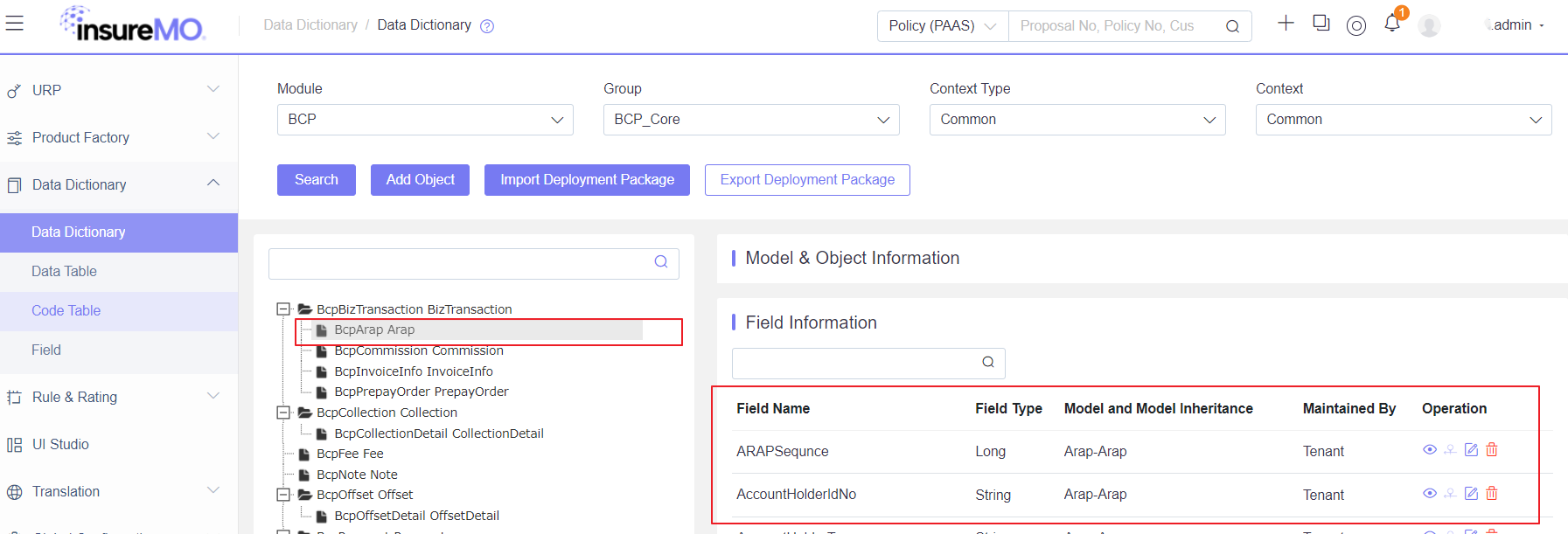
The Data Dictionary (Module = BCP, Group = BCP_Core, Context = Common) manages the metadata of BCP business objects (BizTransaction, ARAP, Commission, Invoice, Prepaid Order, Collection, Offset, etc.). Take the BcpArap business object as an example — its tenant-level extension fields:
| Field Name | Type | Model Inheritance | Maintained By | Description |
|---|---|---|---|---|
| ARAPSequence | Long | Arap-Arap | Tenant | ARAP record unique sequence (core primary key). |
| AccountHolderIdNo | String | Arap-Arap | Tenant | Account holder ID number (for实名 verification, AML checks). |
Note: Tenant-maintained fields are tenant-isolated and only take effect for the current tenant. Field changes must be deployed before they take effect in the business environment. The Data Dictionary supports metadata import/export deployment packages for cross-environment migration (same-version platforms only).
BCP Export API
- /bcp-core/core/export/v1/exportArap
- /bcp-core/core/export/v1/exportPayment
- /bcp-core/core/export/v1/exportReceipt
- /bcp-core/core/export/v1/exportAppOffset
- /bcp-core/core/export/v1/paymentApproveExport
- /bcp-core/core/export/v1/asyncExport
BCP Query via Skills
The insuremo-gi-bcp-query skill provides programmatic API access to query all BCP transaction data. It covers the following business domains:
- Suspense — parked funds awaiting allocation
- BizTransaction — root business transactions (new business, endorsement, claim, etc.)
- Collection — money received from customers
- Payment — money disbursed (claim payouts, refunds)
- Offset — AR/AP netting and reconciliation
- GL Voucher — GL accounting entries
- ARAP — accounts receivable and payable
- Commission & Settlement — commission records and settlement details
- GL Mapping Rules & Fee Types — BCP configuration data (GL double-entry mapping rules and fee type definitions)
These are the APIs for data export in BCP. For the function description of each API, please refer to the instructions in the SDK. This section introduces the supported capabilities for exporting data in the API.
- columnList: Specify the data columns to be exported
- Label: rename column header
- CodeTable: convert Code values
- datePattern: specify the date format
- x-mo-lang-id: specifying the output language through the parameter “x-mo-lang-id” in the header.
X-mo-lang-id Code Table
| Code | Description |
|---|---|
| en_US | English |
| es | Spanish |
| ja_JP | Japanese |
| pt | Portuguese |
| th_TH | Thai |
| vi_VN | Vietnamese |
| zh_CN | Simplified Chinese |
| zh_HK | Traditional Chinese (HK) |
| zh_TW | Traditional Chinese (TW) |
Sample request
{
    "columnList": [  //Specify the data columns to be exported
        "ArapNo",
        "BranchCode",
        "BranchName",
        {
            "name": "ArapType",
            "label": "Arap Type Test", //rename column header
            "codeTable": "BcpArapType" //convert Code values
        },
        {
            "name": "InsertTime",
            "label": "Time Test",
            "datePattern":"yyy-MM-dd" //specify the date format
        }

    ],
    "conditions": {
        "ArapType": "-1001"
    },
    "fromRangeConditions": {
        "InsertTime":"2023-07-17"
    },
    "toRangeConditions": {
        "InsertTime":"2023-07-17"
    },
    "fuzzyConditions": {}
}
Data Source Options Reference
The drop-down fields on the BCP Query screens are backed by the code tables below. Tables marked Data Table have a fixed option list; tables marked Master Data are maintained in their own maintenance menus and their options come from master records.
| Name | Source | Notes |
|---|---|---|
| Branch Master | Master Data | Maintained in Branch Menu. |
| Producer Master | Master Data | Maintained in Sales Channel Menu. Producer / agent. |
| Product Master | Master Data | Maintained in product maintenance menu. Product details. |
| CurrencySetting | Data Table | Currency options. |
| ProductLine | Data Table | Product category options. Maintained in product factory. |
| BcpArapType | Data Table | Consult platform team if to change. Options: Policy Premium / Claim Settlement / Subrogation Salvage / RI Statement / Commission. |
| BcpArapStatus | Data Table | ARAP status options: Outstanding / Settled / Canceled. |
| BcpArapCate | Data Table | ARAP category options: Receivable / Payable. |
| BcpPaymentMethod | Data Table | Payment method options (Cash / Bank Transfer, etc.). |
| BcpBranchAccount | Data Table | Insurance company bank account options; determined by Branch / Currency. |
| BcpPaymentStatus | Data Table | Payment status options (e.g. Requested / Paid / Reversed). |
| BcpCollectionStatus | Data Table | Consult platform team if to change. Options: Collected / Confirmed / Reversed / Refund. |
| BcpOffsetType | Data Table | Consult platform team if to change. Options: Arap / Application / Tolerance / Write Off / Commission. |
| PayerOrPayeeCategory | Data Table | Payer/payee categories (organization / individual / intermediary). |
| SalesChannelAPI | Data Table | Sales channel code translation API. |
Platform Doc & Skills Reference
- BCP Query — Platform technical documentation for the BCP query module
- User Preference Guide — How to customize search criteria and result columns
- You can also use the deep search skill to look up more details on BCP query APIs, SDK calls, and configuration data