Basic Concept
Party is used by the insurance company to manage all its stakeholders.
In our InsureMO GI design, we have already provided separate APIs and management functions for customers and sales channels. Therefore, party management is usually applicable to stakeholder types such as coinsurer, binder broker, internal employees, and internal branches.
Also, in some markets, there can be provider management and providers can be Garages or Hospitals or Clinics or Pharmacies depending on the line of business. They can also be created as different parties via party module.
All these stakeholder types can be referred to as different party roles. Each role will maintain a complete set of party data. For example, if one person works as both a customer and a sales channel, all information, including name or ID, will be maintained separately for both roles.
User Scenario
For anybody who want to use our platform to maintain party information.
Basic UI Operation
Search
Log in to the home page of InsureMO and click Party Management in the left menu bar. Enter query criteria and click Search to filter party records. Click Edit or Delete in the Operation column to manage existing records.
Search Filters:
| Field | Description |
|---|---|
| Party Name | Party full name |
| Party Code | System-generated unique identifier |
| Third Party Code | Cross-system mapping code |
| Party Category | Top-level classification |
| Party Type | Sub-type under the category |
| ID/Registration No | Identity or registration number |
| Status | Effectiveness status |
Result Columns:
| Column | Description |
|---|---|
| Party Code | System-generated unique ID (prefix PTY) |
| Third Party Code | External system mapping code |
| Party Name | Party full name |
| Party Type | e.g. Agent Company, Garage, Broker Branch |
| Party Category | Individual / Organization |
| ID Type | Identity document type |
| ID/Registration No | Document or registration number |
| Status | Current status |
| Operations | Edit / Delete |
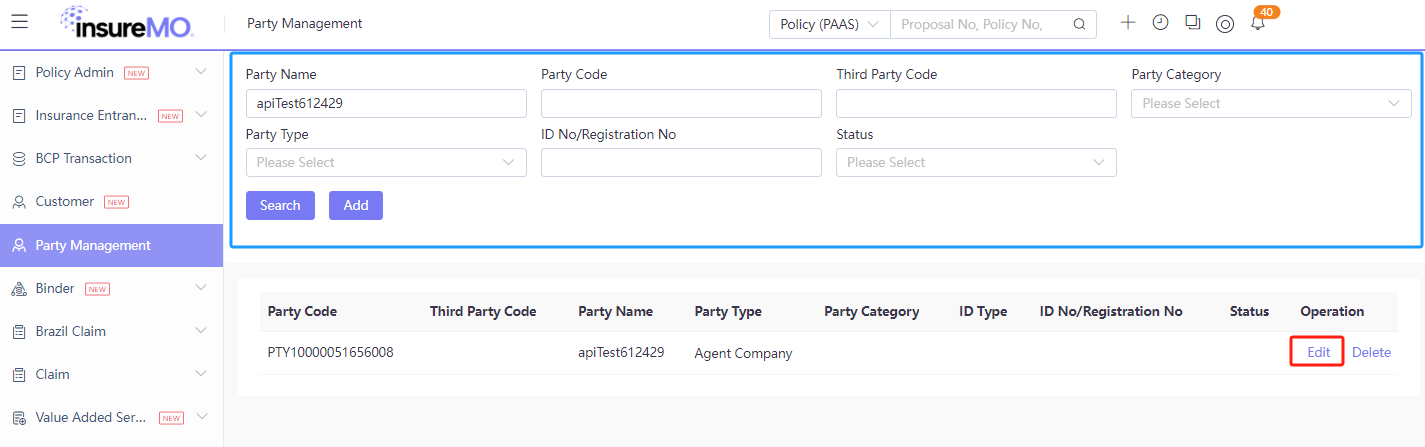
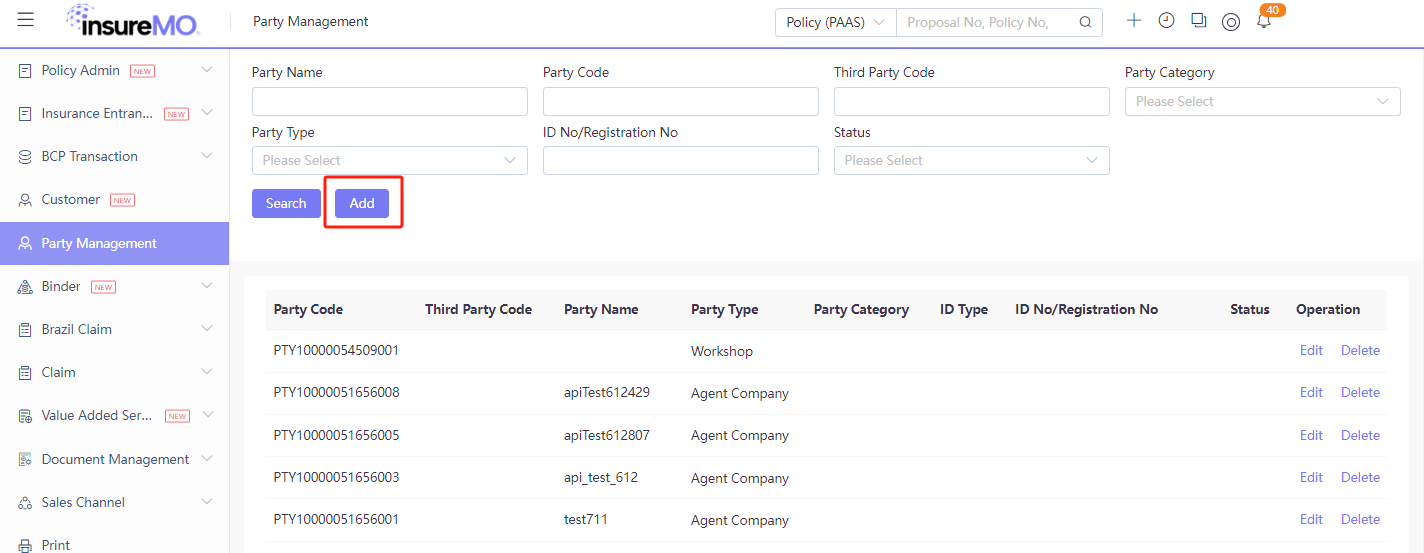
Add Party
Click Add to create a new party.
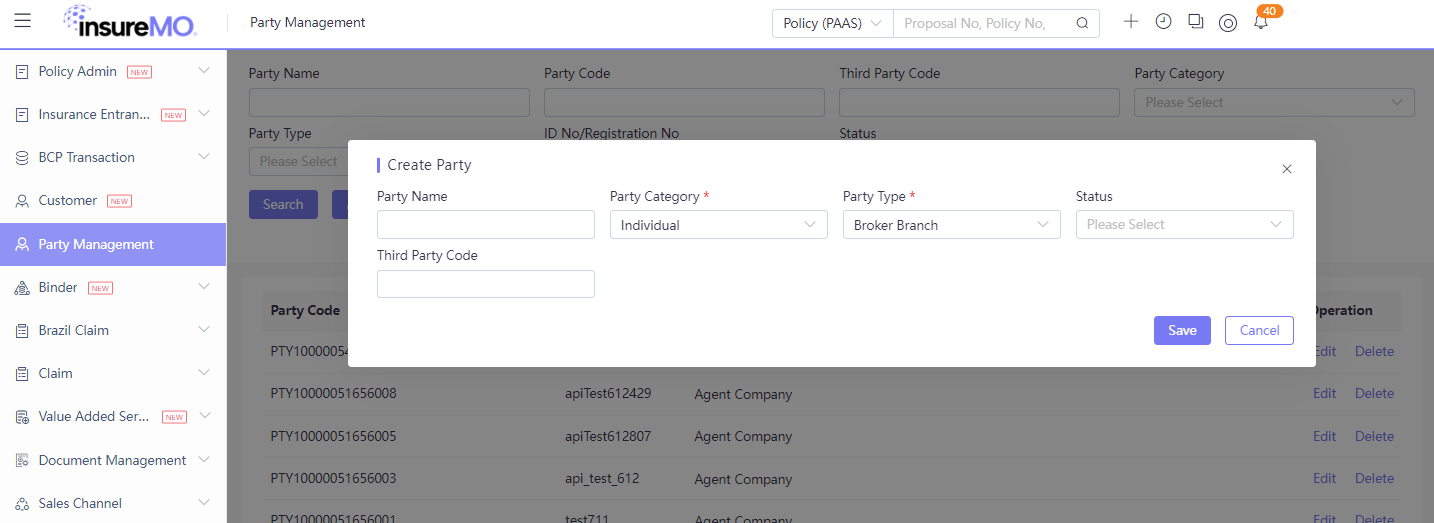
Create Party Modal
After clicking Add, a modal dialog appears for initial party creation:
| Field | Required | Description |
|---|---|---|
| Party Name | No | Party display name |
| Party Category | Yes | Individual / Organization |
| Party Type | Yes | Filtered by Party Category selection |
| Third Party Code | No | External system mapping code |
| Status | No | Initial status |
Once Party Category is selected, the options cannot be changed afterwards. This is because the options in Party Category determine whether the Basic information displays an individual or organization entry page.
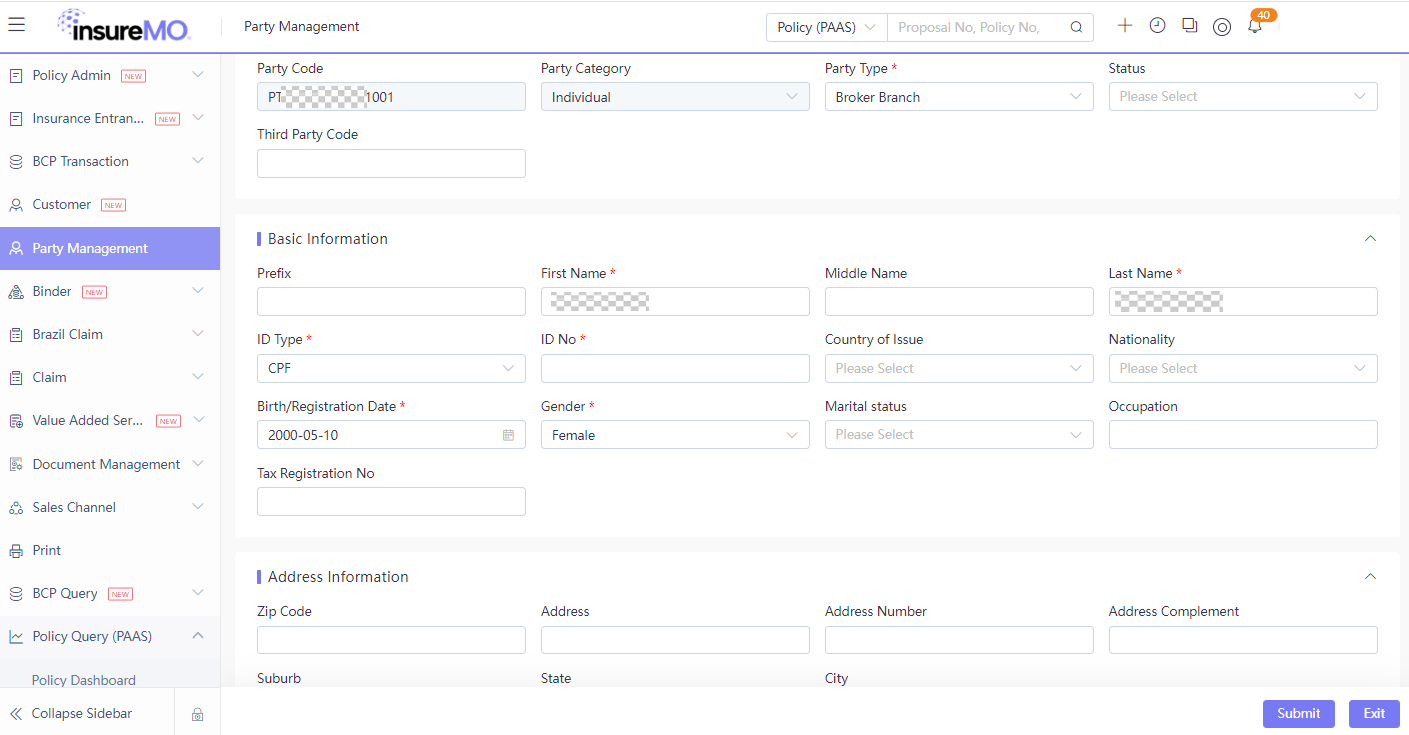
Party Detail (Individual)
After clicking Save, the party detail form is displayed. The form consists of three sections:
Party Identification:
| Field | Description |
|---|---|
| Party Code | Auto-generated (prefix PT), read-only |
| Party Category | Fixed as selected in modal |
| Party Type | Fixed as selected in modal |
| Status | Current status |
| Third Party Code | External system mapping code |
Basic Information:
| Field | Required | Description |
|---|---|---|
| Title | No | Name prefix |
| First Name | Yes | Given name |
| Middle Name | No | Middle name |
| Last Name | Yes | Family name |
| ID Type | Yes | Identity document type |
| ID Number | Yes | Identity document number |
| Issuing Country | No | ID issuing country |
| Nationality | No | Nationality |
| Date of Birth | Yes | Date of birth |
| Gender | Yes | Male / Female |
| Marital Status | No | Marital status |
| Occupation | No | Occupation |
| Tax Registration No | No | Tax registration number |
Address Information:
| Field | Description |
|---|---|
| Zip Code | Postal code |
| Address | Street address |
| House Number | Building/house number |
| Address Supplement | Address complement |
| District | District/neighborhood |
| State/Province | State or province |
| City | City |
Fill in the required fields and click Submit to save the party data. Click Exit to discard and return to the list.
Party Detail (Organization)
When Party Category is selected as Organization, the detail form displays organization-specific fields (e.g. Company Name, Registration No.) instead of individual fields. The Address Information section remains the same.
Entity Model Discussion
Our Design: One Party per Role
In our platform, each role (e.g. customer, sales channel, coinsurer) maintains a separate and complete Party record. If the same person holds multiple roles, their information is maintained independently for each role.
This design is intentional and offers several advantages:
- Departmental autonomy — Different roles are managed by different departments (e.g. employee management vs. customer management), each with its own data standards and operational requirements.
- Context-specific accuracy — The same person may need different identifiers depending on context (e.g. an employee alias vs. a legal name for insurance contracts). Separate records allow each department to maintain the level of accuracy it needs without compromising others.
- Clear ownership & accountability — Each Party record has a clear owner, making data governance and auditing straightforward.
- Independent lifecycle management — Each role’s data can be activated, deactivated, or modified without side effects on other roles.
Alternative Design: One Party, Multiple Roles
An alternative model is to have one Party (person/company) linked to multiple roles:
- One Party = the real-world person or organization
- Multiple Roles associated with that same Party
While conceptually cleaner, this model introduces trade-offs:
- Shared data, shared risk — a single incorrect update affects all roles simultaneously.
- Complex role-based access control — different departments need different permissions on the same record, increasing security configuration complexity.
- Harder lifecycle management — deactivating one role without affecting others requires careful handling.
- Mandatory field conflicts — different roles may require different mandatory fields (e.g. date of birth for an individual customer vs. registration number for a business entity), making a single form harder to design.
Supporting One Party Multiple Roles via iComposer
Our one-party-per-role design can also support the “one party, multiple roles” behavior. Tenants can implement cross-role data synchronization in their own iComposer customization layer, for example, when key fields in one Party are updated, orchestrate changes to be propagated to other Party records of the same person.
The synchronization strategy is fully controlled by the tenant:
| Strategy | Description |
|---|---|
| No synchronization | Each role’s data is maintained independently — suitable when departments have fully different data requirements |
| Manual confirmation | User is prompted to confirm before syncing changes — provides control while reducing manual entry |
| Auto synchronization | Changes are propagated automatically — best when data must stay consistent across all roles |
This approach combines the strengths of both models: the tenant gets the flexibility and safety of separate Party records, while achieving unified data consistency through tenant-defined orchestration rules — without requiring any platform-level changes.
Change History
- Change history is tracked per Party record — there’s specific API to fetch each individual Party’s own change history.