Every financial movement resulting from the aforementioned processes is recorded as a separate fee entry in our BCP backend system, which maintains a detailed record of all such entries.
Some GL systems might require a single fee entry, while others may require a double fee entry for our single fee.
In most of our business scenarios, we need to transmit our fee information to a third-party accounting system. Some systems might require our fee information directly, while others might need fees split into double-entry entries. Therefore, there is a need to configure such mappings and develop APIs for fetching them.
The overall data flow consists of four steps: BCP Transaction (business transaction context) → BCP Fee (raw fee generated from transaction) → GL Voucher Fee (converted from BCP Fee via mapping rules) → GL File (optional, final file sent to the external GL system).
This article provides guidance on how to set up this mapping and fetch data.
GL Fee Concept
To use GL fee, developers must understand the difference between four concepts first:
-
BCP Transaction
BCP transaction (BizTransaction) is the business context that triggers fee generation. Each transaction carries business reference information such as policy number, branch, product code, business source, and transaction type. The transaction type indicates which atomic operation was performed:
- ARAP — Accounts receivable / payable generation
- Collection — Collection processing
- Payment — Payment processing
- Offset — Offset / deduction
- Commission — Commission generation
- Commission Settlement — Commission settlement
- Reversal — Transaction reversal
-
BCP Fee
BCP fee is generated along with each BCP transaction. Every time one of the above atomic APIs is called, a corresponding fee entry is automatically recorded in the BCP fee domain. BCP fee can be viewed as raw fee data generated within the BCP module itself.
-
GL Voucher Fee
GL voucher fee, also called “GL voucher” or “voucher fee,” is something converted from BCP fee. There can be multiple purposes to generate such voucher fee, including:
-
The primary scenario to generate GL fee is to conduct double entry. Normally, BCP fee will only be generated as a single entry. For example, when a collection transaction occurs, only one BCP fee record is generated. From the accounting perspective, however, an accounting system will usually want double entry to be performed. By having GL fee configuration, the system allows multiple fee records to be generated. Of course, in some cases, clients don’t want double entry, so we can also create a one-to-one entry.
-
Our fee information includes every fee type while the GL system might just want a couple of these types. For example, ARAP is considered a fee type for BCP internal transactions. However, from the GL perspective, more detailed fees are required such as premiums or taxes. There’s no need to supply ARAP to the downstream GL system. By having GL fee configuration, we can purposefully remove some unnecessary fees.
-
Accounting systems require not only correct fee records but also additional information for each fee transaction. For example, premium might be the most common fee type but it’s not the only information that GL system requires. Apart from premium type and amount, GL system might also want additional information such as how premium is collected, pay mode or branch. By having GL fee configuration, we can also add such information which is also called GL voucher segment.
-
-
GL File
GL File is the final output sent to the external GL/accounting system, generated from GL Voucher Fee records. This step is optional — only needed when the downstream GL system requires file-based integration.
The file format and structure depend on the target GL system’s requirements (e.g., fixed-width, CSV, XML). Core journal entry fields typically include: account code, amount, debit/credit indicator, posting date, reference, currency, and segment/dimension information. The actual field layout, delimiters, and encoding are configured per client integration.
All GL mapping logic (how to define the GL fee and how it is converted from BCP fee) is configurable and will be introduced in subsequent sections.
GL Data Model
All model definitions can be found in the system’s Data Dictionary (DD). The main models involved in GL fee integration are:
Source Models:
- BcpFee — the primary source model. Its fields can be directly referenced in GL data table configuration via
${}expressions. - BcpBizTransaction — provides business reference information such as policy number, branch, product, etc. Referenced via
${transaction.}prefix. - BcpCollection — provides collection-related information. Referenced via
${collection.}prefix. - BcpPayment — provides payment-related information. Referenced via
${payment.}prefix.
Target Models:
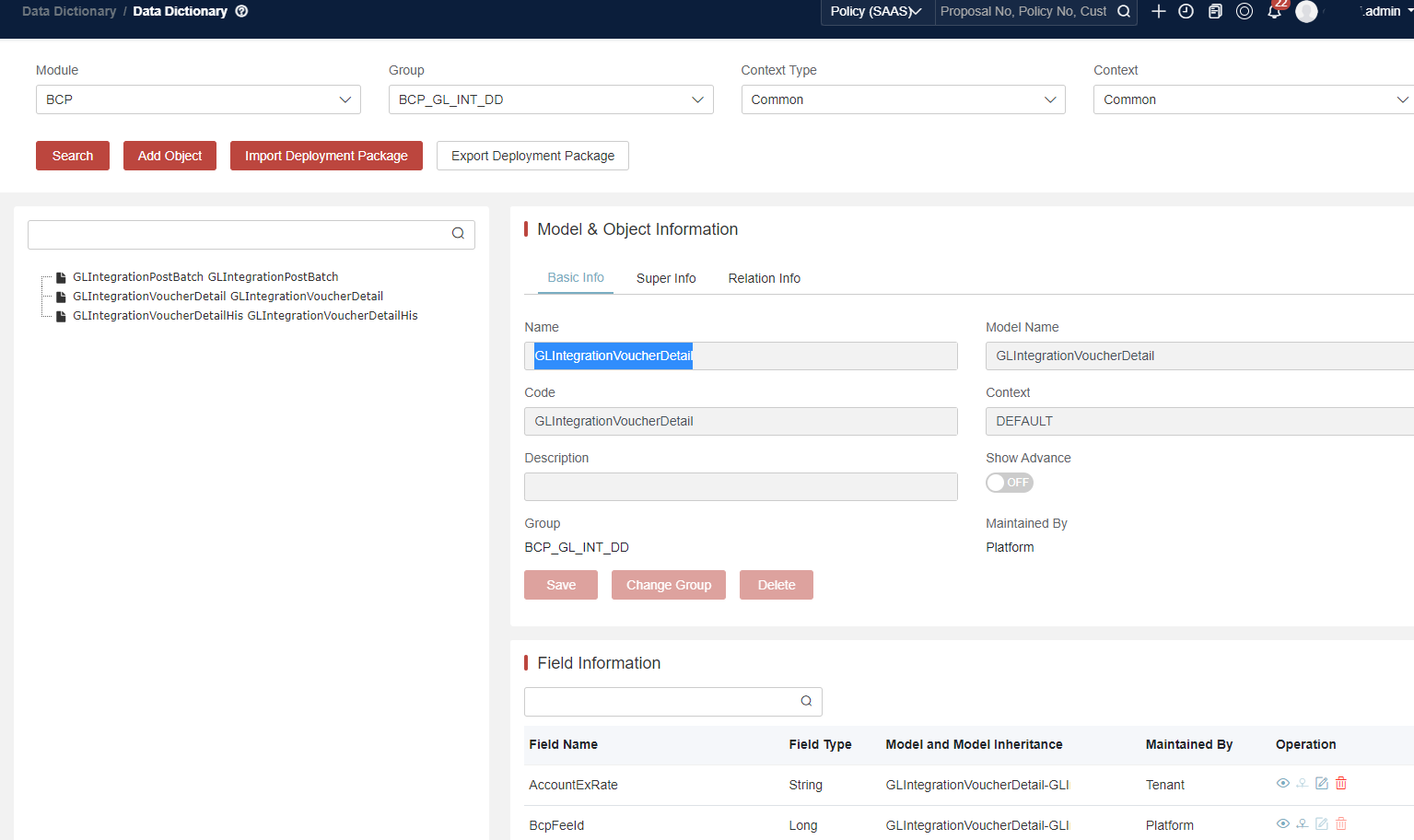
- GLIntegrationVoucherDetail — the unified DD model for GL voucher records (both current and archived).
Based on the data table configuration, the system reads from source models and writes mapped results into GLIntegrationVoucherDetail.
Voucher Archiving:
Voucher records are stored in two physical tables, both using the same DD model (GLIntegrationVoucherDetail). The archiving status is tracked by GLIntegrationVoucherPostBatchStatus:
| Status | Code | Meaning | Physical Table |
|---|---|---|---|
| 1 | Init Created | Batch has not run yet | t_bcp_gl_int_voucher_dtl |
| 2 | Archiving | Voucher is being archived | t_bcp_gl_int_voucher_dtl |
| 3 | Archived | Voucher detail records is archived | t_bcp_gl_int_voucher_dtl_his |
The typical lifecycle is 1 → 3. Once queryVoucherDetailsOrderByIdForPostGL is called, the system transitions from status 1 through status 2 (a brief intermediate step) to status 3, at which point records are moved from t_bcp_gl_int_voucher_dtl to t_bcp_gl_int_voucher_dtl_his.
Dynamic Field Extension:
The mechanism supports dynamic fields. When adding a new GL segment for a business field that already exists, changes are required in two places:
- Data table (GLIntegrationMappingRule) — add the new segment column and define its mapping expression
- GLIntegrationVoucherDetail (DD) — add the corresponding dynamic field
GL Configuration
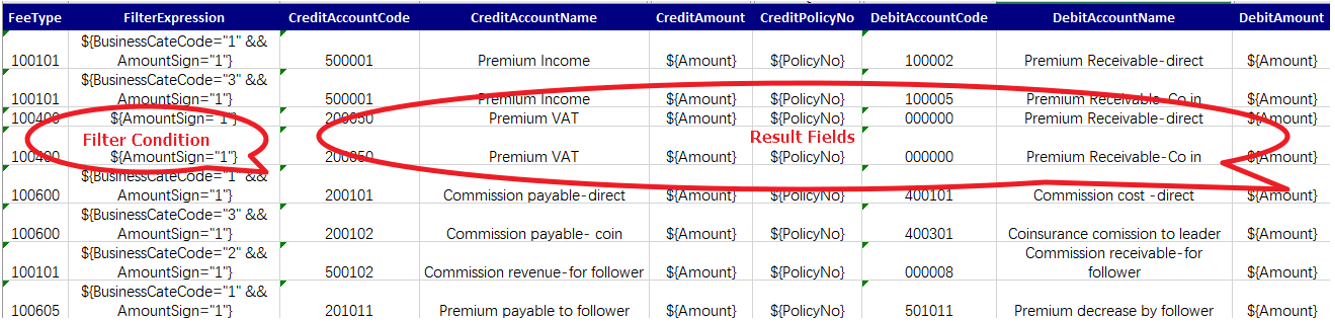
Currently, all GL fee configuration is conducted by using DataTable (Table Name: GLIntegrationMappingRule) to define mapping rules.
GL Condition
-
FeeType Mapping
By defining fee types, the system will be able to locate which fee to generate mapping.
-
FilterExpression Mapping
Not only can we directly fetch specific information in the BCP fee based on specific field conditions, but we can also use Groovy scripts supported by the system to define conditions from other objects, such as the Fee and BizTransaction objects, as context objects.
GL Result
After conditions are defined, the system will be able to generate results:
-
GL Table - Rows
Users can define fee types in multiple GL rules to generate multiple entries. As long as conditions are satisfied, the system will generate the voucher accordingly.
-
GL Table - Columns or Segments
Users can extend data table column to add more segments. Then users can define whether segment values are fetched from any of the BCP objects or to be blank. Also, users need to define the column names in data dictionary GL voucher object (group:
BCP_GL_INT_DD, object: GLIntegrationVoucherDetail) to store final records.
By default, segment values will be taken from BCP fee, and the system also support Groovy scripts to define value expression for each voucher fields (Fees and BizTransaction objects as context objects).
GL Sample DSL
If it’s a fixed value, then just input the value in the data table like GL account code which will usually be of several pure digits.
If it’s something need to be fetched from BCP existing objects, then users need to specify format like ${}, for example ${BranchCode}. Users need to make sure the field is already pre-defined in the data dictionary and the script is in groovy grammar.
A complex example: ${transaction.BizSource=="1" && transaction.BizTransType=="ENDORSEMENT" && FeeType=="1073209" && AmountSign=="-"}
-
Get field from BCP fee
Just state the field name in DD > Fee model, for example
${BranchCode}.One of the most important field is RefTransType, which can be used to differentiate between original account (NEWBIZ/ENDORSEMENT/CLAIM/SALESCHANNEL) and offset account (OFFSET).
-
Get field from Biztransaction
Append ‘transaction’ at front, for example
${transaction.BizSource}. -
Get field from collection
Append ‘collection’ at front, for example
${collection.AccountType}. -
Get field from payment
Append ‘payment’ at front, for example
${payment.BankAccountNo}. -
Get field from offset
Append ‘offset’ at front, for example
${offset.OffsetNo}. -
Get field from reverse
Append ‘reverse’ at front, for example
${reverse.ReverseId}.
GL Configuration Examples
The following examples show typical mapping rules for common fee types. Each row defines one GL voucher entry that is generated when the FilterExpression condition is met.
100501 - Premium
| Description | FeeType | FilterExpression | ReferenceNo | DebitAccountCode | CreditAccountCode |
|---|---|---|---|---|---|
| Premium - Direct Business (NB/RN) | 100501 | ${RefTransType == "NEWBIZ" && AmountSign == "+"} | ${transaction.PolicyNo} | 11201 | 40101 |
| Premium - Direct Business (ENDORSEMENT) | 100501 | ${RefTransType == "ENDORSEMENT" && AmountSign == "+"} | ${transaction.EndoNo} | 11201 | 40101 |
| Premium - Direct Business (ENDORSEMENT - Decrease/Cancel) | 100501 | ${RefTransType == "ENDORSEMENT" && AmountSign == "-"} | ${transaction.EndoNo} | 40101 | 11201 |
| Premium Application (NB/RN/Endo Increase) | 100501 | ${RefTransType == "OFFSET" && AmountSign == "+" && IsReverse == "N"} | ${offset.OffsetNo} | 11301 | 11201 |
| Premium Application (END-Decrease/Cancel) | 100501 | ${RefTransType == "OFFSET" && AmountSign == "-" && IsReverse == "N"} | ${payment.PaymentNo} | 11201 | 11101 |
| Premium Application Reverse (NB/RN/Endo Increase) | 100501 | ${RefTransType == "OFFSET" && AmountSign == "-" && IsReverse == "Y"} | ${offset.OffsetNo} | 40101 | 11301 |
| END-Decrease/Cancel payment reversed | 100501 | ${RefTransType == "OFFSET" && AmountSign == "+" && IsReverse == "Y"} | ${payment.PaymentNo} | 11101 | 40101 |
700009 - Collection
| Description | FeeType | FilterExpression | ReferenceNo | DebitAccountCode | CreditAccountCode |
|---|---|---|---|---|---|
| Collection | 700009 | ${AmountSign == "+"} | ${collection.ReceiptNo} | 11101 | 11201 |
| Receipt Reverse | 700009 | ${AmountSign == "-"} | ${collection.ReceiptNo} | 11201 | 11101 |
100600 - Commission
| Description | FeeType | FilterExpression | ReferenceNo | DebitAccountCode | CreditAccountCode |
|---|---|---|---|---|---|
| Commission generate from NB/RN/Endo | 100600 | ${RefTransType == "SALESCHANNEL" && AmountSign == "-"} | ${transaction.PolicyNo} | 50201 | 21201 |
| Commission clawback from Endo | 100600 | ${RefTransType == "SALESCHANNEL" && AmountSign == "+"} | ${transaction.EndoNo} | 21201 | 50201 |
| Commission Payment | 100600 | ${RefTransType == "OFFSET" && AmountSign == "-" && IsReverse == "N"} | ${transaction.ChannelSettlementNo} | 21201 | 11101 |
| Commission application | 100600 | ${RefTransType == "OFFSET" && AmountSign == "+" && IsReverse == "N"} | ${transaction.ChannelSettlementNo} | 11101 | 21201 |
| Commission Payment Reversed | 100600 | ${RefTransType == "OFFSET" && AmountSign == "+" && IsReverse == "Y"} | ${transaction.ChannelSettlementNo} | 11101 | 21201 |
| Commission application reversed | 100600 | ${RefTransType == "OFFSET" && AmountSign == "-" && IsReverse == "Y"} | ${transaction.ChannelSettlementNo} | 21201 | 11101 |
402000 - Payment
| Description | FeeType | FilterExpression | ReferenceNo | DebitAccountCode | CreditAccountCode |
|---|---|---|---|---|---|
| Payment Confirmation | 402000 | ${AmountSign == "-"} | ${payment.PaymentNo} | 21301 | 11101 |
| Payment Reverse | 402000 | ${AmountSign == "+"} | ${payment.PaymentNo} | 11101 | 21301 |
200312 - Settlement / Claim
| Description | FeeType | FilterExpression | ReferenceNo | DebitAccountCode | CreditAccountCode |
|---|---|---|---|---|---|
| Settlement - Direct Business | 200312 | ${RefTransType == "CLAIM" && AmountSign == "-"} | ${transaction.ClaimNo} | 50301 | 21301 |
| Refund approval for claim settlement AP | 200312 | ${RefTransType == "OFFSET" && AmountSign == "-"} | ${payment.PaymentNo} | 21301 | 11101 |
| Reverse Settlement - Direct Business | 200312 | ${RefTransType == "CLAIM" && AmountSign == "+"} | ${transaction.ClaimNo} | 21301 | 50301 |
| Claim AR application | 200312 | ${RefTransType == "OFFSET" && AmountSign == "+"} | ${offset.OffsetNo} | 11101 | 11401 |
Sample Account Code Reference
| Code | Account Name |
|---|---|
| 11101 | Cash / Bank |
| 11201 | Premium Receivable |
| 11301 | Offset Receivable |
| 11401 | Claim Receivable |
| 21201 | Commission Payable |
| 21301 | Claim Payable |
| 40101 | Premium Revenue |
| 50201 | Commission Expense |
| 50301 | Claim Expense |
GL Integration
Basically, there are two ways to synchronize GL fee data to external system:
- API-based integration — Expose GL fee API at our end for a third party to consume via pagination. The third party calls our APIs directly and handles the voucher data themselves.
- File-based integration — Create GL posting batch at our end, convert voucher records into a GL file, and upload to a third-party system file server.
No matter which measure is taken, there’s a need to call GL API to start the fetch and any record can only be viewed as once.
GL Posting API
Key APIs
The following posting batch APIs are the foundation for both integration methods. Due to the sensitivity of GL information, we have a rigid process to call related APIs to avoid any mistake.
The SDK client used: BcpSdkClient (com.insuremo.sdk.services.bcp.BcpSdkClient)
| # | Operation | Method / URL | OperationId |
|---|---|---|---|
| 1 | Query pending batch | POST /bcp-core/core/gl/integration/v1/queryPendingBatchList | BcpSdkClient.queryPendingBatchList |
| 2 | Create batch | POST /bcp-core/core/gl/integration/v1/createGLPostBatchRecord | BcpSdkClient.createGLPostBatchRecord |
| 3 | Query vouchers | GET /bcp-core/core/gl/integration/v1/queryVoucherDetailsOrderByIdForPostGL | BcpSdkClient.queryVoucherDetailsOrderByIdForPostGL |
| 4 | Complete batch | POST /bcp-core/core/gl/integration/v1/completePostBatch | BcpSdkClient.completePostBatch |
Process: Query pending batch (reuse if exists) → Create batch → Query vouchers → Send to GL system → Complete batch.
def client = (BcpSdkClient) getSDK("com.insuremo.sdk.services.bcp.BcpSdkClient")

// 1. Query pending batch (reuse if exists)
def pendingList = client.glApi()
    .newQueryPendingBatchListRequestBuilder()
    .dueDate(dueDate)
    .moduleName(moduleName)
    .doRequest().getBody()

// 2. Create new batch if no pending batch
def batch = client.glApi()
    .newCreateGLPostBatchRecordRequestBuilder()
    .allowCreateMultipleBatchForOneDay(true)
    .dueDate(dueDate)
    .moduleName(moduleName)
    .comments("GL posting batch")
    .doRequest().getBody()

// 3. Query voucher details (cursor-based pagination, max 1000 per call)
def details = client.glApi()
    .newQueryVoucherDetailsOrderByIdForPostGLRequestBuilder()
    .batchId(batchId)
    .preDetailId(preDetailId)
    .maxRecords(1000)
    .doRequest().getBody()

// 4. Complete batch (prevent duplicate posting)
client.glApi()
    .newCompletePostBatchRequestBuilder()
    .batchId(batchId)
    .doRequest()
Sample GL posting batch source code is provided in the sample tenant code. Readers can also ask the platform team for sample code.
Auxiliary APIs
The following auxiliary APIs are also shared by both integration methods:
| Operation | Method / URL | OperationId |
|---|---|---|
| Generate additional GL voucher | POST /bcp-core/core/gl/integration/v1/createVoucherDetail | BcpSdkClient.createVoucherDetail |
| Query voucher by condition | GET /bcp-core/core/gl/integration/v1/queryGLByCondition | BcpSdkClient.queryGLByCondition |
Generate Additional GL Voucher — By default, GL voucher will be automatically created once BCP fee is created based on mapping configuration. In special cases, if there’s additional voucher to be created, developers can call the following API:
def vouchers = client.glApi()
    .newCreateVoucherDetailRequestBuilder()
    .bizTransaction(bizTransaction)
    .doRequest().getBody()
Query Fee Information — Query voucher records by condition with pagination:
def result = client.glApi()
    .newQueryGLByConditionRequestBuilder()
    .postTime(postTime)
    .bizTransactionType(bizTransactionType)
    .voucherProcessStatus(voucherProcessStatus)
    .referenceNo(referenceNo)
    .duePostDate(duePostDate)
    .pageNo(pageNo)
    .pageSize(pageSize)
    .doRequest().getBody()
API-based Integration
For API-based integration, the third party calls the posting batch APIs above and handles the voucher data themselves. The flow is: create batch → query vouchers → complete batch.
File-based Integration
For file-based integration, after querying vouchers via the posting batch APIs, additional steps are required to convert records into the target GL file format and deliver the file. The flow is: create batch → query vouchers → transform → write → complete batch → upload.
Unlike BCP Fee → GL Voucher Fee which happens in real-time, GL File generation requires a batch process to collect and export voucher records into the target file format.
Integration principles:
- File format is configurable per target GL system (fixed-width, CSV, XML, etc.)
- Each record maps to one journal entry with core fields (account code, amount, debit/credit indicator, posting date, segments, currency, reference)
- Actual layout and encoding are defined per client/project
Additional services involved:
- GL mapping service (iComposer) — Transforms GL voucher details into target GL file record format (handles debit/credit structure and segment mapping)
- GL file persistence service (iComposer) — Temporarily saves GL file records in chunks to handle large data volumes
File-based Process Pipeline
The file-based GL integration follows a batch pipeline with the following steps:
-
Create Batch — Create or reuse a posting batch for the given due date and module. The system will first check for any pending batch to reuse; if none exists, a new batch is created.
-
Query Vouchers — Fetch GL voucher details from the batch using cursor-based pagination. Each query returns up to
maxRecordsresults, usingpreDetailIdas the cursor for the next page. -
Transform — Convert each voucher detail into GL file records via the GL mapping service (iComposer). Each voucher may produce multiple GL records (e.g., debit and credit entries). Each record contains: a side indicator (debit or credit), account code, amount, and segment dimensions. The debit/credit structure means each voucher detail typically generates at least two records — one for the debit side and one for the credit side.
-
Write — Temporarily persist transformed GL file records via the GL file persistence service (iComposer). This is a buffering mechanism to handle large data volumes — records are accumulated and written in chunks before final file generation.
-
Complete Batch — Mark the posting batch as completed after all records are processed without errors. This prevents the same records from being processed again.
-
Upload — Generate the final GL file and upload to the target file server (e.g., CloudDisk or third-party SFTP).