Objective
Policy object JSON body creation is always the first step to call any of general insurance related policy API.
This guide helps users to derive the request payload to execute atomic APIs of policy to issue policies and create proposals respectively for the configured Product.
To test your configured product, send this JSON payload as a request to our platform APIs by using an API testing tool like Postman.
Policy JSON Illustration Example
To begin understanding policy JSON, users should first familiarize themselves with the overall policy structure. Here is an example of a typical policy JSON with key fields and models.
{
  "EffectiveDate": "",
  "ExpiryDate": "",
  "OrgCode": "",
  "PolicyCustomerList": [
    {
      "CustomerName": "",
      "DateOfBirth": "",

    }
  ],
  "PolicyLobList": [
    {
      "PolicyRiskList": [
        {
          "ProductElementCode": "R10005",
          "PolicyCoverageList": [
            {
              "ProductElementCode": "C101064",
              "PolicyBenefitList": [
                {
                  "SumInsured": 20000,
                  "Description": "Description",
                  "ProductElementCode": "B00003"
                }
              ]
            }
          ]
        }
      ],
      "ProductCode": "PMCAR001"
    }
  ],
  "ProductCode": "PMCAR001",
  "ProductVersion": "1.0"
}
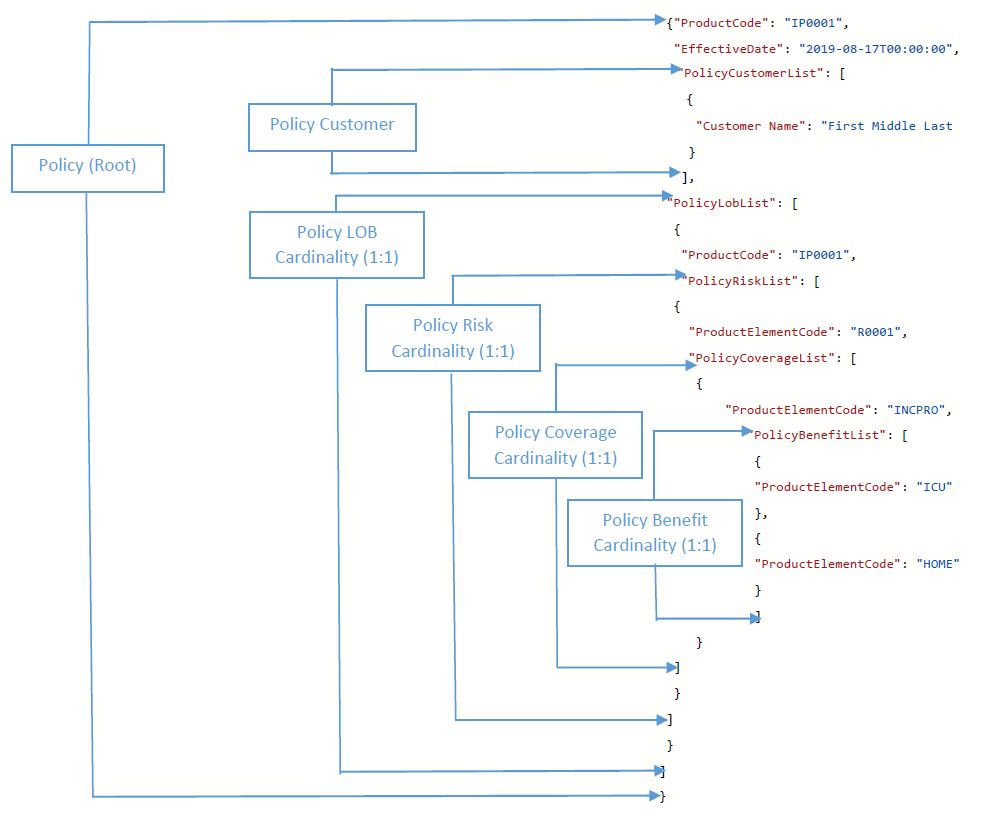
The image below illustrates the product components and mandatory fields/key-value pairs required within the Request JSON payloads for Policy APIs.
Sample JSON Generation
To create all policy JSON data from scratch manually is always a tedious process, especially for those beginners who first try InsureMO. It will become more difficult for those product component related IDs. If the ID is wrong, the policy JSON will not be accepted.
In order to facilitate these JSON creation activities, the system now is able to automatically generate sample of policy JSON request payloads from the UI for each market product.
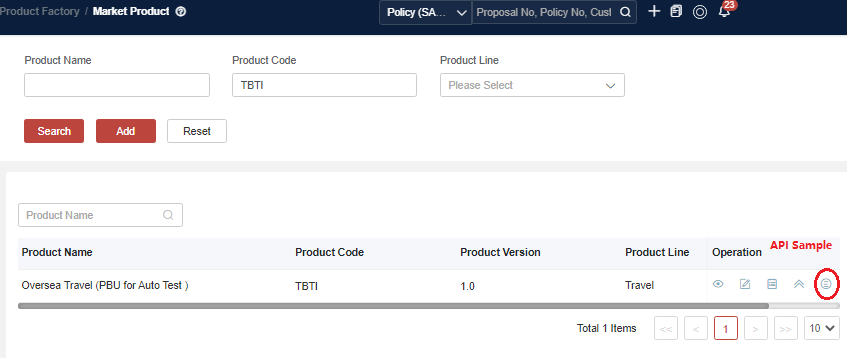
If this is the first time for you to create JSON payload, after your product configuration completed, you can access the “API Sample” menu or navigate to the “Market Product” menu to locate the shortcut.
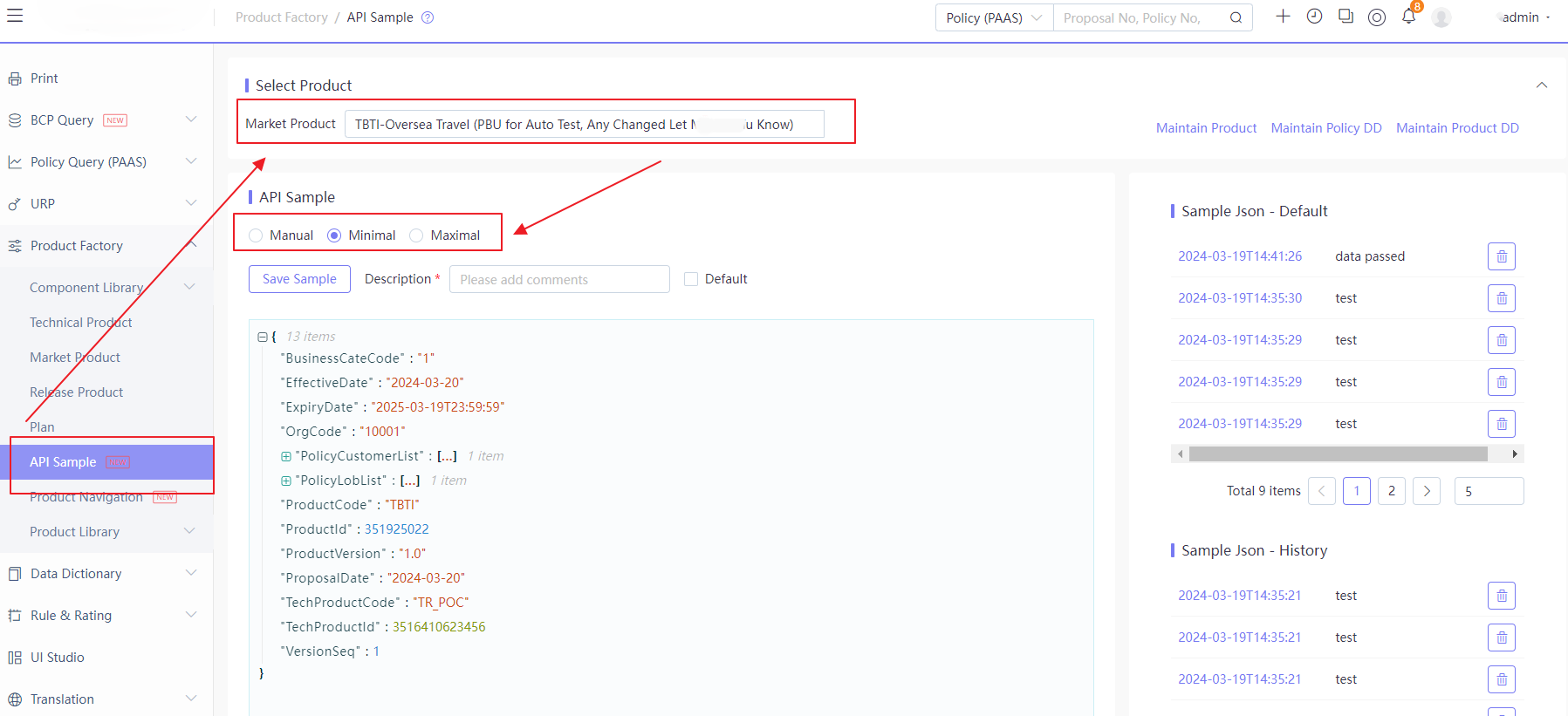
In the API sample management UI, there are multiple capabilities supported:
Automatic Creation from Data Dictionary
- Minimal Set
It includes all basic minimal fields required to create a new proposal. The key is to append all product-related element codes and IDs, providing users with a concise, yet product-elmement-code-complete working set that includes all product structural information.
- Maximal Set
It includes all fields available in the data dictionary that can be appended as the part of JSON request to create a new proposal. The key is to append all product-related element codes and IDs, as well as policy-related fields, providing users with a comprehensive idea of all fields that can be appended as the part of the policy body.
- Manual Set
It provides users with a sample policy entry screen which is dynamically generated based on the product and data dictionary configuration. Users can construct the policy body in a manner similar to policy entry, creating sample testing data for any level of policy API testing.
Manual Creation from Policy Input Screen
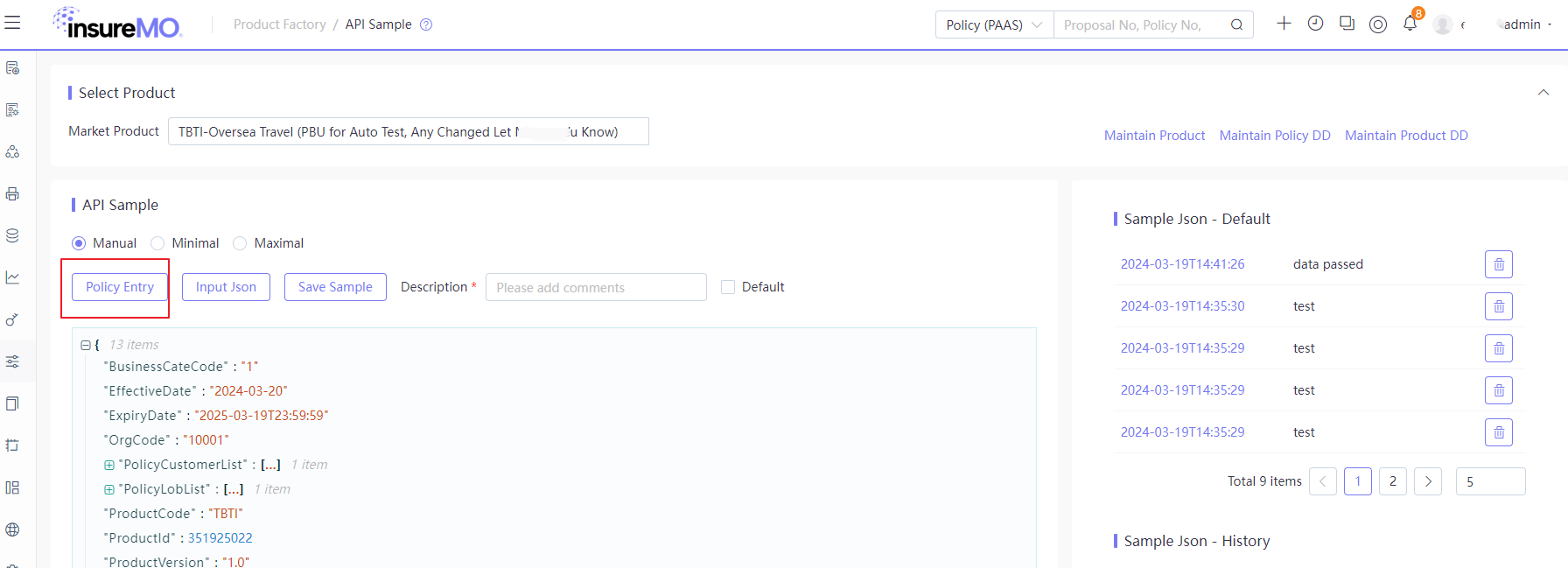
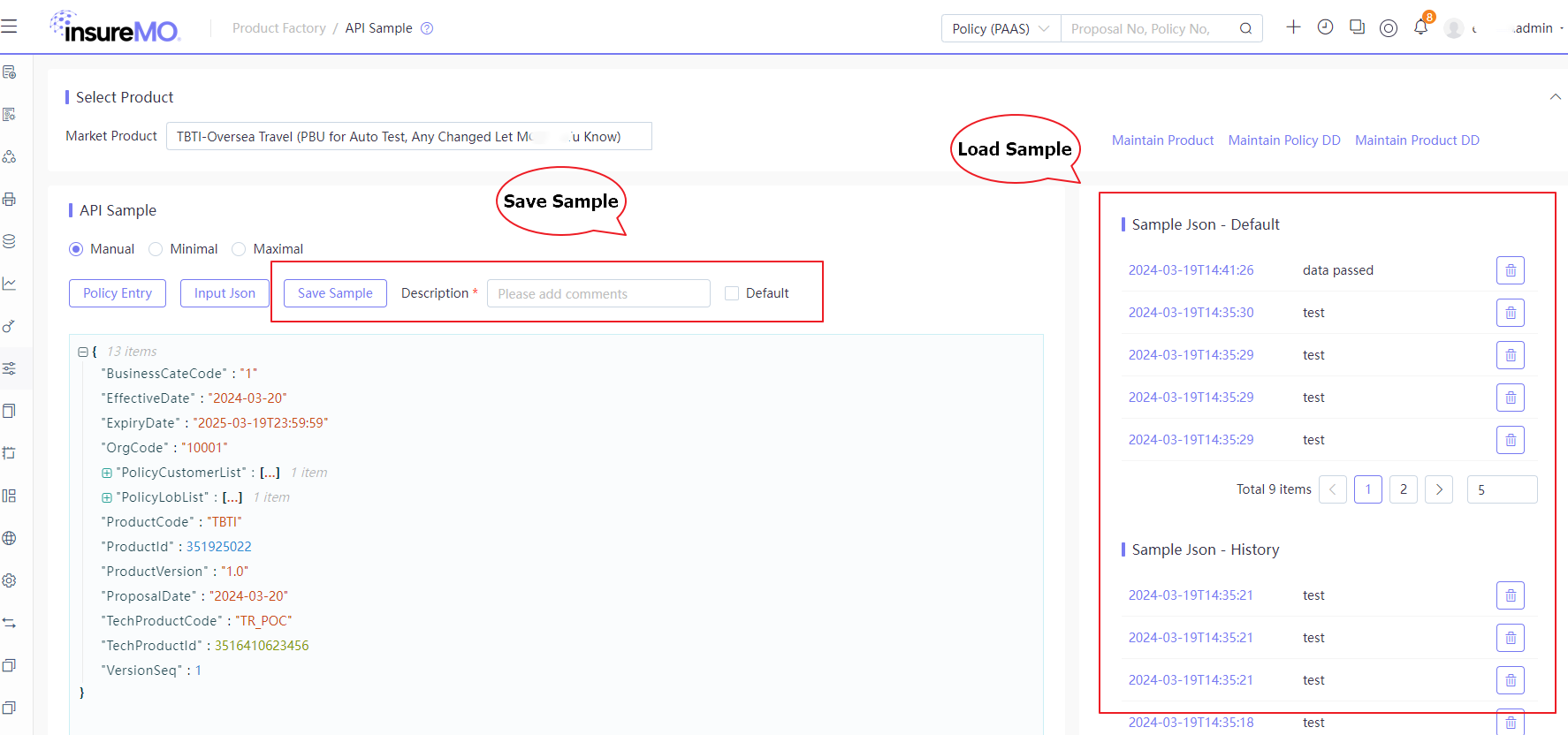
When users select the option “Manual Set”, there will appear a “Policy Entry” button, allowing them to create JSON in the policy entry format.
The sample policy entry screen is dynamically generated based on the product and data dicitonary configuration. Users can construct the policy body in a manner similar to policy entry, allowing them to create sample testing data for any level of policy API testing. It is very useful and safe to create all kinds of JSON testing data compared to changing the JSON itself directly.
Below are some detailed tips for using this page:
- The policy layout functions as a typical table layout which is expanded by default.
- The policy table and fields strictly adhere to the policy object structure definition. Some special policy objects that are not part of the standard policy object (e.g., quotation, group policy, micro-insurance, underwriting history) will not be displayed.
- All fields are available for input. Special treatment to is applied to display UI labels and value formats (e.g., String, Number, Date, and Code Value) according to data dictionary configuration.
- Users can modify the table display columns and their sequence based on the product. The system will save these preferences to the user/tenant profile and maintain these settings.
For more details about user preference, see User Preference Guide.
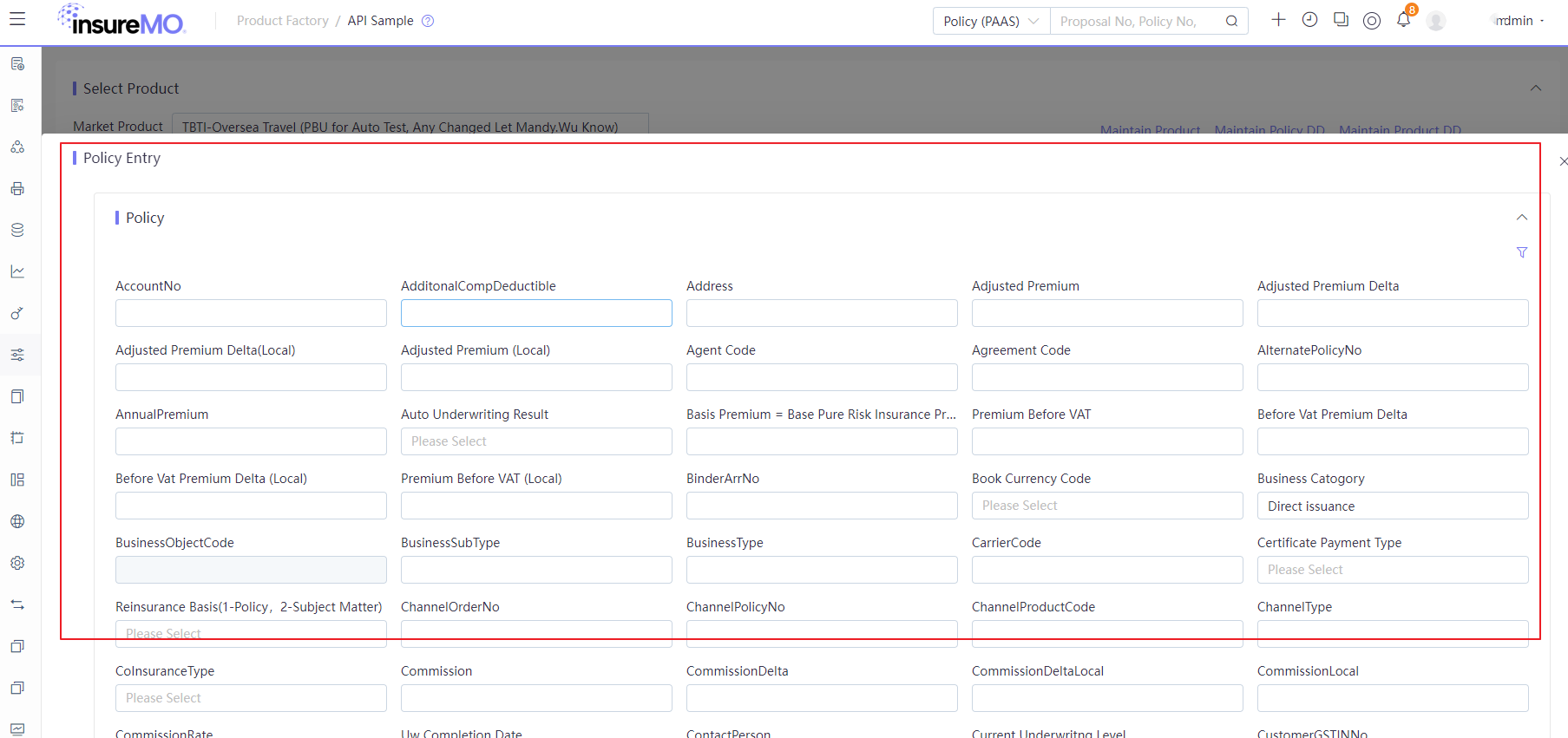
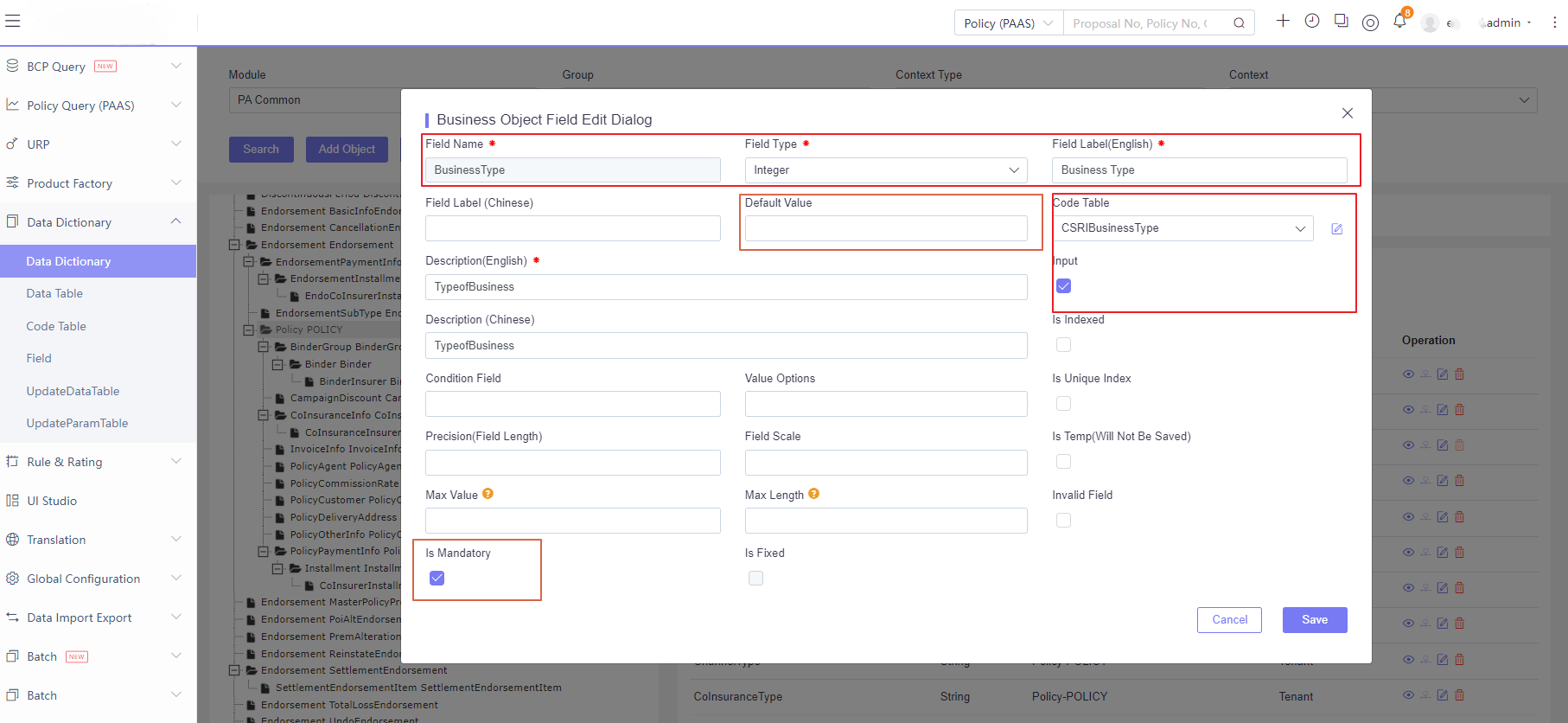
For the policy detail screen, the platform will display all fields that have been persisted in the policy JSON object. These fields will be displayed via the UI. Users can review the following aspects of the configuration if necessary:
Manual Creation from Copy & Paste
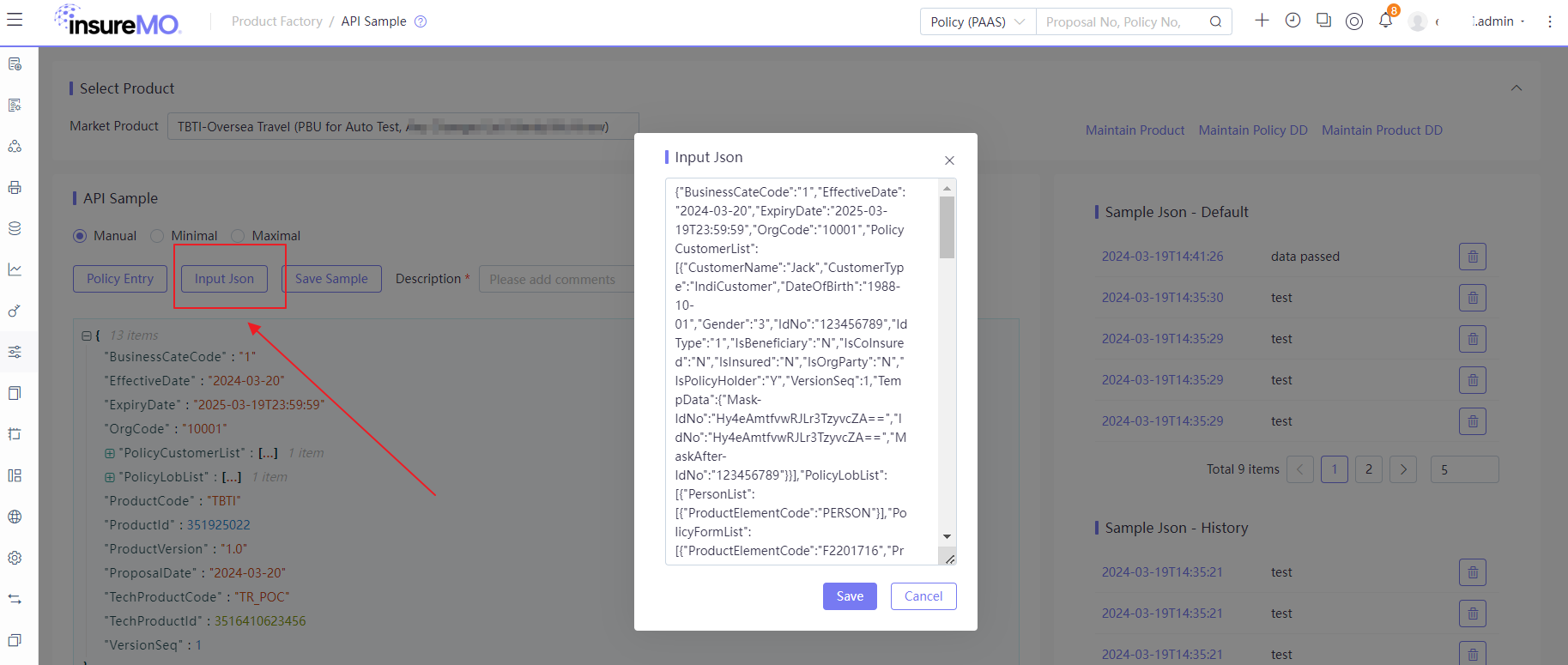
Selecting “Manual Set” will revel an “Input JSON” button, allowing users to create JSON in the policy entry format.
If a JSON payload has already constructed, users can input it here for further modification.
Manual Creation from Policy Json
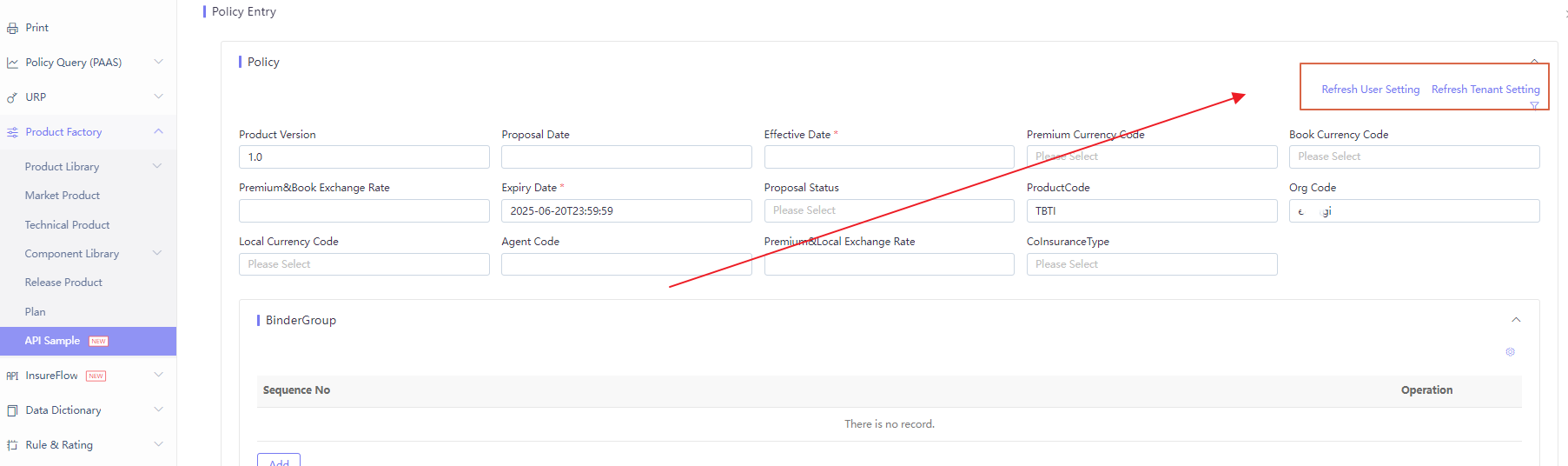
If user has already have Json and want to update the policy entry page, there’s a way to do it.
By clicking “Refresh User Setting”, policy entry page will be refreshed to display only field which exist in the Json for the operating user.
If user click “Refresh Tenant Setting”, policy entry page will be refreshed to display only field which exist in the Json for all the user within tenant.
Sample JSON Save & Load
If a JSON sample is well-developed and users want to share it with other team members, they can save it, particularly as a default sample for future use.
Test Sample JSON via Atomic API
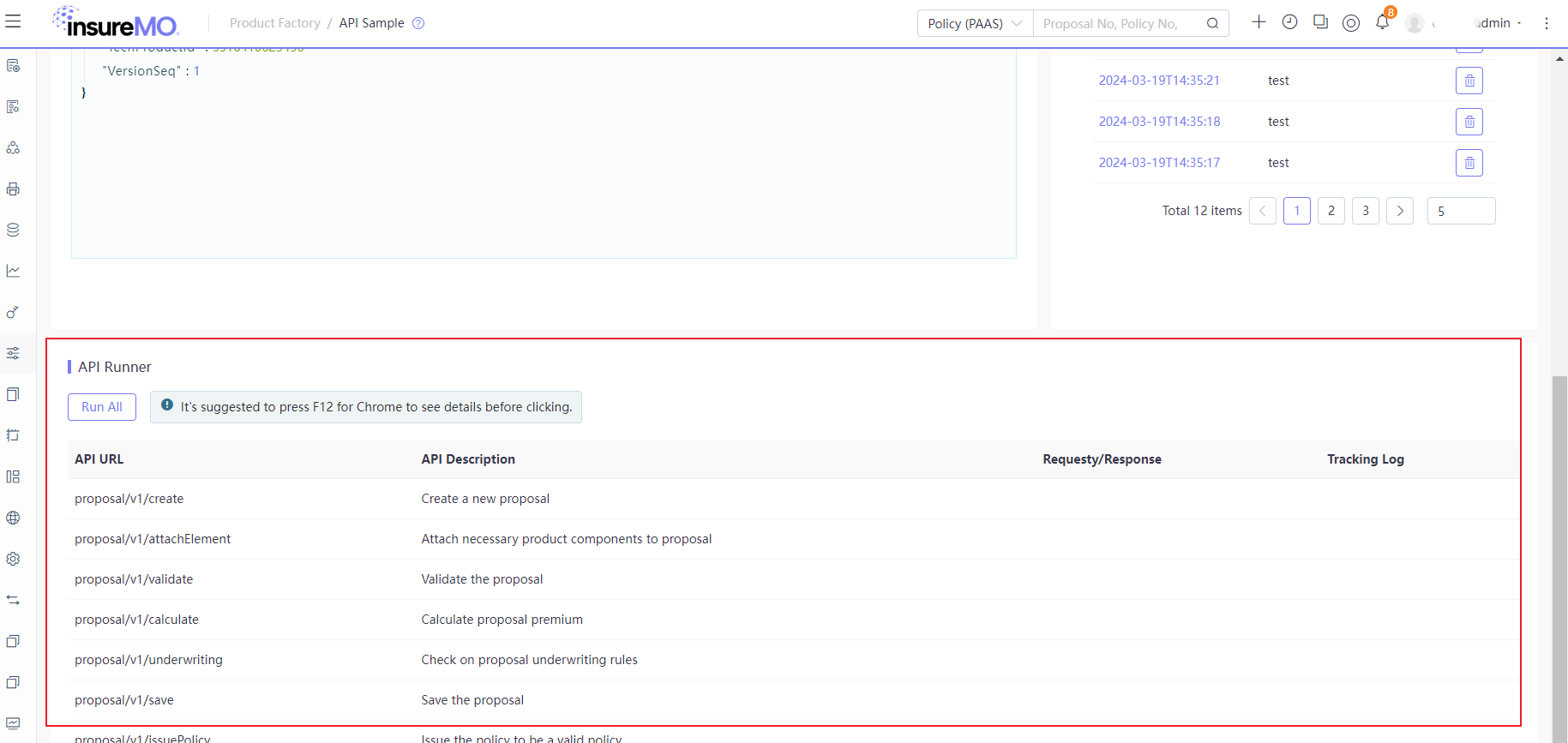
After all samples finalized, users can quickly test the API in the “API Runner” section below to verify whether all key elements are supported for platform atomic APIs.
Model Object and Structure in Data Dictionary
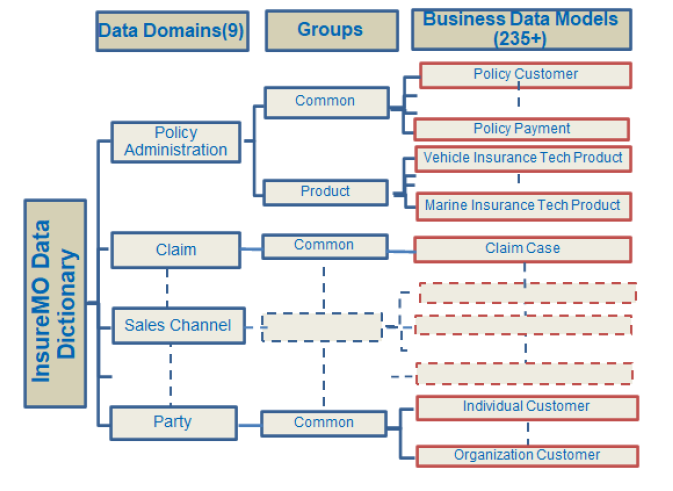
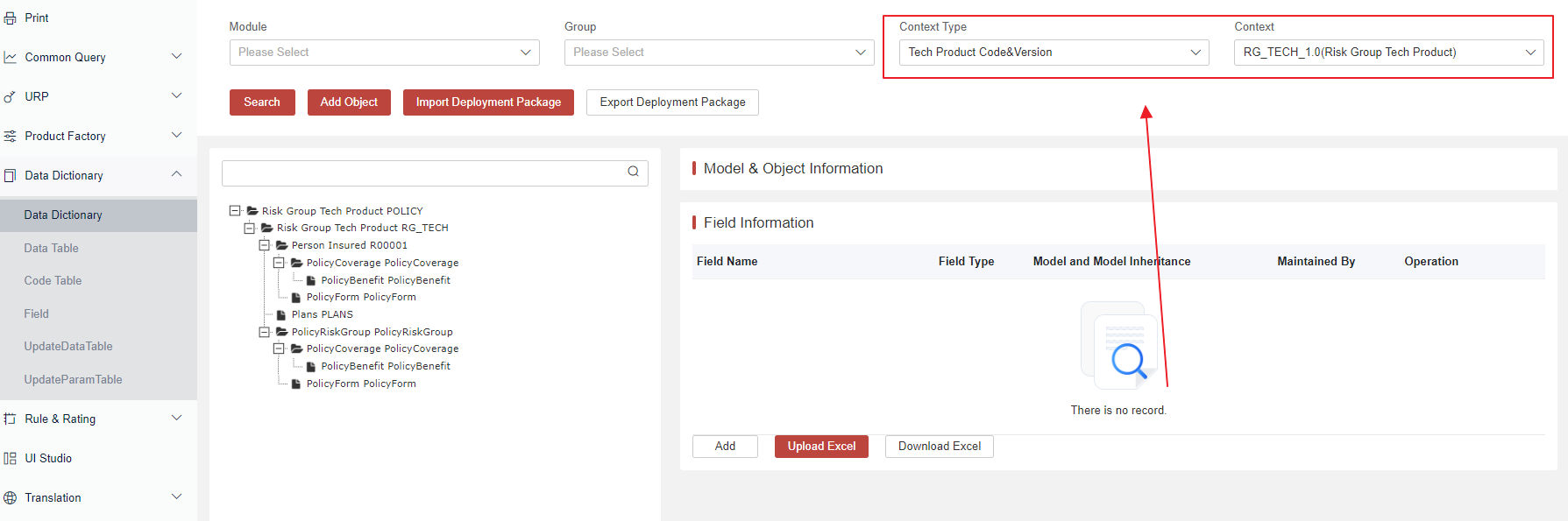
All policy data models can be viewed in our data dictionary and looked up using filter combinations of Module and Context to bring up common data models and product-specific data models.
Before calling any API, please ensure that all data models and fields are correctly configured in your data dictionary.
Common Model of Policy
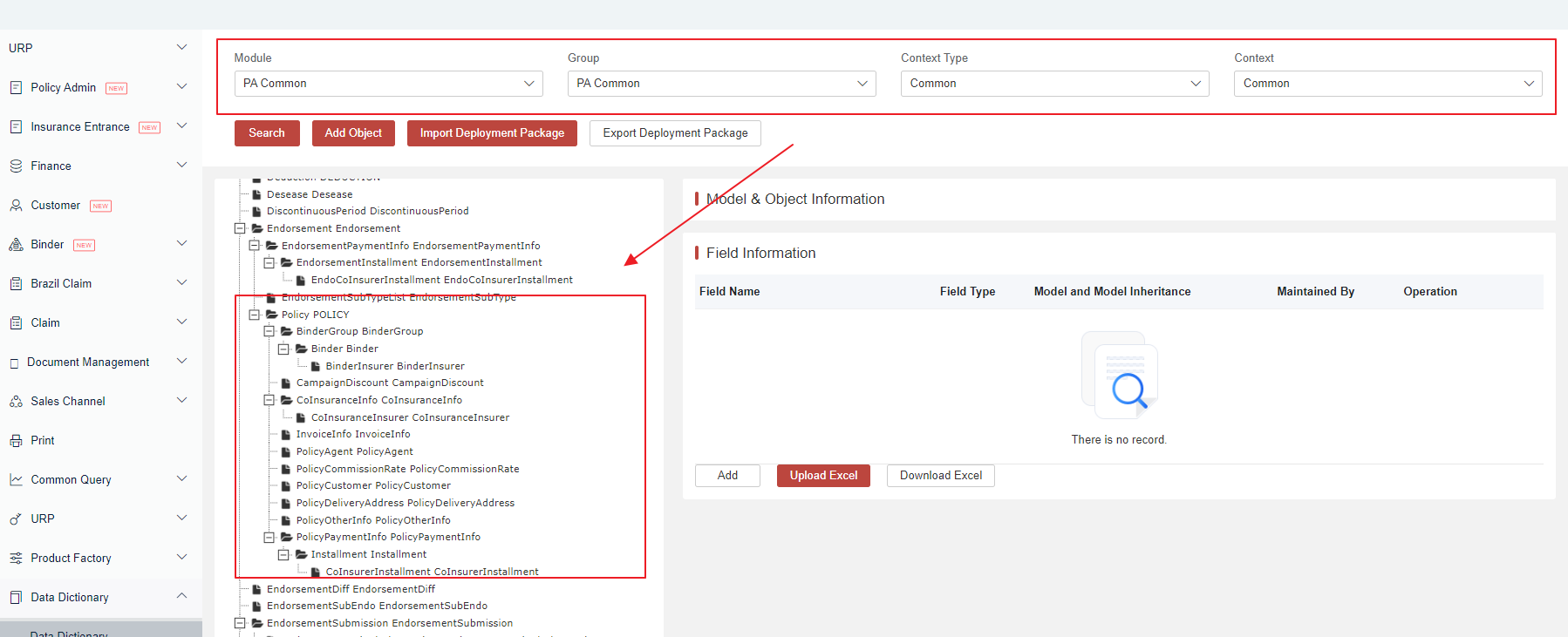
Many predefined common data models (like PolicyCustomer, PolicyPaymentInfo, and PolicyDeliveryAddress) exists, with predefined platform fields mapped to them. These data models are commonly used in operations and management for any insurance application.
Such models are typically applied to all product lines and are thus considered common across the entire organization. Therefore, from a design prospective, they should not be defined on a product-by-product basis.
{
  "PolicyCustomerList": [
    {
    }
  ],
  "PolicyPaymentInfoList": [
    {
    }
  ]
In the data dictionary, you must specify context type as “Common” to conduct a search. Please remember to always start with “Policy” node.
Product Specific Model
In addition to common policy models, each GI product may require capturing significantly different information. To accommodate this, we have introduced the concept of “Context”, which can manage distinct policy models by different products.
Our product data models are now at the technical product level, and the JSON structure under PolicyLobList should mirror the technical product model defined in the data dictionary. These models are different from each product line and closely tied to product configuration.
"PolicyLobList": [
    {
      "PolicyRiskList": [
        {
          "PolicyCoverageList": [
            {
              "PolicyBenefitList": [
Make sure to check you have generated a data dictionary model from technical product configuration, and in the data dictionary specified context type as “Technical Product” to search.
Key Field Explanation
Inside each model, there are critical fields that should be available for each JSON request.
Product and Product Element
Product Code
The ProductCode and the ProductVersion should align with the Market Product’s definition. They are located under both the Policy Level and the Policy Lob level.
{
"PolicyLobList": [
    {
    // highlight-next-line
      "ProductCode": "PMCAR001"
    }
  ],
    // highlight-start
  "ProductCode": "PMCAR001",
  "ProductVersion": "1.0"
  // highlight-end
}
Product Element Code
All product components are referred to as Product Element and product element code is the unique reference for the components.
The covers/benefits under PolicyCoverageList and PolicyBenefitList are identified by their ProductElementCodes. The ProductElementCode should align with the Market Product’s structure and the fields within the PolicyXXXList should also be pre-defined in the Data Dictionary Model.
"PolicyRiskList": [
        {
        // highlight-next-line
          "ProductElementCode": "R10005",
          "PolicyCoverageList": [
            {
            // highlight-next-line
              "ProductElementCode": "C101064",
              "PolicyBenefitList": [
                {
                  "SumInsured": 20000,
                  "Description": "Description",
                  // highlight-next-line
                  "ProductElementCode": "B00003"
                }
              ]
            }
          ]
        }
      ]
Product Elements Covered
By default, the system only considers the input risks/covers/benefits JSON lists as covered. This means if anyone does not input the request data, it is not covered in the policy.
The system does not automatically add any covers or benefits by default. If required to add/remove some covers, you need to manually append additional JSON data for them.
     "PolicyCoverageList": [
            {
              "ProductElementCode": "C101064",
              "PolicyBenefitList": [
                {
                  "SumInsured": 20000,
                  "Description": "Description",
                  "ProductElementCode": "B00003"
                }
              ]
Policy ID, Policy Element ID and VersionSeq
For all proposal APIs that involve persistence actions, you need to continuously pass through the following persistence-related fields:
- PolicyId - System ID indicates the right policy for persistency
- PolicyElementId - System ID indicates the right policy element for persistency
- VersionSeq - Sequential running number indicates the exact proposal version for persistency, preventing duplicate submissions
If it’s your first-time to perform creation and call the creation API, then there’s no need to pass all these fields. However, if it’s your second time to save operation instead of creation, then it’s crucial to pass these fields correctly, which not only reduce the system volume of records to be persisted but also avoid the same data to be submitted for multiple times.
Policy Type
The Policy Type refers to the following data table. If the Policy Type field is not provided, it defaults to 1—a single policy.
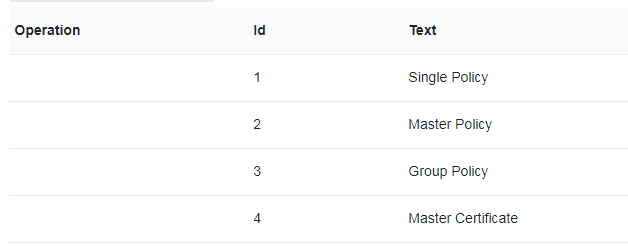
The Policy Type is a technical definition that is not solely based on business scenarios. Please select an appropriate policy type in accordance with the requirements listed in the table below. If you require distinguishing between different types based on business scenarios, you can create a new field and assign a value to it.
The field is crucial as different policy types might relate to different API behaviors because of performance.
- Group Policy has no certificate. Need Cert or Not?
- Yes—> Master.
- No —> Group.
- Should all risks be issued at the same time?
- Yes—> Group/Single is recommended.
- No —> Master policy is recommended, and it is always used for marine cargo.
- Insured Number of Policy,
- If <100, Single Policy is recommended.
- If >=100, Group Policy is recommended.
- Does each risk have its own covers and premium?
- If all risks have the same CTs, there is no detail premium for each risk, and the NameList is recommended.
- Otherwise, Single or Group.
- If all risks are to be categorized, we can use the Policy Risk Group.
Single Policy
If the Policy Type field is not input, it defaults to 1—a single policy. For Single Policy, it is always created by the following APIs:
- {{server}}/proposal/core/proposal/v1/createEx
- {{server}}/proposal/core/proposal/v1/calculate
- {{server}}/proposal/core/proposal/v1/issuePolicyEx or {{server}}/proposal/core/proposal/v1/issuePolicyWithFullBody
Master and Certificate
- Master Policy: The Policy Type should be set to 2.
- Certificate: The Policy Type should be set to 4. And “Fields Master Policy No” and “Master Policy ID” are mandatory.
The Policy JSON of both Policy Type is the same as that of the single policy. Both of them can be processed through the same APIs as a single policy.
Group Policy
For the Group Policy, the Policy Type should be set to 3. For more details, see Group Policy.
Group Policy with Schedule
The Group Policy with Schedule can be created with special APIs.
- {{server}}/proposal/core/proposal/v1/createEx
- {{server}}/proposal/core/group/proposal/schedule/v1/createGroupPolicyElement?policyId={{PolicyId}}
The example of the Policy JSON structure is as follows:
{
    "@type": "Worker-WORKER",
    "Name": "jack_NB",
    "GenderCode": "M",
    "IdNo": "IdNo",
    "IdType": "1",
    "DateOfBirth": "2020-12-11",
    "SequenceNumber": 1,
    "DetachedParentPolicyLobId": {{policyLobID}},
    "IsDetached": "Y",
    "PolicyId": "{{PolicyId}}",
    "DetachedProductId": 370544693
}- {{server}}/proposal/core/proposal/v1/persist/calculate
- {{server}}/proposal/core/proposal/v1/issuePolicyEx
Group Policy with Risk Group
The Group Policy with Risk Group can be created with specialized APIs.
- {{server}}/proposal/core/proposal/v1/createEx
The Policy JSON example provided below: Policy Risk Group List is mandatory.
"PolicyLobList": [
        {
            "PolicyRiskGroupList": [
                {
                    "SequenceNumber":1,
                     "SumInsured": 10000,
                    "PolicyCoverageList": [
                        {
                            "PolicyBenefitList": [
                                {
                                    "ProductElementCode": "B00393",
                                    "ProductElementId": 527811455,
                                    "SumInsured": 1000
                                },
                                {
                                    ....
                                }]
                          }]

                 }]
}]- {{server}}/proposal/core/group/proposal/risk/v1/createGroupPolicyElement?policyId={{PolicyId}}
{
    "@type":"PolicyRisk-R00001",
    "SumInsured": 10000,
    "ProductElementCode": "R00001",
    "ProductElementId": 527811449,
    "RiskName": "Risk001",
    "VersionSeq": 1,
    "IsDetached":"Y",
    "IdType":"1",
    "RiskGroupNo":{{riskGrpNo}},
    "IdNo":"1000000000000022",
    "DetachedProductId": 527809281,
    "PolicyId":"{{PolicyId}}"
}- {{server}}/proposal/core/group/proposal/risk/v1/persistCalculatePolicyRisk?policyId={{PolicyId}}
 {
    "@type":"PolicyRisk-R00001",
    "SumInsured": 10000,
    "ProductElementCode": "R00001",
    "ProductElementId": 527811449,
    "RiskName": "ProductElement",
    "VersionSeq": 1,
    "IsDetached":"Y",
    "IdType":"1",
    "IdNo":"1000000000000034",
    "RiskGroupNo":{{riskGrpNo}},
    "DetachedProductId": 527809281,
    "PolicyId":"{{PolicyId}}"
}
Additional Response Fields
Normally, when there’s policy object as request, there will be the same policy object in response with identical data. There can be several scenarios where response can be different.
So when developing your front-end application, please always adhere to it as a basic principle that user application must allow new fields coming in the response.
- Platform Structural Field
Some of the response is required on the platform. One good example is the above-mentioned policy persistence related fields, e.g. policyId which needs to be passed along.
Also in order to continuously enhance the platform, platform teams might continuously introduce more fields in the response in the future.
- Additional Field Returned after Setting up Rating
The premium fields returned after the rating logic is set up and called by the APIs (quotation/calculate etc.).
In rating logic, the premium fields are added/updated. So when calling these APIs, there will be additional premium fields returned, which depends on respective configuration.
Additional Data Model When Applicable
Schedule Model
In the general insurance industry, it’s common for users to extend policy models by adding new schedules for different product lines. e.g. employee lists for worker compensation or equipment lists for an engineering product.
Our policy models can be dynamically extended by using the Schedule structure if users find our default data models insufficient.
If any schedule model is adopted, steps to create JSON are:
- Confirm that the schedule is added in the product factory, and the product-related schedule model is placed under the technical product in the data dictionary.
- Prepare the JSON under the target model. For example, a Policy Risk List containing a schedule called Build List is as follows.
   "PolicyRiskList": [
          {
            "ProductElementCode": "RISK001",
            // highlight-next-line
            "BuildList": [
              {
                "SumInsured": 20000,
                "Description": "Description",
                "ProductElementCode": "B00003"
              }
            ]
Installment Model
If installment is needed for the policy or if information needs to be fed to BCP, the Policy PaymentInfo List should be added to the policy request.
"PolicyPaymentInfoList": [
    {
      "IsInstallment": "Y",
      "InstallmentType": "1",
      "InstallmentPeriodCount": 12
    }
]- IsInstallment: Y/N. If it is set to ”Y”, InstallmentType is mandatory. If the installment is totally not needed, just set it to ”N“.
- Installment Type: It is defined in codetable Installment Type.
- Installment Period Count: The count of installment periods.
When the IsInstallment is set to Y, the response will contain Installment List under the Policy PaymentInfo List. The Installment List contains the premiums that are updated in installment rating logic.
"PolicyPaymentInfoList": [
    {
      "IsInstallment": "Y",
      "InstallmentType": "1",
      "InstallmentPeriodCount": 12,
      // highlight-next-line
      "InstallmentList": [
        {
          "BeforeVatPremium": 800,
          "BeforeVatPremiumLocal": 800,
          "BusinessObjectId": 200001394,
          "Commission": 160,
          "CommissionLocal": 160,
          "DuePremium": 859.04,
          "FeeSeq": 1,
          "InstallmentAmount": 859.04,
          "InstallmentAmountLocal": 859.04,
          "InstallmentDate": "2021-03-03",
          "InstallmentPeriodSeq": 1,
          "PolicyElementId": 857195207,
          "PolicyId": "857195197,8DBFBCBD37B0B9E3E6D4EEC81559755C",
          "PolicyStatus": 2,
          "PremiumInterest": 0,
          "PremiumInterestLocal": 0,
          "SequenceNumber": 1,
          "TaxInterest": 0,
          "TaxInterestLocal": 0,
          "TotalInterest": 0,
          "TotalInterestLocal": 0,
          "Vat": 59.04,
          "VatLocal": 59.04
        },
        {
            ...

        }
        ]
 }
]
Policy Plan (Product Has Plan) Model
The Policy Plan model is very useful for achieving pricing comparison capabilities.
Firstly, make sure the technical product’s attribute “Has Plan” is set to “Yes”. This will generate an additional Policy Plan under the Policy Risk in the data dictionary.
After this is done, you just need to add the Policy Plan List under the Policy Risk List, similar to the Policy Coverage List.
Plan Code is a mandatory key for each plan. If a plan is chosen for the policy, just add the “Plan Code” (Plan Code only) under the Policy Risk.
The Plan Code is the Plan Code of the Plan created under Product > Plan. Make sure the Plan Code is correct as defined, otherwise errors will pop up.
"PolicyRiskList": [
                {
                // highlight-next-line
                    "PlanCode": "PLANTEST0120220001",  //This plan is chosen for policy
                    // highlight-next-line
                    "PolicyPlanList": [
                        {
                        // highlight-next-line
                            "PlanCode": "PLANTEST0120220001",
                            "PolicyCoverageList": [
                                {
                                    "PolicyBenefitList": [
                                        {
                                            "PolicyLimitDeductibleList": [
                                                {
                                                    "LimitDeductibleValue": 1000,
                                                    "ProductElementCode": "L200073",
                                                    "ProductElementId": 527045012
                                                }
                                            ],
                                            "ProductElementCode": "B00117",
                                            "ProductElementId": 527045010,
                                            "SumInsured": 1000
                                        }
                                    ],
                                    "ProductElementCode": "C100415",
                                    "SumInsured": 1000,
                                    "VersionSeq": 1
                                },
                                {
                                    "PolicyBenefitList": [
                                        {
                                            "PolicyLimitDeductibleList": [
                                                {
                                                    "LimitDeductibleValue": 1000,
                                                    "ProductElementCode": "L200073",
                                                    "ProductElementId": 527045026
                                                }
                                            ],
                                            "ProductElementCode": "B00082",
                                            "ProductElementId": 527045024,
                                            "SumInsured": 1000
                                        }
                                    ],
                                    "ProductElementCode": "C100116",
                                    "SumInsured": 1000,
                                    "VersionSeq": 1
                                }
                            ]
                        },
                        {
                        // highlight-next-line
                            "PlanCode": "PLANTEST0120220002",
                            "PolicyCoverageFormList": [
                                {
                                    "PolicyCoverageList": [
                                        {
                                            "ProductElementCode": "C100116",
                                            "SumInsured": 1000,
                                            "VersionSeq": 1
                                        },
                                        {
                                            "PolicyBenefitList": [
                                                {
                                                    "ProductElementCode": "BFT1209",
                                                    "ProductElementId": 527045020,
                                                    "SumInsured": 1000
                                                }
                                            ],
                                            "ProductElementCode": "CT1209",
                                            "SumInsured": 1000,
                                            "VersionSeq": 1
                                        }
                                    ],
                                    "ProductElementCode": "CF1209",
                                    "ProductElementId": 527045014
                                }
                            ]
                        }
                    ],
                    "ProductElementCode": "R10005",
                    "ProductElementId": 527045006,
                    "RiskName": "ProductElement",
                    "VersionSeq": 1
                }
            ],
When calling the rating calculation/updateEx API, in response, the coverages/benefits/limit deductibles under the chosen plan (the Plan Code under Policy Risk) will be copied from the Policy Plan to the Policy Risk automatically. After issuance, premiums for each plan are only stored at the Policy Plan level, and premiums for coverages/benefits under the plan are NOT stored.
"PolicyRiskList": [
{
"BeforeVatPremium": 18,
"BusinessObjectId": 527042997,
"DuePremium": 19.26,
"GrossPremium": 18,
"PlanCode": "PLANTEST0120220001",
"PolicyCoverageList": [ //Plan detail is auto copied from PolicyPlan to PolicyRisk
{
"BeforeVatPremium": 9,
"BusinessObjectId": 527043005,
"CoverageName": "Personal Accident (With Burning)",
"DuePremium": 9.63,
"GrossPremium": 9,
"PolicyBenefitList": [
{
"BusinessObjectId": 527043009,
"CoverageName": "Rent",
"PolicyLimitDeductibleList": [
{
"BusinessObjectId": 527046426,
"LimitDeductibleValue": 1000,
"PolicyStatus": 2,
"ProductElementCode": "L200073",
"ProductElementId": 527045012,
"SequenceNumber": 1,
"TempData": {}
}
],
"PolicyStatus": 2,
"ProductElementCode": "B00117",
"ProductElementId": 527045010,
"SequenceNumber": 1,
"SumInsured": 1000,
"TempData": {}
}
],
"PolicyStatus": 2,
"ProductElementCode": "C100415",
"ProductElementId": 527045008,
"SequenceNumber": 1,
"SumInsured": 1000,
"TempData": {},
"Vat": 0.63,
"VatRate": 0.07
},
{
"BeforeVatPremium": 9,
"BusinessObjectId": 527043005,
"CoverageName": "Cargo Transport",
"DuePremium": 9.63,
"GrossPremium": 9,
"PolicyBenefitList": [
{
"BusinessObjectId": 527043009,
"CoverageName": "Earthquake",
"PolicyLimitDeductibleList": [
{
"BusinessObjectId": 527046426,
"LimitDeductibleValue": 1000,
"PolicyStatus": 2,
"ProductElementCode": "L200073",
"ProductElementId": 527045026,
"SequenceNumber": 1,
"TempData": {}
}
],
"PolicyStatus": 2,
"ProductElementCode": "B00082",
"ProductElementId": 527045024,
"SequenceNumber": 1,
"SumInsured": 1000,
"TempData": {}
}
],
"PolicyStatus": 2,
"ProductElementCode": "C100116",
"ProductElementId": 527045016,
"SequenceNumber": 2,
"SumInsured": 1000,
"TempData": {},
"Vat": 0.63,
"VatRate": 0.07
}
],
"PolicyPlanList": [
{
"BusinessObjectId": 527043001,
"DuePremium": 19.26,
"GrossPremium": 18,
"PlanCode": "PLANTEST0120220001",
"PlanDefinitionId": 527045053,
"PolicyCoverageList": [
{
"BeforeVatPremium": 9,
"BusinessObjectId": 527043005,
"CoverageName": "Personal Accident (With Burning)",
"DuePremium": 9.63,
"GrossPremium": 9,
"PolicyBenefitList": [
{
"BusinessObjectId": 527043009,
"CoverageName": "Rent",
"PolicyLimitDeductibleList": [
{
"BusinessObjectId": 527046426,
"LimitDeductibleValue": 1000,
"PolicyStatus": 2,
"ProductElementCode": "L200073",
"ProductElementId": 527045012,
"SequenceNumber": 1,
"TempData": {}
}
],
"PolicyStatus": 2,
"ProductElementCode": "B00117",
"ProductElementId": 527045010,
"SequenceNumber": 1,
"SumInsured": 1000,
"TempData": {}
}
],
"PolicyStatus": 2,
"ProductElementCode": "C100415",
"ProductElementId": 527045008,
"SequenceNumber": 1,
"SumInsured": 1000,
"TempData": {},
"Vat": 0.63,
"VatRate": 0.07
},
{
"BeforeVatPremium": 9,
"BusinessObjectId": 527043005,
"CoverageName": "Cargo Transport",
"DuePremium": 9.63,
"GrossPremium": 9,
"PolicyBenefitList": [
{
"BusinessObjectId": 527043009,
"CoverageName": "Earthquake",
"PolicyLimitDeductibleList": [
{
"BusinessObjectId": 527046426,
"LimitDeductibleValue": 1000,
"PolicyStatus": 2,
"ProductElementCode": "L200073",
"ProductElementId": 527045026,
"SequenceNumber": 1,
"TempData": {}
}
],
"PolicyStatus": 2,
"ProductElementCode": "B00082",
"ProductElementId": 527045024,
"SequenceNumber": 1,
"SumInsured": 1000,
"TempData": {}
}
],
"PolicyStatus": 2,
"ProductElementCode": "C100116",
"ProductElementId": 527045016,
"SequenceNumber": 2,
"SumInsured": 1000,
"TempData": {},
"Vat": 0.63,
"VatRate": 0.07
}
],
"PolicyStatus": 2,
"SequenceNumber": 1
},
{
"BusinessObjectId": 527043001,
"DuePremium": 17.12,
"GrossPremium": 16,
"PlanCode": "PLANTEST0120220002",
"PlanDefinitionId": 527089587,
"PolicyCoverageFormList": [
{
"BeforeVatPremium": 16,
"BusinessObjectId": 527046430,
"DuePremium": 17.12,
"GrossPremium": 16,
"PolicyCoverageList": [
{
"BeforeVatPremium": 8,
"BusinessObjectId": 527046436,
"CoverageName": "Cargo Transport",
"DuePremium": 8.56,
"GrossPremium": 8,
"PolicyStatus": 2,
"ProductElementCode": "C100116",
"ProductElementId": 527045016,
"SequenceNumber": 1,
"SumInsured": 1000,
"TempData": {},
"Vat": 0.56,
"VatRate": 0.07
},
{
"BeforeVatPremium": 8,
"BusinessObjectId": 527046436,
"CoverageName": "CT1209",
"DuePremium": 8.56,
"GrossPremium": 8,
"PolicyBenefitList": [
{
"BusinessObjectId": 527043019,
"CoverageName": "BFT1209",
"PolicyStatus": 2,
"ProductElementCode": "BFT1209",
"ProductElementId": 527045020,
"SequenceNumber": 1,
"SumInsured": 1000,
"TempData": {}
}
],
"PolicyStatus": 2,
"ProductElementCode": "CT1209",
"ProductElementId": 527045018,
"SequenceNumber": 2,
"SumInsured": 1000,
"TempData": {},
"Vat": 0.56,
"VatRate": 0.07
}
],
"PolicyStatus": 2,
"ProductElementCode": "CF1209",
"ProductElementId": 527045014,
"SequenceNumber": 1,
"SumInsured": 2000,
"TempData": {},
"Vat": 1.12
}
],
"PolicyStatus": 2,
"SequenceNumber": 2
}
],
"PolicyStatus": 2,
"ProductElementCode": "R10005",
"ProductElementId": 527045006,
"RiskName": "ProductElement",
"SequenceNumber": 1,
"SumInsured": 2000,
"Vat": 1.26
}
],FAQ
Is there any API to fetch all fields for the product?
Yes. The relevant API is called fetch policy schema API exposed from data dictionary.
Get Policy Schema API url is : /api/platform/dd/public/dictionary/v1/generateFullResourceSchema and sample POST request is:
{"modelName":"Policy","objectCode":"POLICY","referenceId":techProductId,"contextType":-2}
You should first get the productId for technical product then call this API. It will list out all the data model and field applicable for the product.
Please pay special notice that it will generate based on technical product level. If you want it more accurate on market product level, you need call product schema API to do the filter by yourself.
Get Product Schema API url is: /api/platform/product/prd/v1/productSchema with GET parameter productCode & versionDate.