1. Overview
InsureMO AI Instructor is an AI powered tool, which is mainly driven by InsureMO AI PaaS, iComposer, and knowledge base. Whenever you have questions for InsureMO, it can quickly answer user’s questions, and provide smart assistant features to efficiently empower users.
2. How to Use InsureMO AI Instructor
2.1 Accessing InsureMO AI Instructor
- Log in to the InsureMO Portal.
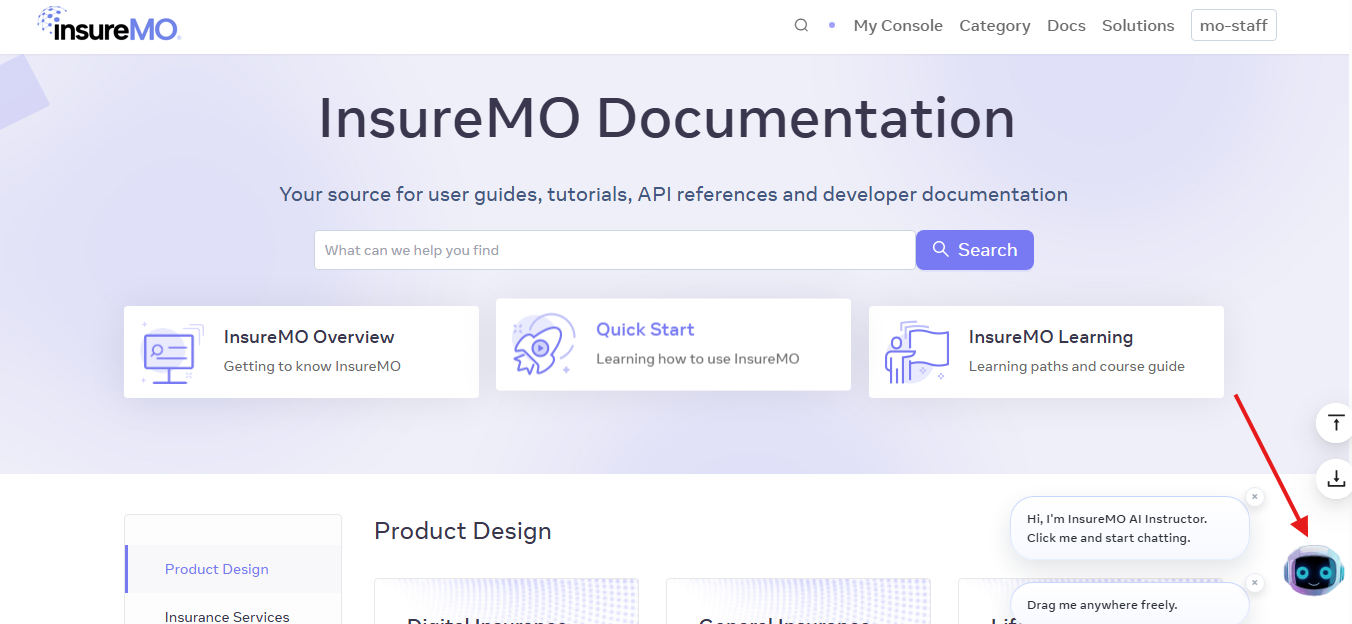
- Click Docs in the top menu to enter the InsureMO Documentation homepage.
- Click the AI icon at the bottom-right corner to open the chat window.
2.2 Category Selection Process
2.2.1 Available Categories
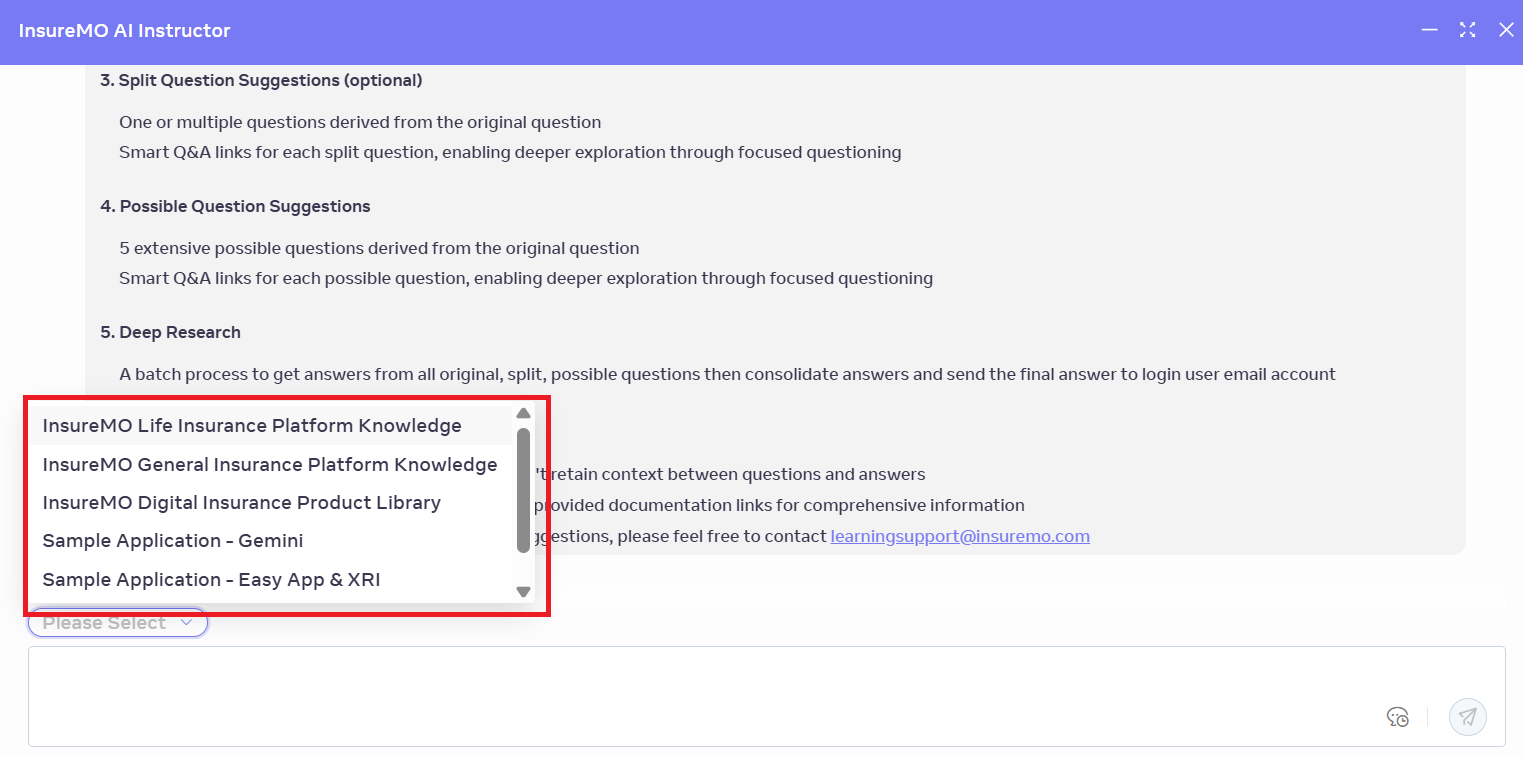
Upon opening the chat window, use the dropdown menu to select a category. InsureMO AI Instructor offers the following categories to narrow down your query:
- InsureMO Life Insurance Platform Knowledge
- InsureMO General Insurance Platform Knowledge
- InsureMO Digital Insurance Product Library
- Sample Application - Gemini
- Sample Application - Easy App & XRI
- Insurance Business Common Knowledge
2.2.2 Category-Specific Operations
2.2.2.1 InsureMO Life Insurance Platform Knowledge
When users select it, they can ask questions regarding:
- LIMO (Life Insurance Module)
- Insurance Common Service (ICS) (e.g., I18n, Data Dictionary, Local Cache, Message Notification Center, Index Management, Batch-V2 Framework, DataIO Export/Import, Workflow Engine, Document Management)
- Non-Insurance Services
- InsureMO tech-stack and utility tools (e.g., App framework, API Management, InsureMO SDK, iComposer, Excel Rating Service, iRules, SPOCK)
2.2.2.2 InsureMO General Insurance Platform Knowledge
Similarly, when users select the it, they can ask questions regarding multiple knowledge domains,
Mainly include:
- General Insurance (GIMO)
- Insurance Common Service (ICS) (e.g., I18n, Data Dictionary, Local Cache, Message Notification Center, Index Management, Batch-V2 Framework, DataIO Export/Import, Workflow Engine, Document Management)
- Non-Insurance Services
- InsureMO tech-stack (e.g., App framework, API Management, InsureMO SDK, iComposer, Excel Rating Service, iRules, SPOCK)
2.2.2.3 InsureMO Digital Insurance Product Library
DIPL stands for Digital Insurance Product Library, a platform designed to facilitate the creation, development, and rapid deployment of insurance products.
When users select this category, they can ask questions regarding:
- Product Library: a foundational component of the Digital Insurance Product Library (DIPL) platform. It serves as a repository of reusable components and elements that are essential for the creation and customization of insurance products.

- Element Library: Contains Public Elements and Private Elements. Public elements are accessible to all tenants and include various components such as coverages, limits, deductibles, fields, rules, rating algorithms, endorsement clauses, data tables, rating tables, discounts, fees, taxes, UI pages, and schedules. Private elements are specific to a tenant and are not visible to others.

- AI Research & Modeling: Utilizes specialized AI agents to perform comprehensive insurance market analyses, including competitor analysis, trend forecasting, and identifying market opportunities. The results can be exported into PDF reports for strategic discussions and presentations.

- ExPro: It is a product execution engine designed to facilitate real-time testing and validation of user interface (UI) definitions in the context of insurance applications. It plays a crucial role in ensuring that the UI elements, such as pages and fields, function seamlessly and meet the requirements for user interaction and data input accuracy.
2.2.2.4 Sample Application - Gemini
When users select this category, they can ask questions regarding:
 - Architecture Overview
 - Product Synchronization
 - New Business Development Introduction
 - Underwriting Development Introduction
 - Customer Service Development Introduction
 - Claim Development Introduction
 - Finance Development Introduction
 - New Business User Guide
 - Customer Service User Guide
 - Claims User Guide
 - BCP User Guide
 - GL Posting User Guide
2.2.2.5 Sample Application - Easy App & XRI
Easy App: a suite of applications designed to streamline various aspects of insurance operations, including policy administration (PA), billing, collection, and payment (BCP) and claims management.
XRI: a digital solution aimed at transforming and streamlining reinsurance processing. It consolidates all types of reinsurance contracts, including inward, outward, and retrocession, into a single application. This consolidation enhances data quality, productivity, and reporting capabilities.
When users select this category, they can ask questions regarding:
- EasyClaim
- EasyBCP
- EasyPA
- XRI (Reinsurance)
2.2.2.6 Insurance Business Common Knowledge
This category covers general insurance industry queries:
- Fundamental insurance concepts
- Insurance terminology
- Common processes (e.g., underwriting, claims, premium calculation)
- Basic principles of insurance laws and regulations
- Overviews of insurance products and their features
2.2.3 Knowledge Domain Selection (optional)
After choosing a category, further select a knowledge domain to refine your query. This feature ensures responses are tailored to the selected domain, enhancing accuracy. If unsure, leave the domain blank and ask your question directly.
2.3 Submitting Questions
InsureMO AI Instructor supports two input methods:
- Selecting pre-defined questions from the dropdown menu.
- Typing custom questions directly.
Press Enter or click the send button at the end of the textbox to submit your query.
3. AI Instructor Response Features
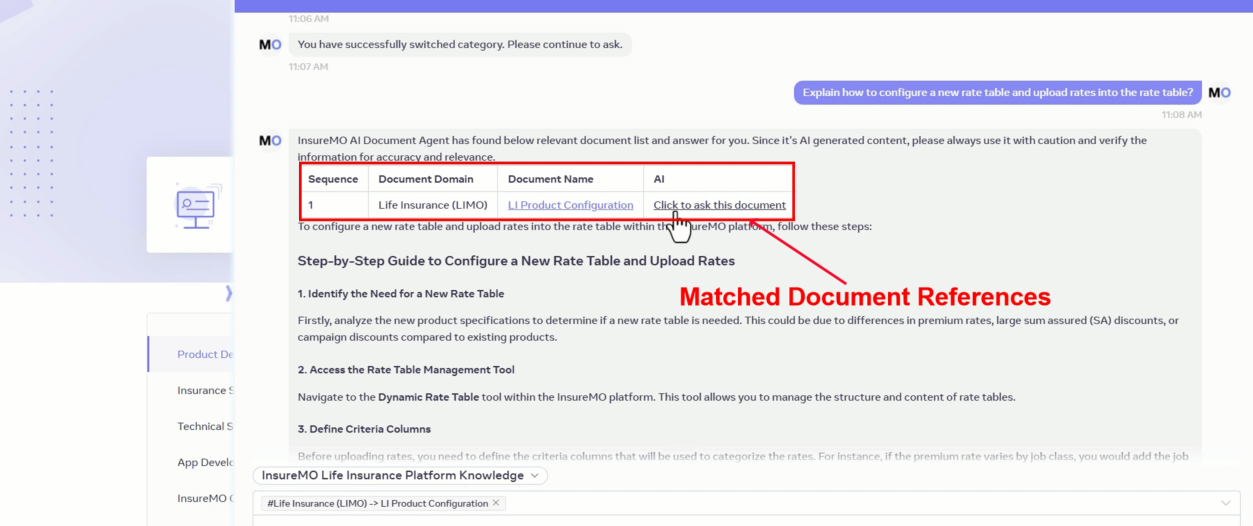
3.1 Matched Document References
InsureMO AI Instructor returns links to documents with direct answers. Each link includes a “Click to ask this document” option for follow-up questions specific to the document.
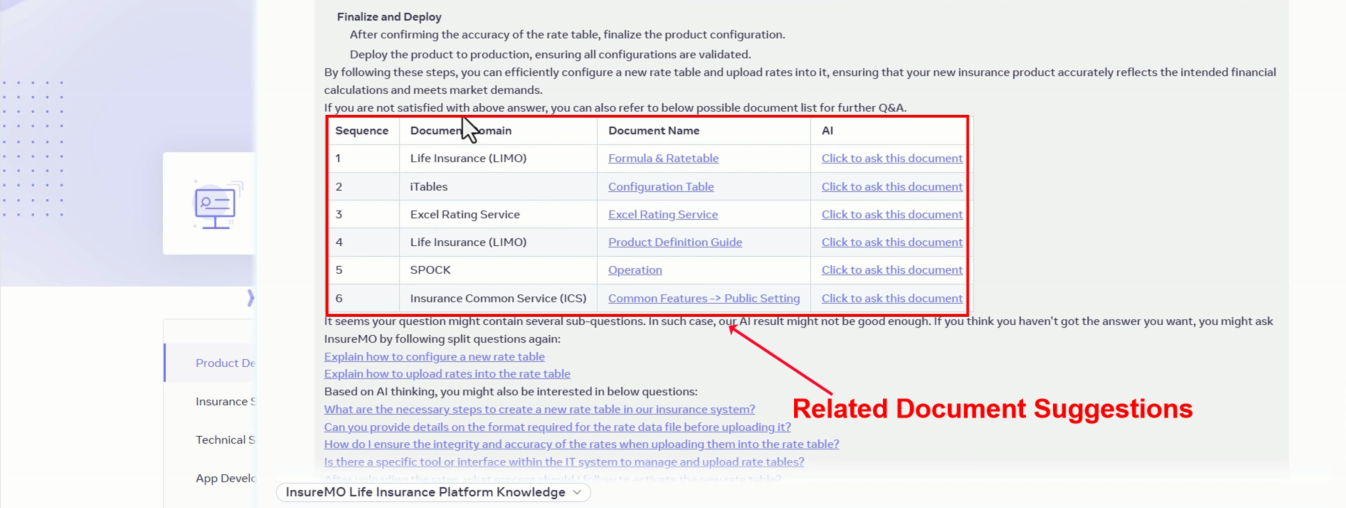
3.2 Related Document Suggestions
It provides links to relevant documents that may contain useful information, also with “Click to ask this document” functionality.
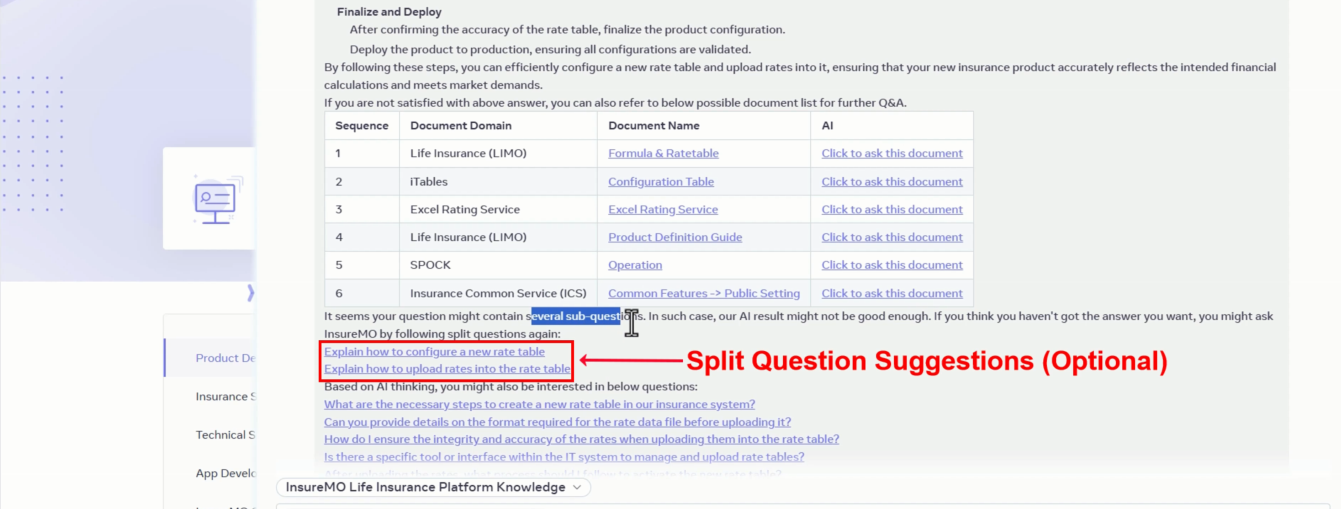
3.3 Split Question Suggestions (Optional)
For complex queries, InsureMO AI Instructor breaks the question into simpler sub-questions, each formatted as a hyperlink for individual exploration.
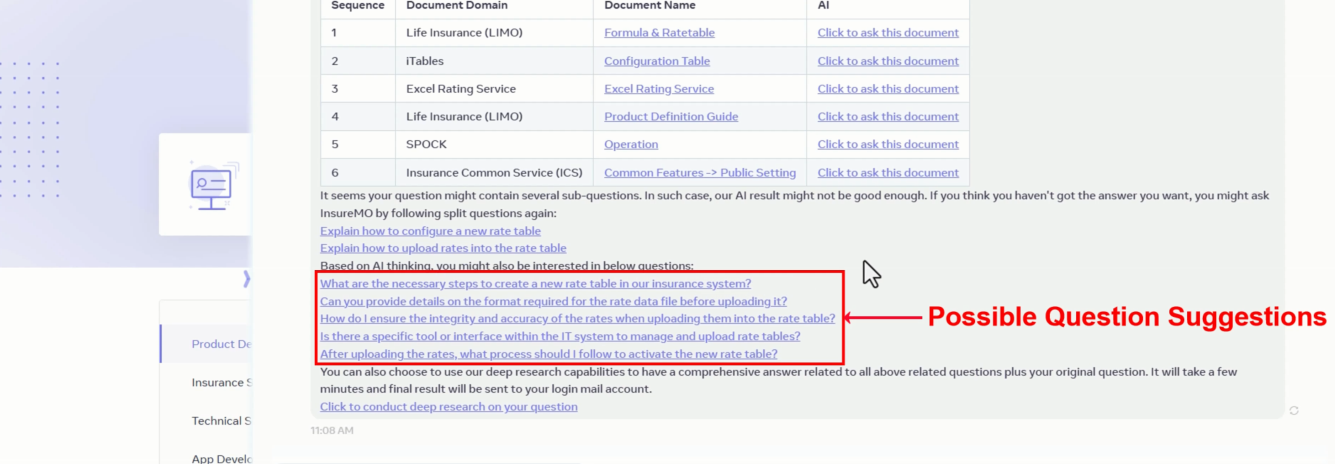
3.4 Possible Question Suggestions
The AI generates 5 related questions based on your query, hyperlinked to expand your knowledge on related topics.
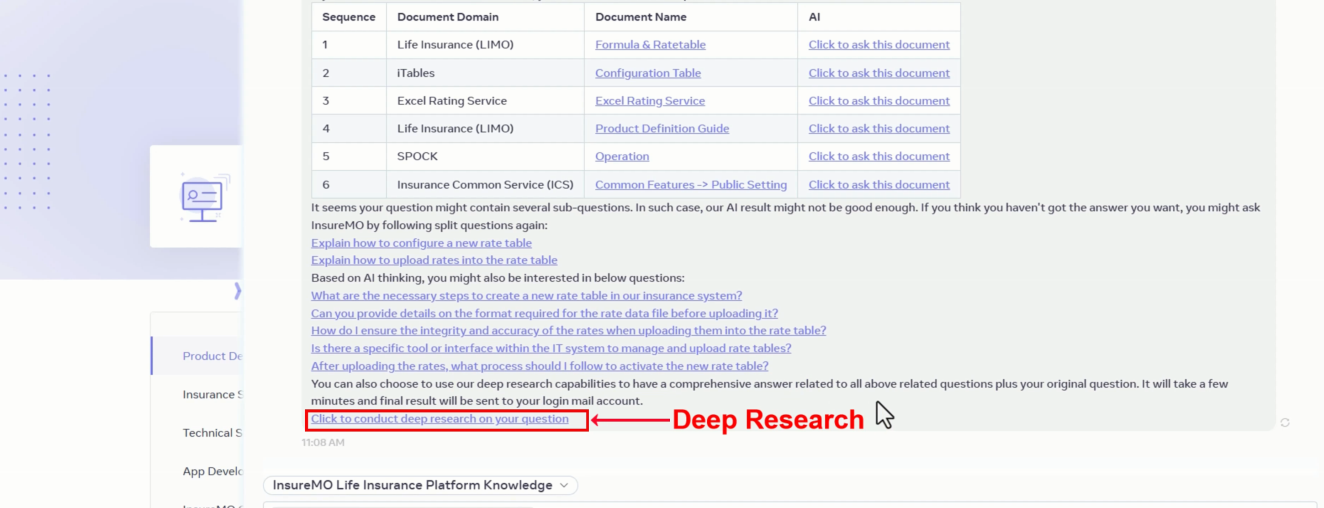
3.5 Deep Research
This feature consolidates answers from the original question, sub-questions, and suggestions, then emails the summary to your login email for reference.
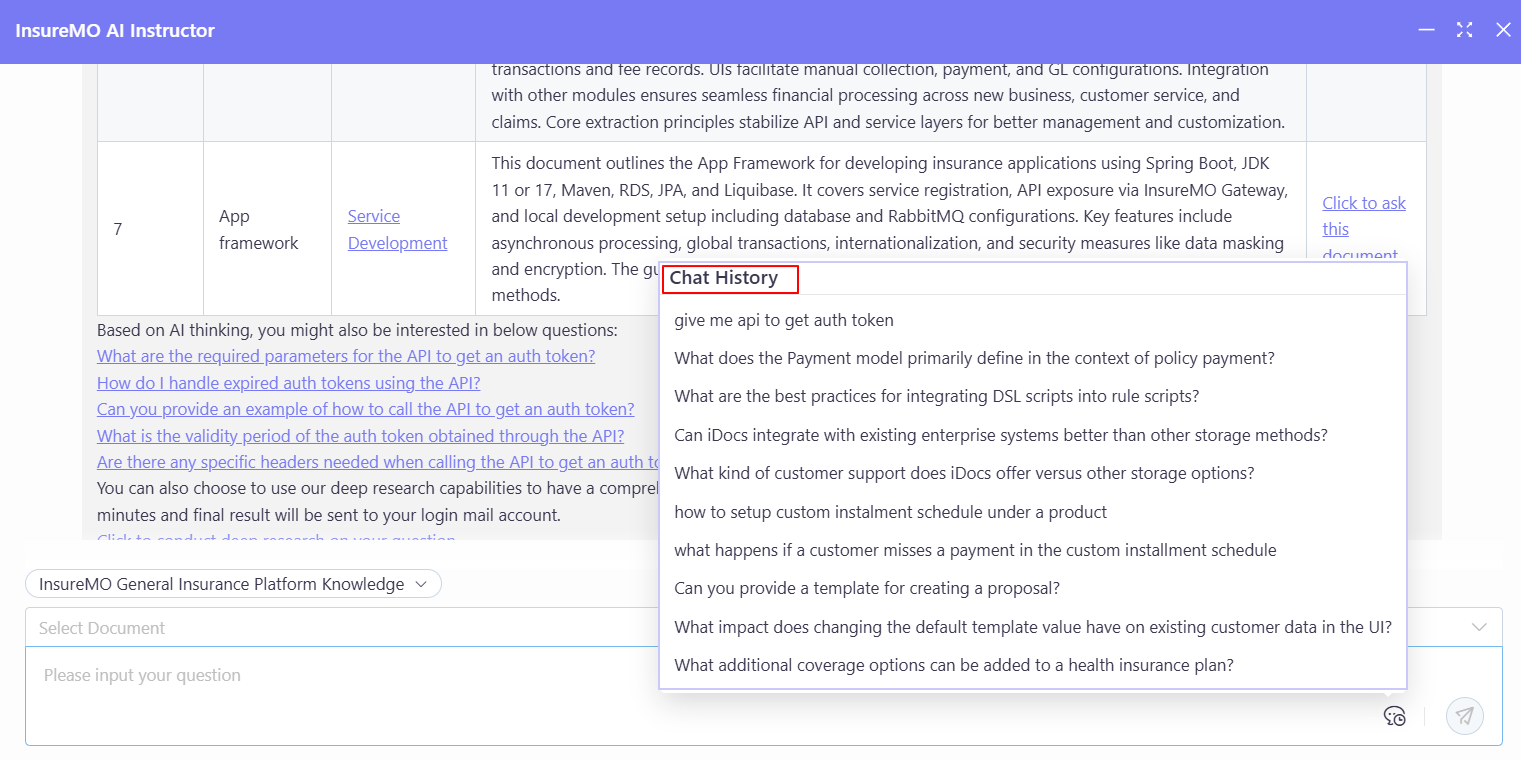
3.6 Chat History
InsureMO AI Instructor supports loading previous conversation history.
4. Troubleshooting
4.1 Timeouts/Errors
- Ensure you are logged in to your InsureMO account.
- Reload the page and try again.
4.2 Vague/Unrelated Answers
- Question Refinement: Please specify your inquiry further for more precise information.
- Exception Handling: If issues persist, the topic might be beyond training data coverage; escalate to a human support.
- Conversation Rule: Single-turn conversations only. The assistant doesn’t retain context between questions and answers.
- Complex Query Guidance: For intricate topics, refer to the provided documentation links for comprehensive details.
5. Feedback & Support
If you encounter any issues or have any suggestions, please feel free to contact learningsupport@insuremo.com to help improve the AI’s performance.
When using InsureMO AI Instructor, always verify information from cited documents, as LLMs may occasionally provide inaccurate data. InsureMO AI Instructor is designed to retrieve relevant links, and detailed accuracy should be confirmed via official documentation.