This document introduces several key concepts for beginners to understand how to utilize InsureMO. These concepts will frequently appear in daily operation, thus a complete and comprehensive understanding on this document is necessary for users.
Key Concepts
Tenant
Tenants are the minimum base to segregate data. Each tenant has their own data space and they will never be able to view others’ data. Any operation you perform with InsureMO will land up in a specific tenant and this is the most important concept.
In the system, every tenant will have a unique code and usually the code will indicate their identities. For example, if you represent ABC insurance, we recommend the tenant code to be abc (in lower case). However, if you stand as a multinational company with different entities operating separately instead of together, we will set tenant codes as abcapac, abceu, etc.
Guest or Visitor Tenant
All InsureMO activities starts on our portal: https://portal.insuremo.com.
If it is your first visit to the portal and you don’t have an account, you can click Sign Up to create a new one. From the InsureMO perspective, you will be considered as a guest and be put into a guest tenant.
You will only have limited operation authority as a guest. For example, you can check InsureMO offerings or documentations, but you cannot modify any configuration or call any API.
Trial Tenant
If you want to further explore InsureMO, you can ask for a trial. The trial request will be handed by our InsureMO learning support team (learningsupport@insuremo.com) or InsureMO sales team.
Formal Tenant
When you finish your learning and you think InsureMO can meet your demand, you need to sign a formal contract with InsureMO before moving to next stage. You can contact your InsureMO sales team about the details about how to sign such contract as well as the detailed terms & conditions.
Once you sign the contract, our InsureMO team will set up workspaces and environments for you. See the following chapters for more explanations about workspace and environment.
Once you become a formal tenant, your tenant code will change. Therefore, we can only use deployment approach to transfer configuration-related data from trial tenants to formal tenants.
Terminated Tenant
When your contract is going to expire, your will receive notification emails for contract renewal and InsureMO team will follow up with you about the renewal process.
If you decide to discontinue using InsureMO, you can terminate the contract. When the termination takes effect, all your data will be deleted, and you will lose access to InsureMO.
Design Time
Site (Environment)
InsureMO environments are a shared system that can host multiple tenants.
For beginners, you need to understand two core concepts related to environments: design time and runtime.
- Design time is where you configure and publish products, and build and deploy your own applications.
- Runtime is where you run all the applications and platform services, provide APIs, manage user access and API access tokens, store data, and perform integration.
When you log in to InsureMO, it always starts with InsureMO portal, which is the global unique design time hosted on AWS in Singapore, serving all countries and clients.
It is called design time because there are several key designing operations that will happen here such as:
- Product configurations
- API configurations (iComposer)
- Environment config center configurations
- Other configurations (e.g. email/SMS)
All these configuration of design time can be synchronized with multiple runtime environments via our ready-to-use deployment tool.
Also, it serves as a hub of operations such as:
- Application DevOps for building and deploying
- Application monitoring
User Account
All users are unique based on user names for the design time. If you have a user account called trialuser, by joining a learning plan or becoming formal tenants, you can work in different tenants with the same password and login credentials. Meanwhile, you can switch workspaces in the top right of the portal. Here is an example:
- Tenant: Guest - User: trialuser
- Tenant: ConfigurationTrial - User: trialuser
- Tenant: EasyAppTrial - User: trialuser
If you sign up with a different user name, you will have a new account and need to set a new password.
Runtime
If you just want to have a trial or take a quick look at InsureMO, learning about the design time is enough. However, if you want to fully utilize InsureMO, you need to grasp the concept of runtime.
Because a project implementation cycle comprises different stages (e.g. internal testing, client testing, and client production), we need to test and troubleshoot in different places. Such places are called workspaces or environments in InsureMO.
Site (Environment)
Sites, also called environment, are where InsureMO is hosted. Because hosting InsureMO is based on k8s clusters, one environment means one InsureMO cluster for a single cloud provider.
A common runtime environment comprises master configuration (MC), development (Dev), user acceptance testing (UAT), and production (Prod).
There are basically three principles behind setting up InsureMO environment:
-
Region consideration
Most of the environments are divided by regions for reasons below:
- Network consideration: For our clients, a nearest region means a better network connection.
- Regulation consideration: Insurance data is sensitive. More and more regulators have required that data cannot cross borders. Therefore, we need to set specific regional sites.
-
Stability consideration
In most regions, we have set different types of the sites:
- Production: This is for the real production usage.
- UAT or Sandbox: This is for the testing stage.
- Co-DEV: This is for the development stage.
-
Cloud provider consideration
Although the majority of InsureMO is hosted on AWS, we do see in some specific regions, other cloud providers actually perform better than AWS.
The table below shows all our existing public InsureMO environments. You can choose one of them to start your business.
| Region | Type | Provider |
|---|---|---|
| SG | DEV | AWS |
| UAT | AWS | |
| PROD | AWS | |
| IN | UAT | AWS |
| PROD | AWS | |
| US | UAT | AWS |
| PROD | AWS | |
| CN | UAT | AliCloud |
| PROD | AliCloud | |
| JP | UAT | AWS |
| PROD | AWS | |
| HK | UAT | AWS |
| PROD | AWS | |
| CA | UAT | AWS |
| PROD | AWS | |
| EU | PROD | AWS |
| BR | PROD | AWS |
| IDN | PROD | AWS |
| AU | PROD | AWS |
Workspace
A workspace is one of your single working places assigned to a specific site.
Let’s assume you are developing an application for American clients. Because a rich set of data, whether it’s configuration data or real policy data, needs to be stored well, it should be saved in America’s cloud space to avoid any regulatory compliance issue. Moreover, you may need two working places: one for your end users to test, and one to conduct real production activities.
Therefore, ideally, two workspaces will be assigned for you:
- Workspace 1: US UAT Site
- Workspace 2: US PROD Site
Codes will be set to mark your workspaces. To manage easily, we will assign your design time tenant code to the runtime. So if your design time tenant code is abc, then the workspace codes will be:
- Workspace 1: US UAT Site - abc
- Workspace 2: US PROD Site - abc
If you are developing a large application that involves a flood of people to test or different development streams, we will update your codes like:
- Workspace 1: US UAT Site - abc
- Workspace 2: US PROD Site - abc
- Workspace 3: US UAT Site - abcpreuat (Because tenant codes must be unique in one site, we need to set this code differently. Also, we will set this tenant code in design time as well as in DevOps and Monitoring.)
User Account
After your workplace is prepared, you will need a user account to access InsureMO. There are two types of users for the runtime:
-
InsureMO URL & users
This type of user accounts can be utilized to access the runtime InsureMO site. For example, for a SG PROD, the URL will be https://sg.insuremo.com. This is where you can check runtime features such as log monitor, email configuration, sms configuration, and config center configuration. Also, you can create PAT tokens to integrate with third party applications.
By default, accounts created for InsureMO will be named in the format of tenant.admin. (Take abc.admin as an example.) After the initial set-up, you will receive an email to reset your password.
To add more users, see Tenant Management for more details.
-
InsureMO Application URL & users
This type of user accounts can be utilized to access the application site. For example, for a SG PROD, the URL will be https://abc-sg.insuremo.com/. This is where you can check application-related features such as user and batch set-up, and query details of policy and BCP.
By default, accounts created for the application will be named as ADMIN. You will receive an initial password to log in. Please remember to change your password and email address after the initial set-up.
To add more users, see URP (User, Role, Permission) for more details.
Services and Tools
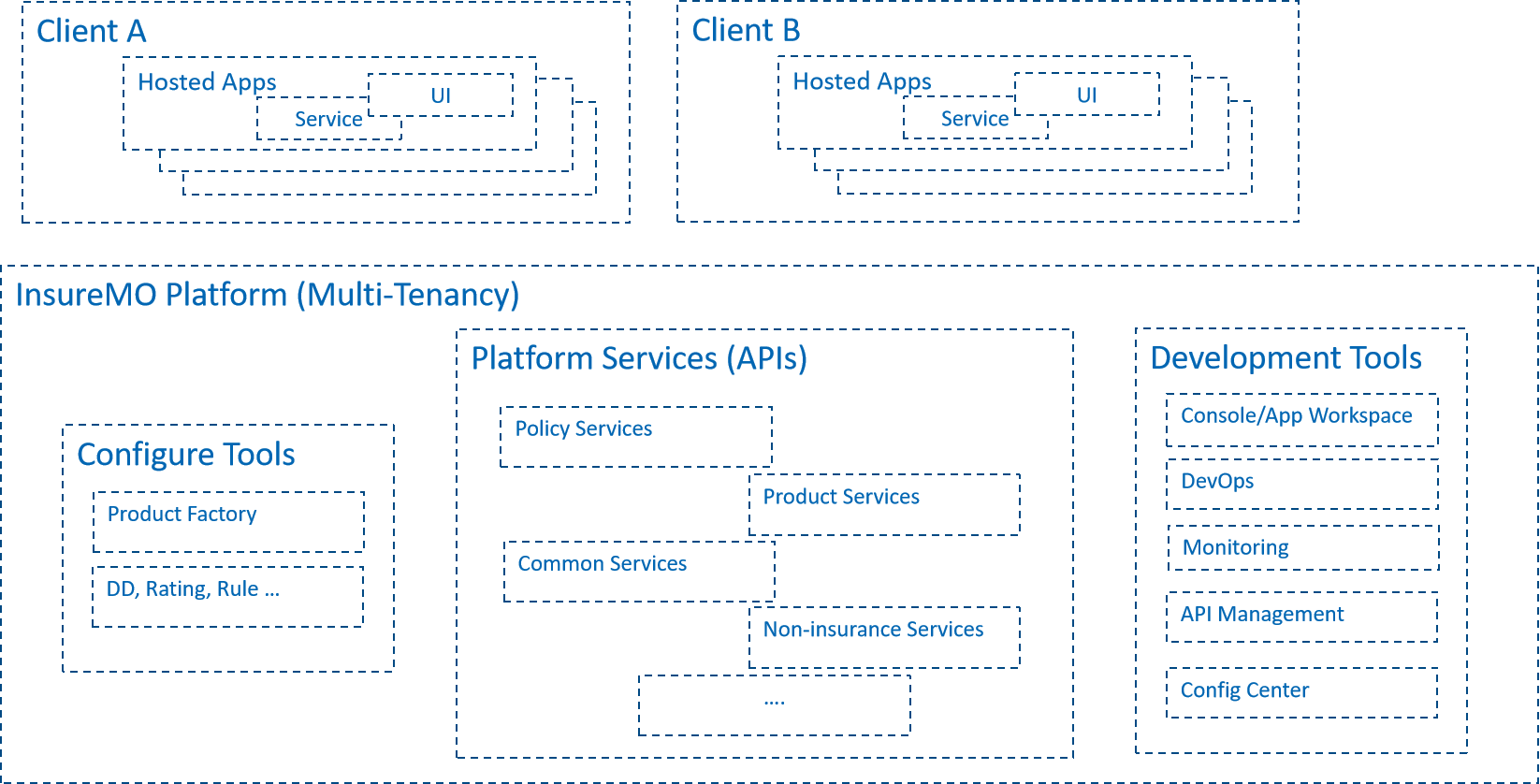 The diagram above shows the relationships between external applications and the InsureMO platform. The InsureMO platform features multi-tenancy and offers a range of configuration and development tools. It also provides services and capabilities in form of APIs, which empowers the external applications.
App Template
InsureMO App Template is a series of ready-made app templates for various business scenarios. You can use them as a baseline to start your application customization. There are dozens of types of the app templates, covering different LOBs (Line of Business) such as travel, health, cyber, and car.
Compared with developing an application entirely from scratch, App Template makes the process faster and easier by providing reusable codes, components, and best practices.
To learn more about App Template, see Getting Started with App Templates.
API Gateway
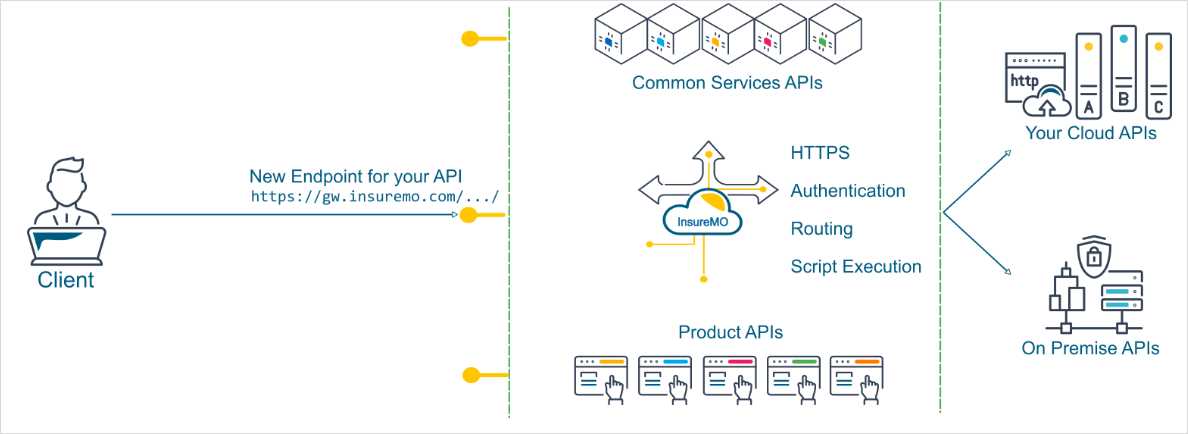
API gateway is the only endpoint that your front-end applications will ever need to talk to. This means if all your APIs are registered on InsureMO, you will never run into any CORS issue because your web applications will think they are talking to a single backend.
API gateway will authenticate every request. It means only API requests with valid tokens or keys can successfully pass the validation. For APIs themselves, you do not have to worry about implementing these complex authentication mechanisms.
API gateway provides a lot of additional monitoring for your APIs. You can monitor and set alerts based on the traffic, and keep on top of any spike in errors in real time.
API gateway will conduct authorization checks against each request. It means API vendors can give their APIs’ access to other tenants on the platform while the gateway will fully control the APIs. This will open new avenues of collaboration with other insurers, vendors, and partners.
Tenant Onboarding
If you want to add a new workspace in any of our site, the process is called “Tenant Onboarding”. How many workspace you should have and where your workspace to be hosted will largely depend on how your contract is written. So now workspace creation is an offline process. You should inform your sales or support team and they will conduct the onboarding process for you.
After onboarding is finished, you should have a new workspace with following key information for your usage:
- New InsureMO Application URL with admin login credential specific to your site & tenant
- InsureMO gateway URL with admin login credential specific to your site
Also, the workspace will appear in design time environment in case you want to perform CICD or monitoring.
Terminology
InsureMO-related Terms:
-
MO: Middle Office, a component of the platform organization situated between the Front Office and the Back Office.
-
InsureMO: Insurance Middle Office, a cloud-based technical platform for developing and supporting insurance applications, digitizing existing insurance applications, and connecting insurance to the world.
-
GIMO: General Insurance Service, a section of InsureMO dedicated to general insurance business.
-
GI: General Insurance, a type of insurance that protects assets from unexpected losses.
-
LIMO: Life Insurance Service, a segment of InsureMO that provides microservices for product factory and policy management.
-
LI: Life Insurance, a contractual agreement between an insurance policyholder and an insurer.
-
DataMO: Data Middle Office, a platform that collects, calculates, stores, and processes massive amounts of data using data technology, while also maintaining unified standards and calibration.
-
Gemini: An app for the life insurance business developed using technical components provided by Container, the App Framework provided by GIMO, and the product factory and policy management services provided by LIMO.
-
AUAT: API and UI Automation Test, a comprehensive testing platform that includes test case and issue management.
-
App Framework: Application Framework, a set of general tools used for developing the general insurance business. It was previously a part of GIMO but has now been separated.
-
Rainbow UI: Rainbow User Interface, a front-end UI development tool built on the React JavaScript framework.
-
MC Env: Master Configuration Environment, where all configuration data is initially defined and then exported to other environments (such as the development and production environments) through business data.
-
Business Service: Business microservices within LIMO.
-
Container: The underlying technology implementation framework of InsureMO, which encapsulates Native Docker, k8s, DevOps, and other technologies, differentiating it from Native Docker.
-
DB: Database, an organized collection of structured information or data typically stored electronically in a computer system.
-
DD: Data Dictionary, a centralized repository of information about data, including its meaning, relationships to other data, origin, usage, and format.
-
DSL: Domain-Specific Language, a computer language specialized for a particular application domain.
-
I18n: Internationalization, the process of designing a software application to be adaptable to various languages and regions without requiring engineering changes.
Insurance-related Terms
- Policy: An insurance policy is a contract between an insurer and a policyholder.
- LOB: Line of Business refers to a set of insurance-related products, such as fire insurance.
- Proposal: An insurance proposal is a document that provides the details of the proposer and the life assured.
- Product: Products sold by insurance companies are portfolios of committed services provided to transfer risk and provide financial compensation.
- NB: New Business refers to the insurance policy application process, which includes the insurance company’s review of the application and their decision on whether to accept it.
- CS: Customer Services, such as changing the sum assured, are commonly used in life insurance and provided after the policy is issued.
- CLM: Claim handling is the process where an insurance company responds to a policyholder’s request for coverage or compensation for a covered loss or policy event.
- Endo: An insurance endorsement, also known as a rider, is an amendment to an existing insurance contract that changes its terms.
- RN: Renewal refers to the process where an insurance company slightly renews the policyholder’s contract conditions based on the actual situation as the policyholder submits an application to continue the contract.
- RI: Reinsurance is the insurance that an insurance company purchases from another insurance company to protect itself from the risk of major claims events.
- PTY: Insurance Parties refer to policyholders and insurance companies in a narrow sense, and in a broad sense, they include all individuals or institutions involved in insurance activities, such as beneficiaries, insureds, auto repair shops, and hospitals.
- SC: Sales Channels for insurance products include insurance agents, insurance brokers, Internet-related channels, bank-led channels, and direct telesales.
- BCP: Billing, Collection, and Payment.
- IPA: Individual Personal Accident Insurance is a fixed benefit plan that provides financial protection to policyholders in the event of death, permanent or temporary disability caused by an accident.
- GPA: Group Personal Accident Insurance is a group insurance plan that provides financial cover against unexpected events, such as accidental death, injuries, or disability, to the members belonging to the group.
- BIE: Basic Information Endorsement is an amendment or addition to an existing insurance contract that changes some basic information of the original policy.
- PA: Policy Administration refers to the set of activities and processes involved in managing insurance policies throughout their lifecycle. It includes tasks related to policy issuance, maintenance, servicing, and termination.
Infrastructure-related Terms:
- IaaS: Infrastructure as a Service is a business model that delivers IT infrastructure like compute, storage, and network resources on a pay-as-you-go basis over the Internet.
- PaaS: Platform as a Service is a form of cloud computing that enables software developers to easily build, run, and manage software applications.
- SaaS: Software as a Service is a software distribution model where a cloud provider hosts applications and makes them available to end users over the Internet.
- API: Application Programming Interface is a way for two or more computer programs to communicate with each other.
- BFF: Backend for Frontend is a design pattern where separate backend services are created to be consumed by specific frontend applications or interfaces, providing an additional layer between microservices and APIs.
- Docker: Docker Engine is an open-source containerization technology for building and containerizing applications.
- K8s: Kubernetes is an open-source system for automating deployment, scaling, and management of containerized applications.
- Containerization: The packaging of software code with only the necessary operating system (OS) libraries and dependencies to create a single lightweight executable, called a container, that runs consistently on any infrastructure.