1. Background
iComposer is a low-code backend platform with two core functional modules:
- RESTful API: The externally exposed interface, equivalent to the Controller in Spring MVC.
- Service Function: The business logic behind the API, equivalent to Service/Manager in traditional backend development.
In this Quick Start Guide, the Hello World example aims to demonstrate how to create a Service Function with basic greeting logic and a RESTful API (POST/GET) that invokes this Service Function, helping new users quickly grasp the core usage of iComposer.
2. Overall Menu Navigation
Before we start, please make sure that you have all read and write authority to make the operations beforehand.
For the first time to operate, we recommend that the user follow the steps below to navigate all the menus:
-
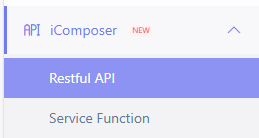
Log in to the home page of InsureMO and locate iComposer menu in the left menu bar.
-
Check Restful API menu.
-
Check Service Function Menu.
3. Service Function
This chapter explains to new users: Service Function represents the “business logic” layer and will be invoked by RESTful APIs. We create a Hello World Service Function to illustrate.
3.1. Create a Service Function
- In the left menu of iComposer, locate Service Function.
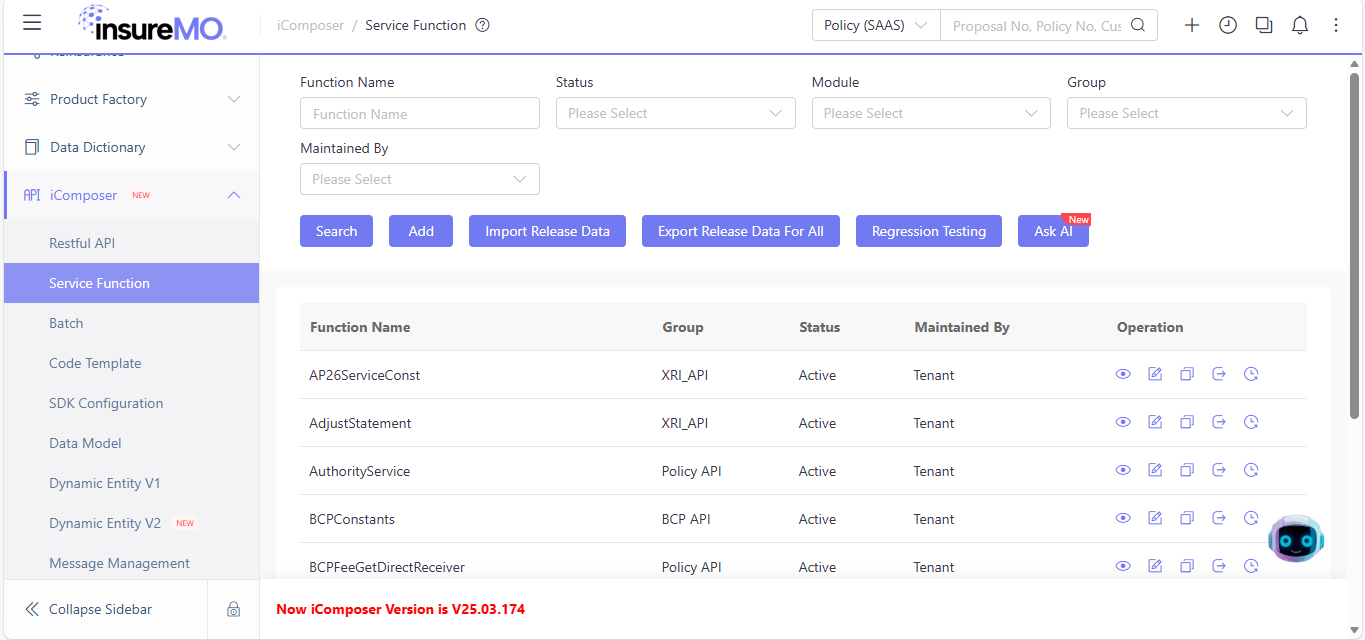
- Users are advised to search the search bar for service functions that have been entered into the system. If no relevant service function is found, a new one should be created.
- Click
Add.
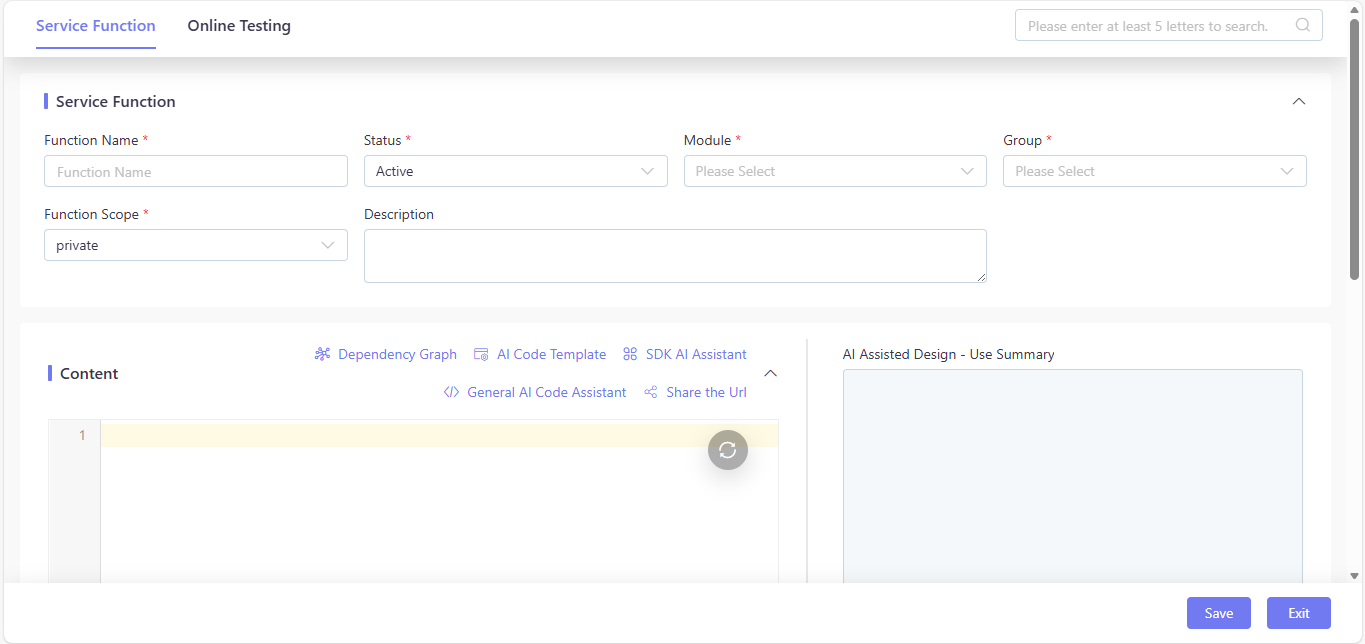
- Fill in the basic information (example):
- Name:
HelloWorldService - Description:
Demo: The function receives a name parameter (from Map type request data), first logs a greeting message containing the name to the system log, and subsequently returns the concatenated greeting string encapsulated in a Map. Assigns "World" as default if the name parameter is empty or not present. - Module:
policy admin - Group:
test_api
- Name:
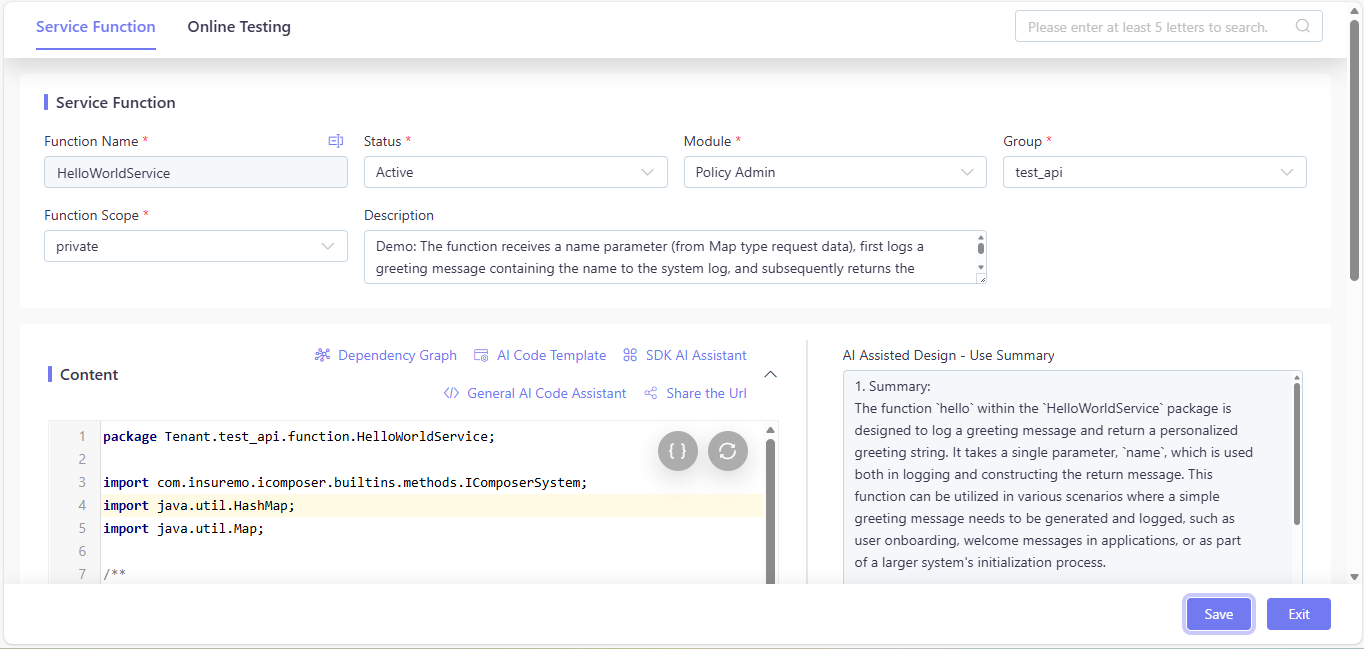
- Click
Saveto upload the information.Exitwill discard all your edits.
3.2. Define Input and Output Structures
We define the input and output data structures for the Service Function as follows:
- Input (Input DTO):
requestData: Map (contains the “name” field of String type; “name” is optional, with “World” as the default value)
- Output (Output DTO):
resp: Map (contains the “message” field of String type, which is the spliced greeting string, e.g., “Hello! World”)
3.3. Write Logic and Code Implementation in Service Function
3.3.1. Logical Steps:
- Define a method named
hellothat returns a Map and takes a single parameter:requestData(Map type, compatible with POST request body/GET URL parameters). - Extract the “name” field from
requestData; if the field is empty or not present, assign “World” as the default value. - Log an informational message using
IComposerSystem.info, passing the string"Hello :{}"and thenameparameter as arguments. - Concatenate the string “Hello! ” with the
nameparameter to form the greeting message. - Encapsulate the greeting message into a Map with the key “message” and return this Map.
3.3.2. Dependencies and Imports:
- Import third-party package:
IComposerSystemfrom the iComposer built-in methods. - Import Java util packages:
HashMap,Map. - No CommonServices are declared or used in this function.
3.3.3. Define the Method hello:
- Explanation: This method accepts a
Mapparameter namedrequestData. It extracts the “name” field from the Map (assigning “World” as default if missing/empty), logs an informational message using theinfomethod fromIComposerSystem(including thename), constructs a greeting string, encapsulates it into a Map with the key “message”, and returns the Map. - Service Function Invoked: None
- SDK Method Path Invoked: None
- RestTemplate API URL Invoked: None
3.3.4. Code Implementation:
package Tenant.test_api.function.HelloWorldService;


import com.insuremo.icomposer.builtins.methods.IComposerSystem;

import java.util.HashMap;

import java.util.Map;


def hello(Map requestData) {

    // 1. Extract the "name" field and handle default value

    String name = null;

    if (requestData != null && requestData.get("name") != null) {

        name = requestData.get("name").toString();

    } else {

        name = "World"; // Default value

    }


    // 2. Print log

    IComposerSystem.info("Hello :{}", name);


    // 3. Encapsulate response into Map format

    String resultMsg = "Hello! " + name;

    Map<String, Object> resp = new HashMap<>();

    resp.put("message", resultMsg);


    // Return the encapsulated Map

    return resp;

}
Click Save to upload the information. Exit will discard all your edits.
3.4. Online Testing
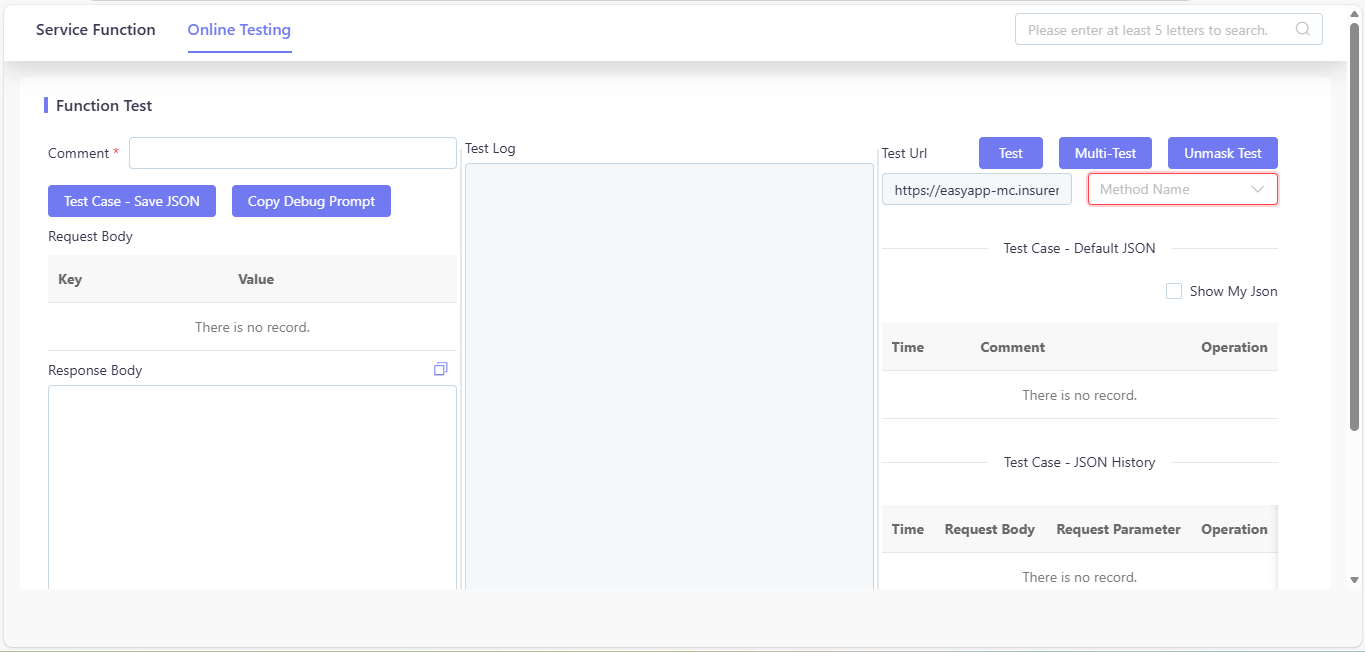
Click Online Testing on the upper toll bar. Select Method Name on the right, then you will see auto-generated Key and Value records on the left.
3.4.1. Functional Testing
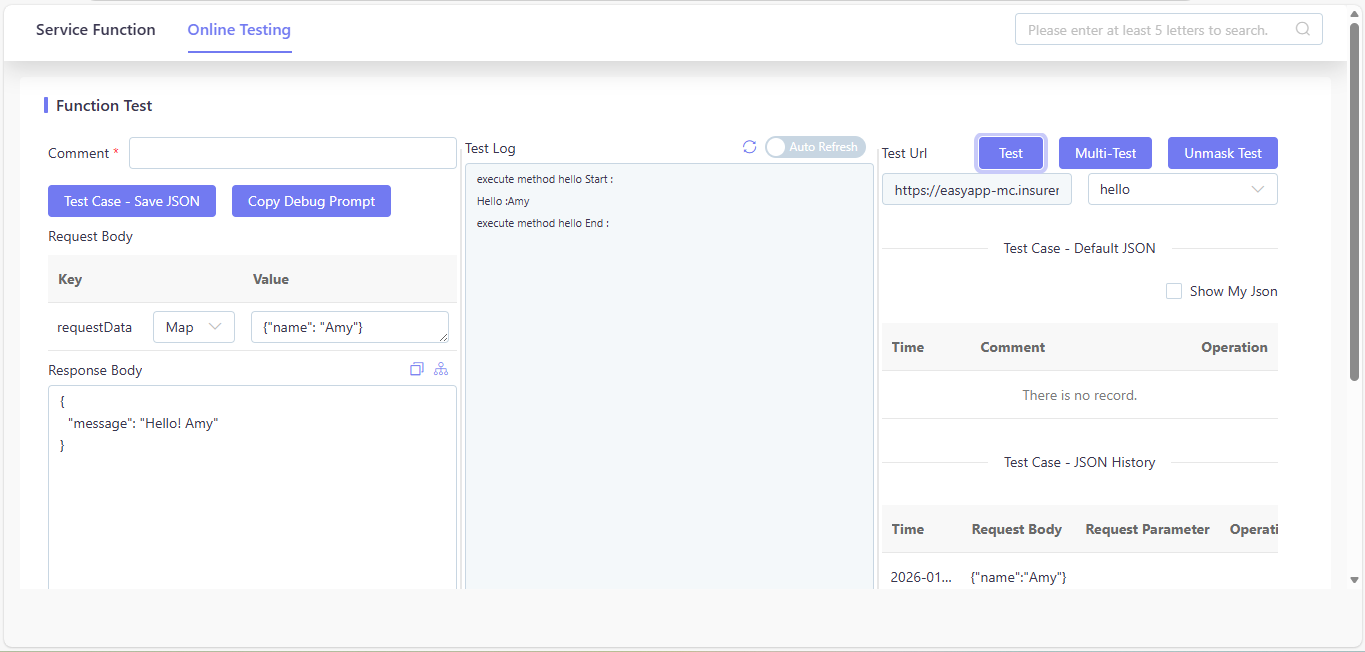
- Test Parameter Configuration:
- Key:
requestData(Map) - Value:
Amy
- Key:
- Test Result:
- Response Body:
{"message":"Hello! Amy"}
- Response Body:
3.4.2. Empty Input Testing
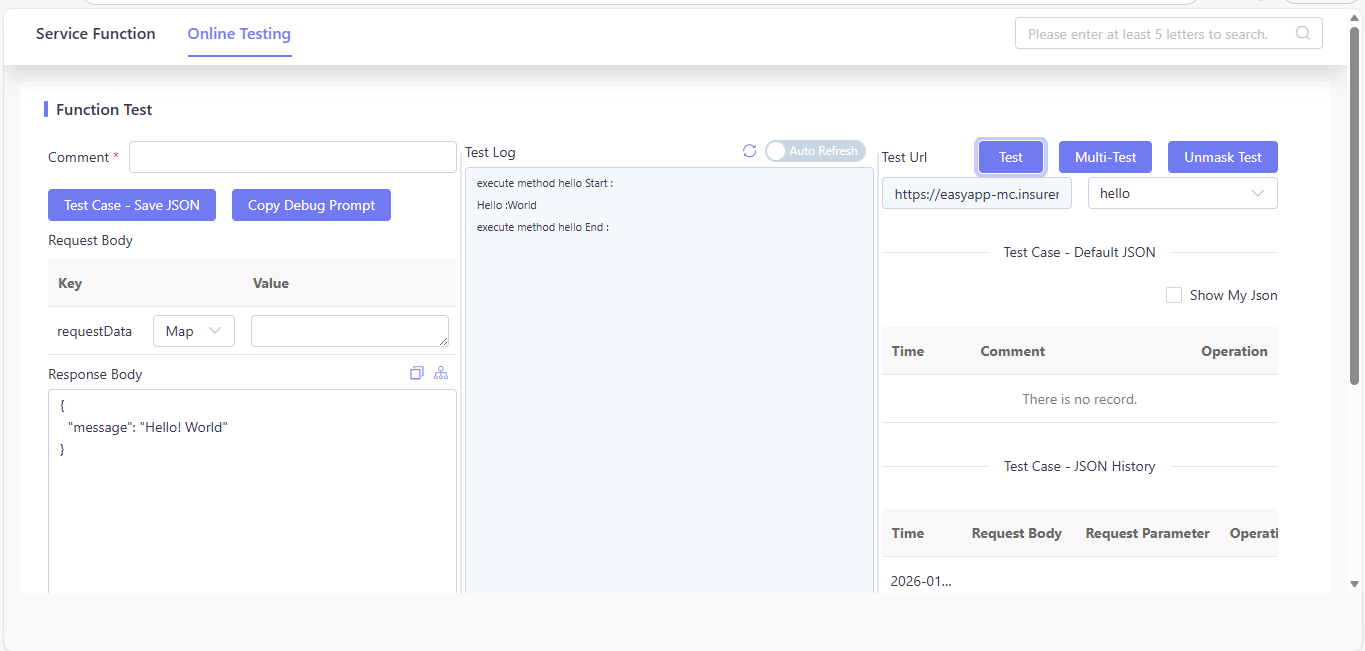
- Test Parameter Configuration:
- Key: requestData (Map)
- Value: null
- Test Result:
- Response Body:
{"message":"Hello! World"}
- Response Body:
4. RESTful API
This chapter tells new users: RESTful API is the external access entry of iComposer, and it will invoke the Service Function created in the previous chapter. Here we create two Hello World RESTful APIs to illustrate the Request Method of POST and GET respectively.
4.1. Create a New POST API
- In the left menu of iComposer, locate Restful API.
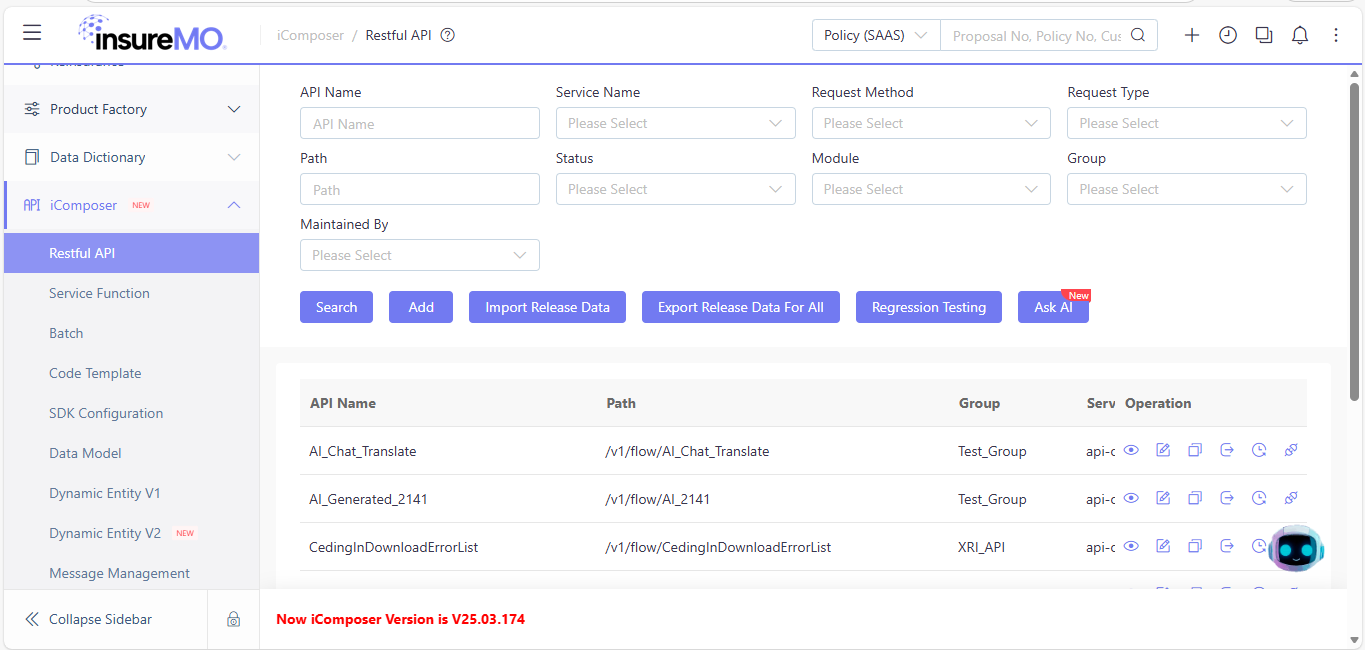
- Users are advised to search the search bar for RESTful APIs that have been entered into the system. If no relevant RESTful API is found, a new one should be created.
- Click
Add, and you will see the following interface.
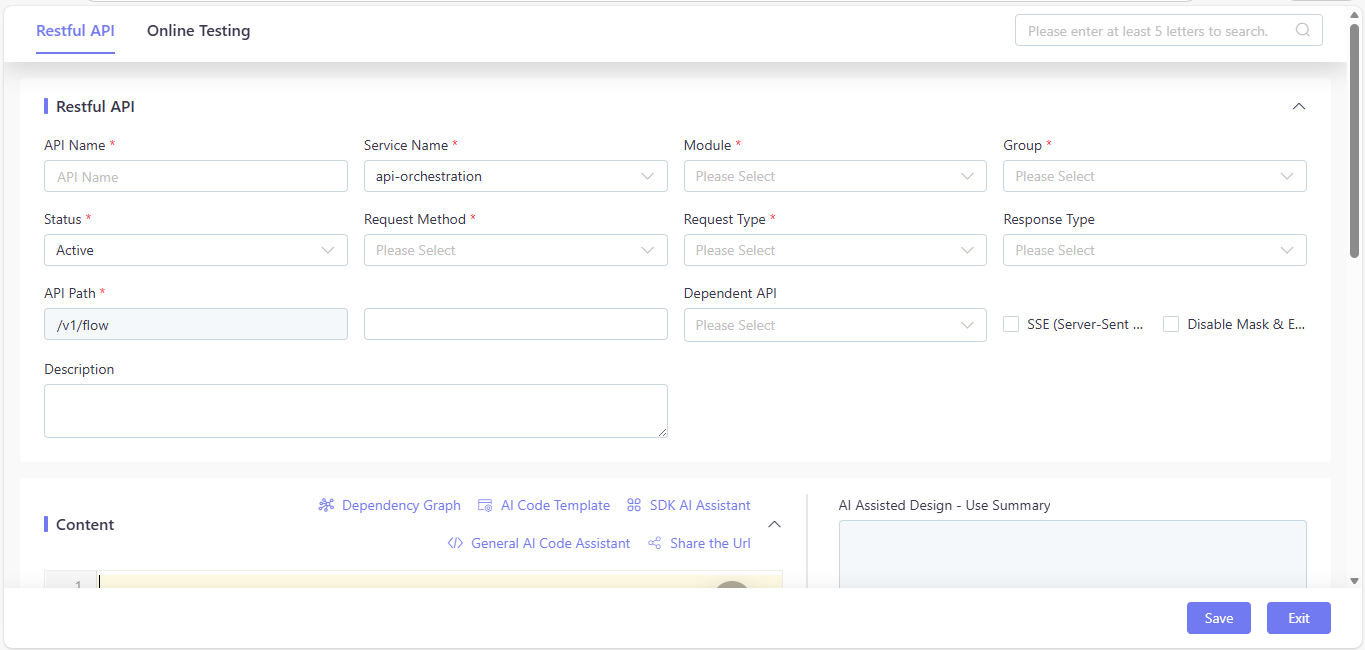
- Fill in the basic information (example):
- API Name:
HelloWorldApi - Description:
Demo REST API (POST) calling HelloWorldService - Request Method:
POST - API Path:
/v1/flow/HelloWorldApi - Module:
Policy Admin - Group:
test_api
- API Name:
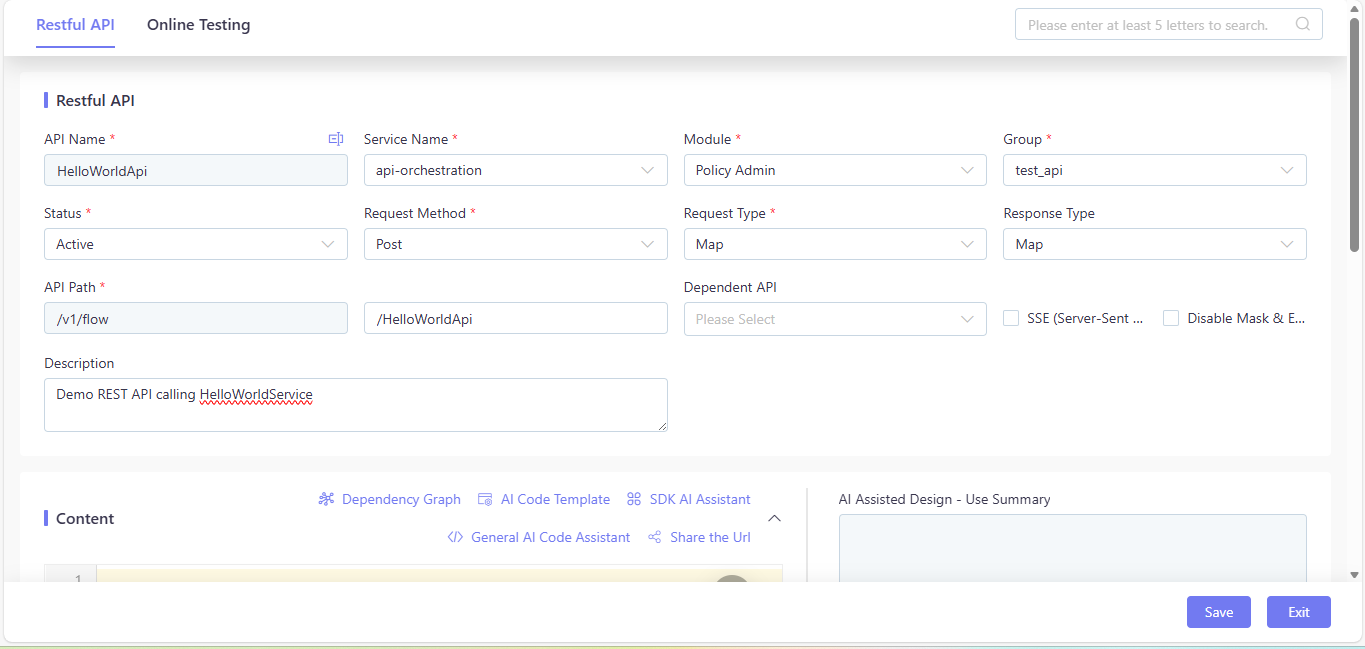
4.2. Define Input and Output Structures
- Request Type: Map (request body in JSON format)
- Response Type: Map (contains the “message” field of String type)
- The
nameparameter is passed via the POST request body (JSON format) and read usingIComposerSystem.getRequestBody()in the code.
4.3. Bind the API to the Service Function
4.3.1. Code Implementation:
import com.insuremo.icomposer.builtins.methods.IComposerSystem;

import java.util.Map;


// 1. Get Service Function instance

HelloWorldService helloWorldService = (HelloWorldService) IComposerSystem.getCommonService("HelloWorldService");


// 2. Read POST request body

Map body = (Map) IComposerSystem.getRequestBody();


// 3. Print interface layer log

IComposerSystem.info("HelloWorldApi(POST) receive request body: {}", body);


// 4. Call the service function and explicitly cast to Map type

Map<String, Object> result = (Map<String, Object>) helloWorldService.hello(body);


// 5. Return the result of the service function directly

return result;
4.3.2. Explanation
HelloWorldServicealready exists in the function list (Type=function), so you only need to obtain an instance viaIComposerSystem.getCommonService("HelloWorldService").- Log: The
IComposerSystem.info()method is used to record runtime logs, which helps in debugging and tracking the request flow (e.g., recording the request body received by the API).- Return Value: The API directly returns the Map result returned by the Service Function (with the key “message”) as JSON, ensuring a unified response format for the API.
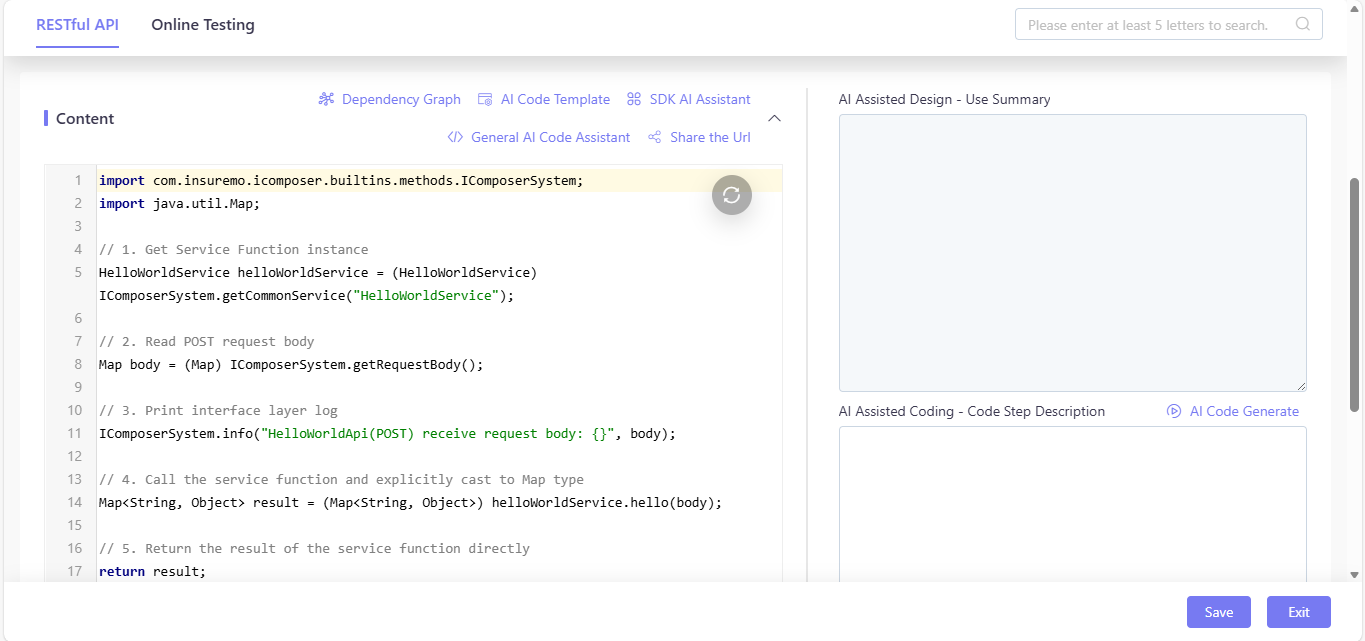
After completing the code writing, click Save to upload the content.
4.4. RESTful API Online Testing (POST Method)
Click Online Testing on the upper toll bar.
4.4.1. Functional Testing
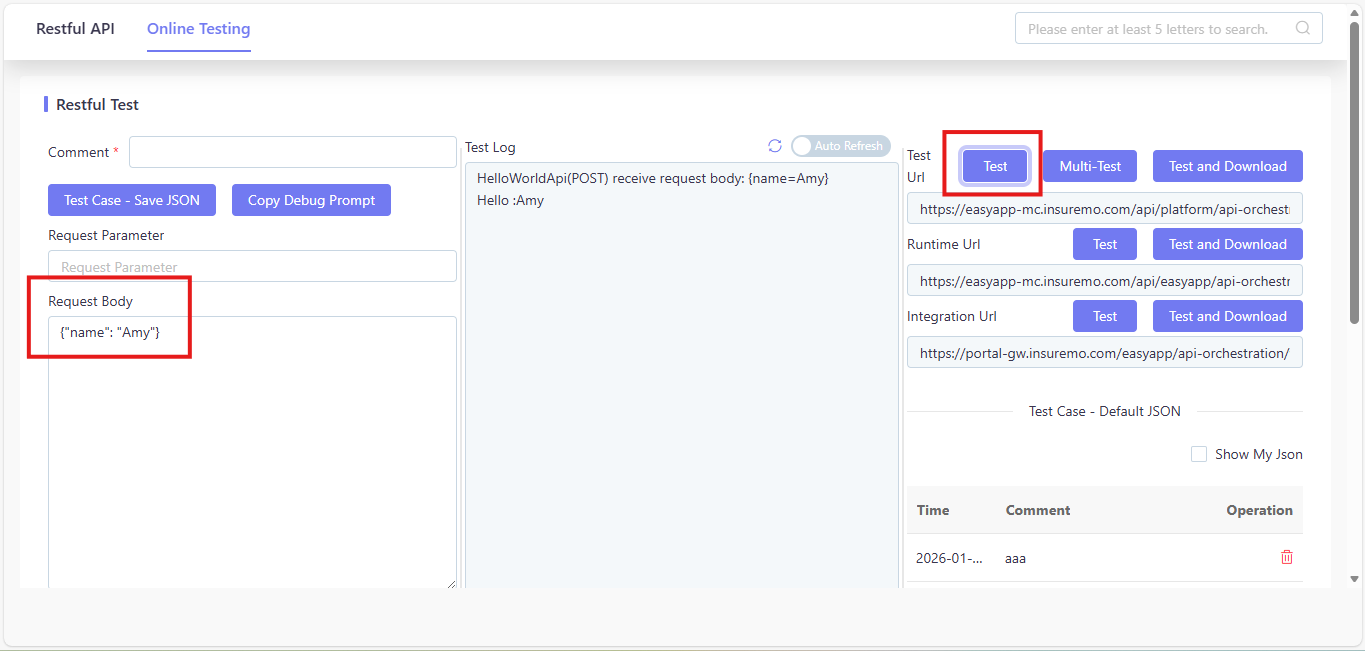
- Fill the Request Body:
{"name": "Amy"} - Operation Step: Click the
Testbutton in the upper right corner of the screen.
- Test Log:
HelloWorldApi(POST) receive request body: {name=Amy}Hello : Amy
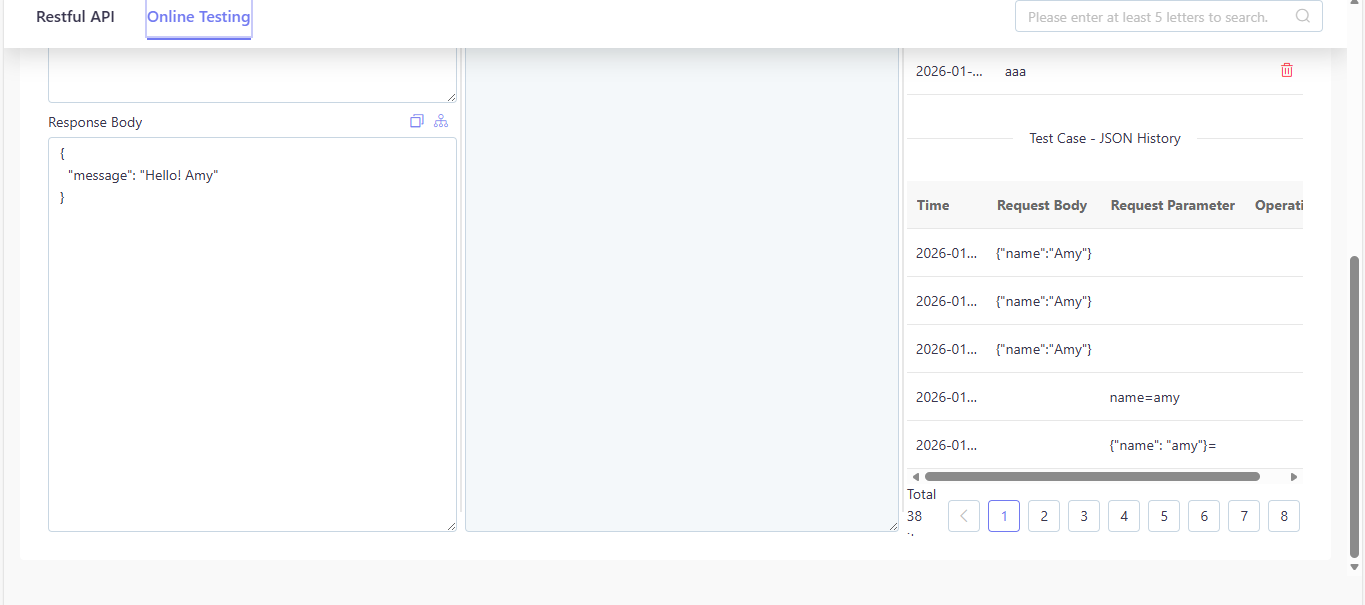
- Response Body:
{"message": "Hello! Amy"}
4.4.2. Empty Input Testing
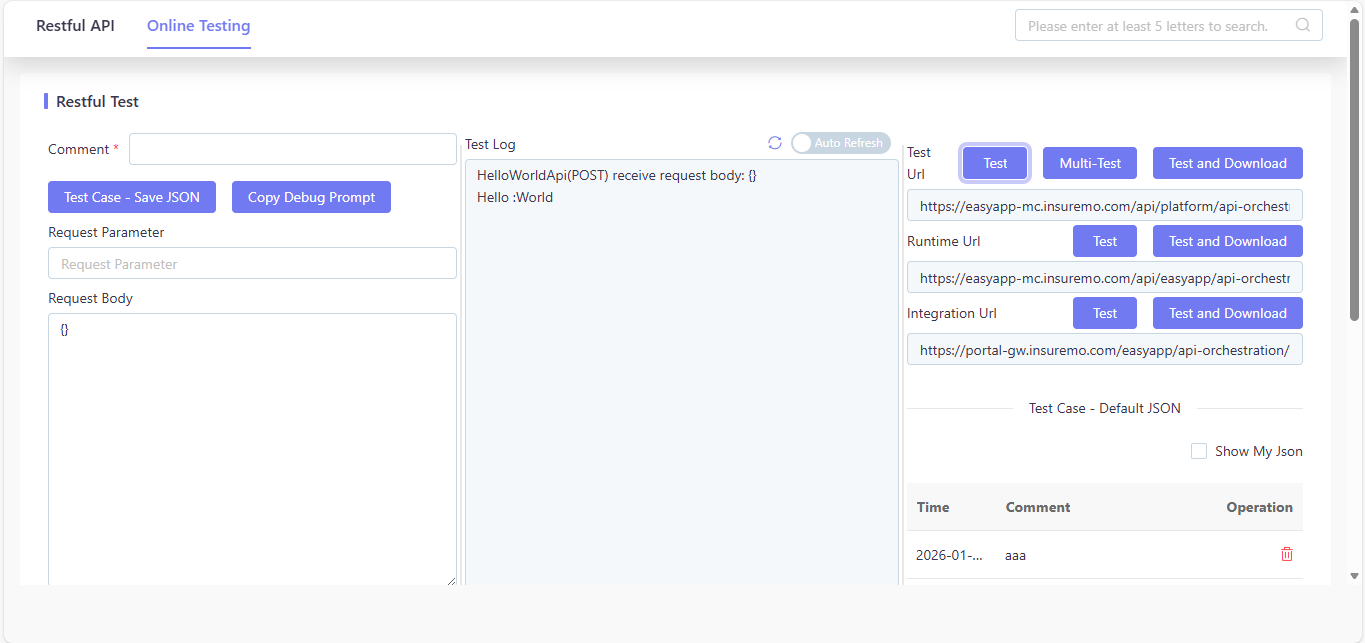
- Fill the Request Body:
{} - Operation Step: Click the
Testbutton in the upper right corner of the screen.
4.5. HelloWorldApi RESTful GET Method
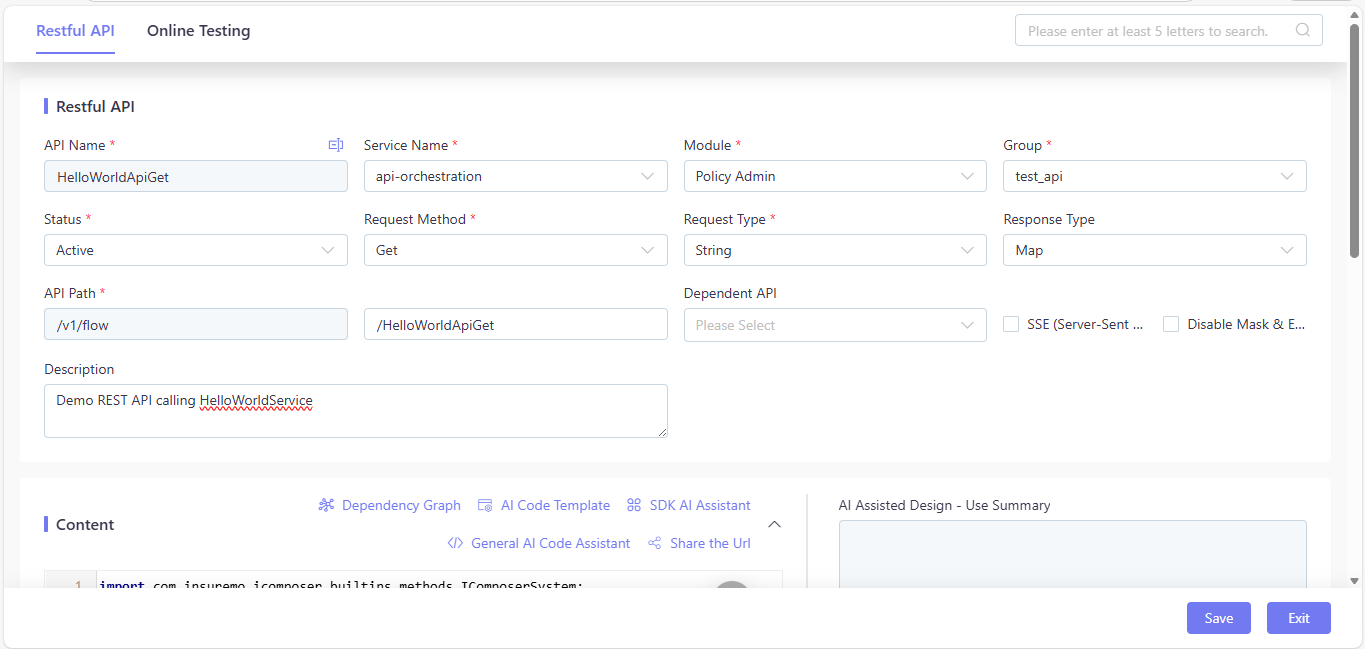
4.5.1. RESTful API Basic Information
- API Path:
/v1/flow/HelloWorldApiGet - Request Method: GET
- Request Type: Map (URL query parameters)
- Response Type: Map (contains the “message” field of String type)
- Request Parameters: Query parameter
name - Logic:
- Retrieve the
nameparameter from the GET URL query parameters (viaIComposerSystem.getRequestParameter()). - Invoke
HelloWorldService.hello(requestParam)(pass the query parameters Map to the service function). - Return the Map result returned by the service function as the API response (ensuring a unified JSON format).
- Retrieve the
Input the above information, and click Save to upload.
4.5.2. Code Implementation (Groovy)
Create a new API in the RESTful API editing page of iComposer according to the above information, then write the following code in the Content area:
import com.insuremo.icomposer.builtins.methods.IComposerSystem;

import java.util.Map;


// 1. Get Service Function instance

HelloWorldService helloWorldService = (HelloWorldService) IComposerSystem.getCommonService("HelloWorldService");


// 2. Read GET URL parameters

Map requestParam = (Map) IComposerSystem.getRequestParameter();


// 3. Print interface layer log

IComposerSystem.info("HelloWorldApi(GET) receive request params: {}", requestParam);


// 4. Call the service function and explicitly cast to Map type

Map<String, Object> result = (Map<String, Object>) helloWorldService.hello(requestParam);


// 5. Return the result of the service function directly

return result;
Explanation
HelloWorldServicealready exists in the function list (Type=function), so you only need to obtain an instance viaIComposerSystem.getCommonService("HelloWorldService").- Log: The
IComposerSystem.info()method records the GET query parameters received by the API, facilitating debugging; the service function itself logs the “Hello :{name}” message, so no additional log processing for the greeting is needed in the API code.- Return Value: The API returns the Map result from the Service Function as JSON (format:
{"message": "Hello! Amy"}), which conforms to standard API response specifications.
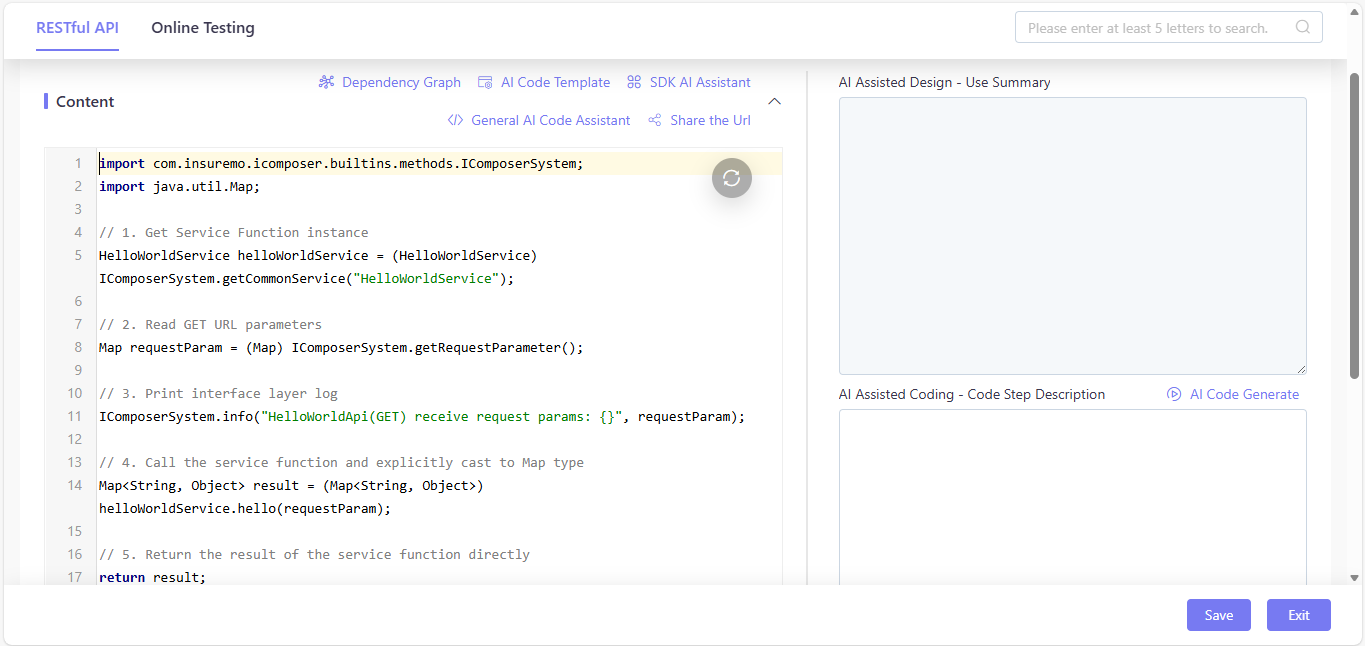
After completing the code writing, click Save to upload the content.
4.5.3 Online Testing (GET Method)
4.5.3.1. Functional Testing
- Fill the Request Parameter:
name= Amy - Operation Step: Click the
Testbutton on the page.
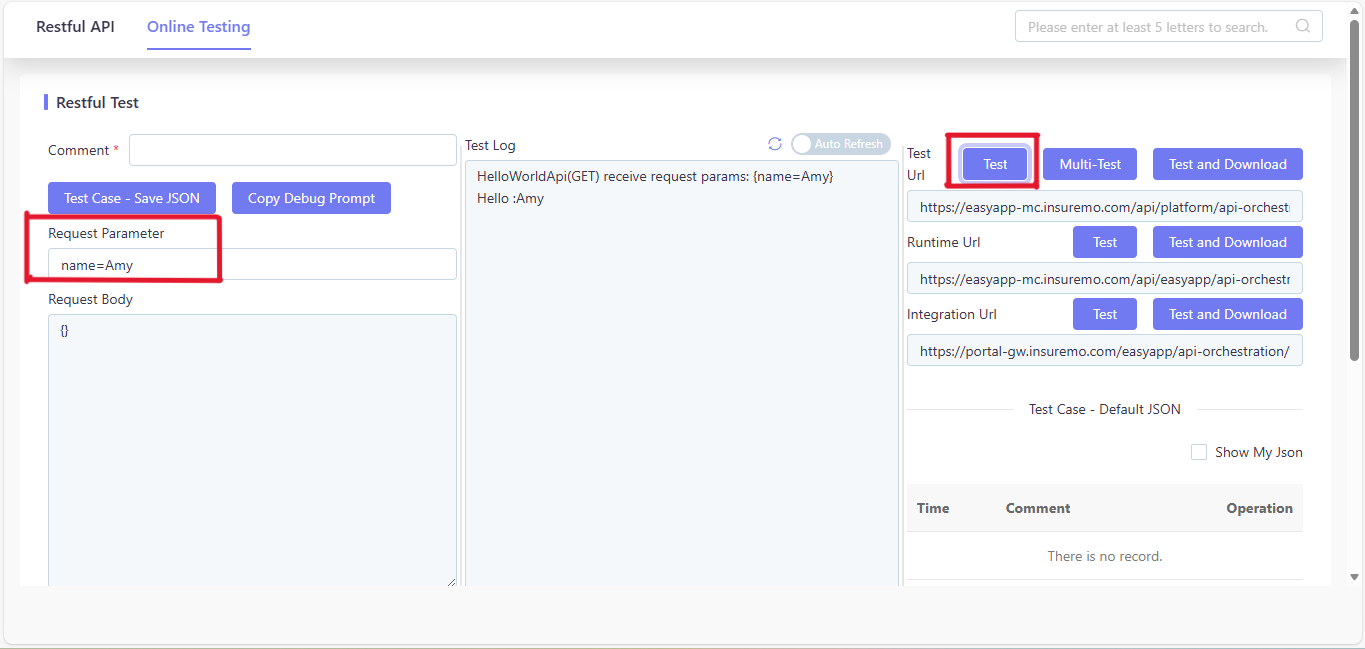
- Test Log:
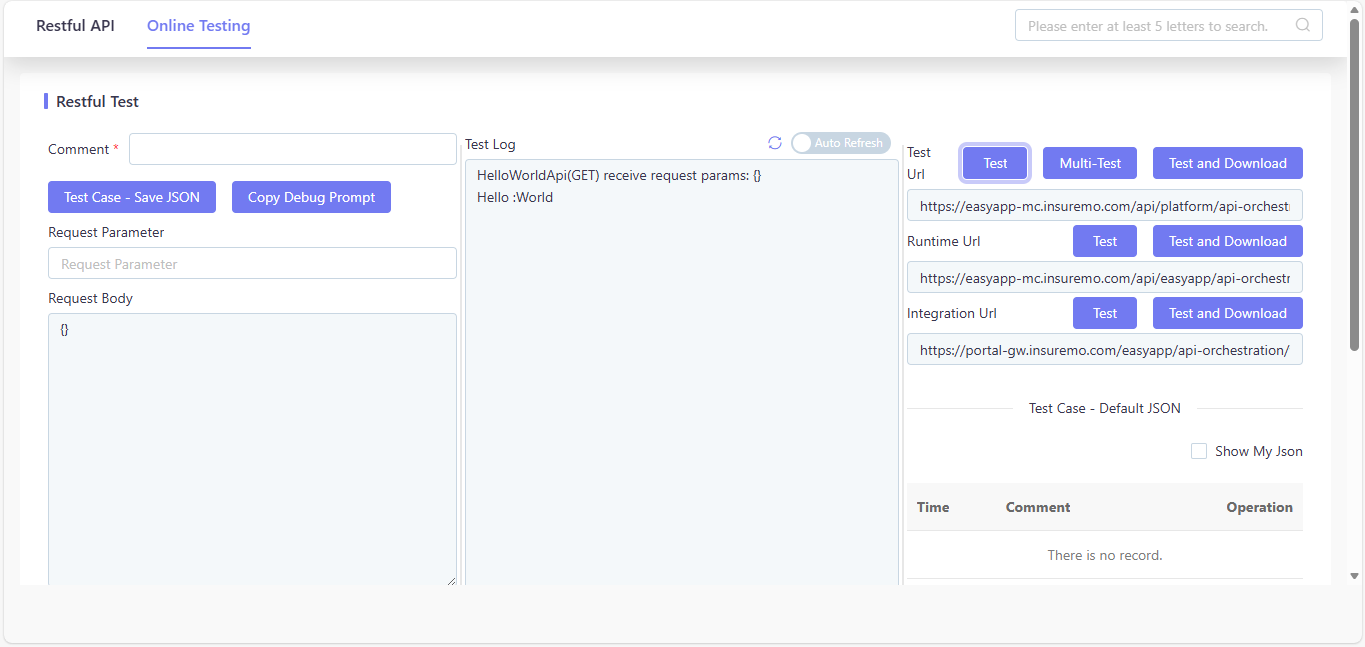
HelloWorldApi(GET) receive request params: {name=Amy}Hello : Amy
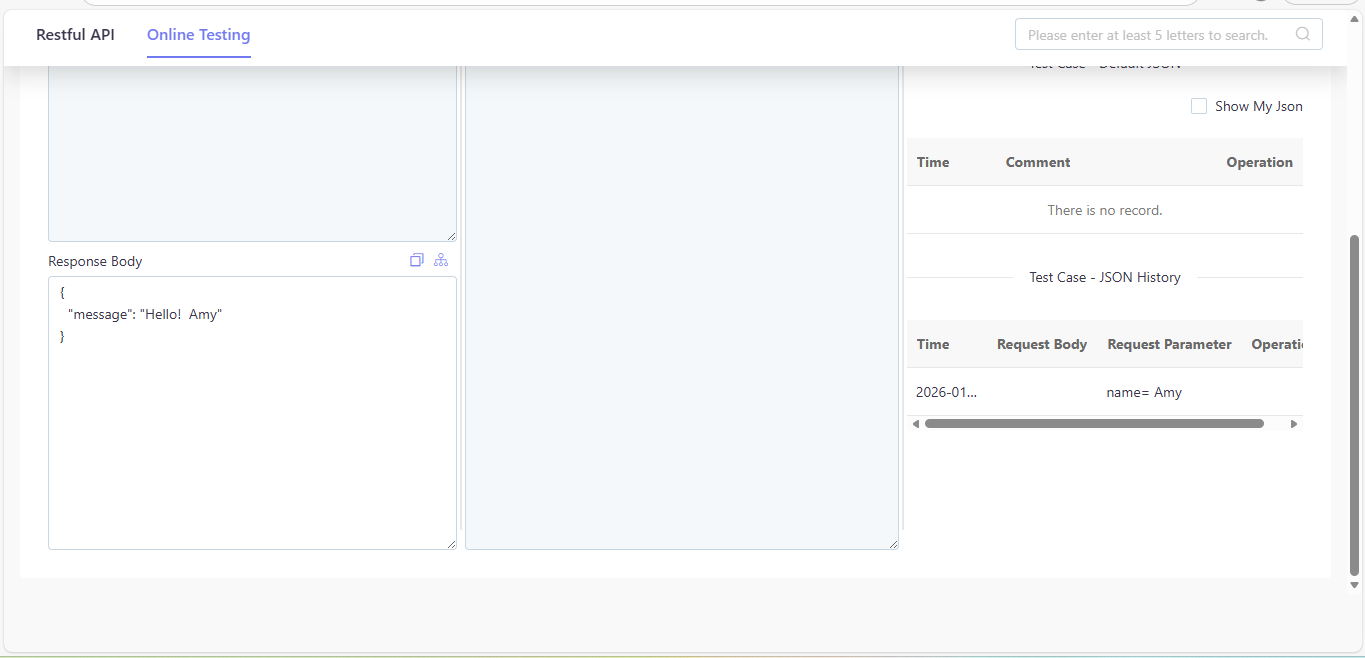
- Response Body:
{"message": "Hello! Amy"}
4.5.3.2. Empty Input Testing
- Fill the Request Parameter:
- Operation Step: Click the
Testbutton in the upper right corner of the screen.