What Is Print Management
This document provides an overview of the Print Management Service in insureMO. It also introduces the basic information about associated services and how they interact with each other.
Print Management Service establishes a relationship between business fields and print fields. It manages print status, the number of prints, and historical data.
As a back-end service, GIMO has developed the front-end for Print Management Service. If other projects need to use this function, they can directly call the API of the Print Management Service or develop their own front-end page.
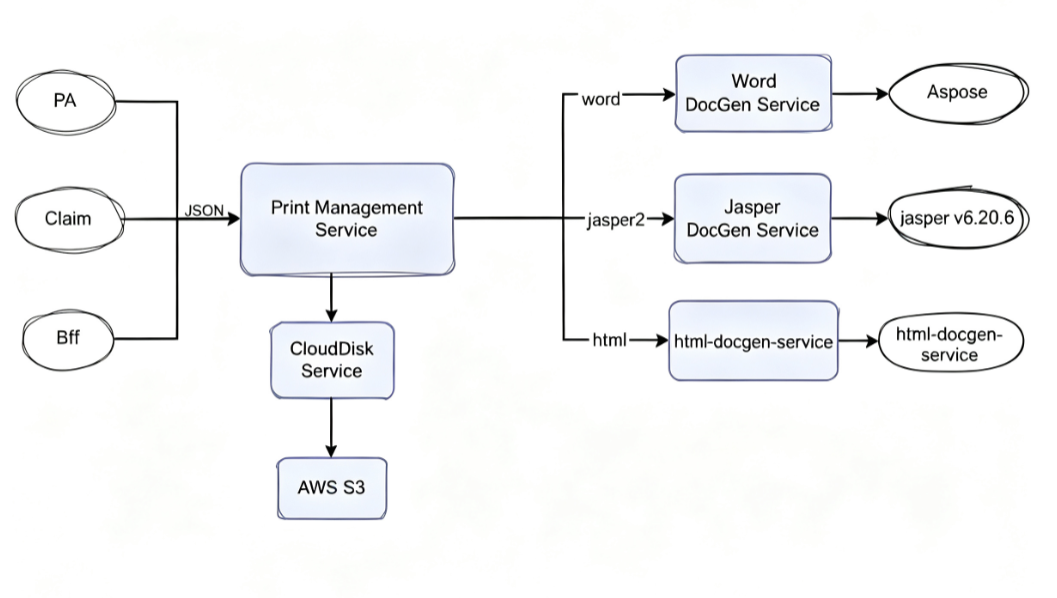
This Print Management Service consists of the following APIs:
- Generate print tasks
- Update print tasks
- Execute print tasks
- Obtain results
- Query print task information
- Query print task history
- Print multiple tasks
- Merge multiple task results
With these APIs, users can perform various operations related to print management in insureMO.
Where to Use Print Management
Scenario 1: If you have already utilized the document generation service to generate a document but require an application to manage business fields, such as policy numbers and claim numbers, as well as the interconnections between multiple document generation tasks, the Print Management Service can be employed.
Scenario 2: When you have already used the Word document generation service.
How to Use Print Management
Steps:

- Upload and manage template
-
Click Sign in to log in to insureMO Portal with your personal account.
infoIf you do not have a personal insureMO account, click Sign up to register one.
-
Click Catalog at the top of the home page.
-
In the left pane of Catalog page, navigate to Utility & AI > Outout & Document Management to find the Print Management Service service card.
-
Select Template Maintain in the navigation pane of the left side of the page.
-
Click Upload Template on the page.
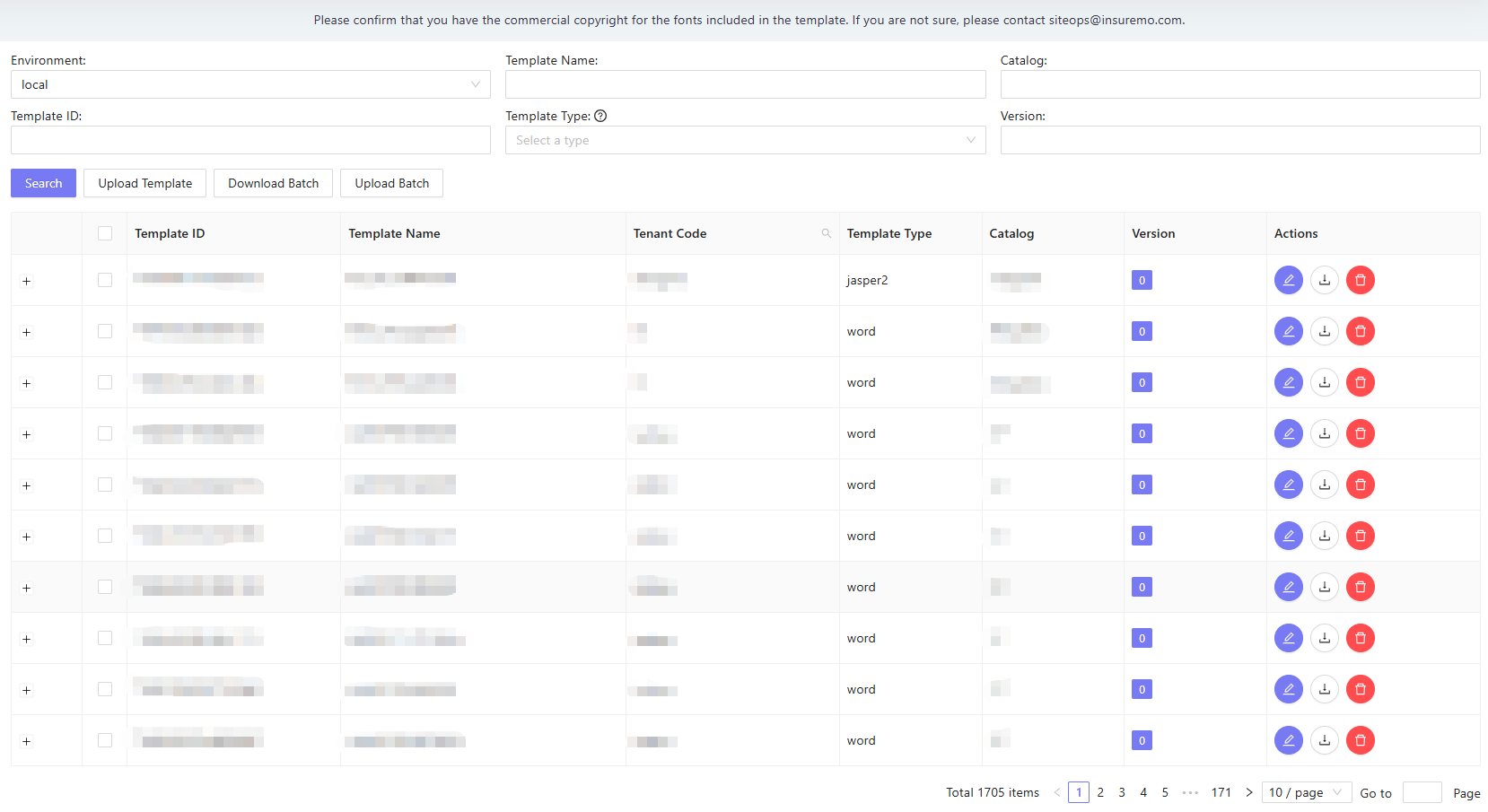
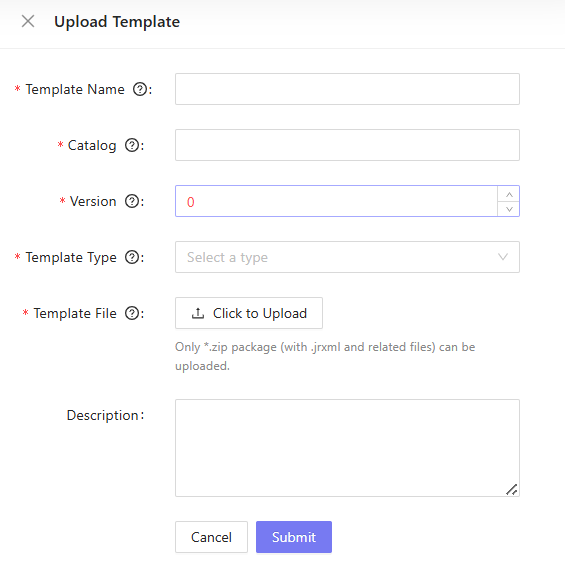
- Manage print task
-
Select Printing Generation Task in the navigation pane of the left side of the page.
-
Click create task to generate new print task
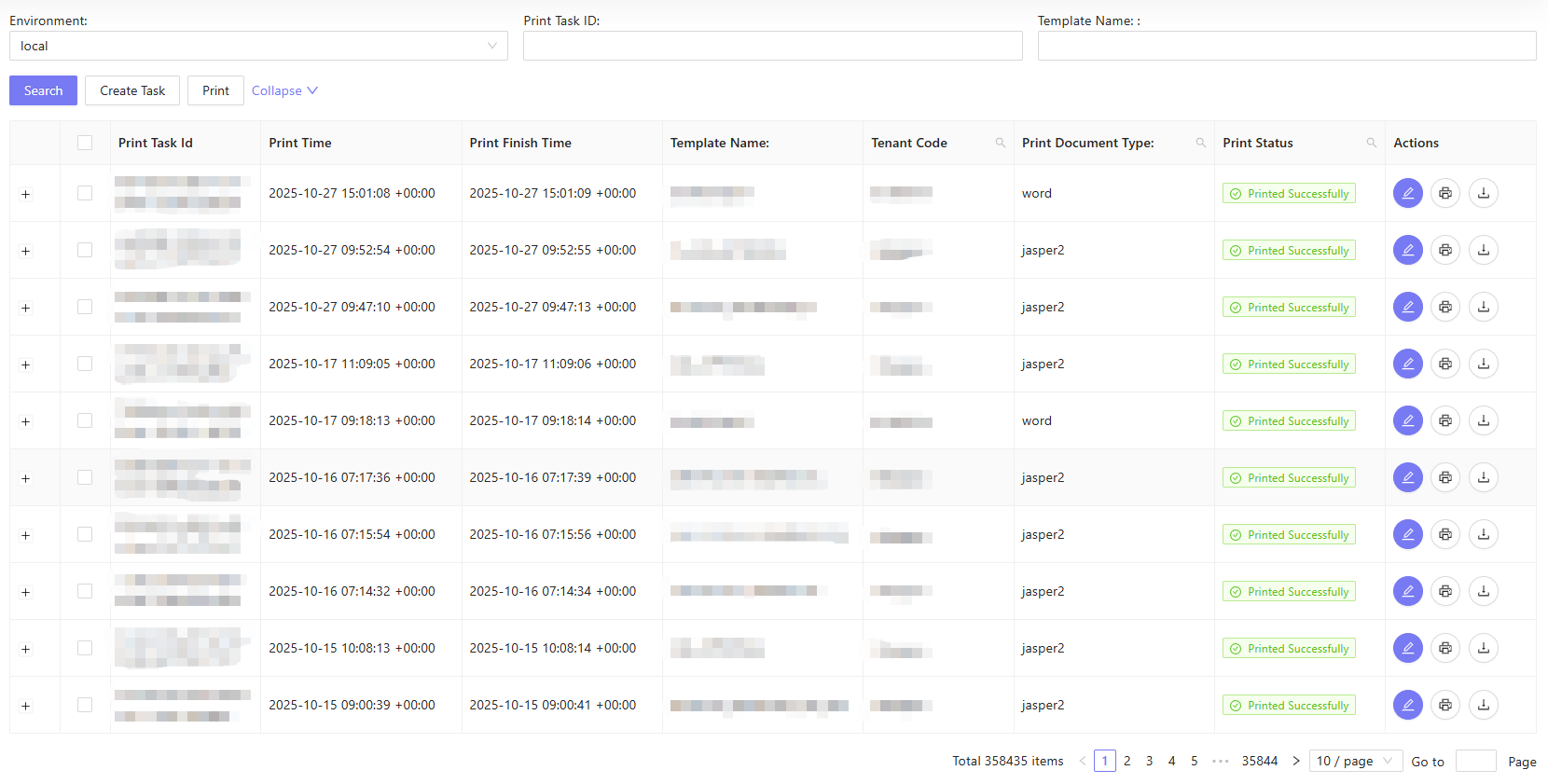
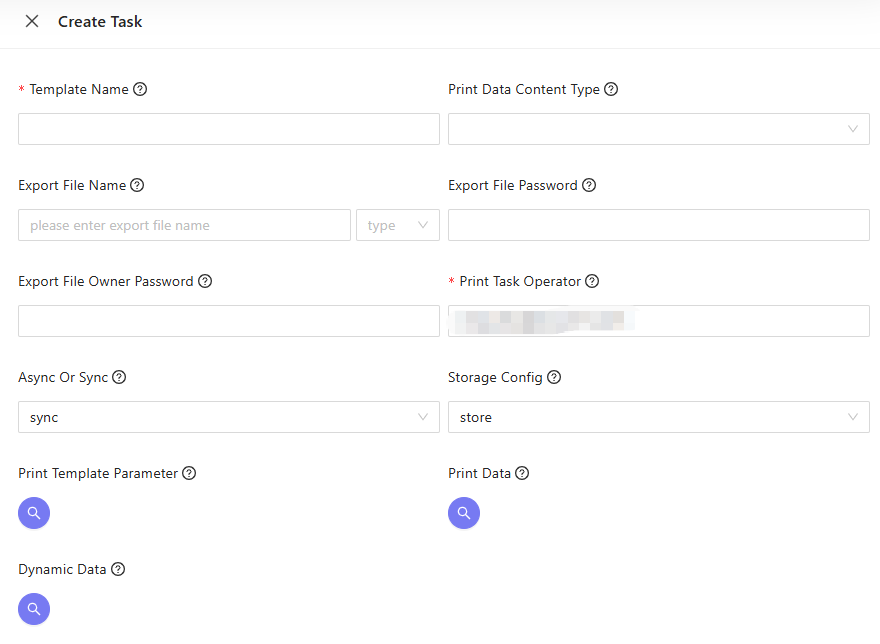
-
Edit print task
-
Execute print task
-
Download print task result
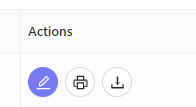
- Search print task history
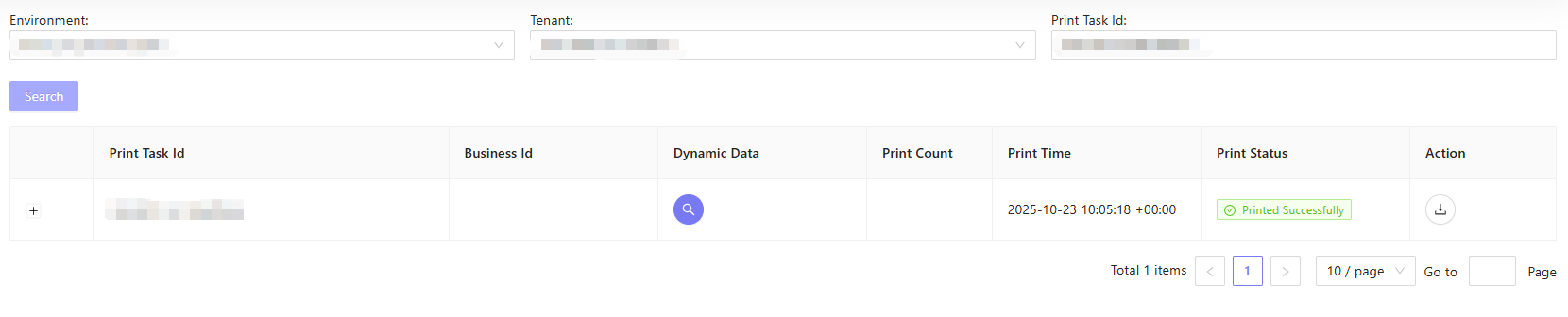
- Select Print Task History in the navigation pane of the left side of the page.
- Click the print task id and you will see the print task history.
PS: We support word-docgen-service, docgen-service, and jasper-docgen-service. Please make sure the template type is right. And don’t use the jasper as your new template, because we will not support this type as we already have jasper2 (jasper version 6.20.6+).
For default the template type is jasper.
- Word-docgen-service: the template type is
word. - Docgen-service: the template type is
jasper, the jasper version is 6.4.3. - Jasper-docgen-service, the template type is
jasper2, the jasper version is 6.20.6.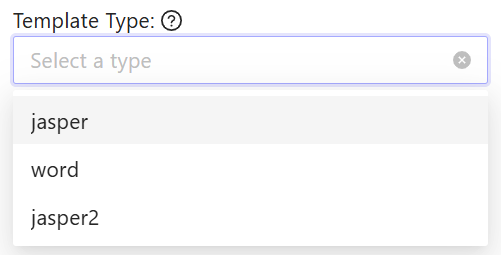
how to use output service skill
Audience: Developers / operations engineers who need to generate print-ready HTML templates from PDF documents. Goal: By the end of this guide you will be able to install the Output Service Skill, ask the AI to convert a PDF into an HTML template end-to-end, and verify the exported PDF against the original. Estimated time: ~5 minutes to issue the task; the AI conversion itself typically takes about 30–40 minutes per document.
1. Overview: Print Management Service
The Print Management Service is the portal module that hosts all template and print-task operations. It currently provides three capabilities:
| # | Feature | What you can do |
|---|---|---|
| 1 | Template Management | Upload, edit, and download templates |
| 2 | Print Task Management | Create and run print tasks, monitor their status |
| 3 | Print Task History | Look up past print tasks by Print Task ID |
The Output Service Skill is the AI skill that automates the PDF → HTML template conversion (covered in Section 3).
2. Template Management
2.1 Supported template types
On the Template Management page you can upload, edit, and download templates. The platform currently supports:
-
Jasper
-
Word
-
HTML (this guide focuses on HTML)
If you are not sure what a template should look like, click the download sample templates button on the page to get a reference package.
2.2 Anatomy of an HTML template
When you download an HTML template, you get a ZIP file containing:
-
one HTML document — the layout;
-
one JSON file — the data / variable definitions.
Inside the HTML template:
-
the left side shows the static text;
-
the right side shows the variables.
Every variable on the right is populated at print time from the JSON file.
3. Use the Output Service Skill to Generate an HTML Template
3.1 Prerequisites
-
Access to the documentation center: https://docs.insuremo.com
-
Access to the portal environment
-
A source PDF (e.g. a proposal document) you want to convert
3.2 Step-by-step
Step 1 — Install the Output Service Skill
-
Open https://docs.insuremo.com.
-
Search for “Skills->Available Skills”.
-
Look up “Output Service Skill”.
-
Install it by following the instructions in the documentation.
Step 2 — Prepare your source PDF
Have your PDF ready. In this demo we use a proposal document.
Step 3 — Give the AI the full task
Open the AI assistant and give it the complete job in one request. The AI will then carry out every step itself — you do not need to manually upload the template or run the print task.
A prompt like this works:
“Please use the Output Service Skill to convert this PDF into an HTML template, then upload the template to the portal environment, create and run a print task, and give me back the exported PDF. After that, compare the exported PDF with the original PDF and tell me the differences.”
Attach the source PDF when you send the request.
Step 4 — Let the AI work
The AI will automatically:
-
Convert the PDF into an HTML template.
-
Upload the template to the portal environment.
-
Create a print task and run it.
-
Download the exported PDF.
-
Compare the exported PDF against the original and report the differences.
This typically takes around 30–40 minutes per document. You can step away and do something else while it runs. To speed things up, you can open 8 browser windows at the same time and design 8 templates in parallel.
Step 5 — Review the result and iterate
When the AI reports completion, check the exported PDF against your original (demo) PDF. The output should be very close to the source layout. If anything does not match, just ask the AI to adjust the template and run the print task again.
4. Tip: Process Multiple Templates in Parallel
The conversion runs asynchronously, so once you kick off a task you do not need to sit and wait.
-
You can step away and let the AI work in the background — go do something else.
-
To speed things up further, open multiple terminal windows and give the AI a separate task in each one.
-
Example: open eight terminal windows, assign a different PDF/task to each window, and you are designing eight templates at the same time.
Any AI assistant works for this.
5. Verifying the Result in the Portal
After the AI reports that the template design task is finished (~38 minutes in the demo):
-
Go to the portal environment.
-
Open the Template Management menu — you should see that the AI has already uploaded the new template file.
-
Open the Print Tasks menu — you should see a new print task with status “Success”.
-
Download the PDF.
-
Compare it against your demo PDF.
Success criteria:
-
The exported PDF format closely matches the original PDF you provided.
-
Any visual or structural differences you spot can be fed back to the AI for adjustment.
Security
- Some customers need the password for their
pdf, and print task supports the password setting in word-docgen-service and jasper-docgen-service.
For jasper-docgen-service
- We support two parameters:
export_file_passwordandexport_file_owner_password. The export_file_password is the pdf read password, and export_file_owner_password is the pdf edit password.
For word-docgen-service
- We support one parameter:
export_file_passwordand the export_file_password is the pdf read password.
Mappings of Print Management and Word Docgen Service:
- For word-docgen-service, we can call the service api directly or call it by the print management api.
- There is a parameter mapping between these two services.
- The
print_datain print management api ismappingin print/template api of the word-docgen-service. - The
print_template_parameterin print management api is theinstructionsin print/template api of the word-docgen-service. - The
export_file_typein print management api is theoutputFormatin print/template api of the word-docgen-service. Please note that the word docgen only supports word and pdf now.
Jasper-docgen-service supports pdf,docx,xlsx,csv and html.
Develop Steps:
- Upload the template in webpage or by API:
- {{insuremo_gw_url}}/mo-fo/1.0/print/v3/template/upload
- Call api to generate a pdf(or other format)
- {{insuremo_gw_url}}/mo-fo/1.0/print/v3/printtask/create
- {{insuremo_gw_url}}/mo-fo/1.0/print/v3/printtask/execute
- This api will return the pdf content as base64 format in targetfilecontent,you don’t need to call the next api to get the result
- {{insuremo_gw_url}}/mo-fo/1.0/print/v3/printtask/generate
- This api can create one print task and execute it,it is the merge of last two apis
- Get the result on webpage or by api

- {{insuremo_gw_url}}/mo-fo/1.0/print/v3/printtask/get-result-by-id
Deploy Templates:
We now support the packaging and publishing functions for templates.
- You need to manage your templates in the portal environment.
- Ask the siteops team to copy the
print-template-data-jobunder themo-templateworkspace to your DevOps CI/CD service. - After that, you can use this service to package all the templates of the current tenant.
- When you click Deploy, these templates will be published to the corresponding target environment under the current tenant.
Audit Template Upload Record
Input the \print-management-service and transaction_name: upload_template and you can check the template upload record. If the content is base64, you can use a tool transfer the base64 to zip file.
Migrate from jasper 6.4.3 to jasper 6.20.0
-
jasper 6.4.3 is not support by the insureMO now, and we plan to remove the docgen-service in the non-prod environment. So, for anyone whose template type is jasper, the printtask will be failed in ptdev since the service is offline now.
-
Please follow the guide to change the template from jasper 6.4.3 to jasper 6.20.0, and reimport to print management and test the whole feature.
-
The template type is jasper, which means the jasper version is 6.4.3. The jasper2 means the jasper version is 6.20.0 and up.
-
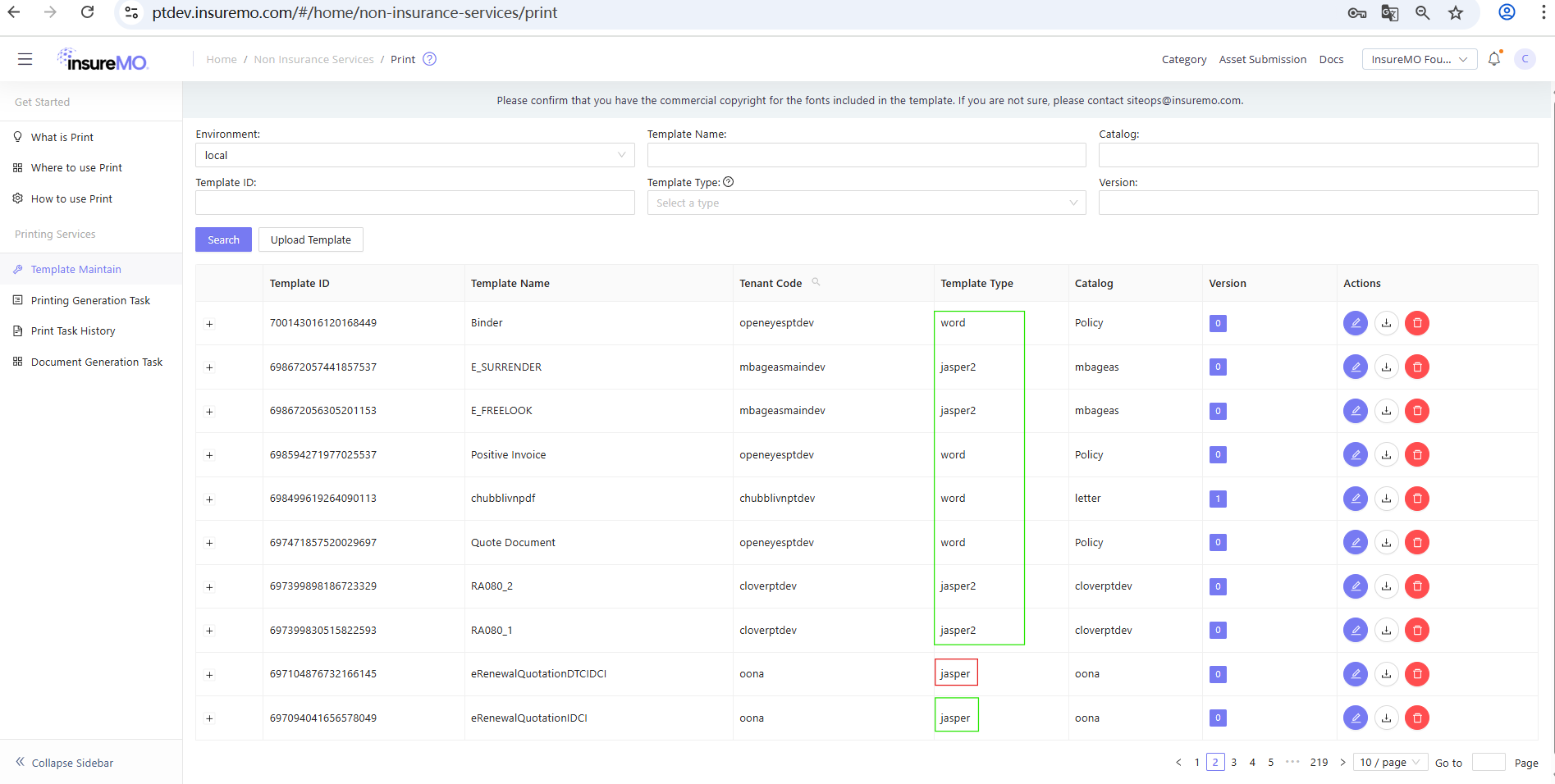
- Download the template in the print management and template maintain page.
- Open the template by jasper studio 6.20.0 and up: you can download it here: https://community.jaspersoft.com/download-jaspersoft/community-edition/
- Make sure the template pdf generation feature works well in local. Then, upload the template to print management again and make sure the template type is jasper2. Finally, test the whole feature in your environment and check the task status and pdf.
Base URLs: {{insuremo_gw_url}}/mo-fo/1.0/print/v3
Changes from V2 to V3
Template Engine
- V3 supports a configurable template engine routing via config center, in addition to the default
print_doc_typebased routing. - V3 adds
htmlas a new template type (Vender=3).
Response Format
- For
generateAPI, V3 clearsprint_datain the response to reduce payload size. - For
generateandexecuteAPIs, when the print task has an error, V3 returns a structured error code viaModelWithCodeinstead of a generic 599 error.
V2 → V3 API Mapping
| V2 API Path | V3 API Path |
|---|---|
| POST {{insuremo_gw_url}}/mo-fo/1.0/print/v2/template/upload | POST {{insuremo_gw_url}}/mo-fo/1.0/print/v3/template/upload |
| GET {{insuremo_gw_url}}/mo-fo/1.0/print/v2/template/download | GET {{insuremo_gw_url}}/mo-fo/1.0/print/v3/template/download |
| POST {{insuremo_gw_url}}/mo-fo/1.0/print/v2/printtask/query-many | POST {{insuremo_gw_url}}/mo-fo/1.0/print/v3/printtask/query-many |
| GET {{insuremo_gw_url}}/mo-fo/1.0/print/v2/printtask/query-one | GET {{insuremo_gw_url}}/mo-fo/1.0/print/v3/printtask/query-one |
| GET {{insuremo_gw_url}}/mo-fo/1.0/print/v2/printtask/get-result-by-id | GET {{insuremo_gw_url}}/mo-fo/1.0/print/v3/printtask/get-result-by-id |
| GET {{insuremo_gw_url}}/mo-fo/1.0/print/v2/printtask/get-his-by-taskid | GET {{insuremo_gw_url}}/mo-fo/1.0/print/v3/printtask/get-his-by-taskid |
| POST {{insuremo_gw_url}}/mo-fo/1.0/print/v2/printtask/execute | POST {{insuremo_gw_url}}/mo-fo/1.0/print/v3/printtask/execute |
| POST {{insuremo_gw_url}}/mo-fo/1.0/print/v2/printtask/execute-all | POST {{insuremo_gw_url}}/mo-fo/1.0/print/v3/printtask/execute-all |
| POST {{insuremo_gw_url}}/mo-fo/1.0/print/v2/printtask/create | POST {{insuremo_gw_url}}/mo-fo/1.0/print/v3/printtask/create |
| POST {{insuremo_gw_url}}/mo-fo/1.0/print/v2/printtask/update | POST {{insuremo_gw_url}}/mo-fo/1.0/print/v3/printtask/update |
| POST {{insuremo_gw_url}}/mo-fo/1.0/print/v2/printtask/generate | POST {{insuremo_gw_url}}/mo-fo/1.0/print/v3/printtask/generate |
How to get token
Please refer to this document: insureMO Identity Management - Get Token.
Error Codes
Print Management V3 APIs report errors in a unified response body:
{
  "code": "e_print_input_parameter",
  "message": "human-readable reason",
  "trace_id": "id to quote when contacting support"
}
HTTP status convention:
499— client-side error. Fix the request and retry.599— server-side error. Retry later; if it persists, contact support with thetrace_id.200with an errorcodein the body — the request itself was accepted, but printing/generation failed (seee_print_failed).
Always branch on the
codefield in the response body rather than only on the HTTP status.
| Error Code | HTTP Status | Meaning | Suggested Action |
|---|---|---|---|
e_print_input_parameter | 499 | Invalid request: malformed JSON, missing or invalid required fields, invalid pagination parameters, template not found (name + version), tenant mismatch, print task not found, or task status not valid for this operation | Read message for the exact reason, correct the request, and retry |
e_print_print_data_empty | 499 | The print task has no print data (print_data is empty) | Provide print_data when creating the task, or update the task with data before executing |
e_print_failed | 200 | Printing or file generation failed (template problem, data does not match the template, or generation engine failure) | Read message and data.err_msg for the generation error detail; fix the template or print data and retry |
e_print_unknown | 599 | Unexpected server-side error | Retry with backoff; if it persists, contact support with the trace_id |
e_print_clouddisk_config_notexist | 499 | No result file is stored for this print task | Confirm the task finished with print_status_id = 2 and was created with storage_config = store |
e_print_clouddisk_getobject | 499 | The result file could not be downloaded from storage | Retry; if it persists, contact support with the trace_id |
Each API section below lists the error codes it can return.
POST {{insuremo_gw_url}}/mo-fo/1.0/print/v3/template/upload
POST {{insuremo_gw_url}}/mo-fo/1.0/print/v3/template/upload
Body Parameters
name: "TestDemo"
version: "0"
catalog: "TestDemo"
description: ""
template: ""
template_type: "jasper"
Params
| Name | Location | Type | Required | Description |
|---|---|---|---|---|
| body | body | object | no | none |
| » name | body | string | yes | template_name |
| » version | body | string | no | version |
| » catalog | body | string | no | catalog |
| » description | body | string | no | description |
| » template | body | string(binary) | no | template |
| » template_type | body | string | no | template_type,jasper,jasper2,word,html |
Response Examples
200 Response
{
  "code": "string",
  "errors": [
    {
      "code": "string",
      "message": "string",
      "message_params": [
        "string"
      ]
    }
  ],
  "message": "string",
  "message_params": [
    "string"
  ],
  "trace_id": "string"
}
Responses
| HTTP Status Code | Meaning | Description | Data schema |
|---|---|---|---|
| 200 | OK | none | ErrorResponseModel |
| 499 | Unknown | none | ErrorResponseModel |
| 599 | Unknown | none | ErrorResponseModel |
GET {{insuremo_gw_url}}/mo-fo/1.0/print/v3/template/download
GET {{insuremo_gw_url}}/mo-fo/1.0/print/v3/template/download
Request Param
| Name | Position | Type | Required | Description |
|---|---|---|---|---|
| template_name | query | string | no | none |
| version | query | string | no | none |
| base64 | query | string | no | none |
| tenant_code | query | string | no | none |
| Authorization | header | string | no | none |
| x-mo-target-tenant | header | string | no | target tenant code |
Response
200 Response
{}Response
| Status Code | Status CodeMeaning | Description | Data Model |
|---|---|---|---|
| 200 | OK | Success | Inline |
POST {{insuremo_gw_url}}/mo-fo/1.0/print/v3/printtask/query-many
POST {{insuremo_gw_url}}/mo-fo/1.0/print/v3/printtask/query-many
V3 Change: Tenant filtering uses
x-mo-target-tenant(TargetTenantCode) directly. The super tenant bypass is removed.
Request Param
| Name | Position | Type | Required | Description |
|---|---|---|---|---|
| page_size | query | string | Yes | none |
| page_no | query | string | Yes | none |
| print_task_id | query | string | no | none |
| business_id | query | string | no | none |
| business_id2 | query | string | no | none |
| business_id3 | query | string | no | none |
| business_type | query | string | no | none |
| task_generate_time_start | query | string | no | none |
| task_generate_time_end | query | string | no | none |
| print_status | query | string | no | none |
| print_status_id | query | string | no | none |
| order | query | string | no | none |
| tenant_code | query | string | no | none |
| x-mo-target-tenant | header | string | yes | target tenant code |
| x-mo-user-identity | header | string | no | none |
Response
Success
{
  "code": "i_common_success",
  "message": "request success",
  "trace_id": "3238a6e096a10ecf6497d40e2df4758d",
  "total": 3302,
  "page_size": 10,
  "current_page": 1,
  "data": [
    {
      "print_task_id": "c0cd5b34-910c-4e76-a2c6-aac89cadb458",
      "print_status": "Printed Successfully",
      "print_status_id": 2,
      "print_time": "2024-03-27T00:01:05Z",
      "print_finish_time": "2024-03-27T00:01:06Z",
      "tenant_code_v2": "smktest",
      "business_type": "BusinessType2",
      "business_id": "businessID1",
      "business_id2": "",
      "business_id3": "",
      "business_id4": null,
      "org_code": "OrgCode2",
      "dynamic_data": "DynamicData,testonline",
      "print_operator": "printerchen1",
      "print_count": 1,
      "print_task_generate_date": "2024-03-27T00:01:05Z",
      "print_task_generate_operator": "chen"
    }
  ]
}
Fail Response
{
  "code": "e_print_input_parameter",
  "message": "page_size <= 0",
  "trace_id": ""
}
Response
| Status Code | Status CodeMeaning | Description | Data Model |
|---|---|---|---|
| 200 | OK | Success | Inline |
| 499 | Unknown | Fail Response | Inline |
Error Codes
| Error Code | HTTP Status | When Returned |
|---|---|---|
e_print_input_parameter | 499 | Invalid or missing page_size / page_no (page_size <= 0, page_size >= 500, page_no < 1), or another invalid query parameter |
e_print_unknown | 599 | Internal error while querying print tasks |
GET {{insuremo_gw_url}}/mo-fo/1.0/print/v3/printtask/query-one
GET {{insuremo_gw_url}}/mo-fo/1.0/print/v3/printtask/query-one
V3 Change: Permission check uses
TargetTenantCodestrict match instead ofTenantCode+CanAccessAllTenant. Error response usesresp.ErrorWithCodeMsgfor more structured error format.
Request Param
| Name | Position | Type | Required | Description |
|---|---|---|---|---|
| print_task_id | query | string | yes | none |
| return_data_format | query | string | no | set to “status” to return only basic status fields |
| x-mo-target-tenant | header | string | yes | target tenant code |
Response
Success
{
  "code": "i_common_success",
  "message": "request success",
  "trace_id": "57594bbd262317162710865023ad0d32",
  "data": {
    "print_task_id": "bc2bd138-2196-4ec0-93b2-5d98384944e3",
    "print_status": "Printed Successfully",
    "print_status_id": 2,
    "print_time": "2024-03-22T03:31:59Z",
    "print_finish_time": "2024-03-22T03:32:00Z",
    "tenant_code_v2": "smktest",
    "print_doc_type": null,
    "template_name": "TestDemo",
    "template_version": null,
    "print_data_content_type": "json",
    "export_file_password": null,
    "export_file_owner_password": "",
    "export_file_type": "pdf",
    "export_file_name": "558560782793687040.pdf",
    "storage_config": "not_store",
    "async_or_sync": "sync",
    "print_data": "{\"docPrintModel\":{...}}",
    "print_template_parameter": null,
    "business_type": "BusinessType2",
    "business_id": "businessID1",
    "business_id2": "",
    "business_id3": "",
    "business_id4": null,
    "org_code": "OrgCode2",
    "dynamic_data": "DynamicData,testonline",
    "print_operator": "printerchen1",
    "print_count": 21,
    "print_task_generate_date": "2024-03-21T00:01:08Z",
    "print_task_generate_operator": "chen",
    "err_msg": "",
    "tenant_code": "smktest",
    "cloud_disk_config": ""
  }
}
Fail Response
{
  "code": "e_print_input_parameter",
  "message": "TenantCode not match with target tenant code,you don't have permission to update this printtask!",
  "trace_id": ""
}
Response
| Status Code | Status CodeMeaning | Description | Data Model |
|---|---|---|---|
| 200 | OK | Success | Inline |
| 499 | Unknown | Fail Response | Inline |
Error Codes
| Error Code | HTTP Status | When Returned |
|---|---|---|
e_print_input_parameter | 499 | print_task_id is missing, the print task does not exist, tenant mismatch (x-mo-target-tenant does not match the task owner), or the task status is not valid for this request |
e_print_unknown | 599 | Internal error while querying the print task |
GET {{insuremo_gw_url}}/mo-fo/1.0/print/v3/printtask/get-result-by-id
GET {{insuremo_gw_url}}/mo-fo/1.0/print/v3/printtask/get-result-by-id
V3 Change: Permission check uses
TargetTenantCodestrict match.
Request Param
| Name | Position | Type | Required | Description |
|---|---|---|---|---|
| print_task_id | query | string | yes | none |
| base64 | query | string | no | base64, default is false, will download the file |
| x-mo-target-tenant | header | string | yes | target tenant code |
Response
Success (base64=true)
{
  "code": "i_common_success",
  "message": "request success",
  "trace_id": "...",
  "data": {
    "data": "JVBERi0xLjUK..."
  }
}
Success (base64=false or not set)
Returns binary file stream with headers:
Content-Type: application/octet-streamContent-Disposition: attachment; filename=<export_file_name>
Fail Response
{
  "code": "e_print_input_parameter",
  "message": "TenantCode not match with target tenant code!",
  "trace_id": ""
}
Response
| Status Code | Status CodeMeaning | Description | Data Model |
|---|---|---|---|
| 200 | OK | Success | Inline |
| 499 | Unknown | Fail Response | Inline |
Return Body
Status Code 499
| Name | Type | Required | Constraint | Description | |
|---|---|---|---|---|---|
| » code | string | true | none | none | |
| » message | string | true | none | none | |
| » trace_id | string | true | none | none |
Error Codes
| Error Code | HTTP Status | When Returned |
|---|---|---|
e_print_input_parameter | 499 | print_task_id is missing, tenant mismatch, or the task is not in Printed Successfully status (print_status_id != 2) |
e_print_clouddisk_config_notexist | 499 | No result file is stored for the task (not finished, failed, or created with storage_config = not_store) |
e_print_clouddisk_getobject | 499 | The result file could not be downloaded from storage |
e_print_unknown | 599 | Internal error |
GET {{insuremo_gw_url}}/mo-fo/1.0/print/v3/printtask/get-his-by-taskid
GET {{insuremo_gw_url}}/mo-fo/1.0/print/v3/printtask/get-his-by-taskid
V3 Change: V3 adds
TargetTenantCodepermission check on history query (V2 history controller had no tenant check).
Request Param
| Name | Position | Type | Required | Description |
|---|---|---|---|---|
| print_task_id | query | string | yes | none |
| x-mo-target-tenant | header | string | yes | target tenant code |
Response
Success
{
  "code": "i_common_success",
  "message": "request success",
  "trace_id": "7422cfd12159af807d71aaa35350ad85",
  "data": [
    {
      "print_task_id": "001ad9c5-8a5d-4ee8-8e02-9bb9b0d56eed",
      "print_status": "Printed Successfully",
      "print_status_id": 2,
      "print_time": "2024-01-14T01:01:47Z",
      "print_finish_time": "2024-01-14T01:01:47Z",
      "tenant_code_v2": "smktest",
      "business_type": "BusinessType2",
      "business_id": "businessID1",
      "business_id2": null,
      "business_id3": null,
      "business_id4": null,
      "org_code": "OrgCode2",
      "dynamic_data": "DynamicData,testonline",
      "print_operator": "chen",
      "print_count": 1,
      "print_task_generate_date": "2024-01-14T01:01:47Z",
      "print_task_generate_operator": "chen",
      "printTaskHisId": "f52cb869-7982-42f3-ad77-6a474c8bb3c9",
      "insert_by": "chen",
      "insert_time": "2024-01-14T01:01:47Z",
      "insert_reason": "execute"
    }
  ]
}
Fail Response
{
  "code": "e_print_input_parameter",
  "message": "TenantCode not match with target tenant code!",
  "trace_id": ""
}
Response
| Status Code | Status CodeMeaning | Description | Data Model |
|---|---|---|---|
| 200 | OK | Success | Inline |
| 499 | Unknown | Fail Response | Inline |
Error Codes
| Error Code | HTTP Status | When Returned |
|---|---|---|
e_print_input_parameter | 499 | print_task_id is missing or tenant mismatch |
POST {{insuremo_gw_url}}/mo-fo/1.0/print/v3/printtask/execute
POST {{insuremo_gw_url}}/mo-fo/1.0/print/v3/printtask/execute
V3 Changes:
- Permission check uses
TargetTenantCodestrict match.- Supports
htmltemplate type (Vender=3) in addition to jasper/word/jasper2.- Uses configurable template engine routing via config center.
- When print task has error, returns structured error code via
ModelWithCodewithe_print_failedcode.- Async execution uses
copyBasicParamForAsyncto prevent gin.Context recycle panic.
Body Request Param
{
  "print_task_id": "001ad9c5-8a5d-4ee8-8e02-9bb9b0d56eed"
}
Request Param
| Name | Position | Type | Required | Description |
|---|---|---|---|---|
| x-mo-target-tenant | header | string | yes | target tenant code |
| body | body | object | no | none |
| » print_task_id | body | string | Yes | none |
Response
Success
{
  "code": "i_common_success",
  "message": "request success",
  "trace_id": "204d41519e8f20446459b176ea5c271b",
  "data": {
    "print_task_id": "001ad9c5-8a5d-4ee8-8e02-9bb9b0d56eed",
    "print_status": "Printed Successfully",
    "print_status_id": 2,
    "print_time": "2024-03-27T00:01:05Z",
    "print_finish_time": "2024-03-27T00:01:06Z",
    "tenant_code_v2": "smktest",
    "export_file_type": "pdf",
    "export_file_name": "558560782793687040.pdf",
    "storage_config": "store",
    "async_or_sync": "sync",
    "err_msg": "",
    "tenant_code": "smktest",
    "cloud_disk_config": "{...}"
  }
}
Error in Printing (V3 returns structured error code)
{
  "code": "e_print_failed",
  "message": "trace:xxx,error message from docgen service",
  "trace_id": "...",
  "data": {
    "print_task_id": "001ad9c5-8a5d-4ee8-8e02-9bb9b0d56eed",
    "print_status": "Error In Printing",
    "print_status_id": 3,
    "err_msg": "trace:xxx,error detail..."
  }
}
Fail Response
{
  "code": "e_print_input_parameter",
  "message": "TenantCode not match with target tenant code!",
  "trace_id": ""
}
Response
| Status Code | Status CodeMeaning | Description | Data Model |
|---|---|---|---|
| 200 | OK | Success | Inline |
| 499 | Unknown | Fail Response | Inline |
Error Codes
| Error Code | HTTP Status | When Returned |
|---|---|---|
e_print_input_parameter | 499 | Invalid request body, print_task_id missing, print task not found, tenant mismatch, or task status not valid for execution |
e_print_print_data_empty | 499 | The print task has no print_data |
e_print_failed | 200 | Printing failed — HTTP 200 with the structured error in the body; see the Error in Printing example above and check data.err_msg |
e_print_unknown | 599 | Internal error |
POST {{insuremo_gw_url}}/mo-fo/1.0/print/v3/printtask/execute-all
POST {{insuremo_gw_url}}/mo-fo/1.0/print/v3/printtask/execute-all
V3 Changes: Same as execute — uses
TargetTenantCode, supportshtmltype, configurable engine routing.
Body Request Param
[
  {"print_task_id": "001ad9c5-8a5d-4ee8-8e02-9bb9b0d56eed"},
  {"print_task_id": "c0cd5b34-910c-4e76-a2c6-aac89cadb458"}
]
Request Param
| Name | Position | Type | Required | Description |
|---|---|---|---|---|
| x-mo-target-tenant | header | string | yes | target tenant code |
| body | body | array | no | none |
| » print_task_id | body | string | Yes | none |
Response
Success
{
  "status": "ok"
}
Fail Response
{
  "code": "e_print_input_parameter",
  "message": "TenantCode not match with target tenant code!",
  "trace_id": ""
}
Response
| Status Code | Status CodeMeaning | Description | Data Model |
|---|---|---|---|
| 200 | OK | Success | Inline |
| 499 | Unknown | Fail Response | Inline |
Error Codes
| Error Code | HTTP Status | When Returned |
|---|---|---|
e_print_input_parameter | 499 | Invalid request body, print_task_id missing in an item, print task not found, tenant mismatch, or task status not valid for execution |
e_print_print_data_empty | 499 | A print task in the batch has no print_data |
e_print_unknown | 599 | Internal error |
POST {{insuremo_gw_url}}/mo-fo/1.0/print/v3/printtask/create
POST {{insuremo_gw_url}}/mo-fo/1.0/print/v3/printtask/create
V3 Changes:
TenantCodeandTenantCodeV2are set fromTargetTenantCodeinstead ofTenantCode.CheckInputParameterfor non-wordPrintTemplateParameteradds extra validation (checks for""andnullvalues and clears them).
if you are using the GIMO, please input the parameter like this:
business_id2: proposalNo
business_id3: policyNo
business_id4: endoNo
business_id5: idNo
Body Request Param
{
  "business_type": "BusinessType2",
  "business_id": "121212121",
  "business_id2": "business_id2",
  "business_id3": "business_id3",
  "business_id4": "business_id4",
  "org_code": "OrgCode2",
  "print_operator": "smktest",
  "template_name": "WordTemplate_delete1",
  "template_version": 0,
  "print_data": {"name":"chen"},
  "dynamic_data": "{\"name\":\"chen\"}",
  "export_file_name": "worddemopdf.pdf",
  "export_file_type": "pdf",
  "export_file_password": "123456!",
  "export_file_owner_password": "ownerPwd123!",
  "print_data_content_type": "json",
  "async_or_sync": "sync",
  "storage_config": "store",
  "print_doc_type": "word",
  "print_template_parameter": [
    {
      "instructionType": "Transform",
      "variableName": "Covers",
      "expression": "var Covers = [...]; ...",
      "expressionResultType": "list",
      "transformResultPath": "Covers"
    }
  ]
}
Request Param
| Name | Position | Type | Required | Description |
|---|---|---|---|---|
| x-mo-target-tenant | header | string | yes | target tenant code |
| body | body | object | no | none |
| » business_type | body | string | no | none |
| » business_id | body | string | no | none |
| » business_id2 | body | string | no | none |
| » business_id3 | body | string | no | none |
| » business_id4 | body | string | no | none |
| » org_code | body | string | no | none |
| » print_operator | body | string | Yes | none |
| » template_name | body | string | Yes | none |
| » template_version | body | integer | Yes | none |
| » print_data | body | object | Yes | JSON object |
| » dynamic_data | body | string | Yes | none |
| » export_file_name | body | string | Yes | none |
| » export_file_type | body | string | Yes | none |
| » export_file_password | body | string | no | none |
| » export_file_owner_password | body | string | no | none |
| » print_data_content_type | body | string | Yes | none |
| » async_or_sync | body | string | Yes | none |
| » storage_config | body | string | Yes | none |
| » print_doc_type | body | string | Yes | jasper, jasper2, word, or html |
| » print_template_parameter | body | [object] | no | none |
| »» instructionType | body | string | Yes | none |
| »» variableName | body | string | Yes | none |
| »» expression | body | string | Yes | none |
| »» expressionResultType | body | string | Yes | none |
| »» transformResultPath | body | string | Yes | none |
Response
Success
{
  "code": "i_common_success",
  "message": "request success",
  "trace_id": "705716c38bc6c19c6a86dc2f9a982024",
  "data": {
    "print_task_id": "084a958a-b6fc-4ad8-9761-5d2f4a4fa9ea",
    "print_status": "Not Printed",
    "print_status_id": 1,
    "print_time": null,
    "print_finish_time": null,
    "tenant_code_v2": "smktest",
    "print_doc_type": "word",
    "template_name": "WordTemplate_delete1",
    "template_version": 0,
    "print_data_content_type": "json",
    "export_file_password": "123456!",
    "export_file_owner_password": "ownerPwd123!",
    "export_file_type": "pdf",
    "export_file_name": "worddemopdf.pdf",
    "storage_config": "store",
    "async_or_sync": "sync",
    "print_data": "{...}",
    "print_template_parameter": "[...]",
    "business_type": "BusinessType2",
    "business_id": "121212121",
    "business_id2": "business_id2",
    "business_id3": "business_id3",
    "business_id4": "business_id4",
    "org_code": "OrgCode2",
    "dynamic_data": "{\"name\":\"chen\"}",
    "print_operator": "smktest",
    "print_count": null,
    "print_task_generate_date": "2024-03-27T03:38:54.429321841Z",
    "print_task_generate_operator": null,
    "err_msg": null,
    "tenant_code": "smktest",
    "cloud_disk_config": null
  }
}
Fail Response
{
  "code": "e_print_input_parameter",
  "message": "get parameter: templateName are empty !",
  "trace_id": ""
}
Error Codes
| Error Code | HTTP Status | When Returned |
|---|---|---|
e_print_input_parameter | 499 | Malformed JSON body, required fields missing (e.g. template_name, print_data, export_file_name, export_file_type, print_data_content_type, async_or_sync, storage_config), template not found (name + version), or tenant mismatch |
e_print_unknown | 599 | The print task could not be created due to an internal error |
POST {{insuremo_gw_url}}/mo-fo/1.0/print/v3/printtask/update
POST {{insuremo_gw_url}}/mo-fo/1.0/print/v3/printtask/update
V3 Changes:
- Permission check uses
TargetTenantCodestrict match withresp.ErrorWithCodeMsg.DocgenSecurityis always overwritten (V2 only updates when password fields are non-empty).
Body Request Param
{
  "print_task_id": "f7a52c93-3ae6-4537-9ec2-cfab80ef1877",
  "business_type": "BusinessType2",
  "business_id": "121212121",
  "business_id2": "business_id2",
  "business_id3": "business_id3",
  "business_id4": "business_id4",
  "org_code": "OrgCode2",
  "print_operator": "smktest",
  "template_name": "WordTemplate_delete1",
  "template_version": 0,
  "print_data": {"name":"chen"},
  "dynamic_data": "{\"name\":\"chen\"}",
  "export_file_name": "worddemopdf.pdf",
  "export_file_type": "pdf",
  "export_file_password": "123456!",
  "export_file_owner_password": "ownerPwd123!",
  "print_data_content_type": "json",
  "async_or_sync": "sync",
  "storage_config": "store",
  "print_doc_type": "word",
  "print_template_parameter": [
    {
      "instructionType": "Transform",
      "variableName": "Covers",
      "expression": "var Covers = [...]; ...",
      "expressionResultType": "list",
      "transformResultPath": "Covers"
    }
  ]
}
Request Param
| Name | Position | Type | Required | Description |
|---|---|---|---|---|
| x-mo-target-tenant | header | string | yes | target tenant code |
| body | body | object | no | none |
| » print_task_id | body | string | Yes | none |
| » business_type | body | string | Yes | none |
| » business_id | body | string | Yes | none |
| » business_id2 | body | string | Yes | none |
| » business_id3 | body | string | Yes | none |
| » business_id4 | body | string | Yes | none |
| » org_code | body | string | Yes | none |
| » print_operator | body | string | Yes | none |
| » template_name | body | string | Yes | none |
| » template_version | body | integer | Yes | none |
| » print_data | body | object | Yes | JSON object |
| » dynamic_data | body | string | Yes | none |
| » export_file_name | body | string | Yes | none |
| » export_file_type | body | string | Yes | none |
| » export_file_password | body | string | Yes | none |
| » export_file_owner_password | body | string | Yes | none |
| » print_data_content_type | body | string | Yes | none |
| » async_or_sync | body | string | Yes | none |
| » storage_config | body | string | Yes | none |
| » print_doc_type | body | string | Yes | jasper, jasper2, word, or html |
| » print_template_parameter | body | [object] | Yes | none |
| »» instructionType | body | string | Yes | none |
| »» variableName | body | string | Yes | none |
| »» expression | body | string | Yes | none |
| »» expressionResultType | body | string | Yes | none |
| »» transformResultPath | body | string | Yes | none |
Response
Success
{
  "code": "i_common_success",
  "message": "request success",
  "trace_id": "0900d2773cdf0d3c54ad6b49269aff21",
  "data": {
    "print_task_id": "f7a52c93-3ae6-4537-9ec2-cfab80ef1877",
    "print_status": "Printed Successfully",
    "print_status_id": 2,
    "print_time": "2024-03-25T06:53:32Z",
    "print_finish_time": "2024-03-25T06:53:32Z",
    "tenant_code_v2": "smktest",
    "print_doc_type": "word",
    "template_name": "WordTemplate_delete1",
    "template_version": 0,
    "print_data_content_type": "json",
    "export_file_password": "123456!",
    "export_file_owner_password": "ownerPwd123!",
    "export_file_type": "pdf",
    "export_file_name": "worddemopdf.pdf",
    "storage_config": "store",
    "async_or_sync": "sync",
    "print_data": "{...}",
    "print_template_parameter": "[...]",
    "business_type": "BusinessType2",
    "business_id": "121212121",
    "business_id2": "business_id2",
    "business_id3": "business_id3",
    "business_id4": "business_id4",
    "org_code": "OrgCode2",
    "dynamic_data": "{\"name\":\"chen\"}",
    "print_operator": "smktest",
    "print_count": 1,
    "print_task_generate_date": "2024-03-25T06:53:24Z",
    "print_task_generate_operator": null,
    "err_msg": null,
    "tenant_code": "smktest",
    "cloud_disk_config": "{...}"
  }
}
Fail Response
{
  "code": "e_print_input_parameter",
  "message": "TenantCode not match with target tenant code,you don't have permission to update this printtask!",
  "trace_id": ""
}
Response
| Status Code | Status CodeMeaning | Description | Data Model |
|---|---|---|---|
| 200 | OK | Success | Inline |
| 499 | Unknown | Fail Response | Inline |
Error Codes
| Error Code | HTTP Status | When Returned |
|---|---|---|
e_print_input_parameter | 499 | Invalid request body, print_task_id missing, print task not found, tenant mismatch, or the task status does not allow update |
e_print_unknown | 599 | The print task could not be updated due to an internal error |
POST {{insuremo_gw_url}}/mo-fo/1.0/print/v3/printtask/generate
POST {{insuremo_gw_url}}/mo-fo/1.0/print/v3/printtask/generate
Create the printtask and execute directly to generate File.
V3 Changes:
- Supports
htmltemplate type (Vender=3).- Response clears
print_datafield (set to empty string) to reduce payload size. V2 returns the full decompressed print_data.- When print task has error, returns structured error code via
ModelWithCodewithe_print_failedcode andReturnBasedata, instead of a generic 599 error with full printTask.- Uses configurable template engine routing via config center.
if you are using the GIMO, please input the parameter like this:
business_id2: proposalNo
business_id3: policyNo
business_id4: endoNo
business_id5: idNo
Body request param
{
  "business_type": "BusinessType2",
  "business_id": "121212121",
  "business_id2": "business_id2",
  "business_id3": "business_id3",
  "business_id4": "business_id4",
  "org_code": "OrgCode2",
  "print_operator": "smktester",
  "template_name": "DataMODemo",
  "template_version": 0,
  "print_data": {
    "Policydetails": [
      {
        "DateofSigning": "44065",
        "NameofInsured": "TestInsured",
        "PolicyNumber": "FS912020",
        "PolicyType": "BuyerW&I"
      }
    ]
  },
  "dynamic_data": "{\"name\":\"12345678\"}",
  "export_file_name": "jasper2.pdf",
  "export_file_type": "pdf",
  "export_file_password": "123456!",
  "export_file_owner_password": "ownerPwd123!",
  "print_data_content_type": "json",
  "async_or_sync": "sync",
  "storage_config": "store",
  "print_doc_type": "jasper2"
}
Request Param
| Name | Position | Type | Required | Description |
|---|---|---|---|---|
| x-mo-target-tenant | header | string | yes | target tenant code |
| body | body | object | no | none |
| » business_type | body | string | no | none |
| » business_id | body | string | no | none |
| » business_id2 | body | string | no | none |
| » business_id3 | body | string | no | none |
| » business_id4 | body | string | no | none |
| » org_code | body | string | no | none |
| » print_operator | body | string | Yes | none |
| » template_name | body | string | Yes | none |
| » template_version | body | integer | Yes | none |
| » print_data | body | object | Yes | JSON object |
| » dynamic_data | body | string | no | none |
| » export_file_name | body | string | Yes | none |
| » export_file_type | body | string | Yes | pdf, docx, xlsx, csv, html |
| » export_file_password | body | string | no | none |
| » export_file_owner_password | body | string | no | none |
| » print_data_content_type | body | string | Yes | none |
| » async_or_sync | body | string | Yes | sync or async |
| » storage_config | body | string | Yes | store or not_store |
| » print_doc_type | body | string | Yes | jasper, jasper2, word, or html |
| » print_template_parameter | body | [object] | no | none |
Response example
200 Response (V3: print_data is cleared in response)
{
  "code": "i_common_success",
  "message": "request success",
  "trace_id": "...",
  "data": {
    "print_task_id": "084a958a-b6fc-4ad8-9761-5d2f4a4fa9ea",
    "print_status": "Printed Successfully",
    "print_status_id": 2,
    "print_time": "2024-03-27T03:38:55Z",
    "print_finish_time": "2024-03-27T03:38:56Z",
    "tenant_code_v2": "smktest",
    "print_doc_type": "jasper2",
    "template_name": "DataMODemo",
    "template_version": 0,
    "print_data_content_type": "json",
    "export_file_password": "123456!",
    "export_file_owner_password": "ownerPwd123!",
    "export_file_type": "pdf",
    "export_file_name": "jasper2.pdf",
    "storage_config": "store",
    "async_or_sync": "sync",
    "print_data": "",
    "print_template_parameter": null,
    "business_type": "BusinessType2",
    "business_id": "121212121",
    "business_id2": "business_id2",
    "business_id3": "business_id3",
    "business_id4": "business_id4",
    "org_code": "OrgCode2",
    "dynamic_data": "{\"name\":\"12345678\"}",
    "print_operator": "smktester",
    "print_count": 1,
    "print_task_generate_date": "2024-03-27T03:38:54Z",
    "print_task_generate_operator": null,
    "err_msg": "",
    "tenant_code": "smktest",
    "cloud_disk_config": "{...}"
  }
}
Error in Printing (V3 structured error response)
{
  "code": "e_print_failed",
  "message": "trace:xxx,error from docgen service",
  "trace_id": "...",
  "data": {
    "print_task_id": "...",
    "print_status": "Error In Printing",
    "print_status_id": 3,
    "err_msg": "trace:xxx,error detail...",
    "print_count": 1,
    "tenant_code": "smktest",
    "cloud_disk_config": ""
  }
}
Fail Response
{
  "code": "e_print_input_parameter",
  "message": "the template not exist,please check your template and version!",
  "trace_id": ""
}
Response Result
| Status Code | Status Code Meaning | Desc | DataModel |
|---|---|---|---|
| 200 | OK | OK | PrintTask (with print_data cleared) |
| 499 | Unknown | 499 | ErrorResponseModel |
| 599 | Unknown | 599 | ErrorResponseModel |
Error Codes
| Error Code | HTTP Status | When Returned |
|---|---|---|
e_print_input_parameter | 499 | Malformed JSON body, required fields missing (e.g. template_name, print_data, export_file_name, export_file_type), template not found (name + version), or tenant mismatch |
e_print_failed | 200 | File generation failed — HTTP 200 with the structured error in the body; see the Error in Printing example above and check data.err_msg |
e_print_unknown | 599 | Internal error |